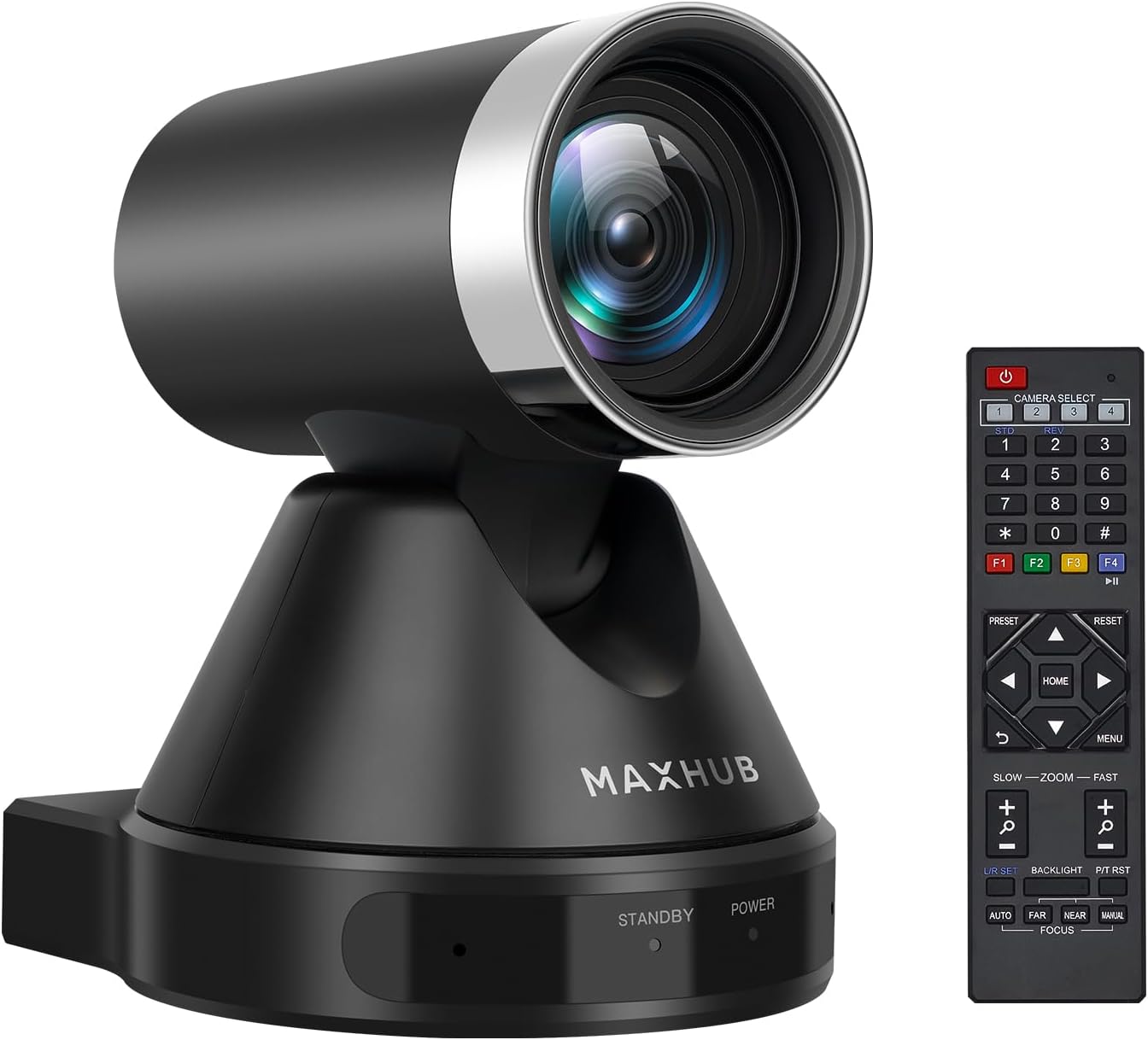




Enther&MAXHUB PTZ Camera,HD 1080p Video Conference Camera System with 12X Optical Zoom,Wide-Angle USB Conference Room Webcam with Remote Control for Streaming, Video Calling, Recording
Product ID: 547887697
UC P10 12x Optical Zoom PTZ Video Conference Camera The MAXHUB UC P10 camera can easily access medium and large video conferences. The P10 combines superb 1080p image quality with a premium 12x optical zoom to bring every conversation to life. This wide-angle camera with PTZ control represents a new generation of clear collaboration. High-definition 1080p images bring depth to remote interactions, while intelligent color optimization ensures you don't miss any crucial detail.Superior HD 1080p clarity in any environment Panasonic 1/2.7"CMOS | 2D and 3D DNR | Wide Dynamic Range Low light conditions are no longer a problem. With leading 2D and 3D DNR and WDR technologies, the P10 delivers crisp image quality even in difficult situations. The best-in-class camera lens delivers professional 1080p viewing at any distance. Medium to large meetings have never looked better.Wide-angle PTZ performance for full coverage Tilt ±30° Pan ±170° | HFoV 72.5° | Up to 255 presets Make sure everyone in the meeting gets the attention they deserve. HFOV 72.5° aligned with wide-angle pan and tilt controls ensures visibility across the room. You can choose from 255 presets to help you switch between different goals instantly. With an ultra-quiet motor, your P10 camera won't interrupt your meetings.12x optical zoom and 16x digital zoom Focus on the parts of the meeting that are most important to you. 12x optical zoom and 16x digital zoom mean you can draw your audience's attention to the tiniest details of your presentation without losing any clarity. Responsive autofocus keeps images sharp and clear even after zooming.Flexible interoperability with current collaboration tools Keep using your favorite products! P10 is a flexible camera that works with many popular indoor devices and conferencing tools based on RS232 protocol communication. We prioritize interoperability so you don't have to rip and replace technology to upgrade your meeting rooms. Build on your current investment and bring new value to your meetings.Plug and play deployment. P10 requires no complicated settings and device support. To use it just connect your monitor via USB and start your video. Review: Not bad of a camera, good for conference rooms, comes with mounts, good resolution - I got this for my conference room at work and so far it has done a good job. I like how compact it is. It does come with a mount so you are able to put this on the wall. I would not say this works for extremely large conference rooms but for my conference room of 10 people it works really well. This has made zoom conference a lot easier on my team. It has worked pretty well for that room. I actually like that this has a more compact size. It also has a camera cover which is just a simple silicone piece. I hooked this up to the mini computer in the conference room and it was able to detect it right away. I did not have to worry about drivers. I did not try it with MAC as my company does not use MAC but the cable that it comes with is only USB and not type c/thunderbolt so you have to actually buy an adapter or another cable if you want to plug into a MAC. I am not sure if it will work unfortunately. I do like that there is a remote that allows you to control the camera from afar without needing to access the computer itself. Be aware that remote does require line of sight in order to control the device. The overall camera design look is nice and smaller in size compared to other devices. It does have autofocus which is not bad but sometimes it does not work and I have to manually control it. Regardless of that, it gives you a really clear and wide range video image. It has worked well so far on zoom. The movement is smooth when you turn the camera and it gives you a wide range view. Again, it can be mounted. This has a metal mount that you can easily screw into the wall. It is sturdy and not too heavy but I would still use an anchor or stud. There is not too much lag in the picture. You can just have this sitting on a desk. The base is wide enough to hold the device up even with all the wires plugged in. The stand is fairly sturdy as well as the movement mechanics. The LED lights to show standby and power are not bright where they will be super distracting.The picture quality I would say is 1080p and transmitting quality is going to be dependent on your internet speed. Honestly for the price you are paying for this camera, it is REALLY good quality. Overall I think this camera is great for small or medium size conference rooms. I would not recommend this for very large conference rooms. This does give you a wide viewing range and it does the job for me. I do wish it has some wireless capability without the need for a computer or even run on an PoE but that is okay. It is pretty easy to setup and the controls are simple. Review: A standout product in the world of video conferencing equipment - I recently purchased the MAXHUB PTZ Camera, and I've been thoroughly impressed with its performance and features. As someone who frequently engages in video conferences, I was seeking a high-quality camera that could deliver clear visuals and a seamless remote control experience. This PTZ Camera has certainly exceeded my expectations in this regard. Video Quality and Zoom Capability: The HD 1080p resolution of the MAXHUB PTZ Camera ensures crystal-clear video quality. Whether I'm in a well-lit room or a dimly lit environment, the camera consistently captures sharp and vibrant images. The 12X optical zoom is a standout feature, allowing me to zoom in without any loss of clarity. This is particularly useful for larger conference rooms or situations where I need to focus on specific details. Pan, Tilt, and Zoom (PTZ) Controls: Controlling the camera's movement is a breeze, thanks to the intuitive pan, tilt, and zoom controls. The camera can rotate 360 degrees horizontally and 120 degrees vertically, providing a wide field of view. The remote control included with the camera allows for precise adjustments, enabling me to pan across the room, tilt the camera up or down, and zoom in or out effortlessly. The responsiveness of the controls ensures that I can frame the shot exactly as I need it, enhancing the overall conferencing experience. Remote Control: The remote control is well-designed and user-friendly. Its layout is straightforward, making it easy to access the various functions and settings of the camera. I appreciate the dedicated buttons for zoom, pan, and tilt, which are conveniently located for quick adjustments during a conference. Additionally, the remote's ergonomic design fits comfortably in my hand, ensuring prolonged use doesn't become uncomfortable. Versatility and Connectivity: This camera offers versatile connectivity options. It's compatible with a range of conferencing platforms and software, ensuring seamless integration into my existing setup. The camera supports both USB and RS232 connections, providing flexibility for different devices and setups. This versatility makes it an excellent choice for both personal and professional use. Build Quality and Aesthetics: The camera's build quality feels robust and durable. Its sleek and modern design adds a touch of sophistication to any conference room. It is also relatively compact, making it easy to mount on a tripod (with its bottom ¼ tripod mount hole) or attach to various surfaces, using the included bracket and mounting hardware. Final Thoughts: In conclusion, the MAXHUB PTZ Camera with its remote control is a standout product in the world of video conferencing equipment, and even football match filming, like I am using it for occasionally. Its impressive video quality, seamless PTZ controls, and user-friendly remote make it an asset for anyone who relies on high-quality video communication. Whether you're hosting virtual meetings, webinars, or online presentations, this camera enhances the overall experience and ensures that you're always seen and heard with exceptional clarity.


| ASIN | B0CDBTL23P |
| Are Batteries Included | No |
| Best Sellers Rank | #1,080 in Webcams |
| Brand | Enther |
| Built-In Media | IR Remote, The PTZ camera, The camera cover, The power supply, USB 3.0 cable |
| Camcorder Type | Video Camera |
| Color | Black |
| Connectivity Technology | USB |
| Customer Reviews | 4.1 out of 5 stars 405 Reviews |
| Digital Zoom | 16 x |
| Display Resolution Maximum | FHD |
| Exposure Control Type | [Multiple exposure control types] |
| Features | Low Light |
| File Format | AVCHD |
| Flash Memory Speed Class | C10 |
| Flash Memory Type | Micro SD |
| Flash Memory Video Speed Class | V30 |
| Focus Type | Auto Focus |
| Form Factor | PTZ camera system |
| Global Trade Identification Number | 00810105180596 |
| Has Image Stabilization | No |
| Image Aspect Ratio | 16:9 |
| Image stabilization | Digital |
| Item Weight | 2.45 Kilograms |
| Lens Type | Zoom |
| Manufacturer | Enther&Maxhub |
| Maximum Focal Length | 2 Millimeters |
| Minimum Focal Length | 2 Millimeters |
| Model Name | P10 PTZ camera |
| Model Number | Maxhub-P10 |
| Operating System | [VARIOUS] |
| Optical Zoom | 12 x |
| Photo Sensor Technology | CMOS |
| Screen Size | 75 |
| Sensor Type | CMOS |
| Shooting Modes | Spotlight |
| Supported Audio Format | AAC, Dolby Digital (AC-3) |
| Supported Image Format | AVCHD |
| UPC | 810105180596 |
| Video Capture Format | AVCHD |
| Video Capture Resolution | 1080p |
| Video Resolution | 1080p |
| Warranty Description | 2 years |
| Water Resistance Level | Not Water Resistant |
| White Balance Settings | Auto |
| Zoom | Optical |
R**2
Not bad of a camera, good for conference rooms, comes with mounts, good resolution
I got this for my conference room at work and so far it has done a good job. I like how compact it is. It does come with a mount so you are able to put this on the wall. I would not say this works for extremely large conference rooms but for my conference room of 10 people it works really well. This has made zoom conference a lot easier on my team. It has worked pretty well for that room. I actually like that this has a more compact size. It also has a camera cover which is just a simple silicone piece. I hooked this up to the mini computer in the conference room and it was able to detect it right away. I did not have to worry about drivers. I did not try it with MAC as my company does not use MAC but the cable that it comes with is only USB and not type c/thunderbolt so you have to actually buy an adapter or another cable if you want to plug into a MAC. I am not sure if it will work unfortunately. I do like that there is a remote that allows you to control the camera from afar without needing to access the computer itself. Be aware that remote does require line of sight in order to control the device. The overall camera design look is nice and smaller in size compared to other devices. It does have autofocus which is not bad but sometimes it does not work and I have to manually control it. Regardless of that, it gives you a really clear and wide range video image. It has worked well so far on zoom. The movement is smooth when you turn the camera and it gives you a wide range view. Again, it can be mounted. This has a metal mount that you can easily screw into the wall. It is sturdy and not too heavy but I would still use an anchor or stud. There is not too much lag in the picture. You can just have this sitting on a desk. The base is wide enough to hold the device up even with all the wires plugged in. The stand is fairly sturdy as well as the movement mechanics. The LED lights to show standby and power are not bright where they will be super distracting.The picture quality I would say is 1080p and transmitting quality is going to be dependent on your internet speed. Honestly for the price you are paying for this camera, it is REALLY good quality. Overall I think this camera is great for small or medium size conference rooms. I would not recommend this for very large conference rooms. This does give you a wide viewing range and it does the job for me. I do wish it has some wireless capability without the need for a computer or even run on an PoE but that is okay. It is pretty easy to setup and the controls are simple.
O**R
A standout product in the world of video conferencing equipment
I recently purchased the MAXHUB PTZ Camera, and I've been thoroughly impressed with its performance and features. As someone who frequently engages in video conferences, I was seeking a high-quality camera that could deliver clear visuals and a seamless remote control experience. This PTZ Camera has certainly exceeded my expectations in this regard. Video Quality and Zoom Capability: The HD 1080p resolution of the MAXHUB PTZ Camera ensures crystal-clear video quality. Whether I'm in a well-lit room or a dimly lit environment, the camera consistently captures sharp and vibrant images. The 12X optical zoom is a standout feature, allowing me to zoom in without any loss of clarity. This is particularly useful for larger conference rooms or situations where I need to focus on specific details. Pan, Tilt, and Zoom (PTZ) Controls: Controlling the camera's movement is a breeze, thanks to the intuitive pan, tilt, and zoom controls. The camera can rotate 360 degrees horizontally and 120 degrees vertically, providing a wide field of view. The remote control included with the camera allows for precise adjustments, enabling me to pan across the room, tilt the camera up or down, and zoom in or out effortlessly. The responsiveness of the controls ensures that I can frame the shot exactly as I need it, enhancing the overall conferencing experience. Remote Control: The remote control is well-designed and user-friendly. Its layout is straightforward, making it easy to access the various functions and settings of the camera. I appreciate the dedicated buttons for zoom, pan, and tilt, which are conveniently located for quick adjustments during a conference. Additionally, the remote's ergonomic design fits comfortably in my hand, ensuring prolonged use doesn't become uncomfortable. Versatility and Connectivity: This camera offers versatile connectivity options. It's compatible with a range of conferencing platforms and software, ensuring seamless integration into my existing setup. The camera supports both USB and RS232 connections, providing flexibility for different devices and setups. This versatility makes it an excellent choice for both personal and professional use. Build Quality and Aesthetics: The camera's build quality feels robust and durable. Its sleek and modern design adds a touch of sophistication to any conference room. It is also relatively compact, making it easy to mount on a tripod (with its bottom ¼ tripod mount hole) or attach to various surfaces, using the included bracket and mounting hardware. Final Thoughts: In conclusion, the MAXHUB PTZ Camera with its remote control is a standout product in the world of video conferencing equipment, and even football match filming, like I am using it for occasionally. Its impressive video quality, seamless PTZ controls, and user-friendly remote make it an asset for anyone who relies on high-quality video communication. Whether you're hosting virtual meetings, webinars, or online presentations, this camera enhances the overall experience and ensures that you're always seen and heard with exceptional clarity.
K**4
OK
I've purchased this camera twice. The quality for a workplace environment is very acceptable. The device is plug n play. I've never used the microphone. It gets docked a star because after about a year, I now need to unplug it and plug it back in to get it to work after EVERY TIME I restart my computer. The computer sees the device, but it will not display video until I replug it in. Changing ports doesn't help, and if I never restart I'm all good. I repurchased this in hopes the new one will fix that issue, and repurchased in spite of this issue because this is the shortest camera I've been able to find making it fit into my setup better.
C**�
Perfect conference camera
This is a fantastic webcam, the 180° panoramic view is incredible! It provides full room coverage, which means everyone in the meeting can be seen clearly without any adjustments. This feature alone sets it apart from regular webcams and makes it perfect for larger meeting spaces. The 4K resolution is amazing. The video quality is sharp and crystal clear, ensuring that every detail is captured during video conferences or distance learning sessions. It's great for presentations or sharing visual content with remote participants. Setting up the camera was a breeze. I was worried that it might be complicated, but it's actually plug and play. It took me no time at all to get it up and running, which is a huge plus. The wide-angle lens is another highlight. It can capture a large group of people in a single frame without any distortion, making it ideal for collaborative discussions and brainstorming sessions. One thing that impressed me was the camera's ability to integrate with various video conferencing platforms. It worked seamlessly with the applications I use regularly, and there weren’t any compatibility issues. Overall, I'm extremely happy with the MAXHUB Intelligent 180° Panoramic 4K Huddle Room Video Camera. It's a powerful and versatile tool for business meetings and distance learning sessions, and it has improved my video conferencing experience significantly. If you're looking for a high-quality webcam with full room coverage, this is definitely worth considering!
Y**E
STAY AWAY. NOT PLUG AND PLAY, So many broken promises, it is nearly a scam!
A lot of reviews have complain about the picture quality and focus. I did not get far enough with the set up to see how the camera performs in a meeting. The picture quality looks fine in the setup utility. The issues I have are four (all show stoppers in my opinion): 1. The aspect ratio of the screen interface does not match that of my monitor, so I cannot see all the image. I cannot find any settings that address this. 2. The link I found in a setup video (cut.ly/ucs10.com) for downloading apps returns the error: “that URL doesn’t exist”. 3. I found the link on your site for downloading the screen share app. When I click on the link, nothing happens. 4. I have submitted multiple support requests and all I get is crickets. Amazon should be more discriminatory about the vendors they allow to sell on their site. This company is nearly scamming the consumers.
S**Y
Great quality but not for Macbook ProMax 2021 M1 !!
I just received it 2 days ago. The shipping is much faster than estimated date. On my Macbook Pro Max 2021, the webcam can work (with limits) with Facetime, Zoom, Teams and Messenger. It shows all my appartement behind me very clear and the color is natural. I work online at home. So i don't want my client to see my cats and all i have in the house. So i need to adjust the angle ! BUT, the is no any fonction in all these applications to adjust the angle. It's been 2 days now that i wasted my time to find a solution. By using OBS (streaming app.) to crop the image, the other apps can recognize it as Virtual camera (source) BUT the cropped image is not for 4K for sure and in my case is like a 720p final result to see in those applications because i cropped a lot. The tracking face function does not work neither on my Mac. So, i'm thinking about returning this webcam and ask for the full refund BUT i love it so much !! If my appartment is pretty to be shown in the very wide angle of the UC W21, i would really love it. For your information, i have a Logitech Brio. About fonctionnalities that works with my Macbook 2021, the Brio is the winner. I tested the microphone : the Brio and W21 are quite good both. But i use seperatly a professionnal microphone on my desk and i need a webcam for only image. I would keep it if the company offers its application like Logitech software for its webcams. So i'm very disappointed of this lack point !!
***V
Great tool for conferences, streaming, etc
I got this camera to use as a main capture device while recording videos. I am trying to build a YT channel focused on Arts and related accessories and wanted a powerful, yet affordable and compact camera. While limited in that it has a fixed focus and needs to be connected to a power source such as the computer to run, that's essentially all that is required to set this up. I'm working to get this stationary as a fixed camera as it can be adjusted with the included mounting bracket and screws. You get incredibly accommodating views with very little interference or uneasy transitioning from wide angles to close ups. The camera lens can capture good amount of detail without your view becoming distorted, though I'm only planning to use it within a yard or so away from my workspace but I'm sure I will be able to use it from greater distances as well without sacrificing too much quality. You can also used as a regular webcam and can work with any capture software I have used so far. There are a good amount of features included that you can toy around with within the Panocam software, too, like focusing on select areas of the room or adjusting the display aspect ratio depending on the need for the viewer or viewers. A great investment for a long time streaming, capturing and video creating.
D**J
Sharp and Wide
This camera offers full room coverage with its wide-angle lens, providing a clear and comprehensive view of everyone in the room. Setting up the camera was a breeze, thanks to its user-friendly design. Within minutes, I was able to connect it to my device and start enjoying its benefits. The 4K resolution ensures that the video quality is crisp and detailed, making for a professional and engaging experience. Its 180° panoramic view eliminates the need for multiple cameras to capture everyone in the room. This not only saves space but also simplifies the setup process. Whether I'm conducting a business meeting with colleagues or participating in a distance learning session, I can rest assured that everyone is visible on screen. The price is a little pricy but it is the business cost that we would need to pay for a better remote conference experience.
D**)
Decent camera for the price
Its a decent camera with high resolution. I had some terrible camera from HP. This will definitely increases the quality of my video meetings. There are few cons, the video white balance is little off. Also need decent amount of light to get some good video quality.
A**O
Con driver genérico
Usado en un Windows 11 Si bien la cámara hace su trabajo a la perfección continuamente da lata cuando pongo el equipo en suspensión. O ya no se reactiva cuando se prende el equipo o causa que el equipo se prenda solo. Entiendo que eso se resolvería usando opciones de energía para el dispositivo pero parece ser que los controles genéricos no lo tienen.
V**Y
Its quality is best
This is very good products.its picture quality is best.its cost is also good
A**R
Brilliant camera !
Such a good picture with this little device, feels sturdy and doesn’t wobble at all. I have not tested the built in mic as using the built in one of the PC.. will test this at some point, but as for quality of image man it’s good 👍🏻
ه**ي
MAXHUB Webcam
Good Product
Trustpilot
2 weeks ago
2 weeks ago