Buy anything from 5,000+ international stores. One checkout price. No surprise fees. Join 2M+ shoppers on Desertcart.
Desertcart purchases this item on your behalf and handles shipping, customs, and support to Vietnam.
🚀 Triple your screens, not your cables — power, speed, and clarity in one sleek dock!
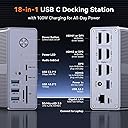
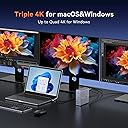
The TobenONE DisplayLink Docking Station is a powerhouse 18-port hub designed for professionals craving triple or quad 4K monitor setups. Compatible with Thunderbolt 3/4 and USB-C laptops, it delivers seamless multi-display support, 120W power delivery, and ultra-fast 10Gbps data transfer. Ideal for Mac and Windows users, it transforms any workspace into a productivity powerhouse with a single cable solution.


| ASIN | B0C616N8T5 |
| Best Sellers Rank | #6,186 in Electronics ( See Top 100 in Electronics ) #95 in Laptop Docking Stations |
| Brand | Tobenone |
| Color | Grey-120W power adapter |
| Compatible Devices | Apple M1/M2/M3/M4, MacBook Neo and Intel Macs (MacBook Pro, MacBook Air with macOS 10.14 or later), such as MacBook Air Retina 12" (2016, Intel chip), MacBook Air Retina 13" (2018/2019/2020, Intel chip), MacBook Pro 13" (2016/2017/2018/2019/2020, Intel chip), MacBook Pro 14" (2021, M1 Pro or M1 Max chip), MacBook Pro 14" (2023, M2 Pro or M2 Max chip), MacBook Pro 14" (2023, M3 Pro or M3 Max chip), MacBook Pro 14" (2024, M4 Pro or M4 Max chip), MacBook Air 13" (2025, M4 chip), MacBook Air 15" (2025, M4 chip), MacBook Pro 15" (2016/2017/2018/2019, Intel chip), MacBook Pro 16" (2019, Intel chip), MacBook Pro 16" (2021, M1 Pro or M1 Max chip), MacBook Pro 16" (2023, M2 Pro or M2 Max chip), MacBook Pro 16" (2023, M3 Pro or M3 Max chip), MacBook Pro 16" (2024, M4 Pro or M4 Max chip), MacBook Air 13" (2020/2021, M1 chip), MacBook Pro 13" (2020, M1 chip), MacBook Air 13" (2022/2023, M2 chip), MacBook Pro 13" (2022, M2 chip), MacBook Pro 14" (2023, M3 chip), MacBook Air 15" (2023, M2 chip), Can't watch Netflix., Please ensure that the laptop's USB-C port supports display, download the latest driver, Windows 10 / 11 & macOS 10.15.x and later, ChromeOS 100.x. Thunderbolt 5/ Thunderbolt 4/ Thunderbolt 3/ USB4.0/ full-featured USB-C Microsoft Surface line/HP Spectre x360 series, Dell XPS 13 / XPS 15 / Latitude series, Lenovo Thinkpad T series. Such as Microsoft Surface Book 2, Surface Go, Surface Laptop 3, Surface Pro 7; Dell XPS 13/XPS 15 9300/ 9310/ 9350/ 9360/ 9370/ 9380/ 9550/ 9560/ 9570/ 7390 +more) / Latitude 5310/ 5580/ 7490 +more); HP Spectre x360 13t, Specter x369, Elitebook 840 G5 series, Elitebook X2, Elitebook x360 1030 G3, Elitebook 745 G6, Elitebook 830 G6, 2018 HP Elite 800 G4, Envy x360 Laptop (15z-ds100), Zbook 17 G4; Lenovo Yoga 730/ Yoga 910/ Yoga 920/ Yoga 930, Yoga15 Thinkpad Ultrabook Pro, Thinkpad E590/ Thinkpad P72, Thinkpad T470/ T480/ T490; Thinkpad X1 Carbon; Legion Y530, Lenovo C930/ T480s; Huawei Macbook Mate10 or later; Google Slate (2019); Pixel book go 2019/2020, LG Gram, Samsung Galaxy TabPro S Compatible Devices Apple M1/M2/M3/M4, MacBook Neo and Intel Macs (MacBook Pro, MacBook Air with macOS 10.14 or later), such as MacBook Air Retina 12" (2016, Intel chip), MacBook Air Retina 13" (2018/2019/2020, Intel chip), MacBook Pro 13" (2016/2017/2018/2019/2020, Intel chip), MacBook Pro 14" (2021, M1 Pro or M1 Max chip), MacBook Pro 14" (2023, M2 Pro or M2 Max chip), MacBook Pro 14" (2023, M3 Pro or M3 Max chip), MacBook Pro 14" (2024, M4 Pro or M4 Max chip), MacBook Air 13" (2025, M4 chip), MacBook Air 15" (2025, M4 chip), MacBook Pro 15" (2016/2017/2018/2019, Intel chip), MacBook Pro 16" (2019, Intel chip), MacBook Pro 16" (2021, M1 Pro or M1 Max chip), MacBook Pro 16" (2023, M2 Pro or M2 Max chip), MacBook Pro 16" (2023, M3 Pro or M3 Max chip), MacBook Pro 16" (2024, M4 Pro or M4 Max chip), MacBook Air 13" (2020/2021, M1 chip), MacBook Pro 13" (2020, M1 chip), MacBook Air 13" (2022/2023, M2 chip), MacBook Pro 13" (2022, M2 chip), MacBook Pro 14" (2023, M3 chip), MacBook Air 15" (2023, M2 chip), Can't watch Netflix., Please ensure that the laptop's USB-C port supports display, download the latest driver, Windows 10 / 11 & macOS 10.15.x and later, ChromeOS 100.x. Thunderbolt 5/ Thunderbolt 4/ Thunderbolt 3/ USB4.0/ full-featured USB-C Microsoft Surface line/HP Spectre x360 series, Dell XPS 13 / XPS 15 / Latitude series, Lenovo Thinkpad T series. Such as Microsoft Surface Book 2, Surface Go, Surface Laptop 3, Surface Pro 7; Dell XPS 13/XPS 15 9300/ 9310/ 9350/ 9360/ 9370/ 9380/ 9550/ 9560/ 9570/ 7390 +more) / Latitude 5310/ 5580/ 7490 +more); HP Spectre x360 13t, Specter x369, Elitebook 840 G5 series, Elitebook X2, Elitebook x360 1030 G3, Elitebook 745 G6, Elitebook 830 G6, 2018 HP Elite 800 G4, Envy x360 Laptop (15z-ds100), Zbook 17 G4; Lenovo Yoga 730/ Yoga 910/ Yoga 920/ Yoga 930, Yoga15 Thinkpad Ultrabook Pro, Thinkpad E590/ Thinkpad P72, Thinkpad T470/ T480/ T490; Thinkpad X1 Carbon; Legion Y530, Lenovo C930/ T480s; Huawei Macbook Mate10 or later; Google Slate (2019); Pixel book go 2019/2020, LG Gram, Samsung Galaxy TabPro S See more |
| Customer Reviews | 4.4 out of 5 stars 895 Reviews |
| Hardware Interface | 3.5mm Audio, DisplayPort , Ethernet, HDMI , MicroSD, USB 3.1 Type A, USB Type C |
| Input Voltage | 120 Volts |
| Item Dimensions L x W x H | 1.5"L x 4.26"W x 4.3"H |
| Item Type Name | DisplayLink Docking Station |
| Item Weight | 17.6 Ounces |
| Manufacturer | Shenzhen KaiLiYuan Technology Co.,Ltd TOBENONE |
| Mfr Part Number | UDS033 |
| Model Number | K1211-200600D |
| Number of Ports | 18 |
| Product Dimensions | 1.5"L x 4.26"W x 4.3"H |
| Total Number of HDMI Ports | 3 |
| Total USB Ports | 6 |
| Total Usb Ports | 6 |
| Warranty Description | 24 Month Warranty |
| Wattage | 120 watts |
M**N
Excellent Docking Station - Great performance & really thoughtful customer service
This TobenONE docking station was a big upgrade to my workspace setup. The single cable connection eliminated all my cable management headaches, and I can easily switch between my work and personal laptops without any hassle. I'm running it with a 34-inch monitor and haven't experienced any lag, disconnections, or quality issues whatsoever. The DisplayLink driver installation on my Mac was straightforward - everything works exactly as advertised. Setup was really quick overall, though I did have to figure out on my own that computer connections go on the back while other inputs go on the front, as the instructions could be clearer on that point. One of the biggest benefits has been the charging capability. I'm charging both my laptops (up to 100W) plus phones through the various USB-A and USB-C ports, which means no more multiple power adapters cluttering my desk. The versatility really helpful since I can connect different devices as needed without needing different chargers now. What really impressed me was TobenONE's customer service this past week. When I went to register for the free extended warranty on the website and encountered an error i just desisted and went on with my day. They proactively noticed an issue with my Amazon order number and reached out to me directly - I didn't even contact them first. They resolved it immediately with just a screenshot and activated my warranty without me having to ask. That level of proactive support really stands out and gives me confidence in the product. Highly recommend for anyone wanting to streamline their multi-monitor setup with reliable performance and great customer support.
K**D
Excellent Triple Monitor Docking Station - 6+ Months of Solid Performance
I've been using this TobenONE DisplayLink docking station for over six months now, and it has exceeded my expectations. I have it connected to three monitors in my setup, and the performance has been consistently reliable. What I love about this product: Seamless triple monitor support - All three of my displays run smoothly at 4K resolution with no lag or connection issues: True single-cable solution - Just one USB-C connection to my laptop handles everything - monitors, peripherals, and power Robust build quality - After 6+ months of daily use, it feels solid and well-constructed Comprehensive connectivity - The 18 ports handle all my devices without any need for additional adapters Reliable power delivery - The 120W adapter keeps my laptop charged while running the full setup. Performance highlights: The DisplayLink drivers were straightforward to install, and once set up, the docking station has been rock-solid. Data transfer speeds are excellent, and I haven't experienced any connectivity drops or display issues during my extended use. Seller experience: Tobenone Official provided superior service throughout the purchase process. The item arrived exactly as described and was well-packaged for protection. This docking station has genuinely transformed my workspace productivity. After two months of daily use with three monitors, I can confidently say this is a quality product that delivers on its promises. Highly recommended for anyone looking to expand their multi-monitor setup!
Y**O
TobenONE DisplayLink Docking Station (Triple Monitor) – Great Capability, Exceptional Support
I’ve been using the TobenONE DisplayLink Docking Station for a little over six months, primarily with macOS, and overall it’s been a solid performer with one notable caveat. What it does well: • True triple-monitor support on macOS via DisplayLink (HDMI or DisplayPort), which is a big win given Apple’s native display limitations. • Plenty of input ports for peripherals, storage, and networking—great as a single-cable desk solution. • Runs cool to the touch, even with multiple displays and devices connected. • Solid build quality that feels sturdy and well-designed. • Easy setup—installing the DisplayLink app was straightforward and painless, and everything worked almost immediately. The issue: After about six months of use, anything connected to HDMI 3 began intermittently losing signal, causing the display to go blank. To their credit, TobenONE’s customer support was outstanding—they walked me through troubleshooting steps and quickly shipped a replacement that arrived within a couple of days. Unfortunately, the replacement unit exhibited the same HDMI 3 issue. At that point, support offered a full refund, no hassle. I ultimately chose to keep using the dock (with minor workarounds) simply because I don’t have the time to research and reconfigure another solution. Bottom line: Despite the hardware quirk, I’d still recommend this docking station—largely because of the top-notch customer support. Not many companies stand behind their product this well or resolve issues this quickly. If TobenONE can iron out the HDMI reliability long-term, this would easily be a standout dock for macOS power users.
M**.
Fantastic product with one exception...
I have three of these items for different locations. Although with one very annoying issue, these are outstanding items for multi-monitor and multi-USB extension ports. In terms of display units, I have WQHD dual monitors on top of the laptop display for a total screen real estate space of "five" desktops. Generally speaking they work flawlessly however with this one particular model (I have a couple other TobenONE products) there is a signaling issue going on that seems to only trigger with this model but not with others. The issue I run into is that I cannot plug my MacBook Pro into the docking station with the lid closed without the system thinking that the lid is open. Although the MacBook goes to sleep when I close the list, when I plug the TobenONE into it, the monitors all come online however the system still thinks that there are three screens (the closed laptop being one of them). I can open the lid, wait a few seconds, then close it and it resolves itself. However since my "dock" for the laptop prevents me from opening the lid, I'm sort of locked out of this solution. The version of the displaylink drive doesn't seem to make a different, older or current drivers all have the same problem. But it only seems to happen on this TobenONE docking station and not my other versions. Sort of at a loss on this one. I don't think its defective as the other two stations I have exhibit the same functional flaw. Other than that (which makes this version almost unusable for me as I have to literally lay the laptop on the desk and not in its cradle as I have to open and close the list to use it correctly), this is a fantastic product. If you don't have a need for what I'm describing, then you should be absolutely fine with this product.
J**M
Multi-Monitor Connectivity
For my scientific work, I often find a need to use both Windows and Mac programs (and, sometimes Unix) and so I have both Mac and Windows laptops. I am often searching for docking solutions that allow me to easily connect my laptops to a multitude of screens and devices both in my home office and my work office. In the past, I have been impressed with TobenOne devices that save desk space. Just recently, I reconfigured an office that gives me a lot more desk space and will allow me to use both the built-in screen of the laptop AND external monitors. So, I looked to TobenOne again and this review is of “TobenONE DisplayLink Docking Station Triple Monitor with 120W Power Adapter, Triple 4K Display for MacBook Pro/Air, Thunderbolt 4/3, USB-C Windows (3X HDMI, 3X DP, 2xUSB-C, 4xUSB 3.2, SD/TF)” I think the best message that I could convey is encapsulated in figure 1. I did nothing to “optimize” position of devices since I just wanted to test connectivity of multiple accessories, especially monitors. The picture shows what is an unusual and not necessarily the best setup, but you can clearly see my Surface Pro laptop in the center and to its right is a LOC 24” monitor and to the left an LG Ultragear 45-inch display. A single USB-C cable is all that it takes to connect the host device (in this case my Surface Pro laptop) to the dock. All monitors show clear displays and respond well to mouse movements. Clearly, not everyone is going to spend the $$ for a 45-inch display, but this port would also allow you to connect a total of 4 monitors so you can get a LOT of real estate with smaller, less expensive monitors. (Some very good 27” monitors can be obtained for around $100 each.) I have used both DisplayPort and HDMI ports for both monitors with no issues. Everything worked well for my MacBook Pro M3 Max. As the information that comes with the dock indicates, I had to first install the DisplayLink Manager (to get the DisplayLink Driver). That was a trivial piece of software to download and install. Once I did that, monitors connected with a DisplayPort cable. With that the same display connectivity I described for the surface laptop worked just fine. The Ultragear 45 is in my home office, but I am now planning to obtain several inexpensive smaller monitors for my work and lab offices using this dock. One small detail affecting Macs is that you can only get 3 external monitors to work while you can get 4 with an appropriate Windows machine. A HUGE potential problem with the Mac is that, if you are using DisplayPort, you cannot view a streaming service like Netflix or Max. That is only for DisplayPort, no problem viewing those services over HDMI. I have also connected multiple USB devices (CD/DVD drive, external hard drives, USB drives) and they all worked well whether connected to the USB-A or USB-C port. It read SD cards well, something of importance to me since that is how my medical CPAP device stores data. Honestly, I didn’t exhaustively test all the ports, but they all worked well out of the box. I am not a huge fan of benchmarking, but I used USBDeview on the Windows Laptop and BlackMagic Disk Speed test on the Mac to show if the dock negatively affects USB transfer speeds. I didn’t pay attention to specific numbers but the numbers I got when I connected the drives to the dock and directly to the laptops were the same. I am also not a gamer so I can’t comment on how games work with these docks, but I can say that various science graphics programs included simulations and animations work quite well. Normally, I wouldn’t be looking for this much connectivity, but the prospect of getting a lot of monitor real estate using inexpensive monitors and this dock was too good to pass up. Also, the ability to have multiple hard drives for data backup is a plus. To be honest, I didn’t do a lot of comparison shopping because I have found TobenOne to make excellent products, but I would say this is a good deal for the capability. So, overall, I like this dock and will be recommending it to my colleagues if they need this much monitor connectivity.
R**F
Compact powerhouse - runs 4 screens from macbook pro m3
I needed a docking station that could handle a serious multi-monitor setup without taking over my desk. This TOBENONE dock delivers. It’s compact yet powerful - I’m running my macbook pro display plus 3 external monitors, all stable and crisp. Build quality feels solid, ports are well placed, and it’s been rock-steady for work and video calls. Zero complaints on performance. What pushed this to 5 stars was the support. I had connectivity issues between my laptop and the dock initially. Anita from the support team was fantastic. She responded quickly, was very knowledgeable, and patiently helped me troubleshoot until everything worked perfectly. That level of service is rare.
L**N
Great dock witrh lots of ports
This is turning out to be a great purchase. I have consolidated multiple cables for USB peripherals and dual monitors into the TobenONE docking station and now my desk looks less cluttered, and everything works seamlessly. I followed the directions to pre-install the DisplayLink app and the display management for OSX went flawlessly. I have various peripherals and even USB drives attached with no problems, and even though this has a power button on the device I have not had a reason to use it thus far. I would definitely recommend this as an aesthetically pleasing, fine addition to your desk.
T**V
It works fine but overheats!
It seems to be a good system worked fine with my mac pro and 2 Samsung 4k 27'. Things I didn't like: I requires to install display driver in order to support extended displays, it's not smart solution with this price. I have been using much cheaper and smaller Mokin docking station which I didn't have to install anything, it was plug and play. Secondly and the most of all, It overheats! I wouldn't bother a slight or moderate heating which is normal but it overheats so that you wouldn't feel safe when you bare handed touch it. I used a few hours and had to return it for my safety. Otherwise It worked as promised and I liked the size, it's robust and makes your desk setup cool!
C**N
Funciona, pero puede ser lento
Lo probe con una mac. Uno de los puertos funciona como un convertidor Thunderbolt->dp/hdmi, tiene algo extra de ancho de banda,lo que me permitio usar algunas de las frecuencias disponibles de mis monitores. Los 2 dos puertos usan ese tipo de hack de grabar pantalla, entonces hay menos opciones en cuanto a frecuencia. Para los puertos no nativos, al dejarlo con una frecuencia de 60hz, se siente como si fueran entre 40 y 50, se mueven bastante lentas las ventanas y el cursor.
W**A
Produto excelente!
Fiquei muito satisfeito, surpreso pela qualidade desta Dock.
F**.
Positivamente impressionado
Fiquei já impressionado com o unboxing, caixa bonita, organizada e de qualidade. Achei sem precedentes - pois nunca vi isso mesmo - que acompanha adaptador de tomada. O hub é bem menor do que imaginei, cabe qse na palma da mão. Bonito, material robusto e discreto, fica tranquilo do lado de tudo na mesa. Drivers são simples de baixar e instalar, funcionou tudo de primeira no Mac com chip M2. Recomendo, virei cliente.
F**A
Excelente
Muito bom!!
A**E
Excelente, porém aquece muito
O produto é de excelente qualidade, porém aquece muito ... ele fica super quente e tenho receio que isso possa reduzir a vida util do produto.
Trustpilot
2 months ago
3 days ago