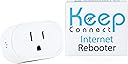
Desertcart purchases this item on your behalf and handles shipping, customs, and support to Vietnam.
๐ง Keep your connection alive and kickingโbecause downtime is so last decade.
The Keep Connect Router Wi-Fi Reset Device is a smart, compact solution that automatically monitors your internet connection and reboots your router or modem upon disconnection. It supports 2.4 GHz Wi-Fi devices, sends instant SMS or email alerts on resets, and offers remote management through a premium cloud app. Designed for homes, offices, and remote locations, it ensures reliable 24/7 connectivity with minimal setup and a sleek footprint.


| ASIN | B0C6YCQ2ZV |
| Antenna Location | Business, Home |
| Antenna Type | Internal |
| Best Sellers Rank | #3,676 in Computers & Accessories ( See Top 100 in Computers & Accessories ) #133 in Computer Routers |
| Brand | Keep Connect |
| Built-In Media | Keep Connect Wi-Fi Reset Device |
| Compatible Devices | Devices with Wi-Fi connectivity technology, such as personal computers, gaming consoles, smart thermostats, security cameras, printers, televisions, tablets, and smartphones. |
| Connectivity Protocol | Wi-Fi |
| Connectivity Technology | Wi-Fi |
| Control Method | Touch |
| Controller Type | iOS |
| Coverage | 2.4GHz routers |
| Customer Reviews | 4.2 out of 5 stars 171 Reviews |
| Frequency | 2.4 GHz |
| Frequency Band Class | Single-Band |
| LAN Port Bandwidth | 100 Mbps |
| Manufacturer | Keep Connect |
| Maximum Upstream Data Transfer Rate | 100 megabits_per_second |
| Mfr Part Number | KC11 |
| Model Name | Keep Connect |
| Model Number | KC11 |
| Operating System | Ios |
| Other Special Features of the Product | WPS |
| Router Network Type | 2.4GHz |
| Security Protocol | WPS |
| Special Feature | WPS |
| UPC | 860002944548 |
| Unit Count | 1 Count |
| Warranty Description | 1 year |
| Wi-Fi Generation | Wi-Fi 4 |
| Wireless Communication Standard | 2.4 GHz Radio Frequency |
| Wireless Compability | 2.4 GHz Radio Frequency |
Z**Y
Exactly what it says on the tin and then some
I picked up the Keep Connect Automatic Router Rebooter after one too many frustrating fibre dropouts that needed a manual fix and I wish I had done it sooner. Setup took only a few minutes. Plug it in, configure the basics and it is immediately watching over your connection. No fuss, no complicated configuration. The core functionality is exactly what you need it to be. Keep Connect monitors your internet health continuously and triggers an automatic remote reboot the moment it detects an internet connection drop, all without any intervention. No more being tied to the physical location of the router to sort out connectivity issues. The device handles it silently and reliably in the background. The wide rated voltage of 100 to 250V means it works straight out of the box whether you are in North America or anywhere with a standard 220 to 240V supply. The compact form factor tucks neatly into the wall socket without blocking adjacent outlets, a thoughtful design detail that matters in practice. For anyone who manages a property remotely, relies on a smart home setup or simply cannot afford unexpected downtime, this device earns its keep immediately. Solid build, reliable performance and genuine peace of mind. Highly recommended.
G**G
Automatically and unobtrusively restarts your network whenever necessary
This is great. Before I got this rebooter, whenever I lost power or internet signal, I would sometimes have to manually reboot the modem and router. With this tool in the system, it just takes care of it for me. I get a text message about once a week telling me that it has restarted the system for one reason or another, and that is the only reason I know the signal went away. The process is seamless and efficient. As the designated tech support for my mother, installing this device at her house has saved me untold hours walking her through diagnosing and fixing a temporary network outage. If you are family tech support, just buy one of these for everyone who calls you and save yourself much pain. I did have to buy a very short Y-shaped power cord (or could have used a power strip) so this could control both my modem and router.
P**N
Easy setup, but
First, I must say I am happy with this purchase. I have a remote router that from time to time will hang. The only way to get everything working is to reboot that router. I have tried something like putting a schedule to reboot on an Alexa smart plug to just manually reboot it every Sunday. The result is not good. The router or the WiFi just hangs randomly. This device sends me emails from time to time to let me know it has just rebooted my router. I am really surprised at how often my router needs to be rebooted. Setup is relatively easy. The provided instruction is clear. However, I do wish for additional features. 1. I did not subscribe to the paid cloud service, so my access to the rebooter is only via the built-in wifi. It works kind of like those dashcams. You first make sure the wifi is turned on on the rebooter, and you connect your phone (or laptop) to that SSID. Once connected, a captive portal will show up and you just manage the rebooter that way. This kind of works, but I do wish for something like a phone app for those Alexa power plugs. That way I can see more info without having to connect to the rebooter's wifi 2. there is very little visual indication of whether the device is working properly or not. Granted, there is one LED that changes color to let you know the device's current state, but you have no idea if it is working properly or not.
K**N
Keeps us online
Solved our problem. Inevitability whenever we went out of town our electricity blinked and knocked out our security cameras and everything. This keeps us online. Easy to install and so far this works great!
J**O
Might be good if it worked
Unable to connect to my router which is TP-LInk AX55. Setup for both 2.5 and 5Ghz and no problem with WiFi for Wyze cameras, laptops, etc. . I have considerable experience with networking but have given up on this device. Keep Connect SSD is visible, sees my router 2.5 Ghz SSD, but unable to connect. Even set up Guest SSD on 2.5 Ghz as suggested by Keep Connect blog. Nothing works. So back it goes. UPDATE: Returned unit and purchased the MAX version. MAX installed without problem, so original Keep Connect unit was defective or some difference vs MAX version. I'm giving MAX a 5 rating.
C**A
I didnโt know this device existed!!
I have T-mobile home internet, which is very glitchy. I constantly need to reboot it just so I can get decent speed, but only when Iโm home. A lot of times, I canโt access my security cameras/thermostat remotely because my wifi is acting up. But nothing I can do since Iโm not home to reboot my router. I just came across this device which I didnโt know even existed!! It reboots my router automatically and I can even set it to reboot on schedule. You can also have it notify you by text or email when it does a reboot. and itโs easy to install. I havenโt had it that long but itโs working very well. There is an older version of this device which I think is oversized. I got the newer one which is smaller and more compact. It does not block the other outlets. At $50, it is a little pricey though. And if you want their online cloud service, thatโs another $25 a year. I wish the $50 includes one year of cloud service. Other than that, itโs a great product!! Will post updates if anything changes
R**.
It just works
This thing just works. I have a slightly more complicated setup with a separate internet modem and wifi router. While the router is rock solid, the modem has maybe 1-2 connection issues a month. And they always occur while Iโm away from home. I bought this little device, connected it to my wifi network and it just works right out of the box. If it detects my network lost connection to the internet, it reboots my modem and texts me. So far Iโve had it for a couple months and itโs recovered my internet 4 times. No more need to worry!
V**L
This tiny little router/modem rebooter has a design that justifies the cost.
Despite what some other users have complained about, our experience with this device has been without issue. Although it is small, the ease of installation and quality of the unit justifies the cost. I tested how it would work by unplugging my router. As advertised, it correctly took action and advised over phone message that it had done so. We have experienced no false rebooting or any other issues operationally for weeks now.
P**.
It works well and has several useful options
After trying an Ankuoo auto switch which kept going into a loop as the delay to wait for full reboot was set too short and was not adjustable, making it useless, this unit works perfectly! The setup is simple. If you want to test the unit to see if it works, do NOT change the default settings. If you set a check time other than 5 minutes, it does not work. This minor problem has been solved in the new firmware. My unit came with firmware KeepConnect_KCMINI_4M_V3_Rev2 and I upgraded it to the latest KeepConnectVPN_KCMINI_4M_V4_Rev1. You need to send an email to support to get the link for the new firmware. I tested it several times and it worked each time. You can also have it programmed to reset your modem once a day, every 2nd day, every 3rd day etc... I have not tested that part, as I don't need to do this, but I don't see why it would not work. It is also much smaller than their former model which is a plus. Overall I do recommend this little unit: it does what it is supposed to do!
N**N
Invaluable !!!
This device has been a life saver resetting my router when it crashes !! Would HIGHLY recommend it for those experiencing crashes. Emails received once it resets allow me to monitor how often my wifi is needing a reset. With an older router (that I need to keep for a number of reasons) it has been invaluable !!
D**E
Works, but now I don't need it
I had trouble setting this up, nothing was appearing on my phone. I contacted support and they said I should be able to connect through my network. I couldn't connect with the IP provided, and it did not appear on my network map. Support wasn't very helpful, but I ended up trying to connect to my tablet and it worked. If the light on the unit is still yellow, it means it is not set up properly, a blue light and it is good to go. After it was set up, was able to connect through my network and make changes, it had a new IP address, and it may be necessary to record it for future changes. After I got this function, I was getting an average of 3 resets a day, and my ISP wasn't able to determine the problem, so I lived with it until I was getting 4 to 5 resets an hour. I contacted my ISP again and explained the function of the Keep Connect, and that I had 25 to 30 dropouts in one day, so they sent a tech to my house. The tech found and fixed a few problems, and I don't have any more dropouts. So, this worked for me, and for the moment, I don't need it anymore, but at least I had proof of my problem and my ISP had to take it seriously. Edit: My internet is still dropping out, so I will keep using my Keep Connect.
M**N
Works exactly as expected
Iโve been looking for a device like this for years and it worked exactly as I would hope. I have two properties 325km apart, on occasion I would experience an internet outage, more so lately after switching my home to Bell Fibre. Internet outages would always happen at one place when I was at the other. In the last 2 weeks my home lost internet 5 times, this device reset my Bell modem and everything was up and running in minutes. I no longer have rely on friends and family to reset my modems, when Iโm away. I have one internet rebooter at each location, I now have confidence both location will have a stable internet connection. Great product.
A**N
It's worse than not having it
For a while I thought my internet was unstable... turns out Keep connect kept restarting my router for no reason.
Trustpilot
3 weeks ago
4 days ago