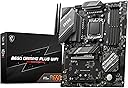
🔥 Elevate Your Build with MSI B650 GAMING PLUS WIFI – Power, Speed & Connectivity Unleashed!
The MSI B650 GAMING PLUS WIFI is a high-performance ATX motherboard designed for AMD Ryzen 9000/8000/7000 series processors. Featuring a robust 12+2 Duet Rail VRM power system, DDR5 memory support with speeds beyond 6400 MHz, dual PCIe 4.0 x16 slots with Steel Armor, and advanced cooling solutions including M.2 Shield Frozr, it delivers stable and efficient performance for gamers and creators. Equipped with cutting-edge Wi-Fi 6E, Bluetooth 5.3, and 2.5Gbps LAN, plus versatile USB 3.2 Gen 2x2 Type-C connectivity, this board ensures future-proof networking and expansion capabilities.


| ASIN | B0C3R2TXHJ |
| Available Memory Slots | 4 |
| Best Sellers Rank | 1,547 in Computers & Accessories ( See Top 100 in Computers & Accessories ) 3 in Motherboards |
| Brand | MSI |
| Brand Name | MSI |
| CPU Model | Others |
| CPU socket | Socket AM5 |
| Chipset Type | AMD B650 |
| Chipset type | AMD B650 |
| Compatible Devices | Desktop |
| Compatible Processors | AMD Ryzen 7000 series |
| Compatible devices | Desktop |
| Compatible processors | AMD Ryzen 7000 series |
| Country of Origin | China |
| Customer Reviews | 4.5 out of 5 stars 1,283 Reviews |
| Global Trade Identification Number | 04711377098052 |
| Graphics Card Interface | PCI Express 4.0 |
| Item Dimensions L x W x H | 26.9L x 6.5W x 34.6H centimetres |
| Item Weight | 1.19 Grams |
| Main Power Connector Type | 24-Pin |
| Manufacturer | MSI |
| Memory Clock Speed | 6600 MHz |
| Memory Storage Capacity | 256 GB |
| Model Name | MSI B650 GAMING PLUS WIFI |
| Model Number | 7E26-001R |
| Number of Ethernet Ports | 1 |
| Number of Ports | 9 |
| Platform | Windows 11 |
| Processor Socket | Socket AM5 |
| Product Warranty | 3 YEARs |
| RAM Memory Technology | DDR5 |
| RAM memory technology | DDR5 |
| Ram Memory Maximum Size | 256 GB |
| S/PDIF Connector Type | Optical |
| System Bus Standard Supported | PCIe |
| Total HDMI Port | 1 |
| Total PCIe Ports | 15 |
| Total SATA Ports | 6 |
| Total USB Ports | 11 |
| UPC | 824142324080 |
| USB 2.0 | 2 |
| Unit Count | 1.0 count |
K**S
Top Market Product
Perfect for my PC requirements with a good, sturdy look! Heavy, but smaller than expected. Works well with MSI power supply, which made me choose this product over others. Good future proofing for my new PC. Onboard WIFI is a brilliant feature. Lots of storage capacity.
K**.
Excellent AM5 mobo for gaming
This is the seconds MSI B650 gaming plus WiFi board Not only is it capable of handling the latest AM5 CPU’s but also has lots of additional features making it an excellent gaming mobo. 4 DDR5 slots (I use slot 2 and 4 to run in dual mode) About 7 fan headers (pwn) including cooler and cpu fan . Also has ability to connect argb direct or through a smart hub 2 x SSD M.2 NVME (one has a thermal case that you need to pull sticker of ) and an additional one below this. This is an ATX compatible board with 8 screws to PX case and a central pivot screw to ensure aligned. IO shield is easily fitted into most of cases (remember to do this before slotting board in) CPU AM5 match the arrows to place cpu and when locked black cap will pop out Screw in blue tooth and WiFi hard shell antennas for better range
O**Y
All good
Perfect modern motherboard for a modern build. The included wifi is a must have.
M**R
Not plain sailing.....
The board arrived well packed, on time and competitively priced. The board had not been easy to source with many retailers out of stock. The popularity due to probably its pricing and features. When I opened the box the nice glossy instruction/information booklet was 'missing'. They now include a folded quick set-up guide and a European Union Regulatory Notices in multi-language fold-up sheet. The quick set-up guide contains links to videos on Youtube, at the least I would strongly advise you to watch these before attempting to install your board. Preferably also go to the MSI website and download and print off the 26 double sided pages of your relevant board. Hole punch the sheets and put them in an A4 binder - you'll thank me later. The board I received had a bios version 7 revisions behind! Now you can update the bios before installation, there is a youtube video showing how to do it using the bios button. I didn't follow this route but elected to assemble the components and update the bios after assembly. Before assembly I downloaded and printed off the manual and downloaded the latest bios version to a flash drive, renaming the bios version to msi.rom I already had iso's of Windows 10 and Windows 11 and valid registration keys. I attempted to load Windows 11 on power-up, but it just went into a 5 minute loop and refused to load, whether this was a bios issue or corrupted operating system iso I don't know, but I had successfully used the iso to load Windows 11 previously. I then tried loading Windows 10, that went seamlessly. I updated the bios (flashdrive 8gb best larger capacity can be problematic), there is a specific usb port to use, on this board the second behind the LAN port. To get to the mflash screen you toggle the delete key on start-up. My update was in two parts, it installed the update, but when I shut down the computer, it fired itself up and spent about 5 minutes finishing off the installation - so don't isolate the mains power to the PC. I then downloaded Windows 11 and installed. When it came to activation, it refused to accept the key and told me to buy a genuine one. To overcome this you have to access a screen that gives you an option to tick a box that say's you have made a significant hardware change, check this box and it will accept the activation key. If you install the latest Windows 11 operating system, you will find the ability to make unfettered access to your computer on start-up as been withdrawn. You now are forced to use a PIN, Passkey or Biometrics. There are alleged workarounds but I couldn't find one that worked. If you are migrating from an existing system use google drive (cloud) to store the info you wish to port over. You will need your access ID and password for Chrome, Microsoft, Password Manager and Mail Clients at the least. Also the set-up details for your email access. When I re-installed Windows 11 and activated most of my previous settings 'magically' installed themselves. Be aware you may not be able to restore from Google Drive if you haven't activated Windows 11. When you download the drivers from the MSI site, included, will be a 6 months trial Norton virus software package, which you have to load, as far as I could gather. I have since uninstalled it as it would not let me access some sponsored sites. If you have this issue, the software can be uninstalled. I find the WiFi and Bluetooth pairing with a mobile phone very useful. On many sites you can use the fingerprint feature on the smart phone to access, without putting your password in the PC. If you sinc the phone and PC it keeps your contacts up to date. In summation the board is working well, but there appears to be some pitfalls for the unwary. A level of preparation prior to installation is advisable
A**H
Highly recommend
Very good looking, easy to install, Great product !
A**R
Solid.
Working with a 9800x3d and 6000Mhz DDR5, no issues. Updated bios and got substantial performance improvements.
D**B
Great motherboard at a great price
Great motherboard with all the connectors you could ever need, lighting and ARGB fan headers, loads of functions. My son is very happy with this combined with his 4070 super GPU. Easy to fit too
C**E
DON’T BUY
1/5 Stars. Major quality control failure. Avoid this board! It arrived with bent CPU pins (a common defect) and exhibited terrible durability (the USB header plastic came off upon unplugging). I strongly recommend the ASUS TUF B650 Gaming Plus Wi-Fi instead.
Trustpilot
3 days ago
1 week ago