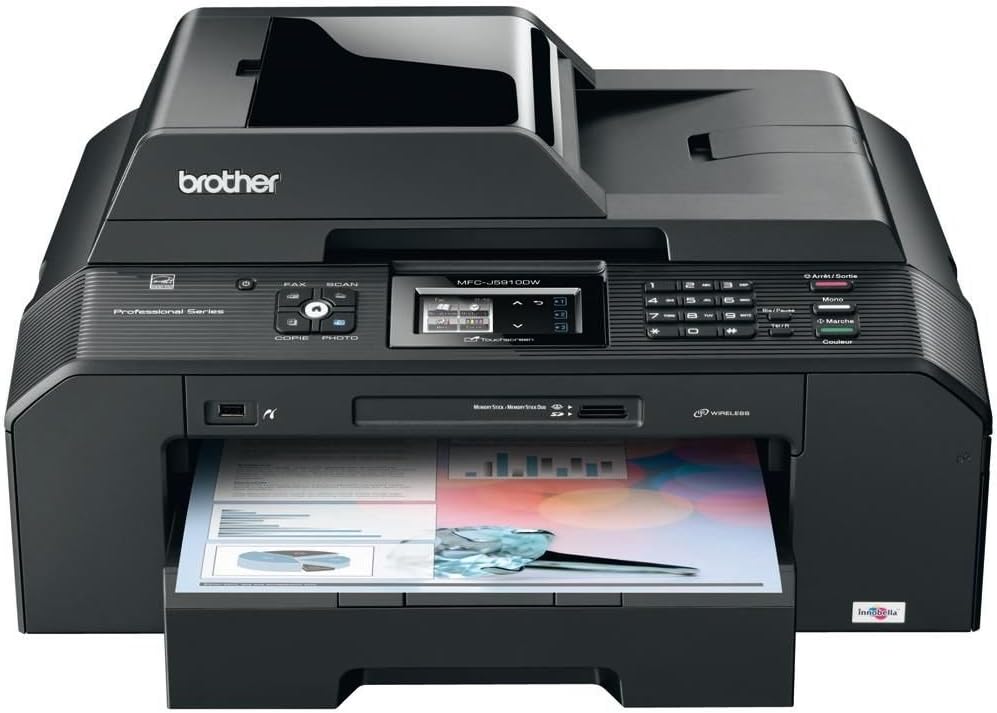



Brother International - MFCJ5910DW - MFC-J5910DW Wireless All-in-One Inkjet Printer,
Product ID: 531984342
⚡Fast output speeds
📏11" x 17" size
📱Mobile printing app
🚀 Elevate Your Office Game with the Ultimate All-in-One Printer!
The Brother MFC-J5910DW is a versatile wireless all-in-one inkjet printer designed for professionals, offering high-quality printing, copying, scanning, and faxing capabilities up to 11" x 17". With fast output speeds, a mobile printing app, and automatic duplex printing, it’s the perfect solution for busy work environments.
| ASIN | B005QOX4K8 |
| Additional Printer Functions | All In One |
| B&W Pages per Minute | 27 ppm, 35 ppm |
| Brand | Brother |
| Color Pages per Minute | 10 ppm |
| Compatible Devices | Smartphones |
| Connectivity Technology | Wireless |
| Control Method | App |
| Controller Type | Android |
| Customer Reviews | 4.0 out of 5 stars 172 Reviews |
| Dual-sided printing | Yes |
| Duplex | Automatic |
| Global Trade Identification Number | 04977766700597 |
| Hardware Interface | Ethernet, USB |
| Item Weight | 38.4 Pounds |
| Manufacturer | BROTHER |
| Maximum Copy Speed Black and White | 23 ppm |
| Maximum Sheet Capacity | 250 |
| Model Name | MF CJ5910DW |
| Model Number | MFCJ5910DWZU1 |
| Other Special Features of the Product | Wireless |
| Paper Size | 11 inch x 17 Inches |
| Print media | Card stock |
| Printer Connectivity Type | Wireless |
| Printer Output | Monochrome |
| Printer Output Type | Monochrome |
| Printer Type | Inkjet |
| Printing Technology | Inkjet |
| Scanner Type | Sheetfed |
| Special Feature | Wireless |
| UPC | 088020599780 |
A**L
Still a brilliant machine!
This is the 2nd time I’ve bought this Brother printer. To buy the same model again says something and to find that it is still on sale 2 and a half years after buying my first model also tells me that this must be a winner. My first model performed outstandingly with no mishaps at all during the past 2 and a half years (apart from the occasional paper jam) until a blocked black nozzle produced printing with the black reduced by about 80%. This machine is now relegated to another room as a spare; I need clear black printing as I mostly produce sheet music for orchestral use. The printer is very easy to set up. Yes I know it's a pain having to take out the paper tray to load different paper sizes, but after a while you get very slick. I don't do the duplex A3 printing as the printer demands very wide margins, so I always do this printing manually for better results. The booklet (A5 size) printing is excellent and gives me good results every time. Splendid to produce miniature scores and for proof-reading orchestral music parts. I always use real Brother inks. I have sometimes considered using compatible inks, but having had a bad experience with a previous (Epson) printer (I could only afford compatibles for it!), I decided to stick to real Brother inks for this one. The LC1280XL refills do last a very long time and if I shop around, I can usually find them at a reasonable price. This is an amazing printer on offer at an amazing price. Having used many different printers over the years, I think it’s one of the best yet that I’ve owned. I only hope they’re still around in a few year’s time when I’ll need to replace this one!
G**Y
It is fast and the print quality is good. Ive been using it for 2 months and ...
I have not had any paper jamming in my printer. It is fast and the print quality is good. Ive been using it for 2 months and the inks that came with the machine have not run out yet. Its great that you can also print on a3 paper. A great a3 printer for the price. Even does a good job with photo's.The main reason for buying this printer was to print my photo's on canvas and hang them on the wall. I bought painter canvas,cut to a3 size.As canvas is slightly thicker than normal paper, i did realise that printing on canvas might not work. As the canvas is rolled i had to roll it the other way to try and straighten it out. The canvas jammed ,which i took out flattened the edges and corners and tried again. 2nd time it printed on canvas. I now have 4 a3 canvas pictures to frame and hang :) Take note that the surface of canvas is not smooth and you have to play around with the settings to get best results.And with canvas you have to make sure all edges and corners are flat, otherwise it will jam. I am over the moon that i can print my photo's on canvas. A truely professional machine.11 pionts out of 10
A**S
Jam at your peril
I have had this printer since late August 2013 and while it seemed like a good idea at the time it's proved a bit of a challange to get the thing to work for more than a day at a time. The big problem with this machine is the paper jamming. It's almost constant and even worse in A3 mode. Just about everything you print out requires you to unblock a "jam" as the paper hasn't fed from the tray. I thought it was me been a mong and using cheaper paper, but no. I bought some really expensive HP paper to try and that either refuses to pick up from the tray or if it does work it takes about 8 or 9 sheets through together. It also refuses to take thin card and A3 is near impossible unless you give it a helping hand. Another thing to take into account is the price. Ok, it cost me £129.99. That means that (as a retailer) it cost about £60.00 wholesale that means it cost about £30-£40 to produce at the most. This certainly shows, the paper draw is really cheap and nasty and is really flimsy. The paper size adjust levers are awful and I am surpised it's not broken yet. The plastics are dreadful but it's not meant to look pretty in an office but at least work for more than ten minutes! Plus points are wi-fi, cheap printer cartridges that are easy to replace that come in 4 tanks so you only have to change one at a time. Printing is ok, but make a cup of tea when using borderless A3 paper. It is so ponderous you can see snails run quicker than this!So it works, but don't expect the earth....Also if you have high blood pressure, forget it, you'll die with stress within a week THIS IS AN UPDATE TO THE REVIEW ABOVE:- After nearly a year and several phone calls to Brother about the paper feed problems that plague these printers I finally got a new off them. The problem was the continual paper jams and it to the stage where it was pot luck it the stupid thing worked for more than five minutes a time. The argument was that I had used non standard cartridges in the printer and Brother swore blind that this would of damaged the printer that is utter rubbish. Well after a visit to my solicitors he found a similar case between Honda and a customer who had fitted different tyres to his car after eight months. Honda said that the warranty had been voided, but a court decided this was rubbish as the tyres would not of caused a fault to the electrics which he was complaining about. My solicitor cited this and Brother backed off. I now have a new printer that is just as bad as the last one but it is new! The old one was plagued with paper feed problems that had NO impact on the cartridges fitted. Also there is interesting piece of EU law about your warranty...See below. In reality go a decent printer without all the rubbish on it. My old HPC2200 has been bought back into service. The Brother makes a good doorstop! Well after another printer been sent out via Brother, this one has packed up already after a couple of months. It is incapable of printing posters in A3 as the paper gets so saturaed it just cloggs up and jams up. I have never mananaged to print out anything on this printer without some sort of drama. Just DONT buy one, they are cheap, nasty and tacky rubbish. Buy yourself an Oki or Ricoh A3 printer, you'll pay 5 times as much but they work without fault. These Brother printers are just banged out of a factory in China for £14.99 a go (I found the source factory) and really are rubbish. Motto is:- Go and buy a HP or Epson printer. Brother really is RUBBISH. AVOID THIS PRODUCT AT ALL COSTS AND GO FOR A DECENT PRINTER. JUST CHEAP TAT. NEW UPDATE: 16TH MAY 2014 Well after months of battling with the useless printer I rang up Brother, told them it was a pile of cheap tat and I want my money back as it was not fit for purpose. Argument, I feel coming on! I bought this from Staples and they said you need to contact Brother, well this is utter crap as I am in business myself. The contract of sale is between me and Staples, not me and Brother. The problem is the constant jamming, the inability to print out more than one A3 at a time with jamming and creasing the paper. Sometimes it refuses to pick up. I hasten to add that Staples refused but after a letter from my solicitor they soon changed their minds. IN A NUTSHELL DO NOT TOUCH BROTHER PRINTERS. THEY MAY BE CHEAP BUT THIS MEANS CHEAP AND TAT IN THIS CASE. I HAVE NOW BOUGHT A HP A3 PRINTER TOP FEED THAT IS PERFECT. REPEAT: DO NOT TOUCH THESE PRINTERS, THESE ARE RUBBISH UPDATE: 27th June 2014:- Well it now gone to the bin, can't be arsed to even call Brother. If you are thinking of buying don't they work great for about six months then the paper pick-up goes and that's it. We have had five of these printers and they have all had the same problem with paper pick up. A3 is nigh on impossible to get printed out. Also Brother customer services are not that helpful even when you tell the idiots there is a problem with their products. I hasten to add the HP is working perfectly even though I have dropped it three times and use cheap ink refills.
L**D
Good, but not good enough
As a design student I'm in need of a printer that can produce good quality pictures. Unfortunately the quality on this machine isn't as good as I expected it to be. You can enhance it by printing on glossy paper, obviously. But since I personally need lots of colour printing for research, that would end up being too costly. On normal paper pictures lack depth of colour and the colours are not accurately representing the colours you have on your computer. Will be sending it back, unfortunately. However, if you don't really need accurate scales of colour this machine will do the trick.
G**F
Quite a big beast, but a very useful one
Well, OK, compared to a lot of A3 printers, it's not that huge, especially not when you consider it's a fax machine, scanner and copier as well. I've had one for a few years now and it's been very reliable. The print quality is not up to laser standards but, with some tweaking via the software, it's perfectly adequate for most of my office needs. The scanner is very good. It's also very economical to run if you buy the very cheap, generic replacement cartridges on amazon. My only quibble is that the cartridges, even the so-called high yield ones, are really small and don't hold much ink, meaning that they do need replacing frequently. However, at the low price of replacements, this isn't too much of a problem. It just leaves one wondering why Brother didn't allow for bigger cartridges. Surely they could have found a little more room without dramatically increasing the size of the printer? One major advantage this device has over a lot of other printers is that it doesn't have those infuriating microchips built into all the major parts that cause them and, therefore, the whole printer, to stop working after a certain number of prints, even though the components are still in perfectly good working order. The cost of replacement parts is usually so high that one is better off throwing away the entire printer and buying a new one. This is planned obsolescence writ large and another way in which printer manufacturers seek to rip us off. No such problem here, as this machine is free of that scam, so well done Brother.
Trustpilot
2 weeks ago
2 weeks ago