🚀 Triple your screens, power your hustle, and own your desk setup!
The WAVLINK DisplayLink Docking Station is a powerhouse productivity tool designed for professionals who demand seamless multi-monitor support with triple 4K@60Hz outputs, robust 100W charging, and extensive connectivity including 6 USB Gen2 ports and gigabit Ethernet. Compatible across major OS platforms and optimized for Mac and Windows laptops, it consolidates your workspace into a sleek, single-cable solution that elevates efficiency and style.


| ASIN | B0BNNCXR6J |
| Best Sellers Rank | #6,591 in Electronics ( See Top 100 in Electronics ) #113 in Laptop Docking Stations |
| Customer Reviews | 4.1 4.1 out of 5 stars (3,121) |
| Date First Available | November 30, 2022 |
| Item Weight | 1.12 pounds |
| Item model number | WL-UG69PD25PRO-US |
| Manufacturer | WAVLINK |
| Package Dimensions | 11.14 x 5.47 x 2.6 inches |
R**P
Perfect docking station for Macbook Pro
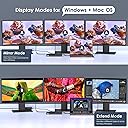
I did a lot of research since there are plenty of good choices out there for a docking station for a Macbook Pro M1 Pro including Wavlink, iVanky, Sateshi, OWC, Plugable. And I chose this Wavlink by considering many factors that were important to me including having the "extend mode" option for multiple monitors, laptop charging via the dock, multiple display port availability, combination of USB type A and type C ports, 1GbE Ethernet port. Having a Thunderbolt 4 40Gb down port was not important for me. And of course wanted something at the $200 price point. This Wavlink was perfect. Few things that you should know. This requires the DisplayLink driver and that is perfectly fine because my work environment requires that as well and so this was not a new requirement for me. BTW, if you run into issues with streaming video (Netflix, Prime Video, etc.) when you use DisplayLink, just switch off "Hardware Acceleration" in the Chrome browser and that will fix it. I used to have 4 cables connected to my Macbook (for two monitors, network cable, speaker). Now have a very elegant setup with just one cable from the Wavlink. Nice!
N**W
Worked out great!
Easy setup....Works as advertised...
W**M
Great dock depending on model you receive
I have three of these docks that my company is using with M3 Macbook pros. They work great with dual and triple monitors. I ordered three more for some M4 Macbook pros we just received. The new docks are labeled as a Pro version while the previous docks I received are labled as a Max version. The Pro version does not work with the M4. We tried all of them and the screen blacks out every few seconds with a dual or triple monitor setup. The M4 works great on the previous docks we received that are the Max version. The only difference I can see between the two models I've received are the Max version of the dock includes a 180W power supply while the Pro version is 160W. With the 180W power supply, the M4 has no issues connecting. Other than the discrepancy in the models, the Max 180W dock works great and has been in use for over a year. I took one star off due to the recent models received.
V**G
This is a very nice docking station.
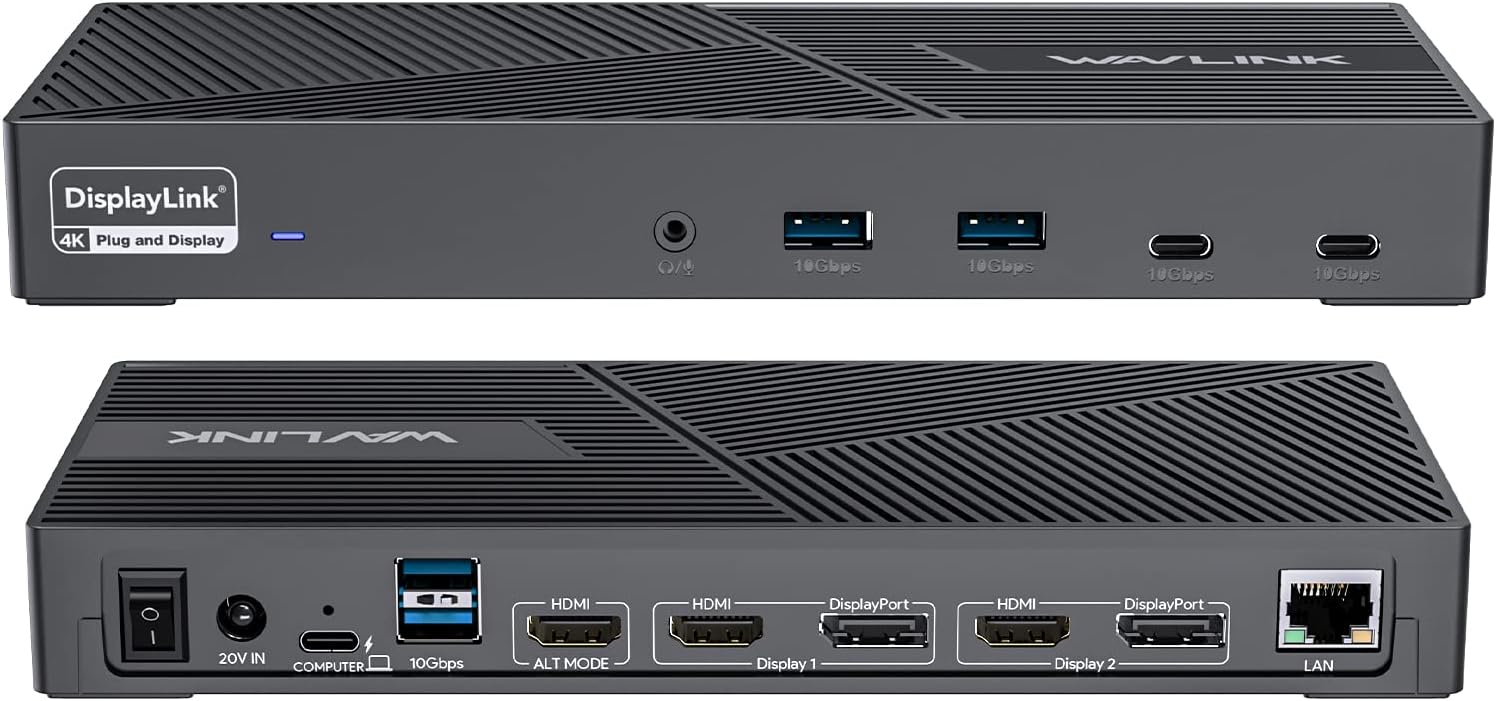
I have only had this docking station for a couple of days but love it so far. I have a M2 macbook air that only has the ability to use 1 external monitor. This docking station allows for a total of 3 external monitors. The first monitor needs to use HDMI. The 2nd and 3rd monitors can use either display port or HDMI. The power cable, the cable from macbook to dock, and the ports for all the monitors are all in the back. The front has a headphone jack, 2 usb ports, and 2 usbc ports. The ports are useful for charging anything that you need. In my case, the keyboard, the mouse, the ti-84 calculator, ipad, and anything else that uses those chargers. One thing that I did not know until now is that you no longer have to charge macbook when using this dock because when the macbook is hooked up to the dock, it actually charges the macbook (bonus). I was originally going to give it 4 stars because every time i shut down the macbook and restarted it, I had to go to applications, display link, and open it up before the 2nd monitor would show up. I was messing around with the settings and there is a setting that allows you to automatically have it open up upon startup. Anyways, it does everything you would expect and that they advertise. I have only had it for 2 days now so I can't comment on long term use, but it's great so far. 3 month update. The docking station is just ok after having it for 3 months. When I turn the macbook on, sometimes it does not recognize that docking station, most of the time it does. When it comes to charging the macbook when it's plugged in, it's weird. It first started and stayed at 100%, but now it shows it's charging but at 93%. It will actually go down to 80%, but then start actually charging again. It's weird. The last thing that I'm not happy about is when you have multiple monitors hooked up, the first additional monitor you have will work perfectly fine and smooth, but the 2nd monitor lags when you move your mouse on it. For example, if you are browsing a web page and scrolling, you can clearly see how it lags. If I knew all of this before I bought my macbook air, I would have just bought the macbook pro and not had the issue with needing a docking station with displaylink technology. This will do the job as I only have about 8 more months left of school and I will finish, but there are probably better products out there.
A**.
**Buyer Beware**
I could not recommend this unit. Although it will allow you to have 3 monitors, it randomly blanks out. It started to blank out altogether at the same time. Now, it slowly blanks out on one monitor.......then the next.......and then onto the next.........when it eventually comes back up, whatever you were previously working on ends up on only 1 monitor. Contacted support numerous times and they take their time getting back to you. Their emails include a support tool, which collects data and supposedly installs the latest version for display link or something like that. I've done this several times. Once they've figured out there is no resolve, they pass you onto someone else and you have to start over from the beginning, as if you've never contacted them. It's a pain having this unit and even more of a pain dealing with tech support. I'd steer clear of this unit. Also, when looking up files, everything is really delayed. Overall, this dock has great options however, it's not worth the hassle.
Y**O
So far so good!
It came well packed. I have been using it for a week, and so far it does everything it is supposed to do. It is connected to Dell Latitude 7440. I connected two 4K monitors to the two HDMI ports and they work very well. All other usb ports work as well. It came with biffy 100 Wt adapter, which is connected and charges my laptop without problems. I also use the RJ45 ethernet port and the audio port without problems. I have not tried to connect an external drive to it, so I cannot comment on that. Some people had problems with that. I will keep you posted, when I try it, or if something happens in the future. It is one month now, and it is working fine - no problems.
K**N
I’m glad to have picked this item over other competing brands. It works without any problems with just plug and play. Already used it for slightly over a month with totally no issues. Another plus feature was that it was sold by Wavlink SG so the power plug supplied was the one needed without the need for adapter. On top of this, delivery was fast.
V**O
Edit: Muss mich jetzt leider revidieren. Werde dafür jetzt keine Punkte abziehen, da eigentlich das Problem nicht eindeutig dem Doc zuzuordnen ist, oder ist es eine Inkompatibilität mit meinem Yoga X380 bzw. Treiberproblem (es gibt ja nur Treiber für Win10 und bei mir ist 11). Hab keine andere Laptos zum Testen und kein Win10 Gerät, was aber seit einigen Tage immer wieder vorkommt ist, daß das Doc ganz zufällig unabhängig davon ob gerade was läuft hängen bleiebt und die Verbindung zum Laptop verliert. Nach reset (über Stromkabel) läuft es wider ... aber das ist schon nervig. Im winlog ist folgedendes zu lesen: The device LAPDOCK (location 0000.0014.0000.013.004.000.000.000.000) is offline due to a user-mode driver crash. Windows will attempt to restart the device 5 more times. Please contact the device manufacturer for more information about this problem. Vorab wichtig (muss zugeben hab die Beschreibung nicht im Detail gelesen, deswegen halt nur Hinweis und kein Kritik) - das ist kein thunderbolt Gerät. Also das Ding braucht Treiber, damit die Monitore laufen (USBs gehen gleich auch ohne) und es liefert kein Strom am Rechner. Auf der Webseite des Herrstellers gibt es sehr viele Geräte. Da muss man schon aufpassen welche Treiber heruntergeladen werden. Hab zuerst die von WL-UG49DK1 installiert, aber das ist ganz anderes Gerät ... meins is WL-UG39DK1. Warum die Nahmen so ähnlich sind weiss nur der Herrsteller :) Nach dem initialen Stress aber läuft alles. Mit Win11 sogar, obwohl Treiber für Win10 sind. An dem Ding hängt bei mir ein SSD für Filme und Musik. Kopieren von und auf dem läuft mit >300MB/sek. Monitor über DVI läuft korrekt. Parallel Beamer über HDMI - auch perfekt.
M**L
Aunque es un poco grande tiene un diseño elegante y queda discreto.
R**O
uso un lenovo st14.. faccio sviluppo IT e saltuariamente immagini e video. Ho memoria da 64 su win10 . ho collegato un video portatile di estensione tramite presa hdmi e alimentato via usb. il pc ha solo tre usb che ovviamente ho riempito in un attimousando anche hd esterni (3) . una porta usb era dedicata alla connessioen di rete ,preferibile al wifi. usando un hub usb per connettere i dischi esterni tutto il sistema rallenza (ovviamente) , pesa anche l alimentazioen del monitor esterno usanto in estensione. Tutto cambia con l uso della dock. le velocità sono ottime , vero che è uno strumento non facilmente portatile , necessita di alimentazione diretta ma ne vale la pena usarlo . a brve proverò le connessioni con monitor tremite lui olte che microfono e cuffia. non ho installato il programma di supporto, per cui lavora con i driver trovati in automatico .
R**R
I have a fairly new laptop (~1.5yrs old); however, as new as the laptop is, it was made with entry level/ basic parts - specifically the output ports (HDMI, USB-A & USB-C only had the most basic capabilities). Because of this, it was very difficult to find a reasonably priced docking station that would function properly with my laptop. Most of the docking stations were $250-$350! I cam across the WAVLINK USB 3.0 Universal Docking Station and it was priced reasonably and appeared to have the potential to work with my laptop, so i decided to give it a try. Upon receiving the unit, I was prepared to have to struggle with installing drivers and updates (and prepared for most of the drivers not to work, as that has been my experience with other peripheral devices). To my surprise and relief, the WAVLINK USB 3.0 Universal Docking Station plugged in and was automatically updated and functioned correctly right away. I'm quite pleased with the unit, ease of use and functionality - i would definitely recommend
Trustpilot
2 days ago
2 weeks ago