🎶 Command your soundscape with pro precision and endless creativity!
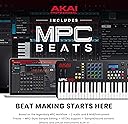
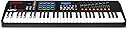
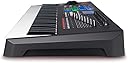
The AKAI Professional MPK261 is a 61-key USB MIDI keyboard controller featuring semi-weighted keys with aftertouch, 16 RGB MPC-style pads expandable to 64, and 24 assignable Q-Link controllers. Designed for professional music producers and performers, it offers deep DAW integration, onboard MIDI I/O, and is USB-powered for hassle-free plug-and-play connectivity. Bundled with Ableton Live Lite and other production software, it serves as a versatile centerpiece for any modern studio setup.


| ASIN | B00IJ7J06Q |
| Additional Features | Studio Recording, Velocity Sensitive Key |
| Best Sellers Rank | #87,445 in Musical Instruments ( See Top 100 in Musical Instruments ) #307 in Computer Recording MIDI Controllers |
| Brand | Akai Professional |
| Brand Name | Akai Professional |
| Color | black |
| Compatible Devices | Computers with USB ports and MIDI compatibility, Apple iPads with compatibility for the Apple iPad Camera Connection Kit |
| Connectivity Technology | USB |
| Connector Type | USB |
| Control Method | App |
| Control Type | Keyboard Controller |
| Customer Reviews | 4.5 out of 5 stars 1,729 Reviews |
| Global Trade Identification Number | 00694318015575 |
| Hardware Interface | USB |
| Hardware Platform | PC/Mac |
| Human Interface Input | Keyboard |
| Included Components | not included |
| Instrument | Piano |
| Item Dimensions D x W x H | 12.28"D x 36.65"W x 3.39"H |
| Item Weight | 16.1 pounds |
| Keyboard Description | Ergonomic |
| Manufacturer | inMusic Brands Inc. |
| Manufacturer Part Number | MPK261 |
| Material Type | Metal |
| Mixer Channel Quantity | 16 |
| Model Name | MPK261 |
| Model Number | MPK261 |
| Model Year | 2014 |
| Noise Control | None |
| Number of Items | 1 |
| Number of Keys | 61 |
| Outer Material | Metal |
| Platform | Mac |
| Product Dimensions | 12.28"D x 36.65"W x 3.39"H |
| Product Style | Controller Only |
| Size | 61 Keys |
| Special Feature | Studio Recording, Velocity Sensitive Key |
| Supported Software | Ableton Live |
| UPC | 139531386809 694318015575 |
| Unit Count | 1 Count |
| Warranty Description | 1 year. |
A**H
Love it, love Akai.
I’ll keep this short. By far my favorite USB / MIDI keyboard I’ve used. I had tried the cheaper 25 key Akai, but it was just too small and the synth key action I didn’t like. By contrast, this thing is a full sized keyboard. For most electronic music production, you might try a riff or something on the keyboard, test out chords etc., but you’re unlikely to be playing Mozart. Point being, I’d rather a very useful 25 key to a less useful full size 88. 25 is also about as big as fits decently on a desk, especially with a mixer and more. The drum pads are super responsive and sensitive, and 4x8 banks gives you 32 options, though I doubt many use them much - I’d get an MPC or something if I wanted just the pads. They’re there and work very well though. Note repeat is like an arp for the pads as well. Regular arp mode is nice too and well implemented, you can get some cool sounds going by playing with latch and letting the arp bounce around notes. You’ll almost always edit them in a DAW, but it’s a starting point for some cool stuff. The keys feel great, play great, etc., far from the synth action of the cheaper models. Tons of onboard DAW presets plus Ableton Live Lite included is good, too. No support for mixcraft which I use, but no surprise there.. anything common is covered though, and you can make your own presets as well. I do wish there was more variability in the presets - swappable banks like the pads would be nice, since for example if you’re using a VST like serum, there’s a lot of places you can map the knobs - plus if you mod one, changing the mod % is a different knob. Of course, there’s really not much room, and if I care that much there are MIDI controllers with more options, I even have a 49-key that at least has sliders and 12 knobs, but I still rarely use it, this is so much more preferable. (And yes I keep note stickers on some keys.. never officially learned to play so those are helpful at times). By far my favorite MIDI equipment, would buy again for sure. Also just confirms my love for Akai, I think more Akai products are in my future.
A**H
Beatmakers look no further!!!!!
Been making beats since 2013; this is easily the best 25 key midi keyboard on the market, but what do you expect from Akai. I had to buy a replacement because my midi cord input jack got ripped out (please beware of this with all MIDI controllers, the jack is very fragile!!) and I noticed that the updated version was a lot sleeker and about 5 pounds lighter ( I had my previous mpk225 for 5 years as a gift from a friend) and it makes for toting it around a lot easier. Akai I would recommend marketing a carrying case for these because it would come in handy. Regardless amazing controller, great arpeggio function and note delay function, 8 mini pads on the top aren’t too stiff, the keys play as perfect as a midi controller could, don’t stick or lag and respond well in real time playing. For the price, durability (I dropped my last mpk 50-60 times), design, easy compatibility with most DAWs (I’ve plugged it up easily to FL studio 12, FL studio 20, and a friend’s Logic in his home studio setup), and easy assurance you’re getting with a name like Akai, you can rest assured you’re getting every dollar tenfold. I argue that Akai is better than Native Instruments in every debate I have with other producers/engineers because of this controller. I would say that Akai should be sponsoring me because of how sweet I make them sound, but really I should be sponsoring them for this MPK225. If you don’t have one of these to make music on your computer, you are lacking!!!
S**E
Still one of the best for the money.
This keyboard does what I need and then some. The pads are really incredible. Responsive and really fun to play. I put my portable pad controller on the shelf. This thing does it all - and it’s a standard in the industry so any DAW is going to pick it up right away. Akai’s support is horrible in my experience- so it’s a good thing it requires almost no support. The feel of the keys, the faders, knobs - you can’t ask for anything more. It has really renewed my love for just sitting down and making music. They keys make you want to play. Just a couple of issues: first, the box shows that it comes with Eighty Eight Ensemble. It does not. Apparently an expired agreement to include it. Most of the software it “includes” are obtained by registering the device and downloading. (Ableton Live Lite is included on a disc- everything else has to be downloaded) while this is not a huge issue, it does mean that the software it comes with is subject to change. If you really want Eighty Eight ensemble, be prepared to buy it. Second, Akai’s website is not for the faint of heart. Try finding any downloads (editor, firmware update, anything) and you’ll likely end up frustrated. Just run it as is. It’s fine. Finally, be aware the device IS USB powered so most people won’t need a power supply - but if you’re using it as a controller for a hardware device or you’re not hooking it up to your Mac or PC for whatever reason - you need to buy a power supply. Definitely would buy again, but the way this thing is built I don’t think I’ll ever have to.
B**E
This is a great controller, i popped it out of the box
This is a great controller, i popped it out of the box....dialed in the protools DAW settings in the programs. BAM!!! works like I programmed it for 8 hours. It was truly plug and play. The MPK225 was shipped fast and well packaged. I have used an M-Audio for years and have found that it is very tricky to configure with AVID's newer line of products, and it seems like East/west sample libraries did not like it, and Kontakt 5 did not like the axiom 25 either.....one day....it just stopped working.... Enter the Akai. This Akai is very well built . all of the knobs turn nicely, and the pads are actually usable and easy to customize... the mod wheel and pitch wheel feel great and have nice resistance.. The keyboard has nice resistance which is especially handy for capturing low velocity performances. I do not see anything on the horizon with this things versatility and quality, in any price range. get one!!! you will not regret it!!!
S**B
A tool to learn, gets better with time, practice and a little patience.
This is a beginners candyland. Knobs, buttons, pads, wheels, and keys. Works with pretty much anything. You may regret it, but that's waaaaaay later. It's also an advanced user's dream. Everything is customizable. I believe the 5-pin midi can function independent of the usb midi, and will do sends when programmed specifically to do so for whatever of 30 pre-sets it's saved in. I don't have a use for that yet, but I'm tempted to go find one just to do it. 4x4 pads on 4 banks, that's 64 hits, and each can be specifically dual color coded for on/off changes. Firm but sensitive. 8 knob/slider/toggles in 3 banks, that's 24 wide. Transport control dead center. DAW control is arrow keys and the enter button in the middle. It's a little thing, but it comes in handy. I'd say I sit low to middle between these two. I'm not a novice, but I've really jumped deep in the fire here to get stuff done. What I've discovered along the way is that you need to be ready to learn and be wrong about buying this from time to time. That's okay. Given the price, it's actually on point for what it does. I'm using Ableton, Fl Studio 20, and I've started fooling around with MPC Beats. Know your DAW. Know what does what and how. Why is not important, we don't have time for that. Set things, change things, play with things. Midi learn works with everything. Factory reset it and do it again. Youtube University is a thing. Ave Mcree is a big Akai lover, so check his stuff out. Professoar is a fun kid to watch and really knows how to set things up. Two great places to start a rabbit hole. I've come at working with this thing with the mindset that if you can do it once, do it five times, and if you can do that, you can do it a hundred times. MPC Beats is the freebie they "sell" you on when you register. It's... um... it's okay. It's not the greatest, but it's not bad at all, and you can do some respectable things with it. Additionally, there is a setup for the MPK2 series that lines up your knobs, pads and transport. You might have to dig into Youtube a bit for it, but it will line up when you find it. Support is slim for what is not obvious. There's little gripes you will come across. My little gripe I can't seem to get around is finding a DAW or DAW setting that sends color changes to the pads. It's there, but I can't find it. Seems like it's a common gripe. You can change the colors in the preset settings, save them and they stay, but if you flip between several drum pad kits on your DAW, the colors won't follow. You can power this with the USB cable, but I've noticed that if I don't plug directly into a PC USB port, I don't get full power or data (one or the other). Tried it with a few powered USB hubs, same result. I would suggest a solid, longer cord, or an extender cable. Again, mind the power draw. There are people who know they want this controller, and there are people that know they want nothing to do with Akai at all. This review is not for either of those. This is for the people caught in the middle. It's not the greatest, but it's good, functional, and does most of the job. I would say the free VST software that comes with it makes the price and the little things balance out (they throw Hybrid 3 in with everything, great synth VST). Don't delay in getting your software codes and downloads, and save them all in zip/rar/7z files, just in case. iLok does the licensing, works fine. Read, research, experiment, reset, repeat. Once you know how you flow... go go go.
K**H
A worthy upgrade from the Mini MK3
I didn’t want a MIDI controller that was very big, so I first purchased the Akai MPK Mini MK3 but I wasn’t very happy with its keys. It was a great quality controller, but the Mini keys felt strange and cramped to me. On top of that, the velocity of every note I played into Logic Pro X came in very soft & quiet unless I really smashed into the keys as fast as I could while I played. Next, I ordered this MPK225 and the difference was night and day. It’s a bigger than I preferred, but as you can see in the pic, it still fit between my keyboard and computer, so that’s good enough for me. The semi-weighted full-sized keys on MPK225 feel way nicer to play, and I have zero velocity issues. Everything about this unit feels top-notch. It’s a really great bang for your buck. The Mini MK3 is a great unit too, but if you’re checking out both of them like I was, I’d say just go for this larger unit.
T**G
Comprehensive control with a good feel
I wanted a lot of control in a small space and this keyboard delivers. The keys feel nice - solid with some mass. The pads are great with excellent aftertouch, fully programmable in four banks with a "full velocity" switch and a programmable repeat. It syncs to external clock easily. The keyboard arpeggiator is excellent with most common patterns available. The other programmable knobs and switches (with a transport control) are what you want. Not great for master clock as you have to go page diving to get to tempo and the internal clock isn't very accurate. I have not used the included software - I am using it with MIDI DIN only. The USB port is being used for power. (NB - No wall wart included.) Buy an OnStage pedestal stand and you will be styling. <g> Highly recommended.
W**D
Excellent quality
Like the semi-weighted keybed and full sized keys--semi-weighted means there's no complex mechanical action like on a piano, but the keys have a good level of weight and springiness, as well as a nicely dampened impact when you clack them all the way down. The pads, sliders, and dials are likewise excellent. Works very well with Ableton Live 10. You will quiclkly realize the utility of all controls provided. There are certainly cheaper alternatives, and the size and price are not negligible, but I wouldn't go with less keys than this unless you are using only one hand.
U**I
Prodotto solido, e performance di alto livello
L'AKAI MPK261, come del resto le altre della serie MPK2, e' uno strumento di alto livello, sia in termini di materiali costruttivi, che di performance. I tasti semi-pesati offrono delle ottime sensazioni, e le numerose funzioni fanno tutte egregiamente il loro dovere. La tastiera si adatta bene a tutti i piu' famosi software moderni per la creazione di musica. Davvero un grande acquisto per gli appassionati, ma anche per chi vuole avvicinarsi all'utilizzo dei controller midi, e vuole da subito un prodotto di qualita', che durera'.
K**N
Ett bra köp
Produktionen lever upp till mina förväntningar
G**E
Top
Top
A**R
Beginner to ameture
My first MIDI controller so probably not the best review but representitive of a beginners experience... Easy to setup initially with your favourite DAW, plenty of info available online if you've never used a similar product. Plug and play with the ability to do more in depth configuration as you progress, with software and hardware. Has enough keys to play a range of melodies (two full octaves with an extra C) can be played two handed however if you are decent at playing piano you may find it limiting. the pitch shifters (one sustained one returns to the middle when you let go) allow you to reach different pitches although, I don't think they shift full octaves alone however with the Octave up and down buttons this is possible. The keys feel decent (even somewhat better than other semi-weighted keyboards ive used from reputable brands) and are relatively accurate as far as the velocity is concerned though it may take a while to get used to if you haven't used anything similar. Ability to plug expression/sustain pedals directly into the back was a nice feature that i didn't even consider using when I first purchased. The latency of input was at first a bit off but I soon realised that the response time can be changed with software which I believe lowers the initial quality of input and allows for the signal to be near instant (quality of rendered sound is not affected e.g. after exporting to .mp3/wav etc.) This isn't really a problem but is particularly useful for doing drum patterns in real time and not having to manually quantize as much if you can't get it perfectly on beat which is something that has a learning curve itself and took me a while to figure out. The pads have a nice feel and aren't too soft/firm. I found it hard to judge velocity which could be a problem however I soon found the 'full level' button which detects all pad input as max velocity, allowing for consistency where necessary. I found this to be the way to go for me though it would be possible to learn the velocity levels I prefer to lay down the drum pattern then go back in the software and change It manually to perfect and reduce velocity for things such as open hats. 8 pads are enough for me with the ability to cycle through 4 banks being a nice extra. I'm still learning with it and haven't used all of the buttons/features such as the knobs, latch and arpeggitator but as far as music production goes, this device has taken me from not being able to create a simple drum pattern to learning how to create complex meoldies using different scales and diverse drum patterns and being able to translate the melodies I can think of directly into digital format which is something I didn't think I would achieve. For anyone who is looking for their first MIDI device this may be a bit overkill however as you progress and climb the learning curve i feel you may find that this has a few extra features that allow you to progress and learn more without being hindered by hardware as early as you might with other devices. If you are serious about learning to create music I would suggest this device and would even consider the models with extra keys (49 and 61 I believe) if you have the room. Durability. I've only put out around 30 hours into using the device however I'm very impressed by the design and feel of it and nothing seems to have degraded/worn out/ no buttons sticking or friction in the keys etc. even with the most used pads/keys. It is slightly bulky and has a fair weight to it however this imo makes it feel more durable. LEDs look good and while they are quite bright they aren't obnoxious or off putting and do serve a function in showing you which bank is selected, which buttons are ON such as the 'Full level' making it possible to see what settings you have selected without having to mess about playing something to see if it sounds different. All in all I would recommend the product however first consider if you will be dedicating some time to learning and perfecting your ability to use it as well as the software you use alongside it. If you aren't sure whether you will continue to use it or get bored with it I'd say get a lesser model such as the Mpk Mini.
E**V
Excelente producto
Como siempre Akai no decepciona, el MPK225 se configura completamente con FL Studio (knobs, botones, pads, entre otros) fue una excelente compra.
Trustpilot
1 month ago
2 weeks ago