Buy anything from 5,000+ international stores. One checkout price. No surprise fees. Join 2M+ shoppers on Desertcart.
Desertcart purchases this item on your behalf and handles shipping, customs, and support to Vietnam.
❄️ Slim, silent, and stunning — cool your rig like a pro!
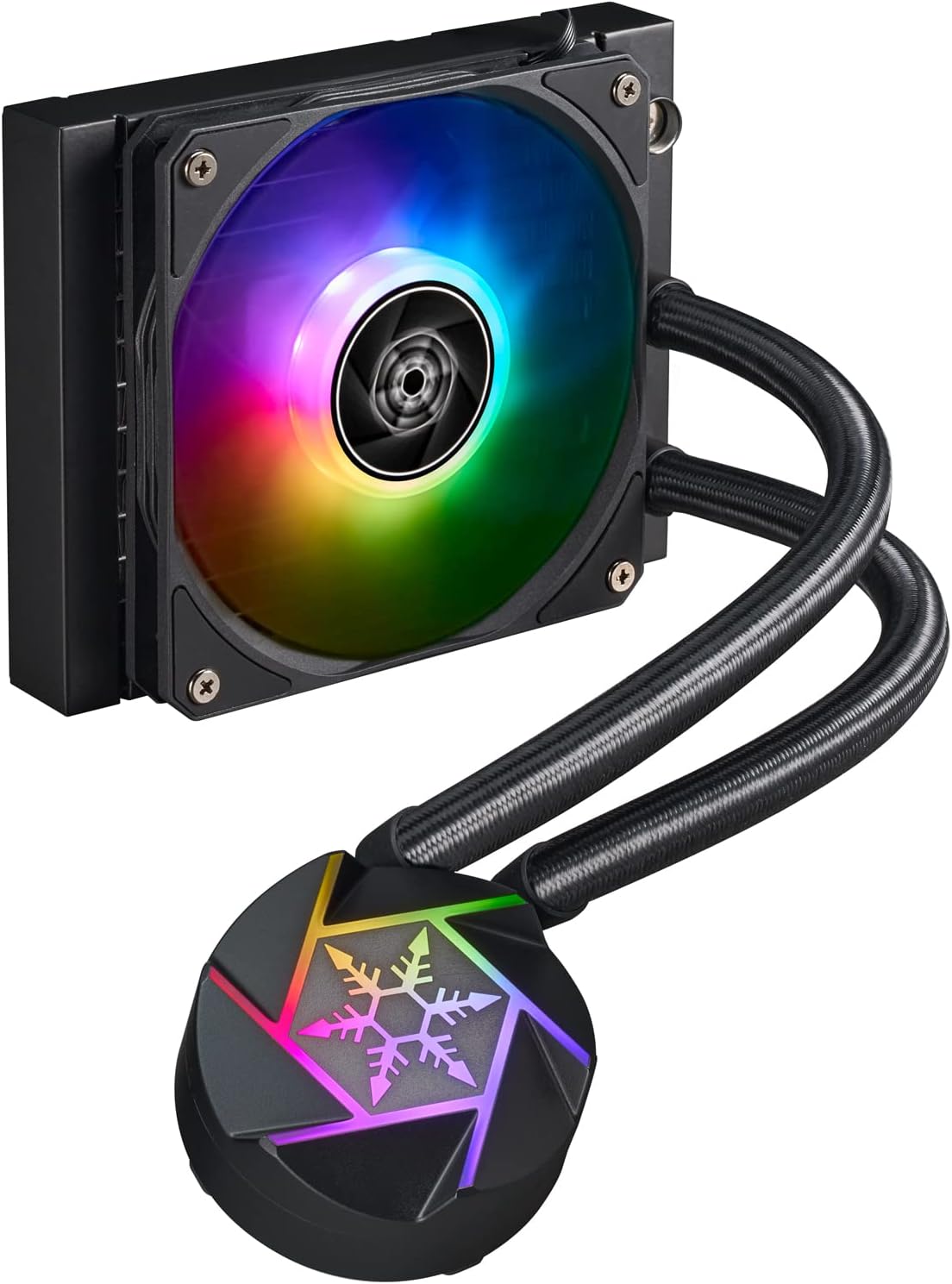
The SilverStone VIDA 120 Slim is a high-performance all-in-one liquid cooler engineered for small form factor PCs. Featuring an ultra-slim 38mm profile combining a 22mm radiator and 16mm fan, it maximizes cooling efficiency in tight spaces. Its advanced 3-phase, 6-pole pump integrated within an aluminum cavity ensures quiet, powerful heat dissipation. The rotatable CPU block and universal mounting kit support a wide range of Intel and AMD sockets, while the included ARGB controller offers 10 customizable lighting modes. Ideal for millennial pros pushing compact builds with high-end CPUs, it delivers exceptional thermal performance without bulk or noise.


| ASIN | B0BFCDCB6B |
| Best Sellers Rank | #355 in Water Cooling Systems |
| Brand | SilverStone |
| Brand Name | SilverStone |
| Compatible Devices | Personal Computer |
| Cooling Method | Water |
| Customer Reviews | 4.1 out of 5 stars 53 Reviews |
| Included Components | Liquid cooling system, fan, mounting kit |
| Item Weight | 1 Kilograms |
| Manufacturer | SilverStone Technology |
| Material Type | Aluminum, Rubber |
| Maximum Rotational Speed | 1800 RPM |
| Model | SST-VD120-SLIM |
| Noise Level | 15.9 Decibels |
| Number of Items | 1 |
| Part Number | SST-VD120-SLIM |
| Power Connector Type | 4-Pin |
| UPC | 844761024840 |
| Unit Count | 1.0 Count |
| Voltage | 12 Volts |
| Warranty Description | 2 year limited |
| Wattage | 5 watts |
E**A
Great thermal performance and fits almost anywhere
Silverstone, at times, can be a *little* hit or miss on certain items. However, this item is definitely a hit. This cooler has amazing performance, especially when considered alongside its size. PROS: - Incredibly easy installation. On AM4, this was byfar one of the most straightforward AIO installations I have done in my life. You simply slide on a small bracket, install 4 posts and 4 nuts -- no twisting, no wrenching. Just like a normal cooler, but with tubes hanging off of it. - The block is also very low profile, and for a tiny case this might be really important for you. - The included fan and radiator are both very high quality. I imagined that the pump being moved to the radiator was going to have a huge impact on the cooling performance - The RGB setup has multiple options, allowing you to use your motherboard's RGB control OR a hardware-driven one. - Several daisy-chains, and included splitter make it easy to have enough ports for everything. You just need 1 RGB header (or not) and 1 fan header to run the whole thing (stock) with lights, that is pretty impressive. - Quiet! - The radiator and fan are both thinner than essentially anything else you can get. My setup wouldn't have been possible to do with any other part. - The tubes are much easier to manipulate than a lot of AIOs, and the tubes are able to spin relatively freely at their connecting points. This is a somewhat niche part, the fact that this exists genuinely opens up more possibilities for SFF water-cooled systems. In my case, I have a 140mm with a shroud and push/pull fans in an SG14. Thermal performance is amazing; I crammed 16 cores into here and this 120mm (with my push push pull fan setup) keeps it at a cool 77 degrees under a full load of both CPU (5950x) and GPU (6750XT.) It is pretty absurd things have gotten to the point where that is possible! It isn't too bad at about a hundred dollars, and frequently goes on sale for around 80-90. At these price points it is a great value. CONS: - Though the block is lower profile, it is also a bit wider. In my specific case, the block really is a bit too wide to fit on my motherboard -- it has an integrated IO shield and the side of the block with the tubes coming out has to hit either the IO shield or the RAM. Luckily, it does still mount well enough to cool the machine reasonably. Just keep in mind you need a good 2 inches in clearance on one of the longer sides of the bracket. - Though I really really really appreciate having a hardware controller for RGB lighting -- especially one as decent and feature-rich as the one provided by Silverstone -- using it is pretty confusing. The instructions certainly leave a lot to be desired, it seems impossible to know what mode you are ever in. I don't even fully understand how I set my lights to be solid pink but it took me about 30 minutes and I eventually did it kind of by accident somehow. - The tubes seem a bit long for an AIO targeting small form factor builds. I do see the other side of this, where they could be too short, but anyone buying this definitely does not need quite so much tubing. - Though the wiring process does give a lot of IO and ports, you do end up with a lot of tiny fan cable mess everywhere. This is especially problematic in a tiny case; there is nowhere for all this crap to go. You have three whole cables coming from the radiator side of things; it isn't the worst thing in the world but something to keep in mind. Overall, hard to go wrong with Silverstone -- this is a great cooler that fits very specific cases that no other coolers will. I am very happy with it!
R**R
My review is based on how I modified it not how it ships.
I didn't want to do a custom loop in my FormD T1 but I wanted to avoid slim fans. The T1 is a great case but with a 4090 inside there is really only room for 2 fans. Those fans have to do double duty as radiator cooling and exhaust. The air being dumped into my case by the 4090 and AIO keeping the Core i9-13900k is a big job. I need the airflow and pressure more than I need a thicker radiator. Like most people I use a Phantek T30 on the PSU side of the RAD. Because I used this slim RAD I was able to put a Noctua NF-A12x25 PWM fan on the MB side. That setup worked really well and then I realized there was no point in having a fan as quiet as the Noctua on there. I swapped it out for a be quiet! Silent Wings Pro 4 120mm PWM. That fan moves a lot more air then the Noctua and it's always quieter than the Phanteks so I don't get any more noise then I already had. I have both fans set to max performance and I use software to control their speed. Most of the time they are dead silent but they will ramp up when needed. If I put my hand over the exhaust I can feel a tremendous amount of heat coming off them and my system is running very cool. More than anything that tells me the fans are doing a great job. The RAD and pump are great. The pump running at 4200 RPM outperforms most of the AIO's out there. You are losing some efficiency with the slim RAD but more then make up for it by being able to use thicker fans. I have no idea how well the included slim fans work on this radiator. Other reviewers probably covered that for you. I'm very happy with this product. In the past I've always rolled my own custom loop but it didn't seem worth it this time. If this slim AIO didn't exist I would have done it to avoid having to use a slim fan. It's working so well I don't see any reason to use anything else.
M**S
Great Slim AIO
Fit perfectly on Neo Air mid case. Standard air cooler wasn’t enough so I upgraded to liquid and love the results. Lowered CPU temperature from 80c to 60c while gaming.
R**.
Solid AIO for SFF PCs
I'm not blown away by this, but it does the job for an AIO that's designed for small form factors. I have mine in the Thorzone Mjolnir case. Using a Ryzen 9 7900X, the temps are okay at stock. But, do not stick to stock settings if you have a high end CPU like mine, I had to spend quite some time undervolting to get decent temps. Right now, I'm running my undervolt with the following settings: PBO limits: PPT/TDC/EDC: 142/110/170 Vcore offset: -40 mV Curve optimizer: All cores -20 I also recommend setting a custom fan curve if your case can only fit one fan for the radiator like mine. I have my fan curve at: 40C: 40%, 60C: 65%, 70C: 75%, 80C: 90%, 90C: 100% The included fans are actually pretty good, I'd argue they're about as good as the Noctua slim fans in performance and noise levels, so using both fans should be plenty for most. Cinebench R23 scores around 28.5k on multicore and around 2k on single core with temps usually staying well below 80C (15C below Tj max so this is great). Not a huge performance loss (3.4% multicore, 1% single core) so I'm happy here. Haven't done any proper stress testing, but I played some graphically intensive games for hours (e.g. Spider-Man Remastered, Hitman 3, Far Cry 6, Forza Horizon 5) and I rarely see temps going above 80C with it averaging around 72-75C, according HWInfo64. Idle temps hover around 50-55C, which is also pretty good. If temps get high in games, then cap your framerate to somewhere around your monitor's refresh rate (e.g. I have a 165Hz monitor so I cap my games at 170fps, this was particularly an issue with Valorant). Overall, I'd say for what it is, this AIO is excellent. It does perform well in a small form factor case, but do be cautious when pairing it with a high end CPU, as you may need to undervolt and make a custom fan curve. Oh right, and don't use their included thermal paste, it isn't that great, I bought an Arctic MX-6 and it dropped temps by around 5C compared to the included paste. UPDATE 1: I'm bumping my score to 5 stars. I decided to set up the second fan in a rather awkward orientation, but one where it is still able to efficiently cool the radiator. The results surprised me. Kept my BIOS settings the same as well as my fan curve, but my Cinebench score went as high as 29.3k on multicore and still around 2k on single core. There is practically no performance loss here, although the temp went as high as 86C during the Cinebench run (still 9C below Tj max so not bad). I am really happy with these results, I didn't expect adding another fan would have made such a significant difference. Definitely recommend this cooler for SFF PCs. UPDATE 2: After some BIOS updates as well as making some adjustments to my fan curve, I can safely say this cooler is really good, probably one of the best ever. Fan curve is mostly the same, but I increased the curve optimizer magnitude to -26. I removed the second fan and flipped the first one to better cool the radiator. Scored about 29.1k on Cinebench multi-core with temps never going above 80C, even in games. Idle temps have dropped drastically to around 46C, but I have seen it go as low as 42C.
A**R
Sent Used
A used cooler was sent. Thermal paste on the waterblock. Fans in the box were not for the cooler...they were not slim and not even SilverStone brand. Missing radiator mounting screws. I'll get a replacement and update this review after.
S**H
Amazing small AIO
Struggled to keep my 10850k cool in a Fractal Ridge case. Tried tons of air coolers, this is slim enough I was able to install the radiator fans with an Intel A770 16gb Limited edition. CPU and GPU remain cool under load, even in a small case like the Ridge. Super impressed with this cooler, it's no frills but does exactly what's advertised. This is the only cooler I'll use for SFF builds.
J**D
Great cooler for Micro ATX cases
I am running this on a Ryzen 5 7600x and it is a great cooler. I have had it now two months and it is fantastic. it really keeps the CPU cool under some heavy loads of spreadsheets and gaming. I am pleased overall. I didn't use the fans that were in the package for one reason. Noise. I tried them full power on a power supply and knew that I wouldn't like them for the noise. They do move a lot of air, so they are a good match for the cooler and they are only 12mm thick. I put two Be Quiet light wings on it and have a great semi-slim and quiet cooler. The pump is in the radiator, so that is a new one for me, but it seems to work and there is no noise from it. Under a 100% all cores stress test the CPU never got above 79 degrees over a 30 minute run. It stabilized between 77 and 79.
M**R
Perfect For The Fractal Ridge (Video Editing PC)
Before I begin, as with all ITX/SFFPC builds, you will need to do research! If you have a 3-slot card or a long 2-slot card, this AIO will not fit in the Fractal Ridge. Now for my review. Previously, I was using the Noctua L9i 65mm cooler and was doing a terrible job cooling the 13600KF at 65w; it overheats. Additional heat the RAMs as it's next to the cooler, causing instability. When I built this PC, this AIO was not available yet, and other low profile coolers were not “compatible,” aka I do not like bending coolers to fit. I am never a fan of AIOs because of the “rat nest” and the downtime if they fail (I have never had one fail so far—knocks on wood). However, this AIO was easy to install, the mounting is SUPER simple, the appearance is RGBish (I plugged mine in), and the dimensions are on point! And it is quiet. My only con is that the fan minimum PWM is 60% (in the Asus B760 ITX bios). There is no conflict with the Arc A580 (Long GOP workload only), and both stay cool during encoding, playback, effects, and software encoding. In other words, there is no issue when the whole system is 100%, GPU at 57c, and AIO/CPU (now set to 181w) at 61c with an ambient of 35c (Socal heatwave and No AC). RAM stays frosty at 47c now! And no issue overclocking it (tREF set to 111111) Overall, this is a great product. The only issue is that it is pricey, and it’s the only slim AIO on the market. The provided paste looks “bad,” so I used PTM7950.
P**N
Fits in my NR200P without mods.
- If you're looking for a slim and sleek liquid cooler that can handle a beast of a CPU like the Ryzen 7900, look no further than the Silverstone Slim 240 VIDA. I installed it in my Coolmaster NR200 ITX case and it fit like a glove. The performance is amazing, my CPU stays cool and quiet even under heavy load. Highly recommend this product! - The Silverstone Slim 240 VIDA is a must-have for any ITX enthusiast who wants to push their Ryzen 7900 to the limit. It's easy to install in the Coolmaster NR200 case and it delivers excellent cooling performance. The fans are whisper-quiet and the RGB lighting is subtle and elegant. This is the best liquid cooler I've ever used! - I was skeptical about buying a slim liquid cooler for my Ryzen 7900, but I'm glad I did. The Silverstone Slim 240 VIDA is a game-changer. It fits perfectly in my Coolmaster NR200 case and it keeps my CPU cool and stable even when overclocking. The quality is top-notch and the design is sleek and modern. This is a great product for anyone who wants to build a powerful and compact ITX system!
N**F
Terrible cooling performance.
Noisy pump. Terrible performance.
A**I
Excellent Pick for Slim Builds
This is a perfect fit for slim builds, I previously went with a standard Noctua fan (best I could fit in the case) and the CPU cooler was getting quite noisy + was sitting at high temps (85-90 with thermal throttling). After switching to the AIO temps dropped with about 13 to 14 degrees on average, GPU temps did not go over 70 degrees in benchmarks and in CPU tests the temp dropped even with 20 degrees. The noise levels have dropped as well, I sometimes forget the PC is on. I used 2 Artic slim fans instead of the ones in the box for more volume and potentially lower noise levels, I'm quite sure the ones it comes with would of produced the same result after benchmarks. Another great feature I did not see on other AIOs yet is the ability to connect the pump directly to the power supply through a molex connector. This freed a header on my main board where I have no pump and only 2 sys fans, you only get so many with a mini ITX card. Definitely a worthwhile purchase, I was on the fence at first about switching to it not believing it could make such a significant difference. It is a bit expensive, but for slim cases like the Fractal Ridge it is a great purchase. Does its thing, is silent, and keeps temps normal. I even enabled PBO on the CPU since i have the space now.
Trustpilot
2 months ago
1 month ago