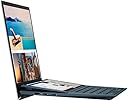
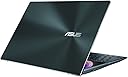
🚀 Elevate your workflow with ASUS ZenBook Duo — where dual screens meet unstoppable power!
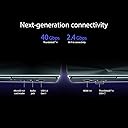
The ASUS ZenBook Duo UX482EAR is a sleek, Intel EVO certified 14-inch laptop featuring dual Full HD touchscreens including a unique tilting ScreenPad Plus. Powered by an 11th Gen Intel Core i7 processor, 16GB RAM, and a 1TB PCIe SSD, it delivers robust performance for multitasking and creative professionals. With PANTONE validated color accuracy, Thunderbolt 4 connectivity, and an impressive 17-hour battery life, it’s designed for on-the-go productivity and seamless multitasking.


| ASIN | B0BN925W4R |
| Audio Output Type | Speakers |
| Audio features | Standard laptop speakers |
| Automatic Backup Software Included | Windows 11 Home |
| Available Memory Slots | 1 |
| Battery Cell Type | Lithium Ion |
| Battery Life | 17 Hours |
| Best Sellers Rank | 19,921 in Computers & Accessories ( See Top 100 in Computers & Accessories ) 219 in Traditional Laptops |
| Bluetooth support? | Yes |
| Box Contents | Charger, Laptop, Sleeve, Stylus Pen, User Manual |
| Brand | ASUS |
| Brand Name | ASUS |
| CPU Codename | TGL |
| CPU Model Generation | 11 |
| CPU Model Number | UX482EAR-HY314W |
| CPU Model Speed Maximum | 4.8 GHz |
| CPU model | Core i7 |
| Chipset Type | Intel |
| Colour | Celestial Blue |
| Compatible Devices | External displays, mice, keyboards, storage devices, printers, and other accessories that use HDMI, USB, Wi-Fi, or Bluetooth connectivity. |
| Control Method | Touch, Voice |
| Customer Reviews | 4.1 out of 5 stars 182 Reviews |
| Display Technology | LED |
| Display Type | LED |
| Form Factor | Laptop |
| Graphics Coprocessor | Intel Iris Xe Graphics |
| Graphics Description | Integrated |
| Graphics Ram Type | L2 cache |
| Hard Disk Description | SSD |
| Hard Disk Interface | Solid State |
| Hard disk size | 1 TB |
| Hard-Drive Size | 1 TB |
| Hardware Interface | Ethernet |
| Has Color Screen | Yes |
| Human Interface Types | Touchscreen |
| Is Electric | Yes |
| Item Dimensions L x W x Thickness | 32.4L x 1.7W x 22.2Th centimetres |
| Item Weight | 1.57 Kilograms |
| Keyboard Description | Chiclet |
| Keyboard Layout | QWERTY |
| Lithium Battery Energy Content | 70 Watt Hours |
| Manufacturer | ASUS |
| Maximum Display Resolution | 1920x1080 Pixels |
| Microphone Form Factor | Integrated microphone |
| Model Name | Zenbook Duo 14 |
| Model Number | UX482EAR-HY314W |
| Model Year | 2023 |
| Model name | Zenbook Duo 14 |
| Native Resolution | 1920 x 1080 pixels |
| Network Connectivity Technology | USB, Wi-Fi |
| Number of Ports | 3 |
| Operating Systems | Windows 11 Home |
| Other Special Features of the Product | Backlit Keyboard, Dualscreen |
| Power Device | Lithium-ion Battery |
| Processor Brand | Intel |
| Processor Count | 4 |
| Processor Series | Core i7 |
| Processor Speed | 4.8 GHz |
| Product Warranty | 1 Year Manufacturer |
| RAM Memory Installed | 16 GB |
| RAM Memory Slot Total Count | 1 |
| RAM Memory Technology | DDR4 |
| RAM Type | DDR4 SDRAM |
| Ram Memory Maximum Size | 32 GB |
| Refresh Rate | 60 Hz |
| Resolution | 1920 x 1080 |
| Screen Size | 14 Inches |
| Screen size | 14 Inches |
| Speaker Description | [Basic Speaker System] |
| Specific Uses For Product | Personal, Business, Multimedia |
| Supported Monitor Maximum Quantity | 1 |
| Total HDMI Port | 1 |
| Total USB Ports | 3 |
| Touch Screen Type | capacitive |
| Video Output | HDMI |
| Video Processor | Intel |
| Voltage | 100240 Volts |
| Warranty Type | Limited |
| Webcam Capability | No |
| Wi-Fi Generation | Wi-Fi 6 or Wi-Fi 6E |
| Wireless Compability | 802.11ax |
| Wireless Technology Type | Wi-Fi |
S**T
A superb Laptop with great features and two displays.
I had been intrigued by the ZenBook Duo for a while, but looked at it as a bit of gimmick. When a needed a new Laptop, principally to use in meetings, I realised that the dual screen was ideal as it allowed me to follow the agenda or presentation and make in-meeting notes all at the same time without having to decipher my hand made notes afterwards. When I received the new Laptop, it more than lived-up to it's expectations. Not only did I get a fast laptop with a bright, high resolution touch screen display - but I got a Laptop with two of them! The ZenBook Duo is a dream to use, and although you get a very nice stylus as well, I find that the screens are so responsive, I hardly need to use it. I had worried that I might not be able to read the 14" screen easily, let alone the second screen, but because of the combination of high resolution, high background illumination and good contrast there has never been a problem, even in brightly lit environments. I have had this Laptop for about five weeks now, and it still blows my socks off! From its sleek lines, its tilted second screen and its gently illuminated keyboard - it just ticks all the boxes. I would thoroughly recommend this Laptop. My only regret is that I didn't buy it sooner!
G**Y
I am impressed!
My venerable Huawei laptop (AMD Ryzen 5 based) quietly handed its cap in after 6+ years of faithful service - and the cost of repair was unrealistic. So, I wanted a more powerful replacement device - but at a reasonable price. This laptop appeared to fit the bill - especially at a discounted price of £699 (and the Amazon offer of 12 interest free monthly payments) - EXCELLENT! Despite the reasonable price, with 16GB of memory, an Intel i7 processor and a 1TB SSD, this laptop is no slouch. OK, everything is not quite state of the Art. The processor is an 11th generation device (the latest ones from Intel are gen 13), the SSD is PCIe generation 3 rather than the newer gen 4 and, as per the listing, this model has Intel Iris Xe graphics rather than a dedicated GPU. That said, the laptop doesn't hang about. It converts video files about 10x quicker than my old PC. Also, with WiFi-6, file transfers to our NAS are much quicker too - I am happy with that! The PC arrived well packaged complete with a leatherette sleeve and stylus. Build quality is excellent and there is thankfully little bloatware. I just had to remove the abominably expensive Office 365 (I prefer MS Office 2021 Professional) and the godawful MacAfee paraphernalia. I reluctantly use Norton Security as it's free with our BT Broadband and, if managed, isn't too intrusive. I use Paragon Hard Drive Manager 17 Advanced - which is excellent for backups, creating recovery media and for disk cloning etc. I also use a few different media editors to manage the family Plex server I run on our TerraMaster NAS. I didn't buy the laptop for its second screen but I find it surprisingly useful for cross referencing purposes etc. It took me a while to get used to the keyboard (with no wrist support) but it works fine. The touch pad is squeezed in to the right of the keyboard which some may find a tad odd. It doesn't bother me as I use a Bluetooth mouse and the touch screen. The stylus is easy to use and the AAAA batteries it requires are readily available on Amazon. The included foldable laptop stand works a treat and is unobtrusive when folded away. The 1TB SSD is an SK Hynix device and I downloaded their SSD Manager App to keep an eye on things. It showed the SSD as being brand new with zero errors. CrystalBenchMark showed the device to perform as advertised - see attached screenshot (includes both displays). This is an SSD known to be frugal as regards its power requirements, give good performance for its price and, to run relatively cool. It can be upgraded by the user. There are a number of YouTube videos on the subject. The 16GB of main memory should be more than adequate for most users. However, note that this RAM is soldered in - so cannot be user upgraded. I ran NovaBench (see 2nd screenshot) and the results were good. As anticipated, with no GPU, the weaker aspect is the Intel Iris Xe graphics capability. However, as I am not an avid gamer, that is not an issue. Both displays are clear and precise, more than adequately meeting my requirements. I believe the BIOS settings can be used to allocate more of main memory to the display if required. There are 2x Thunderbolt-4 and a USB-A 3.2 port so there's plenty of connectivity. I already have a PD power pass-through docking station which gives all the other connections I need including an RJ45 LAN port. My only minor gripe concerns the twin cooling fans being surprisingly noisy when they kick in. That said, I quickly got used to them and they normally drop out after a few seconds. There is an option in MyAsus to reduce fan noise by lowering their spin speed. Anyway, checking on the temperatures, neither the CPU nor the SSD get unreasonably hot. I did see that the MyAsus App shows the laptop as having its 12 month warranty starting last May (I bought it in December) and ending in May 2024. However, I am not particularly concerned as, when I queried it, Amazon confirmed that the laptop is covered by their own 2 year warranty from date of purchase. So, I presume Amazon bought a 'job lot' of these laptops from ASUS earlier in the year at a bulk discount - and hence their reasonable price now. In summary, I am rather chuffed with my purchase. It's an excellent laptop that meets my needs at a very reasonable price. The more I use it, the more I appreciate it 😊 😃
A**R
A dual screen lappy that works...finally
Well done Asus. First to market with a dual screen laptop, perfectly integrated and that works as it should. Others have tried and not quite made it work but this is superb. I tend to use it in horizontal duo mode which is the primary purpose for me. The integrated stand is solid and secure and the two OLED screens are bright and a good size. Moving between screens is seamless and intuitive. Battery life could always be better but I get a solid 7-8 hours when using both screens. It's a super fact machine with no lag whatsoever and the detachable keyboard is superb. Very thin, feels good to type on and instant connectivity using BT. This is a gamechanger for the future of laptops.
S**U
UX8406CA is a nightmare.
The first month I bought it was alright because I didn't use it much, didn't have time to transfer my files from my old ASUS laptop UX482. I have been using my old laptop along with a Gigabyte 1080 eGPU for 4 years now and never had an issue. I have also used it with 2 Anyoyo SCSI usb-c and usb-a adaptors for my SK Hynix P41 platinum drive, and again no issues. After 1 month of barely using the UX8406CA I managed to finaly transfer my files from my old laptop, but it wasn't easy. I couldn't use the NVMe drive because copying files from one laptop to another just doesn't work. Every time I wanted to copy my files from the NVMe drive to my new laptop it, the copy procces would stall and and then stopped with errors on Event Viewer. I had to connect the laptops with a TB4 cable and transfer the files through the Thunderbolt - USB4 P2P networking. There is definitely something wrong with the USB ports because when I connect my eGPU to the laptop, the laptop freezes after a while. I could be playing, browsing the internet, do nothing, or the laptop just be hibernating, it would just freeze and the only way to restart it is press the power button for 15 sec. I'm fairly sure the problem is not the windows 11 because I have reseted and clean installed the windows several times and the problem is still there. It is either bad drivers and/or firmware/BIOS issue. I have the latest 310 bios version as of 22.11.2025. The intel external display driver throws hundreds of errors in Event viewer every times the screens go to sleep or turn back on. Now the TPM 2.0 doesn't work either (no TCG event log is available) when trying to enable the Bitlocker drive encryption (yes, I have updated to Windowes 11 Pro, still doesn't work). Now it is too late to send it back and ask for a refund because the 30 days windows is closed, but I'm really considering selling it and buying another laptop from another brand. But guess what: the price dropped from £2100 to £1800 and now on Black Friday is even £1500. So not only I have overpaid for this garbage laptop but selling it is gonna make loose even more money. All in all this laptop is perfect if you don't use eGPUs and NVMe drives connected to it. The 2 3k oled touch screens are wounderfull and the removal keyboard is excelent. Unfortunately this laptop is plagued with bad software/firmware. Don't buy it. I will come with updates later and more explanations. Don't buy.
R**U
Great laptop..
I wanted a laptop that is ultralight for when I travel but I need power for photo editing and this one hit the spot ! Pros: very good ips screen on par with oled, second screen is very useful, fast enaugh to run photoshop and lightroom classic well for my photography, battery does last a lot for youtube and movies. Cons: be careful with the usb c charger (only use the one that it came with) as this laptop can have issues with aftermarket chargers (bricks the ports..known issue) Would I buy it again ?? Yes !!!
M**T
Max Productivity on the go
Great laptop, good battery life, dual (or quad in my case :) screen, picture taken with extra aftermarket displays) screen makes it easy to work on. If you travel, but still need multi screen set-up, this is the way to go. Performance adequate for everything (maybe heavy gaming would need something more), I did not notice any issues running additional screens, crispy graphics, comfy, illuminated keyboard, great value for money. Definitely recommend!
K**N
Great laptop with a terrible keyboard
The Zenbook Duo 2024 could've been a great laptop from ASUS. How on Earth could they include this keyboard? A weird combination of a US and UK one. The keyboard has an extra "\" key next to the left shift, but the enter key is horizontal like a US keyboard, with the "#" key above it. A typing disaster for everyone. Display: it could be the best part, but again, a miss with a highly-reflective dual-display. Who's the target here? As a working machine, the vivid display is useless. For entertainment, we don't need dual-displays. The rest of the laptop is great, if you like Windows 11. Fast and responsive. The dual-display with the kickstand is a great invention. That's why I kept it. You'll have a dual-display anywhere. Thank you, ASUS, for the invention. I hope they can fix these annoying mistakes in the next generation. Until then, I only recommend this machine if you work in a dark environment (reflective display), and if you can't type blindly (and won't hit the # whenever you want to hit enter and hit enter whenever you want #).
M**E
The machine is highly sophisticated
This laptop is lovely. I get value for my money.
Trustpilot
1 week ago
2 months ago