🖨️ Print smart, travel light, stay ahead.
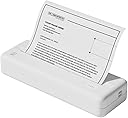
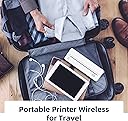
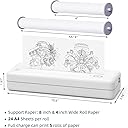
The HPRT MT810 is a compact, wireless thermal printer designed for professionals on the move. Featuring Bluetooth connectivity, inkless printing technology, and a rapid 30 ppm speed, it delivers crisp monochrome prints from iOS and Android devices. Its durable build withstands diverse environments, making it ideal for travel, mobile offices, schools, and home use.


| ASIN | B0BQRFPJ1P |
| Additional Printer Functions | Print Only |
| B&W Pages per Minute | 30 ppm |
| Best Sellers Rank | #80,094 in Computers ( See Top 100 in Computers ) |
| Brand | HPRT |
| Built-In Media | 1 x Portable Printer, 1 x USB-C Cable, 1 x User Manual, Paper |
| Color | White |
| Color Depth | 24 bpp |
| Colour | White |
| Compatible Devices | Laptops, Smartphones |
| Connectivity technology | Bluetooth |
| Control Method | App |
| Controller Type | iOS |
| Customer Reviews | 4.2 out of 5 stars 722 Reviews |
| Dual-sided printing | No |
| Duplex | Simplex |
| Hardware Interface | Bluetooth |
| Ink Color | black |
| Item Dimensions D x W x H | 6.6D x 36.6W x 12.2H centimeters |
| Item Type Name | Printer |
| Manufacturer | HPRT |
| Maximum Copy Resolution Black and White | 203 dpi or 300 dpi |
| Maximum Copy Resolution Color | 203 dpi or 300 dpi |
| Maximum Copy Speed Black and White | 30 ppm |
| Maximum Media Size | 8.5 x 11 inch |
| Maximum Print Resolution Black and White | 203 dpi |
| Maximum Sheet Capacity | 400 |
| Model Name | MT810 |
| Model Number | MT810 |
| Model Series | MT810 |
| Model name | MT810 |
| Number of Drivers | 1 |
| Number of Trays | 1 |
| Other Special Features of the Product | Portable |
| Paper Size | A5 |
| Print media | Thermal Paper |
| Printer Connectivity Type | Bluetooth |
| Printer Output Type | Monochrome |
| Printer Type | Thermal |
| Printing technology | Thermal |
| Processor Count | 1 |
| Resolution | 300 x 300 |
| Scanner Type | Portable |
| Series Number | 810 |
| Special features | Portable |
| Specific Uses For Product | Portable, wireless printing for various environments including travel, mobile offices, schools, and homes |
| Total Usb Ports | 1 |
| Unit Count | 1.0 Count |
R**.
Works great with any cell phone. Not so great with laptops
Was so excited to buy this and say Goodbye to inkjets. Turns out this is only compatible to cell phones. Tech support tried to help with connection to laptop but the driver wouldn't take. They need to update their driver for laptops and desktops. In terms of printing quality. It is grainy. The technology is based on fax machines. Nice and convenient for something quick for word documents. But not the best quality for pictures. Sorry folks but we still need those Deskjeta for pictures and other images. Like I said hooks up really fast to any cell. And based on my experience the price needs to come down. I would put a value of no more than $100
C**O
Excelente eficiencia en el transcurso del tiempo
Excelente eficiencia se ha utilizado durante un largo tiempo y sigue imprimiendo como el primer día súper súper recomendado
E**H
A Traveler's Best Friend for On-the-Go Printing
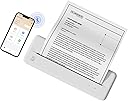
I recently added the HPRT Portable Printer MT810 to my travel gear and it has been a game-changer. Here's my take on its pros and cons: Pros: 1. Truly Portable: This printer is compact and lightweight, making it incredibly easy to pack into a backpack or carry-on. 2. Wireless Convenience: The Bluetooth functionality allows for quick and hassle-free printing directly from my iPhone, Android, and laptop. 3. Inkless Printing: The thermal inkless technology is not only environmentally friendly but also eliminates the need to carry around ink cartridges or toners, making it even more travel-friendly. 4. Quick Setup: It was pretty straightforward to set up. The manual is clear, and I was up and running in no time. 5. Versatile: I’ve used it for printing out invoices, tickets, and even quick snapshots while on the road. It’s proven to be extremely versatile. 6. Good Battery Life: I was pleasantly surprised by how long the battery lasts. It's sufficient for multiple printing sessions without needing a recharge. 7. Quality Output: The print quality is quite good for a portable printer, especially for text and simple graphics. Cons: 1. Paper Size Limitations: The paper roll sizes are smaller than standard paper, so it’s not ideal for larger documents. 2. Price of Paper Rolls: While the printer itself is cost-effective, the specialized paper rolls can be a bit pricey. 3. Monochrome Only: It only prints in black and white, which is fine for most of my needs but may not be suitable for those requiring color prints. In my opinion, the HPRT Portable Printer MT810 is an excellent investment for anyone who frequently travels for business or leisure and needs the ability to print on the go. Its ease of use, compact size, and inkless technology make it incredibly convenient, and the quality is more than satisfactory for most tasks. Although it has some limitations like paper size and monochrome printing, these are minor trade-offs for the portability and convenience it offers. Highly recommended for the modern traveler.
M**L
Thermal cartridges
I love this printer but hardly use it. I didn't know what thermal paper was like. I dont like the texture . I mostly bought it because I get tired of feeding individual paper in. <---(Lazy). Any way I can use regular paper instead of thermal somehow? I did buy the other HPRT portable printer individual feed for paper. Having said all of this both printers are excellent!!!!!! I would highly recommend either. I only write reviews if the product is above average in every way.
J**R
Handy Printer to Have for Smaller Print Jobs
Good quality for the price. Does not print pictures well, but is fine for print documents. Set up was pretty easy. The only issue I had is that after you go to the companies website to download the printer software, you have to make sure to install it after download. Otherwise you will see it in the list of printers to add to your selection, but it will say device not found. I went back and clicked on the download and then my laptop sort of crashed! Everything went black. So that was scary. I just did a restart on my laptop then installed the software and then was able to use it to print. One other item is after a page prints it has teeth on the edge to tear the paper. They are so small and the paper is pretty thick. I did not trust myself to tear the paper because I know I will jam the paper roll! I use scissors to cut each page after it prints.
Trustpilot
4 days ago
1 month ago