Buy anything from 5,000+ international stores. One checkout price. No surprise fees. Join 2M+ shoppers on Desertcart.
Desertcart purchases this item on your behalf and handles shipping, customs, and support to Vietnam.
🚀 Elevate your home network to Wi-Fi 7 supremacy — speed, coverage, and control redefined!
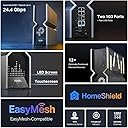
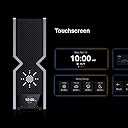
The TP-Link Archer BE24000 (BE900) is a cutting-edge quad-band Wi-Fi 7 router delivering up to 24.4 Gbps wireless speeds with a dedicated 6 GHz band, supported by 12 internal antennas for superior coverage and stability. It features dual 10 Gbps multi-gig Ethernet ports, multiple 2.5 Gbps LAN ports, and advanced security with VPN and IoT network segmentation. Designed for professional-grade home and small office networks, it supports EasyMesh for seamless expansion and offers an intuitive touchscreen interface and app control for effortless management.


| ASIN | B0BRD3P4XV |
| Antenna Location | Gaming |
| Antenna Type | Internal |
| Best Sellers Rank | #134 in Computers & Accessories ( See Top 100 in Computers & Accessories ) #14 in Computer Routers |
| Brand | TP-Link |
| Built-In Media | Power Adapter, Quick Installation Guide, RJ45 Ethernet Cable, Wi-Fi 7 Router Archer BE900 |
| Color | Red |
| Compatible Devices | Personal Computer |
| Connectivity Protocol | Wi-Fi, Ethernet, IPv4, IPv6 |
| Connectivity Technology | Ethernet, USB, Wi-Fi |
| Control Method | App |
| Coverage | Extensive coverage for 4-bedroom houses |
| Customer Reviews | 4.1 out of 5 stars 198 Reviews |
| Data Transfer Rate | 10 Gigabits Per Second |
| Frequency | 6 |
| Frequency Band Class | Quad-Band |
| Has Internet Connectivity | Yes |
| Is Modem Compatible | No |
| Item Dimensions L x W x H | 11.9"L x 10.3"W x 3.8"H |
| Item Type Name | Router |
| Item Weight | 11.8 Pounds |
| LAN Port Bandwidth | 4× 2.5 Gbps LAN, 1 x 1 Gbps LAN |
| Manufacturer | TP-Link |
| Maximum Upstream Data Transfer Rate | 10000 Megabits Per Second |
| Mfr Part Number | Archer BE900 |
| Model Name | Archer BE900 |
| Model Number | Archer BE900 |
| Number of Antennas | 12 |
| Number of Ports | 7 |
| Operating System | ZyNOS |
| Other Special Features of the Product | WPS |
| Router Firewall Security Level | Basic |
| Security Protocol | WPA/WPA2-Enterprise (802.1x), WPA2, WPA3 |
| Smart Home Compatibility | Smart Home Compatible |
| Special Feature | WPS |
| UPC | 840030704727 |
| Unit Count | 1.0 Count |
| Warranty Description | 2 year manufacturer |
| Wi-Fi Generation | Wi-Fi 7 |
| Wireless Communication Standard | 802.11.be, 802.11ac, 802.11ax, 802.11g, 802.11n |
| Wireless Compability | 802.11.be, 802.11ac, 802.11ax, 802.11g, 802.11n |
A**P
Beats the competition. BE24000
They need to break up reviews based on models... BE24000 A month in and I'm very happy so far. Long time netgear nighthawk user and while some worked better then others the newer versions have been spotty. I purchased the latest and greatest (RS700s) at about the same price as this 24000. Tested great and 5min later slowed, rebooted or plain disconnected. Done with Netgear for good. I can't find the number of devices "supported". Other brands list up to 20,40,200 etc. I have between 35 and 45 devices connected at a time, while many use limited bandwidth my worry was the sheer number of devices were causing some of my issues. No problems with this. User interface, app, ip site and even led screen on the device itself are easy to interpret and user friendly. Preferred over the netgear option. I consistently run at 25% ram on the router (2gb, highest I've seen on a router). Download speeds heavily rely on distance to router and band you're on. I get close to 1g down and up on a fiber network through wireless on my phone in both the 5G and now 6G. You're able to split up channels with 1x 2.4G 2x 5G and 1x 6G or merg them, they can be named the same or seprate with passwords. I tried MLO network feature, worth reading up on (multi link operation) but it seemed to throw off my smart devices, many of which only function on a 2.4 channel. Pretty customizable by end user with limited tech savy. The IoT network is a nice idea but I don't use it. Qos is also nice and available on most routers now but unnecessary if your IP maintains 400mbps speeds. I do use it on 3 devices but doubt it affects much. Reception is also a win.. on my furthest devices I was getting 40-70% signal with older routers and this is above 75 at all times. This includes the RS700s returned router at this price point which was abysmal even a room away. The Mesh networks which this 24k claims to support may be good but 1 single router simplifies the process and should be pretty stable and strong depending on building for up to the stated 2500sqft. At 2k my house is fully supported and the hassle I had with range extenders (netgear) in the past is something I wanted to avoid. Looks good, screens cool.. So far it functions flawlessly and thats how I choose a router.
J**N
Best home router on the market in 2025
I've worked in IT for over 30 years and always use the OEM router from Xfinity/Verizon for initial connectivity, but always use a third part router/access point for my internal network. I have owned many other routers over the years, but this router is hands-down the best router on the market today. It supports CIDR addressing, allowing me the flexibility to address my IoT devices on separate subnets, IoT isolation, VPN server, WireGuard VPN services, EasyMesh support and more. The Ethernet ports and speed blow away the competition. I have Xfinity Fiber internet, so fiber comes off the telephone pole, into their ONT, and from the ONT I have a fiber SFP into the back of this TP LINK BE900. I have three floors in my house and bought 6 RE655BE's to extend my network, but on the third floor I wasn't able to get more than 1000 Mbps, so I bought a second BE900, connected them via CAT8 cable that I pulled myself to the second and third floors. You can either extend your network with a second BE900, using it to extend my WiFI network via 10GbpE wired connection, Or connect the 10GbE port and create a separate WiFI network. Now my Wifi 7 devices on all three floors get over 2Gbps synchronous speeds, no matter where I am. My Xfinity ISP service is 2Gbpe, but my wired speed is about 2.3Gbps up and down. I'm not sure there's another router on the market with 12 internal antennas. I live in a small condo complex and can 'see' my neighbors channels in use - the BE900 has an optimization feature that puts my WiFi network on channels my neighbors aren't using, making my traffic free of interference. I travel for a living, many times internationally and my TV provider has an App to stream TV. Many stations, even in the US, are not available 'out of home'...annoying! Also, my provider won't let me stream anything internationally...really annoying. The fix? The VPN server. I use my iPad or laptop, connected to the TP LINK router with its built-in VPN server puts me on my home network and boom, my TV provider sees my device on my internal network and I can stream TV from anywhere in the world, as if I'm sitting on my couch. Highlights: Most routers advertise speed. The BE900 delivers it in excess: • Up to 24.4 Gbps total throughput (quad-band Wi-Fi 7)  • True quad-band architecture (including 6 GHz) • 16 simultaneous streams + 12 internal antennas That last part is critical—competitors often rely on fewer streams or external antennas. The BE900’s internal antenna array is engineered for: • Better signal isolation • Reduced interference between bands • Cleaner, more consistent coverage The Ethernet ports are where the competition can't match Dual 10Gbps ports (including SFP+ fiber support) • Four 2.5Gbps Ethernet ports • Link aggregation for multi-gig throughput Speed is meaningless without efficiency—and this is where Wi-Fi 7 shines: • 320 MHz channels + 4K-QAM for higher data density • OFDMA + MU-MIMO for handling dozens of devices simultaneously • Dedicated IoT network segmentation
A**R
Absolute trash
After four months of struggling with this router, I'm beyond the return window, and TP-Link support is completely worthless, so I'm stuck with a $700 paperweight. This thing will just randomly drop connection to the internet, and when you're relying upon said connection for remote meetings, you can imagine the frustration that ensues when this thing up and decides, "hey, I think I'll take a break and come back to life when I please". As of this writing, 8/28/2023, the last firmware update was made available at the end of June. TP-Link knows there's a problem with this router, but it's painfully obvious that it's hardware based and not software. This is why updates have ceased and availability for the router is non-existent. I've factory reset this thing a total of five times over the course of the last four months, even changed every ethernet and coax cable in the connection chain thinking that would make a difference, but now I have resolved that TP-Link released a half baked product and is turning a blind eye to the people who were suckered into buying this piece of trash. I've since went back to using my previous router, and surprise, I have zero issues with my internet connection. Please do yourselves a favor, if you've got this on your wishlist in anticipation to purchase it, remove it immediately and save yourself the financial burden and heartache that those of us that bought into have to show for it. Shame on you, TP-Link
J**.
Massive upgrade in speed, coverage, and stability
This router completely transformed my home network. Setup through the TP-Link app was very straightforward—plug it in, follow the prompts, and I had my main network, guest network, and basic security settings configured in just a few minutes. The interface is clean enough for non-techy users but still has plenty of advanced options if you want to tweak channels, bands, or QoS. Performance-wise, it’s a beast. WiFi coverage is strong across the whole house, including rooms that used to be dead zones. Devices connect quickly and stay connected, and even with multiple 4K streams, online gaming, and a bunch of smart home devices, everything stays smooth. Latency is noticeably lower and large downloads finish much faster compared to my older router. I also appreciate little touches like the ability to easily see which devices are connected and put limits or priorities on them. The hardware feels solid and runs surprisingly cool for how powerful it is. It’s definitely not the cheapest router out there, but if you have a lot of devices or fast internet and want to actually use all of that speed reliably, this is worth it.
T**T
Better than ISP equipment
My rating is 4 stars, for now. I'll get into my reasons further down. First my criteria for choosing the TPLink Archer router. 1. Repalce ATT fiber Nokia BGW320-505 ONT with an actual router. (Bypassing my ISP hardware with my own) 2. It must have multiple 10GB SFP+ & Eth ports. (More on this, later) TPLink is somewhat limited here vs Protectli Vault. 3. I wanted a device with better wifi capabilities built into it compared to the ATT ONT. (This overshadows the Protectcli Vault imo) The TPLink Archer met my overall criteria for the most part. Primarily becasue I didn't have to comprimse too much in any one place. Positives: 1. After careful consideration, this offered more 10GB ports albiet one less than I wanted but with the wifi performance it is more of a bargin than a Protectli Vault. 2. After programming my SFP+ ONT (ODI) stick, I was surprised to find out the fiber bypass worked so quickly. I was skeptical this router would not work with my desired plan. (With a caveat or two, see negatives) 3. The softwre is simple and user-friendly as is its layout. It is easy to navigate.(This is a positive and negative) 4. The Wifi menu is thorough and thoughtfully laid out. This was a breeze to setup. 5. Performance, both Ethernet and Wifi outperforms my ISP equipment. Wifi is at least a 30% increase with better range. 6. It does have an asthetically pleasing appearance, it is somewhat light-weight but it feels nice. 7. I couldn't care less about the touch-screen but it adds a certain flair. I suppose seeing the speeds, client connections and weather is kind of a trick addition I've never seen before. Negatives: 1. One 10GB SFP+, two 10GBE (rj45) ports, four 2.5GBE ports.(I would have preverferred two 10GB SFP+) and two-four 10GBE rj45 and two 2.5GBE rj45s. 2. The SFP+ and one 10GBE rj45 ports are linked meaning you cannot use both simultaneously. This cannot be reconfigured in the software, it is one or the other and this is disappointing because I wanted at least two (available/open 10GB ports) whether rj45 or sfp+. 3. The ports cannot be reconfigured inside the software. 4. The stupid guided novice-based software sure is not tech friendly, either. Meaning you have a limited scope in which to configure absolute control. 5. Some preconfigured items must be checked enabled/disabled to allow certain advanced options to become available. Again, not tech focued on control but more novice guidance. 6. The removal of known technical nomenclature have been replaced with every day public jargon. Not once is 'WAN' mentioned and I struggled to determine what the interface was referring to when attempting to configure my WAN port and setup a VLAN. This was especially frustrating. 7. Lack of total customaization vs a PFSense setup. 8. Compared to the Protectcli and a PFSense, the ports are hard-coded for specific use, the user is unable to fully take advantage and configure the ports individually as desired. 9. Router modes. I'm confused by this. In days of old, routers would be routers regardless of a mode, you would have wifi configured or not, regardless it had antennas and the hardware to support wifi. I find this to be useless and quite frankly a waste of time because the router must be in one or the other mode. If in wifi only (access point) mode, you cannot access any actual routing features. Why? 10. The reboot times, 5 minutes. One may look at the negatives and think I made the wrong choice. The fact this is working with the fiber bypass and I have a 10GBE uplink to my 10GB switch with having better wifi coverage and performance is really all I was after. Because I was able to reach my goal and desired setup and coming in at $300 less than a custom built router, I'm happy for now. But because the lacking advanced software features, I still would prefer to have a custom router running PFSense and have a 10GBSFP+ uplink wan and a 10GBSFP+ lan fiber connections and do away entirely with copper.
B**S
Skip the gaming router, get this instead
If you want a router that is as future-proof as possible while delivering great real-world performance and EasyMesh support, this is the one to get. I previously tried a TP-Link gaming router that I thought would do everything this one does. Instead, I got weaker and less stable WiFi in exchange for it looking like a spaceship and coming with a bunch of AI gaming QoS features that are mostly useless in real setups. In most cases, you should not be using QoS at all anyway. This router has been far more stable, has better signal strength, and has been much less of a headache overall. Do yourself a favor and get the non-gaming version. You will get better performance without the gimmicks. The little pixel screen is fun but kind of pointless. I would have preferred it not be there in exchange for a lower price, but it is still fun to mess with and write things on. Also, for those who care, this is an AMAZING Steamlink router even through multiple rooms. Can confirm, very low latency and packet loss.
M**.
Fast!
I got a new iPhone 16 Pro which supports Wifi 7, so I decided to buy a Wifi 7 router. The BE24000 is pricey at regular price, but Amazon had it for $225 less during the recent Prime Day. I would recommend waiting for a big sale day because this router is worth the additional cost over a slower router. First, SpeedTest on WiFi equals my *wired* speeds. On my broadband 1Gbit connection, I get 24-26 ping and 1040 Mbit/s for both wired and WiFi. My desktop has Wifi 6E, and both it and my iPhone 16 Pro get those speeds over Wifi in the same room with the router on the 6G band. So WiFi is now equal to wired for getting top speed from your internet. Second, setup took less than 5 minutes. I do have nearly 10 years experience setting up TP-Link routers because they are my preferred brand. (Asus routers come in a close second. I have both on the network.) The TP-Link wizard for setting up the router asks a few questions and then handles everything else. The"Quick Setup" instructions in the box walk you through everything. Third, so far, I haven't been able to saturate the Wifi network with 4 TVs streaming 4k content at the same time. The signal strength is good everywhere in my 4000 sq ft home with the router centrally located in roughly the center of the second floor. If you need to add mesh routers, this router can be the central hub. Fourth, the IOT network is enabled by clicking on a single button. Then you tell your IOT devices, eg smart bulbs, Ring cameras, smartlocks, Nest thermostats, etc., to connect to "TP-Link_IoT_xxxx". This network is separate from your main wifi so the devices are not entry points for hackers. Because IOT devices often do not have robust security because they have simple computers in them, they have become easy targets for hackers. Using a separate WiFi network for them adds a layer of protection for the rest of the devices in your home. The only negative I have is the LED display. I am not a fan. Fortunately, you can turn it off. There is also a "night mode" which you can schedule to turn off all the lights at a specific time. Same with the touchscreen display. I leave the touchscreen on because it shows useful info about the CPU load. I don't think I would buy this router at regular price, but I am quite happy with the sales price given how powerful it is and how many features it has.
M**I
Too many drops and reboots. Solid device when stable
Bought this product based on reviews on Amazon and articles on the web. A lot of the newer wifi7 routers have reviews about drops and stuff but went with it anyways. Setup was easy and straight forward. Everything connected as expected. Speed tests were really good. Max wired speeds and 3-4x improvement from my previous ASUS router. GUI is clean but very lacking compared to previous routers. Within the first week noticed it rebooted a few times randomly. Thinking this was auto updates or something I changed the setting to not install updates automatically. Over the next month or two this thing would still reboot randomly and sometimes more then 2-3 times a day. At times while watching WiFi strength on my phone I could notice the signal slowly dropping until full disconnect then wait about 2 minutes before it came back to half strength. Dropped again and then back to full strength. A month or so ago they released a firmware update. That seemed to reduce reboots and issues slightly. So now it randomly reboots maybe once a day or I might get a few days in between a reboot. The system logs are garbage and provide no assistance to figure out why it’s doing what it’s doing. While this is pretty solid when it’s working. It’s constantly rebooting enough to be an annoying. Especially working from home and relying on stable WiFi connections. Keep looking or stick with slightly older tested routers until they figure out this new generation better.
A**D
Better than Asus ROG BE98
Great router, way more powerful wifi signal than my replaced Asus ROG BE98. Only issue was the IoT network is flakey, but just setting up a guest network with the same SSID and credentials, then deactivated the IoT broadcast, fixed all issues and I'm never seeing a single drop out any more.
Trustpilot
1 month ago
1 week ago