Buy anything from 5,000+ international stores. One checkout price. No surprise fees. Join 2M+ shoppers on Desertcart.
Desertcart purchases this item on your behalf and handles shipping, customs, and support to Vietnam.
🚀 Upgrade your storage game with speed and cool confidence!
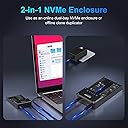
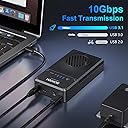
The Sokiwi 10Gbps NVMe Docking Station is a dual-bay M.2 SSD enclosure supporting up to 8TB drives and sizes 2230 to 2280. It features a tool-free design, built-in cooling fan, and offline cloning capability via a one-key button—no PC required. With USB 3.2 Gen 2, it delivers blazing 10Gbps transfer speeds and broad OS compatibility, making it an essential tool for fast, efficient SSD upgrades and backups.


| ASIN | B0B7R8V96K |
| Best Sellers Rank | #37 in Enclosures |
| Brand | Sokiwi |
| Color | Star Black |
| Compatible Devices | Laptop |
| Customer Reviews | 4.5 out of 5 stars 2,389 Reviews |
| Data Transfer Rate | 10 Gigabits Per Second |
| Hardware Interface | USB 3.1 Type C |
| Hardware Platform | Windows, Mac OS,Linux ,Android |
| Item Weight | 0.39 Kilograms |
| Manufacturer | Sokiwi |
| Memory Storage Capacity | 8 TB |
| Model Number | SKUD1001 |
| Supported Devices Quantity | 2 |
| Warranty Description | 1 Year Warranty |
J**C
Slam Dunk
Worked as advertised. Lots of tech initials to make it confusing, but shapes were rights and the SSD I bought fit in after some fussing. The cloning with Acronis went fast and smooth. And the laptop fired right up and installation. I wish all upgrades were so easy!
E**N
Solid construction
The metal enclosure is nice and solid and felt good in my hand. And it worked. Which is also a plus.
B**N
easy and quick way to copy an old SSD on my motherboard
Great product and easy to use. I was able to replace a 120 gig main drive mounted on my motherboard with a 1 gig one and finally be able to update windows because there was room. All that was on the main drive was windows because I had 2 other drives for all my programs and data.
A**T
Very nice, and worked
Missing the pegs to hold down the SSDs but customer service took care if it. Fyi, Offline cloning for my unit, once started the left and right lights flashed red and blue the entire time. The 25% flashed until it was solid, which i assume means it was 25% complete and then the next one flashed and so on. Once complete the lights all went solid blue. When going from 250 -> 1 tb i had to install a free partition program to move the recovery partition to the end of the volume and then i could extend the partition and gain access to all the storage
M**N
What I think of this product
This item is very easy to use and will help with your storage needs and also with any transfers that you may have to do plus get rid of file that you don't want seen or need much any more.
P**1
IT Pro Confirms Cloning Does Work and FAST!
As others have wrote, this unit works exactly as needed. I'm another one of the 40 year IT guys here and can vouch this clone device works exactly as described and does it FAST. Cloned a 256GB NVMe to new 1TB NVME, took less than 5 minutes. I was amazed. Afterwards use one of the many free 'partition wizard' programs to rearrange (or delete) partitions so you can make the newly found disk space contiguous with existing space. Ie: The existing C drive partition must be adjacent to the new unallocated free space in order to Extend the drive's useable space. I deleted the two Dell/Windows recovery partitions using EaseUS Partition Assistant Free Edition. The two recovery partitions allow for a system restore from the manufacturer's Windows files. For me, if the drive is fouled so badly that I need to reinstall or repair Windows I'll simply reinstall Windows 10/11 from a USB image created using free Windows 10/11 Installation Media utility. If you're an amateur the above steps may be overwhelming or frustrating, seek out YouTube for assistance. Only caveat of the clone device might be the cheap feel and durability. It feels like cheapy $15 USB speaker thing. This is one of the few devices in my toolkit that I'm willing to overlook the build quality for functionality and time savings achieved.
M**N
Worked as intended, but needs a small bit of work if migrating to larger drive...
I used this to upgrade my 500 GB NVME SSD to 1 TB. The cloning process was smooth. I followed the instructions, and it worked. I did not notice any overheating during the offline cloning process, and so far, no data seems lost. However, upon booting from the new drive, I noticed my storage was still 500 GB; this is because the cloner creates an EXACT copy of your previous drive, including a Recovery Partition at the end of the first 500 GB. You cannot extend the data partition to the unassigned space using the Windows disk management tool because it cannot move this partition to the end, and your data and unassigned space need to be contiguous. You will need to download an external partition tool to change the order of the drive partitions (many disk management products offer free trials that can be used to accomplish this simple operation). After moving the Recovery partition to the end of the drive storage, the Windows Disk Manager can extend your data partition to occupy the free space without problems. Now, I am using the cloner as an enclosure for the old 500 GB drive, which is now for data storage.
S**H
Windows 11 fail
This device does not work with Windows 11. It did with Windows 10, then upgraded, and no more. Sad. Is there a special Windows driver for this thing that is not available with their standard driver package? Can't find anything on the internet. If I don't get an answer from them within 24-48 hrs, I will be returning it. Thank you.
A**R
M.2 NVME SSD Enclosure
It works exactly as advertised, easy to use and completely tool free. I used it to clone a larger M2.NVME drive for my laptop, and am using the enclosure for the old drive that I replaced for extra storage. It is sleek, looks good, and works well enough for my needs.
A**R
Stylish minimalistic enclosure
Reliable enclosure. I've had it for over 4 years and no complains. It might get a bit warm/hot to the touch when used a lot.
L**S
Works with Linux too
Although the manual does not specifically say this will work on Linux, it does, no extra drivers required, just plugged it in and the SSD was mounted. I have just the 2280 size SSD and it snaps right in, but they include extra clips for the physically smaller SSD's.
E**H
Sturdy Enclosure, Remains Cool During Data Transfer
This sleek little M.2 NVMe/NGFF enclosure is well-made and functioned as advertised. I used this plug-and-play enclosure to clone between a small, old SATA SSD and a new, larger Samsung NVMe SSD for my laptop's operating system (which is complemented by a separate 1TB data drive, but wasn't transferable!), and the process took less than 20 minutes. My laptop didn't immediately recognize the enclosure device once it was plugged in, but all I had to do was download and run the new SSD's migration software and both SSDs were then recognized without issue. There was no overheating during the cloning process. I now have my old SSD housed in the enclosure, and can keep it as a bootable back-up should the need ever arise. My laptop's opsys is running happily once again, after being hobbled by a lack of space. Happy computer, happy customer!
G**Y
Could be faster but great for the money !
this is with a crucial p2 inside i recommande buying a 3mm thermal pad this will greatly help the ssd . it will prevent the ssd to not throttle and dissipate the heat . Tres bon boîtier la vitesse est respectable je recommande de rajourter un coussin thermique de 3mm pour aider a la dissipation de la chaleur .
Trustpilot
2 months ago
1 week ago