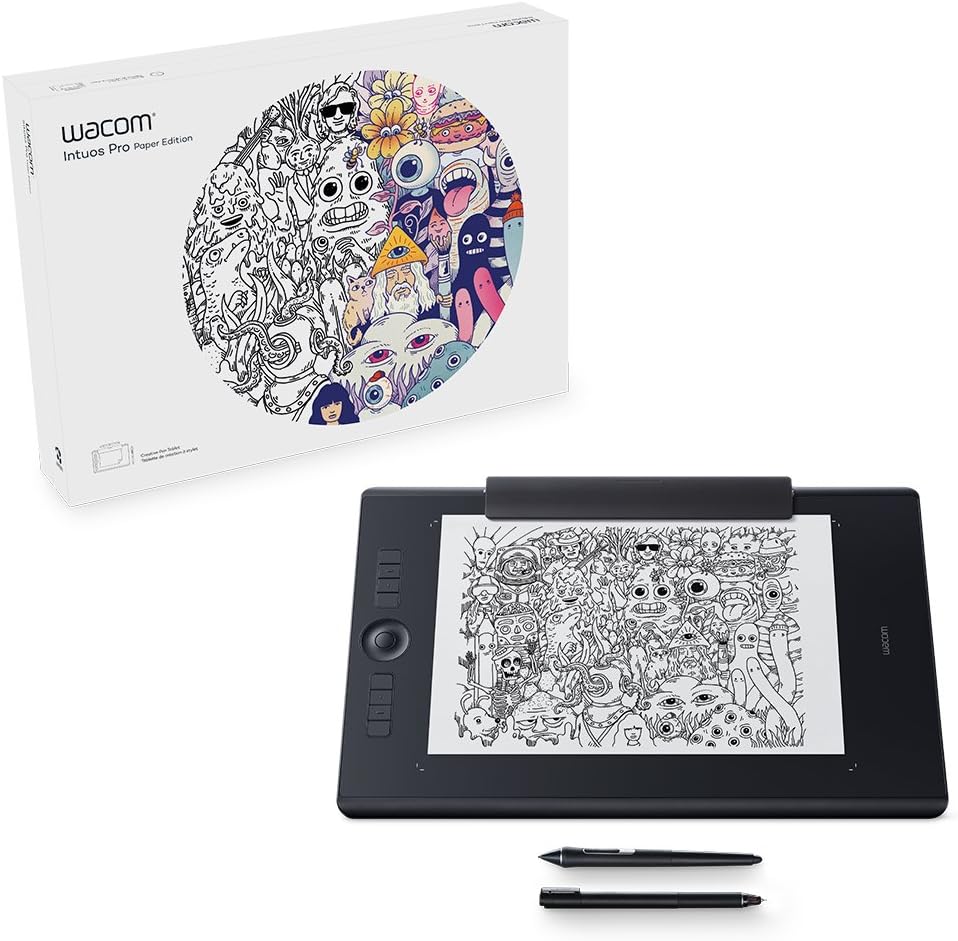


Wacom Intuos Pro Paper Edition Large Pen Tablet, Black, L
Product ID: 48686075
⚡Lag-free tracking
📏Super-slim design
🖊️8192 pressure levels
Buy anything from 5,000+ international stores. One checkout price. No surprise fees. Join 2M+ shoppers on Desertcart.
Desertcart purchases this item on your behalf and handles shipping, customs, and support to Vietnam.
🎨 Transform Ideas into Art with Every Stroke!
The Wacom Intuos Pro Paper Edition Large Pen Tablet combines exceptional pen performance with innovative features, allowing users to seamlessly transition from paper to digital. With 8192 levels of pressure sensitivity, customizable controls, and a sleek design, it’s the perfect tool for creative professionals looking to enhance their workflow.


| ASIN | B01NBN80ZI |
| Active Surface Area | 8.7 square inches |
| Box Contents | USB Cable |
| Brand | Wacom |
| Brand Name | Wacom |
| Colour | Black |
| Compatible Devices | Laptops, Desktops, Tablets with Windows 7 and above or Mac OS X 10.10 |
| Connectivity technology | USB |
| Country of Origin | China |
| Customer Reviews | 4.5 out of 5 stars 455 Reviews |
| Display Type | LCD |
| External Testing Certification | US: FC, CEC (California EnergyCommision), RBRC, Mercury Labeling Requirements\nEU/EEA/SW/Turkey: CE,RoHS\nKuwait: Ministry of Communications\nJapan: VCCI, Radio Act\nChina: SRRC (CMIIT), China RoHS, GB\nAustralia/New Zealand: RCM, IDA\nSingapore: IDA |
| Global Trade Identification Number | 04949268620079 |
| Item Type Name | Wacom Intuos Pro Paper L Bluetooth® Creative Pen Tablet Black |
| Item Weight | 1.3 Kilograms |
| Manufacturer | WACOM |
| Manufacturer Part Number | K100909 |
| Model Name | K100909 |
| Model Number | PTH-860P-N |
| Model name | K100909 |
| Native Resolution | 1920x1080 |
| Network Connectivity Technology | USB |
| Operating System | unbekannt |
| Operating system | unbekannt |
| Pressure Sensitivity | 8192 Levels |
| Pressure sensitivity | 8192 Levels |
| Product Features | 60° Tilt Support, Programmable Press Key, Shortcut Key, Stylus Dock |
| Product Warranty | 2 year manufacturer |
| Screen Size | 8.7 Inches |
| Special feature | 60° Tilt Support, Programmable Press Key, Shortcut Key, Stylus Dock |
| Specific Uses For Product | Painting, Writing |
| Target Audience | Graphic Designers and Artists |
| Unit Count | 1.0 count |
A**.
Fantastic piece of kit - No issues with setup on windows 10.
I purchased this tablet for a great deal of photo-editing and the occasional fun with digital art. Previously I was using a Wacom Intuos, which is around 4/5 years old at this point. The difference between them is huge, the build quality is exceptional, it feels good to the touch and weighty in the hand. The unboxing experience was brilliant, its clear that a lot of effort went into packaging the materials and laying them out with a unique design. The setup process was just as easy, I plugged in the Wacom using the cable provided and it popped up with a notification to download the Wacom desktop centre. From there it was super easy to do the firmware updates and configure the express keys for my most used functions. I also purchased the additional Paper add on, personally I feel that it makes the tablet that more user friendly and gives you more options for you work, whether you use it to take notes, sketch logo designs or draw character outlines. I used a sheet of A4 sketch paper, cut in half which fills the space nicely. The tablet picks up every stroke within the boundary without issue. The only issue that I have had with this tablet is that the surface is slightly rougher than what I am used to, my old tablet was perfectly smooth and the pen didn't have any feeling of texture. The rougher surface on the pro gives the pen a great feeling, but it seems to be eating my nib much faster. Fortunately the nibs are cheap, and you are given 10 in the box. There is the option to replace the surface with one that is smoother or rougher but these are an additional purchase. Overall, I am very happy with this device. Before purchasing this one I tried to use a cheaper Chinese equivalent but it was bogged down with so many issues that I had to return it. With the Wacom it just works!
A**R
A GODLY GRAPHICS TABLET!
This is by far the best Graphics Tablet in all History. I'm an Illustrator and I tend to make digital Paintings. I decided to buy this since I heard so much good stuff about it. I was worried about the size of the Intuos Pro Small but it turns out to be amazing to work on with. There is enough working space within the square, there is also button sensitivity when you hover your finger over the buttons. You can customize your buttons. You can easily rotate canvas and zoom in and change brush and so on without barely having to use your keyboard shortcuts. It does come with wireless and for me it can last 2 days with a full recharge. When not in use the graphics tablet will switch off to save battery so you dont have to worry if you leave it on and forget to turn it off. The small squares lights up so you know the area your working on even in the darkness. The pen feels comfortable on your hand and seriously it is by far the best Pen in history, it is so heavenly to use. The pressure sensitivity is a like a freaking Terminator, it is so accurate and so precise it makes you want to worship this Graphics Tablet. My only issue is the condition the box came in...it was damped, torn and they placed stickers on the actual box. Rather than to put the product within another box they used the main Wacom box to place the stickers and to deliver. I was not happy about it considering that I payed a lot for this graphics tablet to come in such a poor state. But everything within the box has not been tampered or anything and is completely new.
W**N
Better than you might imagine
For most folks I suspect they will never try a tablet but, if you edit photos or do anything freehand using a mouse you'll find this much easier. I finally gave in after years of using a mouse. I have not regretted it. The pen in quite intuitive and once in your hand and you get used to lifting off and moving/hovering over the surface ( Just like a real pen) you'll be able to work MUCH more accurately. The screen cursor appears as long as the pen tip is within about 30mm of the surface. With photoshop the added benefit of pressure sensitivity means I can get many things done in one pass instead of having to lighten the flow and go over the same area a few times to build it up. This tablet is well made as you would expect and the pen is replaceable. If you want to use it as such you can turn on the touch feature and use your finger to draw with. This cannot use the pressure levels though. It comes packed in a well made quality box which reminded me of the ipad packaging. Its definitely a quality item and I would heartily recommend it to anyone using Photoshop. They recommend that to get used to it you play Solitaire with it and while you can do that and other tasks with it, I prefer the mouse as the mouse moves a much greater distance for any given hand movement. They recommend this tablet for helping to prevent RSI. A good mix of this and the mouse will probably do just that.
M**H
I like it and feel I will grow to love it
I like it and feel I will grow to love it. At present I am going through a frustration phase, having never used one of these before and having too many years of mouse use to forget :-) Seriously though, navigation is remarkably different, but then the benefits make the little investment, which I am certain is good old fashioned familiarisation, worthwhile. So using a mouse to draw a line usually results in line of fixed width, fixed opacity and potentially not too accurate - can you write your name easily with a mouse? With this tablet and the pressure sensitivity of the pen, your line can vary in width and opacity, thin to thick, dark to light, and back, simply by adjusting the pressure on the pad and... you can write your name with it. As a photoshop and lightroom user, that is where I see massive benefit from this tool - controlling tool variables with pen pressure. As to the tablet and pen itself, they seem very well made, the look, feel, rigidity, finish, all seem excellent. the pen holder houses multiple additional pen tips, together with an extractor tool and the wifi works a dream. I haven't had this long enough to comment on battery life, but so far (two days) I have not had to recharge. The function buttons are easy to map to common keystrokes such as Undo and changing brush tool sizes and a number of them default to useful commands already. Put the pen down and the pad is a touch pad with all the usual gestures in swipe, pinch, etc at err... your fingertips :-) I would strongly recommend having a quick google or search in youtube, to look at a few starter videos and settings for the likes of photoshop as these reduce the learning curve. To sum up, this seems like a massively helpful tool for my photography retouching, it fits in alongside my laptop in the same bag and I am sure I will get a lot of use out of it. If it got stolen, even at this early stage in my learning, would I buy another.... YES.
A**R
This is probably the tablet for you. Review from a professional 3d artist.
I use an art tablet hours each day in work and I'd highly recommend this tablet for a professional or enthusiast. The name "small" really doesn't do it justice, it's the perfect size for me. (I'm doing 3d digital sculpture primarily so I don't do much gesture drawing. If you use gesture drawing maybe go for a bigger one, but this one is easily big enough for what I do) The pen is a great size and comes with a stand and a selection of replacement nibs. It also comes with a battery and wireless upgrade which is handy. Out of the box the pen and touch worked perfectly, it's no hassle to set up at all. I have used other brands of art tablet in the past and they have all broken through use. None of my Wacom products have ever broken and not needing a battery for the pen is a huge benefit to Wacom tablets also. I also own a cintiq which is wonderful but honestly not needed for 3d work if you have a desk tablet like this one. All in all, if you're considering buying a tablet, this one has been perfect for me and I would highly recommend it to anyone doing 2d or 3d art.
J**Y
Awesome Tablet - I advise reading if you're contemplating
Every creative's dream!!! Ok it's lovely - and makes my workflow enjoyable once again. A couple things I might add 1. If you are contemplating the Intuos Pro or Intuos Pen/ Intuos Pend and touch, don't contemplate and just get this. I had the Pen and Touch for a few years and it was just OK and yes I did regret getting that first(just go ahead and take the plunge) 2. If you are contemplating on which size to get, get the small. This is great for photo editing and drawing. I've got a 24inch monitor and still use about 1/10 of the surface area on the Pro small. You can configure the tablet to use how much area you want to use and I prefer moving my hand a little to cover more ground, rather than a gym workout on the tablet. I would check out Aaron's demo of this https://www.youtube.com/watch?v=1wkwpntvyU4. I was convinced and not regrettably got the Intuos Pro Small
J**.
Definitely worth the upgrade.
I deliberated between this and the intuos pen and touch model for a couple of months and finally took the plunge with the pro small. It has helped my photoshop and lightroom work enormously (I wouldn't want to work without it now!). It takes a few hours of practice to get used to (I did wonder how on earth people preferred it to begin with!) but once you do it is a hugely useful tool. The benefit over the pen and touch model really being the express keys and touch dial. You can set these up to be shortcuts/keystrokes/pretty much anything and on a program basis to fit your style. Initially the number of options was overwhelming but with a few youtube videos with suggestions I quickly found the setup that works for me and keep tweaking it as I need. These keys really are worth it as the speed at which you can work is hugely increased in programs like lightroom and photoshop. Definitely would recommend this. If you are taking photography or any sort of graphics related work seriously (even just as a very serious hobby) you wont be disappointed in going for the better model. Small is the perfect size for me as I don't need big sweeping arm movements for artwork, photo editing is great on the small and I definitely wouldn't want bigger. You may find the larger sizes better if you are an artist.
N**K
Terrible nibs
Generally speaking its a good tablet, it works nicely though there are quite a few bugs with the touch controls and the buttons sometimes decide not to work. I would normally brush these off but after spending £500 it seems only fair to point them out. However my biggest complain is that the nibs are just awful, I've had it for less than a week and the first nib is completely unusable and I'm halfway through the second nib. I Must have used it for less than 5 hours so far. It does come with replacement nibs but at the current rate they will last me till the end of the month at tops. When I contacted Wacom they suggested I get the smooth texture to apply to my tablet, I wouldn't mind but they cost £40 each which in my opinion is really cheeky including I've just spend £500 on a new tables. Its a shame because other than that I've enjoyed using the product so far. Not sure if I'd recommend honestly.
P**.
Nicht nur für Profis
Dieses Stift-Tablett ist sehr einfach zu bedienen. Mit dem entsprechenden Stift findet man schnell den Dreh heraus, wie man mit dem Andruck z.B. die Strichstärke steuern kann. Es ist zwar nicht ganz billig, aber die Wertigkeit und Verarbeitung ist sehr gut.
M**O
Fantastic appliance!
I already used the normal version of the Wacom and now I've upgraded to the Paper edition. I love working with this thing; it's so easy to use and once you're used to it, it's so natural you forget you're not drawing on paper. And now you CAN draw on paper as well, and it goes straight to digital via the Inkspace app, which is brilliant!
C**O
Para lo que necesito es perfecta
Llevaba tiempo detrás de una tableta gráfica y antes de comprar esta compré otra de marca china que tenía muy buenas valoraciones. El caso es que, como novato, me pareció que estaba bien en cuanto a sensibilidad y acabados, pero me daba problemas con los drivers y cada vez que reiniciaba el ordenador me dejaba de funcionar la sensibilidad a la presión. Viendo que no era capaz de hacerla funcionar la devolví y decidí ir a lo seguro. Me compré la Intuos Pro de km 0 en tamaño mediano (la M). El cambio fue brutal, la diferencia de calidad se notaba muchísimo y la tecnología exclusiva de tener un lápiz son pilas gana por goleada. Con el uso me dí cuenta que la M se me hacía demasiado grande para retoque fotográfico, por lo que revendí la M y me compre esta, la S. Con la Intuos PRO S estoy encandadísimo. El tamaño es perfecto para mi, es manejable, me encanta que sea inalámbrica porque yo no la uso a todas horas, cuando tengo que editar fotos o hacer fotomontajes en PS la saco del cajón, presiono el botón de encendido y a funcionar. Como no la uso tanto como los diseñadores puros, a mi me aguanta semanas, así que un 10 por la batería y el sistema wireless. Al principio cuesta hacerse con ella y configurarla a tu gusto puede llevar varios días de adaptación e investigación, pero una vez la tienes a punto la configuración se guarda en la nube y la tienes para siempre. El control táctil no va fino, yo prácticamente no lo uso porque da saltos y salvo excepciones es mejor pasar de él, y pegas tiene, como todo en esta vida pero para mí no son tan importantes como las cosas buenas que me ofrece. El área de dibujo es muy rugosa y desgasta bastante rápido las puntas, alguna vez he apreciado algún retardo, pero mínimo. En definitiva, que para un novato como yo es una pasada, otra cosa será puede ser para los que la utilizan como única herramienta de trabajo...
J**O
nice product.
wacom never make us disappointing. works as we expect.
J**A
Tolles Tablet aber kaputtes Teil.
Das Zeichentablet ist super! Auch für Anfänger sehr gut geeignet 😊 Daran ist nichts auszusetzen. Super einfache Bedienung, Einrichtung und Anschließbarkeit. Einziges Problem: ein Teil kam kaputt an. Bei dem Klemmteil ist estwas gebrochen. Da ich allerdings nicht das ganze Tablet zurück schicken will behalte ich es jetzt so.
Trustpilot
2 months ago
2 days ago