🔌 Power, speed, and style — all in one sleek hub!
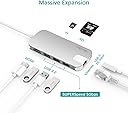
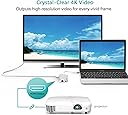
The EgoIggo USB-C Hub in silver is a lightweight, aluminium multi-adapter designed for professionals on the move. It features a USB-C charging port, 4K HDMI output at 30Hz, and two USB 3.0 ports supporting up to 5 Gbps data transfer. Compatible with MacBook, Chromebook Pixel, and other USB-C devices, it combines portability with high-speed connectivity and power delivery, making it an essential extension for modern workstations.
| ASIN | B01MRY5CDO |
| Brand Name | QacQoc |
| Colour | Silver |
| Compatible Devices | macbook, macbook pro, usb c devices |
| Customer Reviews | 3.9 3.9 out of 5 stars (651) |
| Data Transfer Rate | 5 Gigabits Per Second |
| Enclosure Material | Aluminum |
| Hardware Interface | Ethernet, USB, VGA |
| Item Weight | 60 Grams |
| Manufacturer | QacQoc |
| Manufacturer Part Number | EgoIggo-GN30H HUB-Silver |
| Model Number | EgoIggo-GN30H HUB-Silver |
| Number of Ports | 8 |
| Operating System | Chromebook |
| Product Features | macbook adapter, macbook hub, type c hub, usb c hub, usb hub, usb type c |
| Total USB Ports | 3 |
C**N
The Starship Enterprise of USB-C hubs!
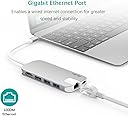
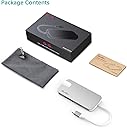
With the never-ending advancement of technology and tech companies who are more focussed on the aesthetics of devices rather than their functionality and convenience - yeah, I’m looking at you, Apple - we now find ourselves faced with the latest trend in laptops; the ubiquitous ‘Ultrabook’, which all of the big gadget companies are scrambling to sell to all and sundry. Not content with merely reducing the amount of ports on them to a measly two or three at the most, many of these companies decided that it would be fun to rub salt into the wound by making these ports USB-C ones, and can I have a head count of how many of you reading this actually own a single USB-C device other than, quite possibly, your smartphone? Yep, just as I thought; not one of you! Of course, I’m saying this from experience after my partner recently came home with a Shiny new Ultrabook under her arm. All was fine and dandy until I had a good look at the Ultrabook and discovered that it had just one (yes, you did read that correctly) USB-C port on it that doubles as it’s charging port. Rather inevitably, it took barely an hour of her playing with her newly acquired ultrabook before she decided that she wanted to plug her wireless mouse into it and, lo and behold, couldn’t do this as the dongle for her mouse has a USB-A connector on it! After much gnashing of teeth, I suggested that we have a look for a USB-C adapter that would give her ultrabook the ‘normal’ amount of ports that a laptop should have and, after looking at quite a few of them, settled on this one from QacQoc as it had three USB-A ports on it, a Micro-SD slot, a normal SD card slot, an ethernet port, an HDMI-out port and, critically, a single USB-C port which also acted as a DC-in port for charging ultrabooks. It was almost as if this thing was designed for the Zenbook 3! We did gulp at a bit at the £66 price tag, but it was less than half price so we decided to go halfers on it and duly clicked on the ‘Buy’ button. >>>>>>WHAT’S IN THE BOX? As is always the case, the USB-C hub arrived the very next day once again thanks to Amazon Prime, so I removed its box from the packaging, slid the cardboard slip off it and opened the box. Inside, the job itself is nicely presented in a foam insert and, once lifted off, there’s a separate compartment below that which contains a velvety pouch for storing the hub in and a set of instructions. >>>>>>FIRST IMPRESSSIONS? While I can hardly describe it as an attractive item, the actual hub itself a nice feeling thing which is fairly lightweight and made out of a very smooth metal (aluminium, presumably). It’s capped at either end with white plastic, which terminates on one end to a high quality short cable and USB-C connector for plugging it into USB-C-equipped devices and around the other edges of the device are the ports I mentioned above. >>>>>>PLUG AND PRAY Of course, the very first thing I did once I’d removed it from its box was to plug it into the Ultrabook, which prompted Windows 10 to make it’s little bleepy-boop noise to notify me that the device had been detected and displayed on the screen that it was installing the device drivers for the hub. So far so good. I then plugged the USB-C charger into the connector on the end of the hub and was pleased to see that the charging symbol appeared over the battery in the corner of the screen. Finally, I plugged dongle for my partner’s mouse into one of the USB-A ports on the hub, the mouse was detected and began to work immediately - hurrah! My partner was obviously delighted as she’s not fond of touchpads and much prefers to use a mouse! When plugged in, one corner of the hub glows blue to let you know that it’s on and working. >>>>>>CONNECTIONS GALORE! Since that initial joyous moment of realisation that her new Ultrabook now has a decent amount of connectivity for things, I’ve had a chance to check out the functionality of the other ports on it and am happy to report that they all work perfectly, without having to install extra device drivers or anything. The HDMI-out port works great when connected to our TV, all the USB-A ports work perfectly even when all three are in use and both the Micro and ‘Normal’ SD card slots work great, which are both mounted automatically and displayed as drives in Windows. Finally, there’s the Ethernet port, which is a bit of an anomaly in today’s Wi-Fi-filled world, but there are certainly scenarios where these things can come in handy (installing corporate builds of Windows on Ultrabooks, for example) and I was able to get the Ultrabook connecting to the internet via a wired connection to our router, so it all works absolutely perfectly! Of course, this device should also be compatible with MacBooks equipped with USB-C ports as well as devices running distributions of Linux such as Ubuntu or Mint. >>>>>>SUMMING UP Well, there’s not a great deal else to say about a USB-C hub, to be honest - but it’s definitely worth pointing out that this is an incredibly high quality and nicely manufactured bit of kit that is capable of turning a Ultrabook that’s very light on connectivity into a device that has the ‘normal’ amount of ports that I would expect on a laptop, so the relatively high price tag is definitely warranted, especially when taking into consideration the prices that some manufacturer’s (Apple, for instance) charge for their accessories - which actually makes this particular hub represent decent bang for the buck. Most importantly from my perspective, my other half is now delighted that her shiny new ultrabook is more usable than it was before and that she can plug several USB devices into it simultaneously - which makes me a happy chappy as I’m not getting griped at about it! Perfect!
C**J
Seems high quality but runs hot and have to reconnect HDMI cable each time I wake computer
This is a beautifully engineered bit of kit and should be for the price.I personally think it is overpriced (£89), but there isn't much competition at the current time (Feb 2017) for a hub that can do so much in such a small quality looking package. It is very light, but very well built. It seems very high quality albeit I have a few niggles (below) which mean I can't give it five stars. I'm currently typing this on a MacBook Pro 13-inch with an external monitor, ethernet cable, external hard drive and usb keyboard and mouse attached via the hub. Everything works seamlessly on first connection. Concerns: - As commented by others, the hub only delivers 49W of power with a 61W charger. I also have a Tecknet VGA adapter and this likewise only delivers 50W of power. I'm not sure why there is such a drop in charge for these adapters. The unit gets somewhat warm even without the power connected. I'm not sure why when it is only receiving USB-C power from the MacBook when the battery is the only source of power. The unit then really warms up with the power cable in. It doesn't 'overheat', but it would actually make a nice 'hand warmer' and it's certainly much hotter than the Tecknet VGA adapter. Most strangely, to me, it gets warm with just the power connected to it and nothing else. Some old power adapters did this, but an Apple Charger won't draw any power unless there's something connected which seems a much better design. This is a bit frustrating at the end of the day. Instead of leaving it connected to my MacBook when I finish work, I feel like I should disconnect it from the mains power so it doesn't sit there endlessly using energy up, and potentially over time, I wonder whether it would cause internal damage to the components? Unless someone can convince me that this is safe and the power draw isn't particularly high, I'm dropping one star - but as there is no support website - My other niggle is that if you close the MacBook or send it to sleep, the HDMI just doesn't reconnect. Not on a 'detect displays' command, not on removing the USB-C connection, but only on taking out the HDMI cable and reinserting it again. For using every day, this is not a viable solution. I really want to like this product, it seems to do everything so well, but I just don't feel you can trust it when it runs so warm. In a few months it could be dead and you've got no warranty or returns post the first 30 days that Amazon offers. It'll have to go back until: 1) The power consumption / heat issue is fixed 2) There is a warranty and an actual company behind the device that would give you some sort of guarantee it will work for at least 18 months 3) Ideally the HDMI issue is fixed, albeit I don't know if this is an Apple issue as I haven't got access to another adapter at present Come on Anker and Tecknet - can't you match this with a better quality product?
T**I
Great multi-connection hub!
After trying a couple of other hubs, I decided to spend a bit extra and get this one with the extra connections. It works very well and has a great range of connections. I'll not go into detail about them as you can see from the spec as to what they are, but in terms of operation, they all work well and I've had no issues. I also have a powered USB 3.0 hub plugged into one of the USB ports on it and that has increased the amount of USB points even more, and there is no issues or conflicts. As others have mentioned, it does heat up quite a bit, although for me/our climate here in Northern Ireland, it isn't an issue! It seems sturdy and well made, and it slim, sleek and looks good. I have mine running with a Samsung Galaxy Book and it's an invaluable addition.
=**=
Der HUB wird in einem Karton mit festem Schaumstoffpolster geliefert, ist also auf dem Versandweg optimal geschützt. Ein Aufbewahrungsbeutel liegt bei, ebenso eine mehrsprachige Bedienungsanleitung. Die meisten darin enthaltenen Informationen finden sich auch in der Produktbeschreibung. Die Verarbeitung des Gerätes wirkt sauber und hochwertig, sämtliche Anschlüsse und Steckplätze sind ohne Widerstand oder Hakelei nutzbar. Die drei USB Ports waren anfangs etwas „stramm“, aber nach mehrmaliger Benutzung hat sich das gegeben. Der HUB ist mit 64g ein echtes Leichtgewicht und ideal für unterwegs – insbesondere, weil er viele Funktionen vereint und man das eine oder andere Teil weniger mitnehmen muss. Die Betriebsbereitschaft wird durch eine unaufdringliche blaue LED signalisiert. Die Kabellänge von 15cm finde ich praktisch; wer ein längeres Kabel wünscht, sollte wissen, dass es fest verbaut ist und sich nicht ohne weiteres austauschen lässt. Die USB Ports funktionieren einwandfrei. Die Stromversorgung reicht für den Anschluss mehrerer externer 2,5‘‘ Festplatten. Der Datentransfer funktioniert zügig und unterbrechungsfrei. Das Auslesen der SDHC-Speicherkarten geht ebenfalls relativ schnell und reibungslos. Transfer von einer SanDisk Ultra (80MB/s) auf SATA-II 3.0Gb/s: bis zu 51MB/s. Anschluss eines LAN-Kabels ist möglich und funktioniert wie erwartet. Auch bei mehrstündigem Betrieb (7-8 Std.) wird der HUB maximal gut handwarm – bei Nutzung von ein bis zwei exterenen HDs, sporadisch einer SD-Karte und angeschlossenem LAN-Kabel. Einzig mit dem HDMI-Anschluss habe ich Probleme, der Monitor erhält kein Signal. Am aktuellen Chromebook meines Mannes klappt alles reibungslos, also liegt es definitiv nicht am HUB. Man sollte vielleicht im Hinterkopf behalten, dass er für aktuelle Systeme konzipiert wurde und mit manchen (etwas älteren) Komponenten möglicherweise nicht zusammenarbeitet. Für mich ist der HUB auch ohne die HDMI-Erweiterung sehr nützlich. Den Preis finde ich im Hinblick auf die Ausstattung in Ordnung. Gerade, wenn man den Rechner häufig unterwegs nutzt, wird man die Funktionsvielfalt des HUBs zu schätzen wissen.
G**O
El producto tiene un diseño precioso, muy buenos materiales al tacto y un tamaño muy comedido para la cantidad de puertos que ofrece. Me llevé la grata sorpresa de ver como incluye una funda para protegerlo en el transporte. Es ideal para llevarlo siempre en la bolsa del portátil. Ocupa y pesa muy poco. Los colores combinan muy bien con la gama de colores de MacBook 12" de Apple. Mi unidad resultó defectuosa y presentaba problemas de sobrecalentamiento e interrupción del funcionamiento. Pero el fabricante, aún fuera del periodo de devolución, me ofreció una solución muy satisfactoria. Dado el resto de comentarios a este artículo, entiendo que mi caso no es generalizado. Viendo como responde el fabricante ante cualquier fallo en su dispositivo, recomiendo totalmente su compra.
P**O
Ho preso questo dongle / adattatore dopo essermi informato su internet, effettivamente come avevo letto e visto in alcune recensioni è fatto molto bene, la connessione alla posta USB-C è stabile, le connessioni USB funzionano bene così come la porta di rete (Gigabit), l'alimentazione passante e la porta SD. Non ho potuto provare ancora la microSD e la HDMI. Peccato solo le USB siano "solo" 3.0 (5Gb/s) 🤓. Unica cosa da segnala è che scalda, non solo se con alimentazione passante, ma anche solo con collegato il cavo di rete. Ad ogni modo dopo una settimana di utilizzo non ho nessuna anomalia da segnalare. La confezione è fatta molto bene, ed in dotazione viene fornito un pratico astuccio in tessuto morbido.
M**O
L'ho comprato come regalo per una utente molto severa verso i prodotti di informatica. Ha gradito molto, per cui direi punteggio massimo.
A**A
marche très bien, chauffe un peu lorsque branché au courant (normal), je l'utilise régulièrement. bon a savoir, cela ne marche pas sur la switch.
Trustpilot
2 weeks ago
2 days ago