Buy anything from 5,000+ international stores. One checkout price. No surprise fees. Join 2M+ shoppers on Desertcart.
Desertcart purchases this item on your behalf and handles shipping, customs, and support to Vietnam.
🚀 Compact power, silent performance — your desk’s new best friend.
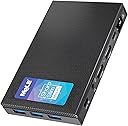
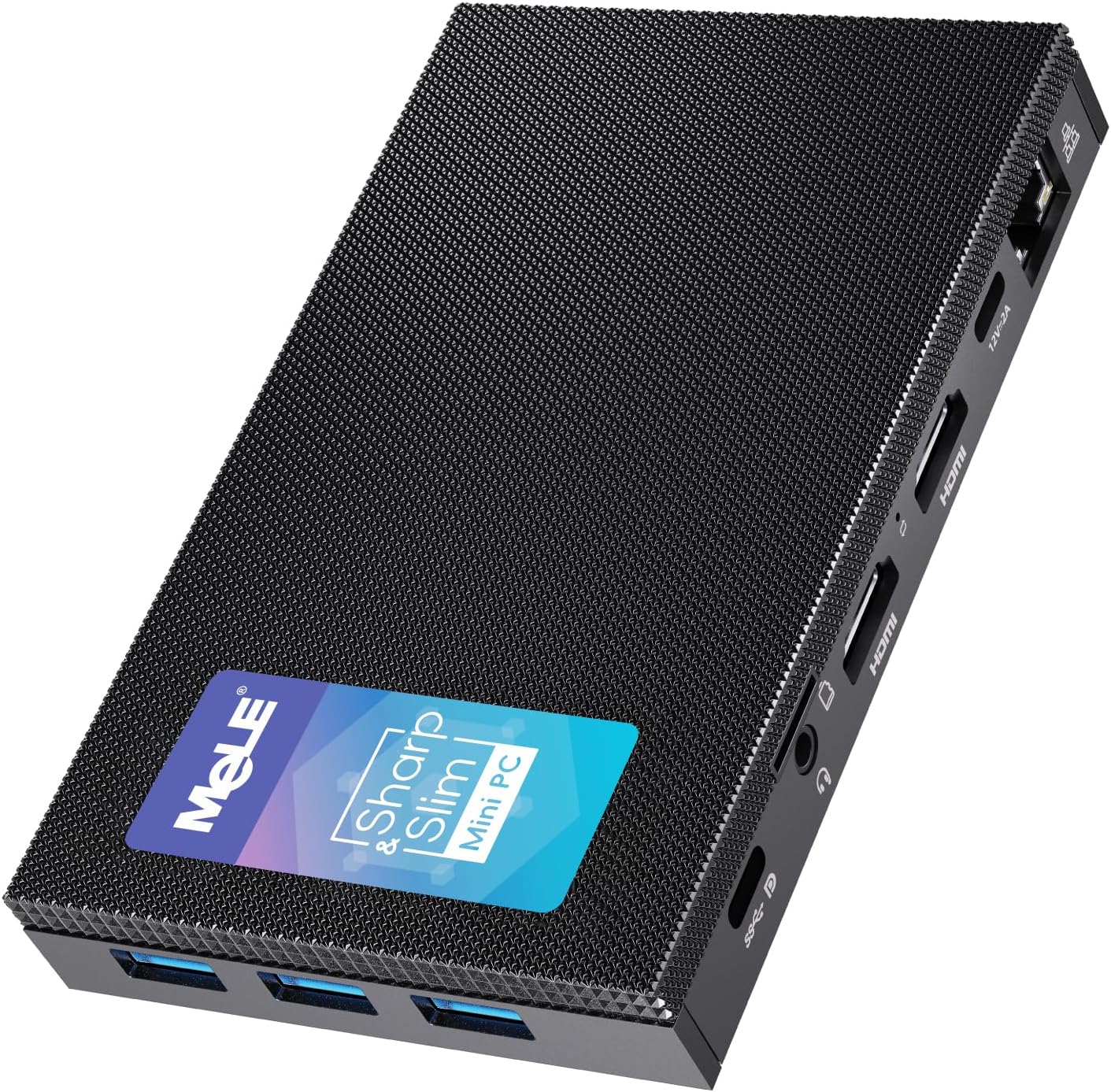
The MeLE Quieter3C is a fanless, ultra-slim mini PC powered by an Intel N5105 quad-core CPU clocked up to 2.9 GHz, equipped with 8GB LPDDR4 RAM and a speedy 256GB PCIe NVMe SSD. It features a full-function USB-C port supporting data, video, and charging, plus multiple USB 3.2 Gen 2 ports, dual HDMI 2.0 outputs, and Gigabit Ethernet. Designed for silent 24/7 operation with passive cooling, it supports unlocked BIOS for advanced customization and VESA mounting for flexible setups, making it ideal for professionals seeking a powerful yet minimalist desktop solution.


| ASIN | B0B74KLMWQ |
| Aspect Ratio | 16:9 - 1.77:1 |
| Available Memory Slots | 1 |
| Best Sellers Rank | 15,413 in Computers & Accessories ( See Top 100 in Computers & Accessories ) 73 in Desktop PCs |
| Box Contents | 1x 12V/2A Power Adapter with UK Plug, 1x Quieter3C Mini PC, 1x User Manual, 1x VESA Mount |
| Brand Name | MeLE |
| CPU Model Number | N5105 |
| CPU Model Speed Maximum | 2 GHz |
| Cache Memory Installed Size | 4 MB |
| Colour | Black |
| Compatible Devices | [Wide range of devices via USB, USB-C, HDMI, mini DP, Ethernet, WiFi 6, and Bluetooth 5.2] |
| Cooling Method | Passive |
| Country of Origin | China |
| Customer Reviews | 4.2 4.2 out of 5 stars (104) |
| Display Type | LCD |
| Graphics Card Interface | Integrated |
| Graphics Coprocessor | Integrated Graphics |
| Graphics Description | Integrated |
| Graphics Ram Type | DDR4 SDRAM |
| Hard Disk Description | eMMC |
| Hard Disk Interface | USB 3.0 |
| Hardware Interface | HDMI, USB 3.1 Type C |
| Human Interface Types | Mouse |
| Item Dimensions | 13 x 8 x 2 centimetres |
| Item Type Name | mini computer |
| Item Weight | 0.49 Kilograms |
| Keyboard Description | External keyboard required (not included) |
| Keyboard Layout | QWERTY |
| Manufacturer | MeLE Technologies (Shenzhen) Co., Ltd. |
| Maximum Display Resolution | 3840x2160 |
| Memory Clock Speed | 2933 MHz |
| Memory Speed | 2933 MHz |
| Memory Storage Capacity | 1 TB |
| Model Name | Quieter 3C |
| Model Number | Quieter 3C |
| Model Year | 2023 |
| Native Resolution | 3840 x 2160 |
| Network Connectivity Technology | Ethernet |
| Operating Systems | Windows 11 Pro |
| Optical Storage Device | BD-R |
| Personal Computer Design Type | Mini PC |
| Power Consumption Size | 15 Watts |
| Power Plug Type | Type G |
| Processor Brand | Intel |
| Processor Count | 4 |
| Processor Series | Celeron |
| Processor Socket | FCBGA1090 |
| Processor Speed | 2.9 GHz |
| Product Features | Auto Power on, Fanless, Full Function USB C Port, IPXE, Wake on Lan |
| Product Warranty | 1 Year Warranty |
| RAM Memory Installed | 8 GB |
| RAM Memory Technology | LPDDR4 |
| RAM Type | DDR4 SDRAM |
| Ram Memory Maximum Size | 16 GB |
| Resolution | 3840 x 2160 |
| Security Features | unlocked BIOS |
| Specific Uses For Product | Business, Digital display, Astro photography, Web browsing, Media, Light office work, Zoom, Personal, Video stream |
| Style Name | Quieter3C N5105 |
| Total Expansion Slots Quantity | 1 |
| Total HDMI Port | 3 |
| Total Thunderbolt Ports | 2 |
| Total USB Ports | 3 |
| Total Video Out Ports | 3 |
| Video Output | HDMI, Mini DisplayPort, USB-C |
| Video Output Interface | HDMI |
| Video Processor | Intel |
| Wireless Compability | 802.11ax |
| Wireless Network Technology | Wi-Fi |
| Wireless Technology Type | Wi-Fi |
M**N
Running Linux Mint Mate on mine, no problems, easy conversion
I love the size, no more massive desktops for me, best selection of connection ports that I have found on a mini, completely silent, only slightly warm underneath, top becomes hot but that is why it has all those mini fins on top so that it does not overheat. I converted mine to run Linux Mint Mate, easy to install and set-up, delighted with the result All Pros no Cons, could not find any fault, absolutely delighted :)
A**T
Excellent little machine
bought this machine 1 week back and so far i am impressed with it. Performance is very good and i love the size of it. I can travel overseas without carrying my bulky laptop. I already have Monitor and keyboard there and this thing is just plug and play. I also like the facf that I can use USB-C for power. Delivery was quick and customer service is excellent
J**N
Very good device that is stylish, well put together and well featured, but a little Expensive
(Update not mentioned in the earlier review): Two of the larger USB3 A ports are actually 3.1/3.2 Gen 2, ie 10Gbs per second, not 5, with the third and the USB-C being 5Gbps! This is not mentioned on the advert, but a definate bonus! This is a long review, party because I have noticed there is very little independent reviews on this particular version of the device on the broader internet (There are plenty for its earlier brother the Quieter 3Q, but very little for the Quieter 3C, which is the model I have). The 3C swaps one of the full size USB ports for a USB-C port ( 3.1/3.2 Gen 1 5Mbs) with DP and Power Delivery (can be powered by a PD USB power supply, power bank, or monitor/hub), and replaces one of the HMDI with a mini DP port. It can also drive three screens at the same time(HDMI, DP and USB-C) unlike the 3Q which can only drive 2 with its two HDMI ports. Firstly, one of the very few external interviews suggest that their version of the 3C is slower than the 3Q (though they did have a pre release version). In my tests, and comparing with a friends 3Q, I didn’t see any difference in performance between the two practically (caveats later). I purchased this device as a “second low power mini - PC” to use as an alternative to my Main Ryzen based PC, which whilst extremely powerful for gaming and productivity, uses a heap of power even when idle, or just browsing the web, and sometimes doubles up as a space heater. I needed something small yet not a laptop for space reasons. It needed to be able to do Web browsing, watch You Tube, run office, and other “Home admin” tasks, yet still be capable enough to run some offline astronomy related analysis overnight. Physical: The device is small and very sleek, as can be seen from the description, its shape is a smaller than a large smartphone (such as the Note 10, or iPhone pro) and about as thick as a Tape Cassette case. Although the outer case is plastic, rather than metal (there is a steel frame inside) the “plastic seems to be made of a material that can dissipate heat well, far better than it looks on paper, though probably not as good as metal, however, the plastic does allow the internal antennae to work well. The top surface is ridged (it doesn’t have any holes, despite what it looks like in pictures) which does increase the surface area. CPU: The 4 core Celeron N5105 is not going to win any performance crowns, but it’s definitely more than ample for running Office, Chrome, Firefox and the usual medley of non-demanding apps, and even some less demanding games. It doesn’t feel sluggish in normal use. It’s definitely more powerful and yet more efficient overall than the J4125 usually found on these mini PCS. It handles 1080p videos extremely well. 4k can vary depending on the source, and I find most 30fps SDR streams play fine, but when you hit 60fps and HDR, some sources such as YouTube struggle, whilst many of my 4k HDR demo files in H265 seems to be fine. Internal eMMC Storage: Its internal eMMC is no way near as fast as an NVMe drive, and benchmarks slower than a SATA 3 SSD (more closer to a SATA2 interface I would suspect), but it is very power efficient, and in practise, with most applications its snappy enough. You CAN fit an NVMe drive into it (though bear in mind its PCIe 3, and only 2 channel, so no point putting in a super-fast super power hungry and super expensive PCIe 4 inside), and bear in mind that it will slightly increase the power usage. Memory It’s has 8GB Single Channel 2900 Mhz LPDDR4, soldered in and not upgradable. Not a lot, and may not benchmark highly but more than enough for its use case. OS: It comes with a very clean full version of Windows 11 Professional (not home), that does not have any bloatware installed just plain Windows, and surprisingly comes with a sensible OOBE experience with a lot of “default” windows phone home stuff disabled, including the requirement for a Microsoft account! It certainly does seem quite clean, with no “value added store apps”, I have checked for malware as well as any unusual network connections). I did blank and reinstall Windows as I wanted a clean H22 install, and found the “default” Microsoft experience as slightly worse in terms of the requirement for a Microsoft account, and additional MS store apps added like Microsoft Solitaire! The BIOS correctly contained the OEM license for Windows 11 Professional, and therefore the installer did not ask for the product key. I have installed Linux MINT in a dual boot config with GRUB and it worked fine. It doesn’t default to Secure Boot (though can be enabled if desired) BIOS: Biggest Surprise, it’s a fully featured Bios with almost everything but the Kitchen sink in terms of settings and configuration. You could tweak this a lot, though the CPU does not offer much overclocking capabilities, and the hardware does have some protection to avoid some settings. Be very careful, as I don’t see any way of clearing the CMOS easily if a wrong setting locks up the POST. Cooling: This is passively cooled. As such it does get quite warm and under load can get very warm, though not too hot to touch. Under normal use (streaming, web, office). I have not seen any Thermal throttling from the CPU (using HWInfo). Under continuous sustained and heavy load the CPU package can reach 73+, which is still below the CPU thermal throttling, but the hardware may induce some power Throttling at this point as I see the CPU switch from boost 10W to 8W a little quicker (about 20 seconds) under sustained load than some other computers with the same CPU, regardless of thermals. However, I have not observed any runaway heat. I have tried placing a large finned aluminium heatsink and fan on top of the unit, and that did drop the temps significantly under heavy continuous load, but I don’t think it’s necessary for normal use cases. Also note it is possible to play around with PL1/PL2 and boost times in the BIOS, which you might want to try at your own risk as long as you have adequate cooling. Power Usage: Using my Macbook Pro USB C power supply, I have a USB Ccable that can tell you the current power consumption via a small LED display on the Cable. It measured 3 Watts on idle, and 13 Watts under load, very respectable figures and is perfect for my use cases This is with 2 screens and the built in eMMC drive (no NVMe installed) Conclusion: A surprisingly good, reliable Mini Computer that is quiet and sleek, with Windows 11 Professional and no bloatware! Not the most powerful and not the most featured, but great for many people who need a PC for web/office/streaming, to hide out of sight. I would have given it 5 stars, but I do feel it’s a little expensive for what it is, so giving it four stars, though its really more of a 4 and a half stars.
G**4
Unfortunately questionable reliability in the long term...
I've had 2 consecutive models of the Quieter (2 & 3) and would have happily sworn that this nifty, beautiful little PC was man's greatest invention since sliced bread. It's tiny form factor, processing speeds, adaptability and super silent, fan-less functionality were everything I had wanted, plus everything I didn't know I wanted but was so very glad someone else had thought about it and crammed it into this delightful object! Without a doubt during the 1st months and year+ of constant use (mostly work related / personal doc creation / occasional streaming and general multitasking etc - so no heavy duty, big-time gaming activity) I would not have hesitated to give it 5+1 stars. So, why the poor review? Firstly, I switched from Q2 to Q3 thinking the newer model (+W11 upgrade) would address any hiccups with the older model (it did) but then I upgraded my WFH setup with a very good quality, latest model, bluetooth keyboard and mouse from a reputable brand. The intermittent connectivity issues (remember using this for work) were inconvenient at best (highly, highly expletive-inducing frustrating). I eventually had to switch to using the backup dongle for sanity's sake (yes, I tried to upgrade the driver, several times). But the very last straw that made me downgrade my original assessment is the added unreliability of waking the Q3 up from sleep or hibernation mode - or rather the random inability to do so. The issues started early last year with the hibernation mode so I stopped using that option (still wanting to give it the benefit of the doubt), then every once in a while it would not wake from sleep mode and worst of all, if I stepped away for a while and it slipped into sleep (yes, I've checked all the power options) it would occasionally decide not to wake, neither with a wiggle of the mouse (which should wake it) nor with a press of the power button (showing either blue (on) or red (off) depending on its mood, apparently) forcing me (and this is the real crux of the matter) to reboot and invariably lose whatever I was working on (not of course with MS docs but mostly other stuff that happened to be open and not logically saveable). Hence the 1 star. My heart still wants to give this a 5+1 star review but I've suffered in silence with this issue for months and having just rebooted for the nth time, my frustration has overflowed and driven me to this somewhat reluctant verdict. By the way, for anyone that's managed to get this far and is thinking about investing in this item, I do still recommend it and hope you like many others giving 5 / 4 star reviews are able to fully get the best out of it and aren't unfortunate like me. Bonne chance!
D**N
Great bit of kit
Will be connecting to a touchscreen display to make a windows tablet. Absolutely silent, handles everything well
M**N
Powerful and silent handles the astronomy load
I bought this to run my telescope and the ASCOM devices attached to it. The risks of heat, power overload and performance have not occurred and the load stays in the low 20%s . So quite happy with performance.
D**N
Excellent mini PC
Found this to a great little mini PC, as bought for my wife. She uses it daily for all Office tasks she needs to do. It seems quick and robust. I sense that it could run quicker if she was not running windows 11 office 365 on the ‘Cloud’ as the operating system.
I**R
its everything you need in a tiny frame
Love this device, set up in 10 mins, all worked perfectly out of the box. really recommend it!
J**N
Compact and well presented. Fired up and was operational in a short time. Came with a bracket to fit to the rear of monitor. Had some trouble sorting out the time zone but that’s W11 issue. Over all very impressive. I installed extra storage.
M**B
La série des Mele Quieter propose des PC suffisants pour un usage bureautique et navigation internet + multimédia, très compacts et totalement silencieux. Avec de plus une consommation électrique faible. Le Quieter 3 amène un peu plus de performance, et cette nouvelle version 3C ajoute un vrai usb-C, supportant le power delivery et un troisième écran. Évidemment ce n'est pas une bête de course, mais il peut couvrir un grand nombre de besoins.
C**S
VESA plate is limited for options for attaching to different monitors. I ended up using spacers and bolts of my own. But every setup will be different depending on monitor. This is only if you want to attach to monitor. Mini PC runs windows 11 great.
E**T
I needed a windows 11 computer for programming electronic devices. Because of the software that has to be used I needed a computer that was configured with American keyboard, times, and dates etc. this tiny pocket computer fit the bill perfectly. It started up quickly, offered the usual first time configuration options, then it was ready to go. It contains all the connections of a larger computer - Ethernet, multiple USB ports, audio out HDMI out. And a microSD slot. This isn’t designed for intensive computing like games or video editing, but if you need to connect to the internet and type up your graduate thesis, or surf Facebook on a budget, this system is more than adequate.
J**)
Petit mais costaud! Ce mini PC est réactif, idéal pour de la bureautique sans prendre de place 👍🏻
Trustpilot
1 month ago
2 weeks ago