Buy anything from 5,000+ international stores. One checkout price. No surprise fees. Join 2M+ shoppers on Desertcart.
Desertcart purchases this item on your behalf and handles shipping, customs, and support to Vietnam.
📷 Capture the Past, Share the Future!
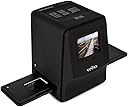
The Veho Smartfix Portable Stand Alone Scanner is a cutting-edge device that allows you to convert your 135 slides and 135/110/126 negatives into high-quality digital images. With a 14-megapixel resolution and a user-friendly design, it features a 2.4” digital screen for instant previews and is compatible with both Mac and PC for easy file transfers.


| ASIN | B072KKDL3N |
| Best Sellers Rank | #898,758 in Office Products ( See Top 100 in Office Products ) #339 in Slide & Negative Scanners |
| Brand | Veho |
| Built-In Media | 110 Negative Tray, 126 Negative Tray, 135 Negative Tray, 135 Slider Tray, 3.5mm Jack to yellow RCA Cable, Cleaning Brush, Lithium-ion Battery, Quick Start Guide, USB-A to Mini-B USB Cable, Veho Smartfix Scanner |
| Connection Type | USB |
| Connectivity Technology | USB |
| Customer Reviews | 3.9 out of 5 stars 1,307 Reviews |
| Global Trade Identification Number | 00040232931505 |
| Item Type Name | Veho Smartfix Portable Stand-alone 14 Megapixel Negative Film & Slide Scanner (VFS-014-SF) |
| Item Weight | 0.8 Pounds |
| Light Source Type | LED |
| Manufacturer | Veho |
| Media Type | Negatives, Slide |
| Minimum System Requirements | Windows 7 |
| Model Name | VFS-014-SF |
| Optical Sensor Technology | CMOS |
| Resolution | 7200 |
| Scanner Type | Film |
| Standard Sheet Capacity | 135 |
| UPC | 040232931505 |
N**E
An affordable way to save your photos
Even though nearly everyone has a camera available to them via their smartphones, that wasn’t always the case. I remember a time when photos were captured on film and had to be developed at the store. It wasn’t always cost-effective and it took a lot of time so I’m glad that the world has moved into a more digital realm, but what do I do to preserve all of those important memories that were once captured on photographic paper? Until now, there haven’t been a large number of options for consumers at home. Thankfully, Veho, an electronics company based out of the UK does now offer a slide and negative scanner called Smartfix. DETAILS The Smartfix device is a scanner that allows you to convert all your old 135 slides and 135/110/126 negatives into digital images. It’s a standalone scanner with a 2.4″ LCD screen for previewing images. You can transfer your film negatives and slides directly to an SD card from the scanner. The scanner is PC and Mac compatible (viewing only) and supports up to 32GB SDHC/SD cards (not included). The Smartfix is aptly named as it has built-in auto-exposure, color balance, and other image enhancements to make sure images are clear and crisp.The Smartfix is designed to be compact. It measures 5.6 inches x 4.5 inches x 4.7 inches and only weighs 12.8 ounces. The scanner is compatible with both NTSC and PAL video formats. UNBOXING Veho has classic packaging. Their branding includes black and white colors so their boxes are typically black and white with shades of gray. The front of the Smartfix box has an image of the device along with “Veho” and “Slide & Negative Scanner – SMARTFIX” stamped on it. The name of the product is also printed on the top of the box and the specs along with images of the slide accessories are printed on the sides. The back of the box shows a nice photo of the device in use and the basic details of the scanner. Veho did a really nice job of describing the product on the box. I actually think that it’s summarized better than on their website. When you open the box you will find the scanner nestled in between cardboard crates and the quick start guide, cleaning brush, USB-A to Mini-B USB cable, 3.5mm jack to yellow RCA cable, one (1) 135 slider tray and several negative tray options. The scanner itself has a very nice Tacton rubber touch finish to it. The operational buttons are on the top and the ports are on the back. Even though the device is somewhat compact, I could see it benefitting from a carrying case since there are so many parts to it. USER EXPERIENCE The first thing you are instructed to do is to make sure the scanner is charged. The Smartfix comes with a rechargeable Lithium-ion Battery which sits inside the battery door found on the bottom of the device. When you plug the scanner into a USB port, it will charge the battery. There is no wall adapter included, but it’s compatible with standard USB wall chargers. If the LED is red, then it is charging and the light will automatically turn off when it’s fully charged. You can operate the scanner while it’s charging if you wish (the LED will turn blue). When you turn on the Smartfix, you will be instructed to insert an SD card if you haven’t already. For testing purposes, I used an 8GB SanDisk SD card. The process is pretty straightforward. You place your selected negatives into the appropriate tray — in my case the 110 negative tray — and select the type of negative you are sending through by pressing the “Type” button on the top of the scanner. A small icon in the bottom lefthand corner of the LCD will change between a slide, 35mm negative, B/W, 110, or 126. Once you have the appropriate size selected, you can slide your negative tray through the scanner. You will have to manually push the tray through the scanning slot. On one side of the tray, there are notches that lock into place on once they are in the scanner. As you push the tray through the scanner you will feel the click of the notches. You will still need to center your image on the LCD before scanning the negative but the notches help prevent you from skipping over an image too quickly. During the course of my testing, I discovered that you cannot save images directly to your computer from the scanner. It’s sort of a bypass option. Here are the different ways you can use the scanner. Save to SD Card: When you scan a negative or slide, you can save that new image directly to the inserted SD card. The image will be saved as a JPEG. View Images on PC: You can view images saved to your SD card when a PC is connected to the scanner via the USB cable. The option for PC > SD Link will appear on the screen before you go to scan. If you select ‘Yes,’ the SD card will appear on your desktop and you can look through the saved images. If you choose this option, you cannot scan other images while you are in this mode. View Images on TV: Veho includes an RCA cable with the scanner so that you can connect it to your television if you wish. Similar to viewing images on a PC, this option will only give you the ability to see what has already been saved. You will use the slideshow option on the scanner and sift through the images on the SD card. The process is pretty easy to get through and as much as I appreciate all the automated tasks that the Smartfix provides, one thing I would have liked to have control over was the quality at which the scanner captures the scanned image. The pictures that I saved were saved as JPG files at 180DPI. I’m not sure if the scanner was programmed this way to keep file sizes low, or if it has to do with the type of media you are scanning, but I thought the quality of the image could be a bit better. The LCD display was actually quite impressive. It shows the scanned negative clearly and gives you a decent idea of what to expect from the saved image. I thought the controls were easy to follow and didn’t have any issues with the buttons capturing my input presses. CONCLUSIONS When you have 30-year-old film negatives lying around, you want a way to preserve them digitally. There are some options out there for being able to send them out to be processed, but that can be a nerve-racking experience. When you have irreplaceable memories locked in those pieces of film, you want them to stay safe. Veho has provided a good way of ensuring that you can not only preserve your memories but also keep them close to home.
T**S
Works great after battery replacement
I received my first Veho from Amazon and started scanning after waiting for the battery to charge per instructions. The output was great--I am very happy with quality (slides, 110, black white). I was able to use it for a few other types of negatives as well. Unfortunately, I learned after unplugging it that the battery didn't work and never charged. I returned it to Amazon for a new scanner. New one came and same battery problem--did not charge. This time I contacted Veho directly through their website. Got an immediate response from Veho and a battery was sent to me fro the UK and I received it in 4 days. Plugged in and the charging light is on. I am pleased with the product and Amazon's and Veho's customer service. The loss of one star is just due to my annoyance level of having to pack it up and mail it. Wish I had contacted Veho first and not returned through Amazon. I am not using the associated photo editing software as I have my own I use.
H**R
Really nice product for the price.
My 5 star review is written within the confines of this scanners defined function. It is not a high resolution professional scanner. Rather it will scan slides, color and black and white negatives quickly and easily. The quality does not challenge the quality of a negative or slide taken with a professional 35 mm camera but is perfectly usable. I have attached a photo from a 1969 Tri X black and white negative as an example. 1. My unit came with a video cable for connecting the scanner to a composite tv or video monitor. I did not use this function. 2. The scanner will charge when plugged into a computer or laptop. This is a slow charge. I found that the supplied cable connected easily to a charge dongle that came with my cell phone. This charges much faster. 3. Files are numbered sequentially on the SD card. Once all files have been deleted, the numbers begin again from 0001. 4. The scanner had a setting for 126 size slides or negatives. I do not have any of them, but I'll bet that they might fit in the slide tray used for 35mm slides. Just guessing however. 5. A cleaning tool is supplied and I found that it needed to be used frequently as I was scanning really cruddy slides from the 1950's and 60's. 6. Software is supplied but I used Faststone for image adjustments. 7. Brightness and contrast was excellent for most of my work. I did rotate vertical shots with Faststone. Also, some old slides had color shifts and I made corrections to color balance with Faststone. Most any photo software should work well too. 8. The SD card I received was 4GB. In summary, I am pleased with my purchase. Previously I had a Plustek scanner which was higher quality at several times the price. Also, the Plustek took four times as long for each scan. If you are in need of reasonable quality images for a decent price the Veho scanner is just right
N**R
Low Quality Results with a Sickly Green Tint
Bought this because I want to scan about 2,100 35mm slides and about as many old negatives to digital. Mostly personal shots of family and vacations for my records, so wasn't looking for professional archive quality. From the reviews, thought this would do just what I needed. It's a stand-alone device and certainly simple to use, but the trade-off is that there is absolutely no control over the "scanning" process (I'm not sure this is a true scanner, it seems to just take a snapshot of the negative/slide as other converters do). The results are slightly fuzzy pictures (from sharp, clear negatives and slides) with a sickly green tint. Even with my relatively low threshold of quality, this was unacceptable. Perhaps some of this could possibly be corrected in a photo editing program (one is included), but I can't spend the time to make manual adjustments to over 5,000 pictures. I did tests from several different sources (different cameras, different films, different time periods, both slides and negatives) and all came out the same, so it wasn't the source material. Package says it makes 5Mp images, but the resolution seemed pretty low. Needless to say, I returned it for a refund. Will try something else.
E**1
good tool for small-medium projects
In general i am satisfied with the product, easy to use, and does a decent job. Scans most of the time still require touch-ups for color adjustments (usually too much blue..). Film strip holder is cumbersome to use, as it is hard to keep the film in the right place, and no support for uncut rolled films. Also missing support for the old C-126 square films.
Y**H
Excellent reproduction
This is a well made product with great features. I was recently given my late father's collection of family slides. I have already scanned about 200 of them. That's about how long the battery charge lasts if you are hand dusting your slides as I have. These slides are so old that I have had to adjust the exposure and color on many of them. This scanned image of my graduating sister is around 55 years old. The slide tray allows 3 slides to be scanned before more slides can be added. I used slides from several manufactures and they all snap nicely into the holding slots of the tray which have wonderful magnetic snaps to keep the slides from displacing. You do have to take a little care in making sure the slides are perfectly placed in the trays prior to scanning. I previously ordered one that malfunctioned (failed to illuminate the image) but the company quickly replaced it for me. I am very happy with this since I purchased a different scanner several months ago that was unacceptable in every regard. I would purchase this again if needed. I myself am a national award winning photographer so I have some experience with judging photo quality. I think you will be very happy with this product!
R**O
Nice hi tech and it works ok, but the poor quality (and poor instructions) is not worth the price.
IS it worth $96 - not for us, not at all. It is a good thing we had pre-decided to save everything as it came out of the box to make it easier to box up. We have been disappointed before by other hi tech gadgets that do not deliver for the price. Right off the bat, very poor instructions. The pictures and instruction are just enough to get started but it is never explained: 1. That you can only "see" the pictures on your PC after you "snapped" them on the Smartfix - by saying NO to PC to SD card connection. We discovered this after a frustrating hour.. 2. That you can do either or - that is, view on the Smartfix little 2.4 viewer, or on your PC but not BOTH - disappointing. (We struggled a bit to find that out the hard way) (A previous VEHO we had did allow for simultaneous viewing on a PC, which is a bigger image to deal with, maybe we got used to that) 3. The quality of the 4 JPG images we tried out was very poor to say the least. We understand the originals are also poor but somehow there was another layer of light fuzz or distortion just barely distinguishable by comparison to viewing the negatives in a AFGA Lupe against the light. (We say this in consideration for the price. We understand of course these machines can't do miracles with old photos, slides etc.) 3 We deliberately only tried about 5 negatives that we had wanted to test the Veho on so that if it passed the test, we would keep the machine. 4. The advertising for this did NOT make it clear if it came with the required SD card. It DOES NOT. Luckily we had one handy. 4B. It comes with a brush to clean the lense, but no instructions on how to open or reach the lens. What?! 5. Supposedly, the Smartfix has "Instant preview and built-in auto-exposure, colour balance and other image enhancements.) Well, the "balance and enhancements" were really poor. The negatives came out either too red, too blue, or too green. (We did not have this problem with the previous VEHO we had) We had to do a lot of adjustments in Photoshop to get the negative images m in good shape. Again, we understand these are old - we did not expect excellent results but we also did not expect each of the 5 negatives to come out too green, red, or blue. Otherwise, everything else worked fine. We did not use the plug to watch the images on TV so we can't speak to that. Given the disappointing quality -considering the $96 price tag, we are likely to return this in a day or two. First a day off and then tomorrow we'll get a fresh start and test 4 more film negatives tomorrow. If more of the same - then it's gone. A day off too will help our perspective and keep a level head. We understand the level of quality film scanners out there are poor, even considering the price tag. So we will take that into account as well. At this point we're disappointed in this product by VEHO, but not in VEHO which is a good brand with a decent reputation. More tomorrow
D**K
The product is fine; the delivery sucked! It was left on my driveway, NOT at my front door!
The product works fine; I am pleased with it. I scanned about 1,500 old 35mm slides. The process went quite smoothly and quickly. But if your old slides have dust, it will show up! But the idiot who delivered it left it out in the open ON MY DRIVEWAY where anyone could see it and steal it. He (or she) was too lazy to walk the additional 25 feet to leave it at the front door under the covered porch where the somewhat large package could not be seen from the street. I was home. He did NOT ring the doorbell. (He did not even get near the doorbell!) Pathetic!
B**Y
Very easy and fast to use
Very easy and fast to use. Well worth it. Better then any flatbed scanner. Was able to scan 60 slides in about 10 mins.
M**.
Très bon produit
J'ai vraiment trouvé le produit idéal pour scanner mes négatifs et tous les formats passent. Je peux sauvegarder les vieilles photos.
M**Y
Sehr gutes Gerät, einfache Handhabung
nachdem ich nun mehrere tausend Dias digitalisiert habe, kann ich behaupten: Ich bereue diesen Kauf nicht. Sehr gutes Produkt !!!
C**N
Perfecto!
Estoy muy contenta con mi compra.Es el artículo perfecto para lo que necesitaba, fácil de manejar, muy completo y además sin tener que conectarlo al ordenador.
H**E
Wenn man Pocketnegativfilme hat einfach nicht wegzudenken.
Klasse ich bin froh, das ich das Geld hierfür ausgegeben habe. Nun kann ich schon verlorengegangene Bilder wiederbeleben. Einfach Klasse dafür
Trustpilot
5 days ago
1 month ago