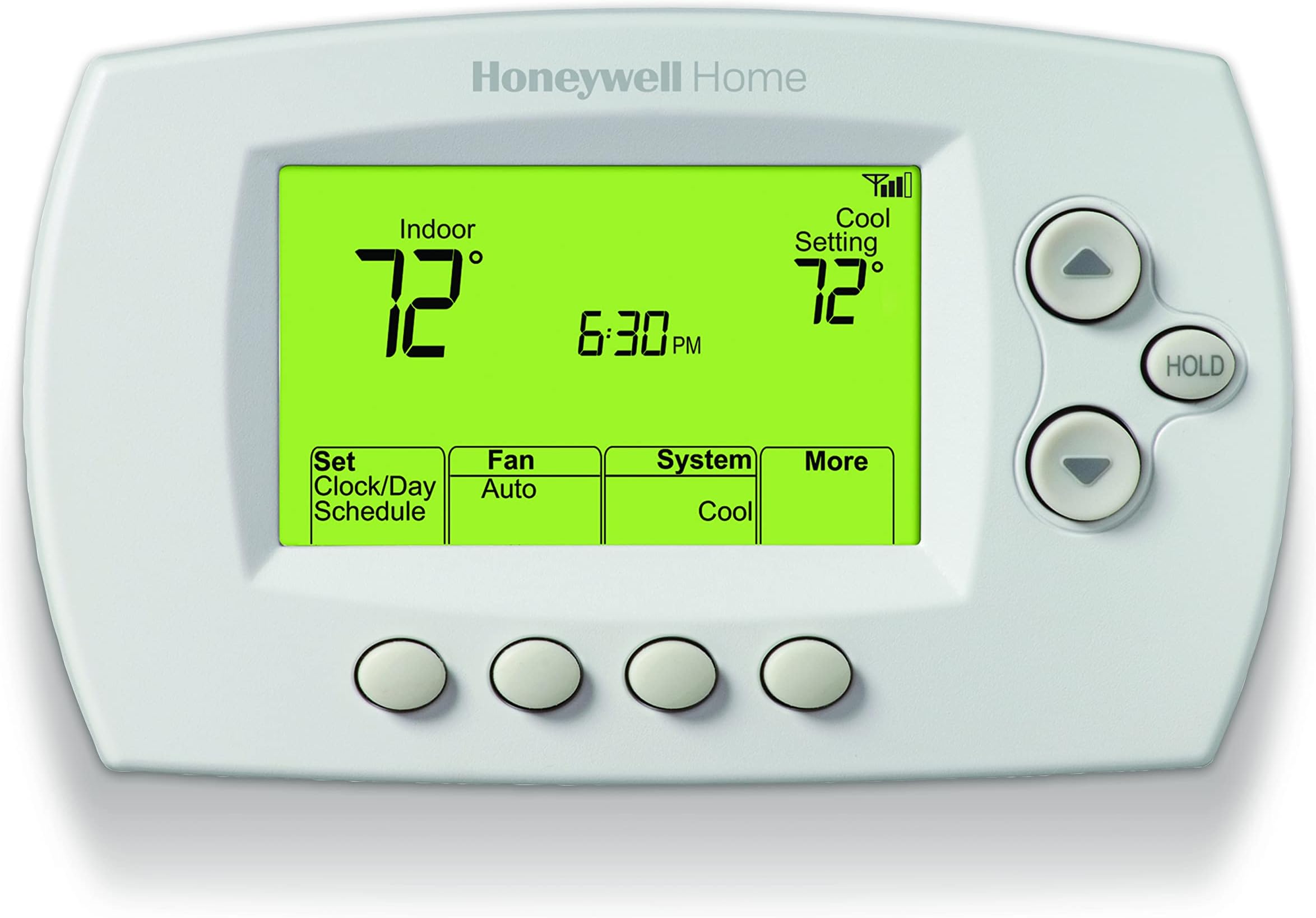
🌡️ Stay cool, save green, and control your comfort like a pro!
The Honeywell Home Wi-Fi 7-Day Programmable Thermostat (Renewed) offers energy-efficient, customizable temperature control with smart home integration. Compatible with major voice assistants and most HVAC systems, it features flexible 7-day scheduling and remote app control, empowering busy professionals to optimize comfort and savings effortlessly.


| ASIN | B0B3NL39W3 |
| Additional Features | Auto Changeover, Clock Display, Daylight Savings Time Ready, Low Voltage, Programmable, Temperature Display, Vacation Mode |
| Backlight | Yes |
| Best Sellers Rank | #3,825 in Amazon Renewed ( See Top 100 in Amazon Renewed ) #64 in Renewed Tools & Home Improvement #299 in Home Programmable Thermostats |
| Brand Name | Honeywell Home |
| Color | White |
| Connectivity Protocol | Wi-Fi |
| Connectivity Technology | Wi-Fi |
| Control Method | Touch |
| Control Type | App Control and Touch Control |
| Controller Type | Amazon Alexa, Google Assistant, IFTTT, SmartThings |
| Customer Reviews | 4.1 out of 5 stars 891 Reviews |
| Display Type | LCD |
| Finish Types | Matte White |
| Global Trade Identification Number | 10194159013473 |
| Included Components | Installation Guide, Mounting Hardware, RENEWRTH6580WF 7-Day Wi-Fi Programmable Thermostat |
| Item Dimensions D x W x H | 1.5"D x 5.75"W x 3.5"H |
| Item Height | 3.5 inches |
| Item Type Name | Honeywell Home 7-Day WiFi Programmable Thermostat (Renewed) |
| Item Weight | 8 ounces |
| Manufacturer | Honeywell Home |
| Material Type | Plastic |
| Model Name | RENEWRTH6580WF/U |
| Model Number | RENEWRTH6580WF/U |
| Mounting Type | Wall Mount |
| Power Source | Hardwired |
| Product Style | Thermostat |
| Shape | Rectangular |
| Specific Uses For Product | Air Conditioner, Furnace, Heat Pump |
| Specification Met | Energy Star |
| Temperature Control Type | Heating |
| Unit Count | 1.0 Count |
| Voltage | 120 Volts, 240 Volts |
| Wattage | 96 watts |
J**Y
Works with iPhone or manual
This thermostat is a really handy WiFi thermostat that you can use from your phone at home or away. It’s fairly easy to program and keeps the temperature exactly as it’s set. If you follow the directions in the book, you can make it work as you want. I’m not sure if it works with a heat pump. The thermostat has to have a common wire to work. I think most of the newer units have the common wire already in use. My older unit did not, but my wire had enough wires to use one as the common wire, but I had to connect it at the heater control panel to make it work as a common wire. I can now sit in the recliner and adjust the temperature as I like it without getting up! I have it programmed to change the temperature automatically for our work schedule, and did it all from the phone.
S**.
Cheap and simple, but mighty for a refurb!
I basically wanted wifi for the cheap basic stupid thermostat I had, for not a lot of money. Enter this review... I got it mounted and setup in about 30mins while making sure I was following the directions. It was pretty much plug n play for my HVAC system. It was pretty easy to get the wi-fi setup and working through the manufacturers app. I had no problem getting it setup in Home Assistant through the Honeywell Total Connect integration. Now, I can set my thermostat anywhere, and use just about any entity for automations in Home Assistant. I have total control! The unit is refurbished, but came in excellent condition with no noticable wear/imperfections, appeared to have came with all needed parts, manuals, and works as advertised. You DO NEED a C WIRE to power the unit! I got it for a little over $40 which is a ste... I mean good deal! :-D Nov. 2025 update, I haven't had hardly any issues with this refurb unit, nor have I really touched it, but to see if the buttons still work. I supplied a recent image to show at bit of what you can do with Home Assistant. I managed to diagnose my AC before going out over the summer when the cooling cycles were progressively getting longer.
G**R
Connects to the WiFi network.
The thermostat works well and we love the ability to adjust the thermostat from our phone app because the thermostat is connected to our wifi. The thermostat is easy to program and has enough flexibility for our family.
E**T
Does not work- heater still running 8 degrees above the set temperature!!
Butter beware- see photo!! We keep it pretty cool in the house overnight, due to a genetic disorder that causes my son and I both to overheat easily, and become ill. In the photo, you'll see that the thermostat is set to 61-- I just woke up sweating and nauseous, and the heater was running. It's 69 degrees in here- eight degrees above the set temperature, and I had to turn the system off to get it to stop running!! It just got cold enough to be running the heater where we're live, but it was also having issues with the AC-- it would run for less than 5 minutes then turn off for less than 5 minutes, over and over and over. I even timed it because I noticed how often it was clicking on and off. I'm going back to a Nest thermostat, because this thing is garbage.
P**R
..well i’ve over a dozen of these but..
definitely used. refurbished? i doubt it. handwriting on the instructions? yep.. missing the MAC card but all the needed info is on the back of the unit so who cares. this one works fine. connects fine so far. saved me some cash. be patient with setting up the online stuff it’s annoying but works once you’re done and.. theres a phone app. However over the years i’ve found the website does maintanance or something occasionally at night and on weekends so i sometimes have 1/2 my stats go offline. annoying at 3am when 1/2 of a building or two sends me communication alarms. its been better over the last year or so. I really should create a new user and move all the thermostats over and delete the current one, that would probably make their database a bit better. someday maybe but what a pain it would be… heres some advice: R-24ac (think of as hot) B-24ac (think of as common) C-on thermostat is B lue Y-cool (24vac hot from stat when active) G-fan (24vac hot when active) W-heat (24vac hot when active) I know… whoever installed yours didn’t stick to the right colors.. sorry.. you should trace your wires and make a diagram… :)
B**Y
When connecting to Alexa DO NOT USE RESIDEO
Purchased the RENEWRTH6580WF 7-Day Wi-Fi Programmable Thermostat and chose renewed to get a better deal. It had a little smudge on it but other than that it looked brand new. My main reason for replacing my old programmable thermostat was it is not Wifi and I can't control it with Alexa. The 6580 requires a C-wire connection and my previous one didn't so I looked to see if there were unused wires and there were. So, I checked the furnace/air handler and saw there was a wire connected to the C terminal. I tagged the same color wire at the thermostat end. I also tagged the other 4 wires as to the terminals they were connected to. I disconnected the wires and removed the old thermostat base, after turning off the power, and installed the new base. I leveled it since the directions said to do so but there's no mercury bubble, so I don't see the purpose other than aesthetics. I snapped the thermostat to the base, turned the power back on and started following the Quick Start Guide that came with the thermostat. Creating a Total Connect Comfort account, connecting to Wifi and my home network using my phone was easy but when registering, the Total Connect Comfort web site needed information from the Thermostat ID Card which was not included in the box, so I called support. They told me the information was on the back of the thermostat and sure enough it was but the Quick Reference Card that I was directed to slide into a slot on the back of the thermostat was hiding it. After entering the needed information, I received Thermostat Registration Success. Then I downloaded the Total Connect Comfort app and it found my Thermostat. Now for the tricky part, connecting it to Alexa. When connecting it to Alexa she asks what type of thermostat do you have, and I chose Honeywell Home which prompted me to sign in to Resideo(formerly Honeywell Home). I never had a Resideo account and I thought maybe my Honeywell information would transfer but it didn't. After multiple attempts I decided to delete the Resideo account and start over. This time I chose the Honeywell Total Connect Comfort type of thermostat and VOILA! I was connected to Alexa. The disappointing part of this is Alexa allows me to view the present state of my thermostat, change the temperature up or down through the app or with voice commands but nothing else. The Honeywell app allows me to change from cool to heat to off, change fan setting from auto to on, create or change my programmed schedule, displays the current temperature OUTSIDE, provides a 5-day forecast for my location along with showing the present state of my thermostat and allowing me to change the temperature up or down, and the app is free. (place mind blown emoji here) Bottom line: Evidently the thermostat ID Card is attached to the back of the thermostat and not a separate card in the box so copy the info before installing. If connecting to Alexa manage your expectation because you will not have much control, do not choose Honeywell Home for the thermostat type choose Honeywell Total Connect Comfort and do not attempt to use Resideo, it does not work. I use the Honeywell Home Total Connect Comfort app (TCC) because I don't have any other Honeywell smart products in my home. If you do you may want to choose one of the other Honeywell apps like Honeywell Home Suite. Setting up a schedule was easy but I had to do it for each day separately instead of one schedule for M-F and another for the weekend. I may have missed something, so I'll look through the user guide later. I'm happy with the thermostat and would recommend. It is a very good value at a nice price point and comes with a user-friendly app that allows access to multiple thermostat controls as well as controlling multiple thermostats. I may upgrade one day to a thermostat with the color touch display but for now this one works just fine.
H**B
EIC Bypass Required, But Worth It for This Affordable Smart Thermostat
⭐⭐⭐⭐⭐ “It Works Great—Once You Wrestle It Into Submission” Nothing about wiring this thermostat was simple… unless you consider rewiring your entire HVAC system “simple.” That said, I’m still giving it five stars for the price, the design, and especially the Wi-Fi interface, which is slick once everything’s up and running. ⚠️ Heads-up for anyone with an EIC (Equipment Interface Control) from a previous thermostat: If you try to connect this thermostat using the 3 wires coming out of the EIC (that was previously installed) like I initially did, prepare for frustration. There won’t be enough power to run the new thermostat—it’ll just sit there, mocking you with a blank screen. 💡 The fix? Bypass the EIC (from the previous install) completely. I went with a good old-fashioned wire-to-wire hookup, cutting the EIC out of the loop entirely. Suddenly, the thermostat powered on like it had been ready all along. Magic. 📲 As for setup: Get the Wi-Fi connected first. Download the app, create your account, and don’t forget to click the email confirmation link—it’s easy to overlook. After that, you can log into the app and set up your heating/cooling schedule with times and temperatures. ✅ Final thoughts: Once installed, this thermostat has worked flawlessly. I’m very happy with the product overall. Big shoutout to customer service, who quickly helped me locate the MAC ID and MAC CRC numbers (pro tip: they’re on the back of the thermostat itself, where it connects to the base). and is required for completing the account set up and syncing your thermostat with the Wi-Fi network. Once that was cleared up, everything synced smoothly. Highly recommend—but bring your wiring patience!
M**E
Like new?
I got a used-like new product but this was missing essential instructions to set up the wifi. I ended up returning. I'd suggest going new, which I ended up buying elsewhere and I'm super happy with how easily the product works. The set up is easy and the phone app is very straight forward. It's nice to be able to adjust the temp on the fly from your cell.
Trustpilot
1 month ago
4 days ago