Buy anything from 5,000+ international stores. One checkout price. No surprise fees. Join 2M+ shoppers on Desertcart.
Desertcart purchases this item on your behalf and handles shipping, customs, and support to Vietnam.
🔌 Unlock hidden PCIe slots and build like a pro—flexibility meets power in one sleek cable!
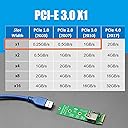
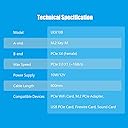
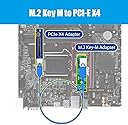
The GLOTRENDS UEX108 is a 600mm M.2 to PCIe X4 riser cable delivering PCIe 3.0 X1 speeds (~1GB/s). It supports PCIe X1/X4 cards including WiFi, sound, USB, and M.2 PCIe adapters. Its flexible, twistable design and insulating foam base enable versatile mounting and airflow-friendly builds. Compatible across Windows, Mac OS, Linux, and NAS, it’s a plug-and-play solution for maximizing PCIe slot utility in compact or crowded systems.


| ASIN | B09ZSP7HFR |
| Best Sellers Rank | #163 in Internal USB Port Cards |
| Brand | GLOTRENDS |
| Built-In Media | PCIe Riser Cable |
| Compatible Devices | Firewire Card, M.2 PCIe Adapter, PCIe WiFi Card, Sound Card, USB PCIe Card |
| Customer Reviews | 4.3 out of 5 stars 635 Reviews |
| Hardware Interface | PCI Express x4 |
| Item Weight | 0.09 Kilograms |
| Manufacturer | glotrends |
| Mfr Part Number | UEX108 |
| Model Number | UEX108 |
| Number of Items | 1 |
| Operating System | Windows/Mac OS/Linux/NAS |
| Style | 600mm M.2 to PCIe X4 Riser Cable |
| Style Name | 600mm M.2 to PCIe X4 Riser Cable |
| Unit Count | 1.0 Count |
B**R
I am very pleased with the quality of the product.
I have a Lenovo desktop model m91p with an Intel i5 processor and a graphics card from EVGA Nvidia 750 GT. The graphics card occupied one slot but the heat sink and fan extended over the PCI-e 1x slot so that I could not use the slot. The other PCI slots were available but most PCI cards do not work well with Windows 10. I am running Windows 10 Pro 64 bit. So, I looked at replacing my graphics card with one that only took up space for 1 slot. But, my graphics card was working fine. I had 2 GB of GDDR5. Something equivalent or better cost $90. So, I looked for a solution to extend the PCI-e slot. I looked at Ribbons but there design blocked the flow of air across the heat sink if I bent them 90 degrees. The GLOTRENDS design made more sense because the card that inserted into the slot was flush with the existing slot and did not interfere with the graphics card overhead. Also the cable extended back toward the rear and did not block any other slots. I purchased a Rosewill 4-port external USB 3.0 card and unscrewed the card from the bracket and flipped it upside down and reattached it to the bracket using standoffs so that I could attach it to the backend. It worked. I was able to attach the other end of the GLOTRENDS cable to the top and it fit snugly into the bracket holder. So, I was able to reuse the PCI-e slot. If I had tried to use the ribbon design, I would not have been able to successfully attach the Rosewill to the bracket holder. But, the true test was to run a benchmark on the new card. Above are the results without the power attached to the card. I need an extension for my MOLEX to finish the installation. But, everything is working fine without it. I am getting very good performance without the power attachment. I believe GLOTRENDS has the best design for extending the PCI-e slot for graphics cards that cover the slot.
E**Y
Great option for small USFF case. Saved my eGPU project!
Here's my combo solution review for the SUPEERPLUS PCI-E 1X to Half/Full Mini PCI-E Adapter and GLOTRENDS 1X to 1X PCI-E Extension Cable UEX101: My goal was to add a DIY eGPU to a Dell Optiplex 7010 USFF (ultra small form factor) PC. The project also included other parts including a 16X/1X USB mining riser, and server power supply with a 12volt mining breakout board. Only 1X PCIE was needed as using for GPU password recovery as part of cybersecurity training and work. My son upgraded GPUs in his gaming rig, leaving me with a GTX1060 6GB for my project. Originally my plan was to use the mPCIE in a Dell laptop (E7440), but that went bust when the laptop would NOT recognize the card. It was the WLAN/WiFi slot, and there must be a blacklist/restriction on cards in that slot even though I was hoping there was not. So I went a different route. The Dell USFF was on hand from a previous project, and I don't have the want, or deskspace, for a mini/tower PC. Plus this could be an easily mobile solution with the size of the devices. Space in the USFF is TIGHT. I spent a lot of time researching, comparing, and looking closely at product pics and videos online until I was more certain the parts would fit. I decided to go with a USB-based solution rather than ribbon-cable mPCIE 1X extender. I ended up not using the PCIE 1X slot card that ships with the extender, rather I just extended the USB cable all the way out of the chassis, via an open external WiFi antenna slot already cut into the case, then extended using an Amazon Basics USB 3.0 extension cable directly to my 16X riser. The USB cable is much more sturdy, and I would be concerned with a thin ribbon doing the same thing. That, and I really don't think there would be any space for a 1X slot extended via ribbon elsewhere inside the case, without leaving out a RAM DIMM to gain space. These items worked perfectly!! I don't think that any other solution could have worked as well. The power connector on the mPCIE, with cable connected, is the highest point, and am sure is being pressed by the seated drive cage. The right-angle USB was the only way to get a solution like this to fit, and the cable reaches inside and out of the case to where I could anchor the USB cable onto the case padlock loop on the back. Yes it did take some packing to get all the cables in. Actually 3 attempts before I could get the cage seated and top panel back on. But it all fits! And works!!
R**.
Cord is a bit long, but works fine for my vertical wifi card placement!
Got this to set up my pcie wifi card in a Thermaltake S100 TG mid-tower case in vertical riser mode to mount along side my vertical video card. The expansion slot mounts in this case have the option to be rearranged vertically. I didn't want to waste my perfectly working wifi card and get a USB wifi adapter. This extender is both a great work-around and cost efficient way to keep my setup. Only problem I have with it is that the USB cord is probably twice the length I needed. So it had to be snaked and coiled around a bit through various cables and jumpers on the motherboard and the vertical mount. It is a very thick quality cord to manipulate and it is not pretty, but since the wifi card is mounted behind the video card (with it's own rather lengthy pcie 16x riser cable), you just don't notice the slight mess. Overall it works out fine. No problems with functionality. Again, for my application, it's just a bit too long. If you have a full-tower or need to snake a pcie 1x expansion around a mini-itx setup, this should do the trick. I may optionally get a shorter cable in the future.
G**Y
Works well.
Works really well, I have a pcie usb hub (7 usb ports) but running 2 large gpus blocks all of the slots. This was able to hide under a gpu and route it up and around to another open slot. Works well!
T**I
I might buy more, its great
Thank you! I was able to squeeze this into a small form factor computer and add a full size rtx6600xt. Works great!
G**O
DOA... Beautiful device but doesn't work.
This device looks perfectly fine. I love the design, cable length, rubber foam under the connector, etc., however, it doesn't work. The computer won't start when the adapter is present. I tried reinstalling it, unplugging and re-plugging the cable several times to no avail. Unfortunately, I don't have another PC to test it with, but I have a different adapter that uses the same port, and it works fine, so this is definitely this adapter. Sadly, I'm going to have to return it. I really wanted it to work because I need it for a project that I'm working on, but it is what it is.
D**S
Worked perfectly, and shockingly, without even losing any speed!
After the GPU card blocked the last open PCIE-x1 slot I had on my motherboard, I was searching for a solution and found this device. I was skeptical as always buying something so cheap and not branded. But being out of options and a choice of using this, or removing 2 HDD out of the system, I decided to give it a try. I took a HDD performance measurement from the PCI-e Sata Interface card on the socket directly, and then after I had extended the card elsewhere using this. And as you can see the performance was exactly the same in both reading and writing to the SATA6 7200rpm disk. So far so good, no noticeable heat is developing, and it clears my Powercolor dual width GPU card heat sink with about 2mm to spare as well. Hoping it will last a long time.
W**S
Works with Dual Slot GPU card
I built an entry level gaming machine using a Dell OptiPlex 990. The OptiPlex has 3 PCI-E 2.0 expansion slots: 1 PCIe x16 - full-height 1 PCIe x4 - full-height 1 PCIe x1 - full-height I have 3 PCIe cards installed: 1 Dual slot ZOTAC GeFource GTX 1050 Ti Mini PCIe x16 card 1 4 Port SATA III NON-RAID PCI-e 2.0 x1 Card (model SI-PEX40064) 1 USB 3.0 PCIe X1 card This machine is so old that the x16 and the x1 PCIe slots are side-by-side, so using the GTX 1050 covers the adjacent 1x PCIe slot. Since the 4 Port SATA card has no external connectors, I purchased the GLOTRENDS 1X to 1X PCI-E Extension Cable and relocated the 4 Port SATA card, which holds my boot drive. The GLOTRENDS extender is in two pieces, one that fits in the PCIe slot, and the other at the end of what looks like a USB cable. The PCIe socket side came with foam mounting tape to hold the extender in place. I plugged my 1x PCIe SATA card in to extension and noticed that there is nothing to keep the PCIe card from slipping out. The PCIe card is friction-held in place by the connector. I ended up using 2 cable management ties to hold the card to the card in the extended just for piece-of-mind. Also, the extender has a SATA power connector, but the Amazon description says "Integrated power supply design, no need external power". So I did not plug a SATA power cable into the extender. Once assembled, I noticed that the GPU fan still collides with the extender, specifically the shroud on the USB cable, which puts an ever-so-slight crook on the GPU card, but not enough to cause concern. Had the shroud been about 1mm shorter, it probably would have fit perfectly. Despite the crook, the GPU works fine and my machine booted with the BIOS identifying all the disks connected to the PCIe SATA card located at the end of the extender. I'm not sure what the SATA power plug is for. I'm not using it and my setup works without it and functions as if I were plugged directly into the SATA slot without any performance issues or side-effects. I would recommend this product.
O**E
Gran solución
Estaba buscando como acomodar una tarjeta WiFi PCIe 3.0 X1 en mi PC, ya que estorbaba la tarjeta gráfica y este kit es la solución perfecta.
C**D
Extensions are needed today with small computers
This allows me up install bigger components outside the tight area of the pcie slots.
E**O
Nefasto, deja tostado el ordenador
Muy malo, deja el ordenador absolutamente colgado al minuto de encenderlo y se reinicia. Ha sido quitarlo y de nuevo el funcionamiento es normal. No es nada recomendable, las características de mi PC son 32 gigas de ram, Placa Gigabyte B450M DS3H con microprocesador Ryzen 5 de 3600. Ni se os ocurra comprarlo
R**E
Saved me at least £80 compared with other alternatives
My situation - PCIe 1x slot obscured by large heatsink of passive cooled GPU in a DIY Media Centre PC. Wanted to add one more single PCIe DVB-S2 tuner, which I already owned. All other slots occupied, so couldn't do it. Other options were:- (1) Buy USB tuner - over £100 (2) Replace one existing single PCIe tuner with a double - over £90 (3) Then I found this product. Solution would be cheaper, utilises my existing kit with no wastage involved, as would options 1 and 2. Didn't know for sure whether (3) could work with my specific requirements, but risked it. Yes it works perfectly and saved me at least £80 compared with the other options! Just needed to find a spare space for the additional tuner within the case and make sure it was well secured/insulated from other components. The PCIe tuner I used had an additional power cable, said to be optional in the instructions. This unit also has a power input via a standard SATA power cable connector. Thought I'd better use at least one of these just in case of power problems. Opted to provide the SATA additional power supply to this product. No problems whatsoever. The PCIe tuner is stable in use and responds just like the other tuners, which are connected to the motherboard in the conventional way.
P**O
esperimento perfettamente riuscito
Quando ho acquistato questo cavo di prolunga, avevo messo in conto che fosse un esperimento non necessariamente destinato al successo, per tante ragioni legate alle reciproche compatibilità dei componenti. Mi piacerebbe capire perché, ormai, girano quasi solo schede video a doppio slot e schede madri che hanno una porta PCIe-1x immediatamente sotto alla PCIe-16x, e quindi irrimediabilmente destinata a rimanere coperta ed inutilizzabile. Lo scopo era quindi, da un lato, recuperare la porta PCIe-1x rimasta nascosta sotto alla scheda video a doppio slot. Dall'altro lato volevo aggirare la fregatura rimediata con la scheda madre Asus Prime B350M-A: il chipset prevede la condivisione di banda tra la porta M.2 e le porte SATA 5 e 6 (dettaglio che mi era sfuggito), quindi, quando ho trasferito il SO dall'SSD SATA su un SSD M.2 NVMe (attenzione! gli M.2 SATA non vanno bene), ho raggiunto, sì, un eccellente miglioramento prestazionale (è un Samsung 970 EVO... chapeau!), ma mi sono trovato porte SATA 5 e 6 (il secondo HDD dati ed il lettore DVD) disattivate. Io avevo la pretesa di continuare ad usare entrambe le periferiche, ed ho cercato una soluzione globale per i due problemi, trovando la prima qui: il "cavo" è un complessivo, formato da una micro-scheda ribassata che si colloca nella porta PCIe-1x rimasta sotto al corpo della scheda video (non ci sono fermi, in mancanza della staffa di fissaggio allo slot posteriore, ma il contatto PCIe-1x è sufficientemente stabile di suo), ed ha una presa USB 3 ribaltata, in modo da non toccare la scheda video sovrastante, un cavo USB 3 sostanzialmente "normale" e di lunghezza ottimale, ed uno slot PCIe-4x "volante", con una basetta provvista di feltrino, da posizonare/incollare come si può negli spazi liberi del case. La soluzione del secondo problema mi è stata fornita da una scheda "Syba SATA III - Scheda PCI-e 2.0x a 2 porte eSATA III, con Marvell HyperDuo" (https://www.amazon.it/gp/product/B00AZ9T31I/), e questa scelta è meritevole di recensione e 5* a parte... sì, perché, oltre ad ogni mia aspettativa, ho centrato perfettamente l'obiettivo, pure con ulteriori opzioni extra; ho, quindi, scelto per il cavo la versione PCI-e 4x, perché quella 1x non bastava per la scheda PCI-e 2x. Il mio (dichiarato) accrocco compensativo ha funzionato perfettamente da subito, senza il minimo problema, ed ora mi ritrovo con le periferiche ora recuperate e due porte eSATA supplementari posteriori, che ho già in parte opportunamente utilizzato con grande soddisfazione. L'esperimento, partito come azzardato, è perfettamente riuscito, e lo consiglio a tutti quelli che hanno problemi (o fissazioni) come le mie.
Trustpilot
2 months ago
2 weeks ago