🎧 Elevate your meetings — hear every word, miss nothing.
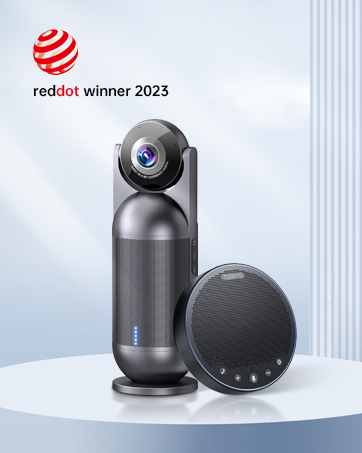
The EMEET M3 is a Zoom-certified Bluetooth conference speakerphone featuring 4 AI-powered omnidirectional microphones for 360° voice pickup, delivering crystal-clear sound with noise and echo cancellation. It boasts an impressive 18-hour battery life, supports USB 2.0 and Bluetooth 5.0 connectivity, and can daisy chain multiple units to accommodate up to 20 participants, making it ideal for medium to large meeting rooms and professional hybrid work environments.


| ASIN | B09X52FL2G |
| Additional Features | None of the above (VoiceIA exclusive tech, noise & echo cancellation) |
| Antenna Location | Indoor/Outdoor |
| Audio Output Mode | Stereo |
| Battery Charge Time | 4 Hours |
| Best Sellers Rank | #35,431 in Office Products ( See Top 100 in Office Products ) #14 in Telephone Audio Conferencing Products |
| Bluetooth Range | 10 Meters |
| Brand | EMEET |
| Built-In Media | EMEET OfficeCore M3, EMEET Adapter A300, USB Type C Cable, EMEET Dongle, Carrying Case, User Manual, Security statement, Parameters |
| Color | Grey |
| Compatible Devices | Smartphone |
| Connectivity Protocol | Bluetooth |
| Connectivity Technology | Bluetooth 5.0 Version, Daisy Chain(Note: exclusive for EMEET daisy chain), Dongle A300, USB 2.0 |
| Control Method | Touch |
| Controller Type | Battery Powered |
| Customer Reviews | 4.4 out of 5 stars 1,101 Reviews |
| Enclosure Material | Plastic |
| Is Waterproof | FALSE |
| Item Dimensions D x W x H | 1.4"D x 5.3"W x 5.3"H |
| Item Weight | 4000 Grams |
| MP3 player | No |
| Manufacturer | Shenzhen eMeet technology Co.,Ltd. |
| Material | Plastic |
| Model Name | EMEET OfficeCore M3 |
| Model Number | M3 |
| Mounting Type | Tabletop Mount |
| Number of Batteries | 1 Lithium Polymer batteries required. (included) |
| Number of Items | 1 |
| Power Source | Battery Powered |
| Speaker Maximum Output Power | 5 Watts |
| Speaker Size | 1 Inches |
| Speaker Type | Portable Speaker |
| Specific Uses For Product | Travel |
| Subwoofer Connectivity Technology | Wireless |
| Warranty Description | 2 YEARS WARRANTY |
| Warranty Type | Full Warranty |
| Wireless Technology | Bluetooth |
W**E
Convenient and versatile bluetooth speakerphone
For work I participate in a lot of committee meetings, and not often can everyone attend in person. Having a convenient way to setup and participate in conference calls is important to my productivity, and usually just putting a phone on speakerphone will not do. Because of this, I looked into bluetooth speakerphones. I already owned the eMeet M1 which does a great job in small groups/rooms, but many times my calls take place in larger rooms with more people, and the M1 had challenges there. Welcome now to the eMeet M220! The M220 is basically an update to the eMeet M2 (which itself was an updated to the eMeet M1) that includes two M2 units but it adds the ability for the two included devices to be daisy-chained together. This daisy chaining allows you to use the M220 in larger rooms with more people. You also can use a single M2 if your particular needs only require one, so it gives you a lot of flexibility. Each device includes a cable lock connector, audio in, audio out (for daisy chaining the two devices), and micro-USB input (for charging and connecting to computer via USB). I really liked the design of the M220; it is modern and sleek and would look great just sitting on a desk. The buttons on the device are not physical push buttons like on the eMeet M1 but are instead capacitive touch buttons. They work well but can develop some smudges. Both of the speakers are provided with soft padded storage cases to help keep them safe. The M220 gives you a LOT of different ways to use the device. You can connect directly to a phone or computer via bluetooth, or you can connect it to the computer with the included Micro-USB cables. They also include USB audio adapters (called the eMeet Audio adapter A200; they give you one for each speaker) that you can use to wirelessly connect to a computer that might not have built-in bluetooth capabilities. I tested each of these different options out and they all worked well. For use on a computer, I found that either the USB cable or the A200 adapter worked best with Skype for Business or Skype; it could be a challenge for me to get Skype to work will via bluetooth only connection (but I think this was more of a Skype/Windows configuration issue that any problem with the speakers). Audio quality was very good both as the person in the room with the M220, as well as the person who was on the other end of the call. Phone calls and Skype calls were loud and clear. For the person on the other line, they could tell that they were on a speakerphone as I did sound further away from the microphone, but they did say that they could still hear me very clearly even when sitting several feet away from the microphones. In addition to being able to use this as a speakerphone, you can also connect the speakers via audio cables (two are included) to a sound source and use it as a regular speaker. The only feature of the M1 that I don't see in the M220 is the ability to use the M220 battery to charge devices (phones) via USB. It was a nice bonus feature for the M1, but definitely not a deal breaker by any means for the M220, and I think all of the additional features and flexibility afforded by the M220 outweigh that minor issue. Pros: Attractive design, easy to use, lots of connectivity options, USB and audio cables included, digital assistant capability, flexibility to use in small and larger groups/rooms Cons: Capacitive touch buttons prone to finger smudges; cannot use as an external battery to charge cell phone
K**H
Clear and LOUD; pleasant for music too
The shipping box from Amazon was heavier than expected with this one item in it. Unboxing the speaker phone let me know why. This is much beefier than my other speaker phone as this one is built like a tank, making it feel very durable. First let me correct a misunderstanding of what other reviews may imply. When using AI recording, some say there is no indicator that the AI is on- BUT, there is a round light surrounding the functions on the phone and when AI is ON, that light is GREEN when speaking, and when AI is OFF, that light is BLUE. That is how you can tell if AI is on or off. I can confirm that with AI on, the loudness of keyboard activity is reduced, as I tested it with my keyboard being only 12 inches from the device (and I was pressing the keys hard to make noise). The environment I am testing this on is a Windows 10 PC. I was surprised that upon connecting the device to my PC via the BRAIDED cable (USB C on the speaker phone side, for easy plugging in, and type A into my computer), it connected so quickly I couldn't believe it. Under 2 seconds for sure, maybe only 1. There was no configuration required; it became my default speaker and recorder automatically. What I like the best about this speaker phone is how loud it is. I compared this with 3 other speakers active on my PC: the speakers in my monitor, another speaker phone, and now this M2 MAX. I set all of them at 25% to play the same song. The monitor speakers were way to soft and tinny sounding (not fun to listen to for music), as one would expect. My other speaker phone sounded great (an eMeet Luna), but when this MAX came on, it blew the others out of the water; quite loud. I turned it down to 10% from 25% and it was still a little louder than the other speaker phone! And both speaker phones were absolutely clear without any distortion. I raised the MAX to 100%, and still no distortion (but I had to turn it down as it was too loud <g>). For playing music, both this MAX and the Luna were pleasant and COMFORTABLE to listen to; not so for my monitor speakers. For quality sound, eMeet speakers are very good indeed; voice is clear and sharp, easy to understand; not garbled or muffled at all. If you are a business, the M2 MAX is the go-to speaker phone for its superior volume alone. No sense making meeting attendees struggle to hear what is coming out of the device, or ask the person on the speaker to repeat themselves. As a note, when I changed the volume using the keys on my keyboard, the light on the MAX goes up and down to reflect the changes - neat; shows the connectivity. Then I tested the recording function by walking around my room and having the PC record what I was saying. Upon playing back my recording, the MAX did a good job, as it easily picked up my voice from 15 to 16 feet away, even with my back turned and I had a hoodie on my head, it picked up my voice well from that distance (of course, the mics pick up your voice louder if you are closer, but still decent from 15 feet - I did an actual measurement). To sum up, this is a quality speaker phone that I like.
B**T
High Tech Professional Conference Speakerphone
PROS VERY Good vocal sound output, clear, rich and capable to play loud With the new eMeetLink App, it is now able to update firmware/software and allow user to personalize some useful parameters, including turn on or off the keypad tap tone (eg, Mute Button) during the meeting and vary Microphone Gain Level Battery last for more than 12 hours call time with a single charge. Compatible with popular online conferencing services such as Skype, Zoom etc. Simple and flexible setup, user can easily connect to other devices via USB-C cable, dongle or Bluetooth in a few seconds with a stable connection Can be used as an ordinary Bluetooth speaker Good battery and volume level indicators CONS Restricted Bass, which may sound good for a midrange focused Meeting speakerphone but not so as a Bluetooth music player Audiences from the other side may hear my voice very slightly fade in and out during some conversations, which may due to M2 Max or it can be caused by other components (my Laptop hardware/software, internet bandwidth, hardware/software on the other side) This new M2 Max has several significant improvement over original M2:- The original M2 Buttons sometimes are not very responsive and may need to press more than once, the improved keypad on Max is bigger and more sensitive The M2 Max can partner with another Max with daisy chain The M2 Max has further improved the Mic reception and noise cancellations The M2 Max incorporates 3 rubber insulators to cut down vibration transmission and improve the sound quality Performance Rating vs Original M2 Speaker Quality: 9.0/10 (vs M2 8.0/10) Microphones: 8.5/10 (vs M2 7.5/10) Value: 8.5/10 $330 (vs M2 9.0/10 $210) Future Nice to have features: IF M1 can house a 200% battery capacity in a 40% body size (vs M2 Max), which can also be used as a Power Bank. I would expect the M2 Max be equipped with the same features Adding an indicator for Ai on/off status Include a hardshell carrying case to protect the unit during storage or travel The original M2 is already a great product for Work from Home usage and the M2 Max has raised the performance hurdle towards the professional segment. The M2 Max with all the new features is able to manage family calls with kids playing around, join the online class or webinar without wearing an earphone all day long, it can also play loud and clear during the business meetings or in a hotel room. The M2 Max does worth the extra investment when you are looking for a good professional product at a very reasonable price.
W**L
Modern Design but could use detachable "spider mics" to help with softer or further away speakers
I like this unit a lot actually even though I have a couple of problems with it. It is not a phone, but it does extend the use of a smartphone via bluetooth. Design is very modern with flat touch style controls and audio / light cues to confirm button choices. It even has light that moves around to indicate the source direction of microphones being detected in use in the face to face meeting. And unit holds power very well. It is not small but not bulky or too large either, about the size/diameter of an average Frisbee and about 2 inches tall. And bluetooth is easy to connect. Directions on how to use could be much better I believe. But the speaker that delivers callers in voices to the face to face meeting members is very clear and natural / pleasing sounding. I did buy two other units from different companies for comparison and this unit by eMeet is the best I could find. I have a couple of problems with it which I state below. The way I use it is I bluetooth to my cellphone, and too I then call into a conference line with that same cellphone and that is how any conference line callers are heard in our face to face meeting, thru my phone into this unit so that my cellphone's speaker and microphone features are switched from my phone to this unit. My biggest complaint is that when I use it for a smallish (10-15 members) weekly meeting of folks, anyone sitting 5 or 6 feet away from the unit, and/or who has a soft or not loud voice lets say, can be fairly difficult for callers in to discern the words spoken. I found that having it on a large table is best to not only come as close to the chest or face of the face to face member speaking but also to allow the voices of those in the face to face meeting to bounce off the table on their way to the 4 mics the unit has built in all around the perimeter of the design shell. My solution on the soft voices would be for the manufacturers to have permanently connected by high quality wire, a couple of spider mics that could extend from the base in two directions say for maybe 4 feet? Or offer 3 feet and 6 feet lengths of extension something like that. But make them permanent or at least can be easily clipped back onto sides of main unit for compact storage. Because soft or low or further away speakers are just plain hard for a single center of meeting table microphone or microphones to really pick up. Also this unit does not come with a carrying case; this unit is like others designed to be portable / charged in advance which means it will be being carried somewhere by someone yet there is no carrying case provided. Even if this were a separate purchase I would have bought it. I had to end up sizing and pricing a case that has turned out to be "ok" but was not designed for this item exactly so that while protective some, it is not as good as a manufacturer making a custom application to their unit type effort. I basically bought a small pocket fabric case that has some soft material inside, one that is meant for a tablet. This speakerphone unit is about 7 to 8 inches wide so it fits ok. Also there is a light that blinks when charging, then it goes solid light but I think the light going out would be a better indicator that is is fully charged. Overall the quality and ease of use I think are very good. I just wish the soft voice thing would have been considered more and solved as I say with mics that could be distributed a few feet from base for better voice pickup of those in the face to face/unit room. We literally pass the unit around the table some to make sure the callers in hear our voices but that is exactly the kind of fussy over control that kind of ruins the whole interaction on some level as the moderator and some face to face meeting members become focused on where the unit is rather than what they are sharing or what the meeting / interaction is all about. Lastly I have some thoughts on price I express in a moment but I still like the unit and it is very easy to charge and use and much better than others voices heard on the speaker of the unit itself. As for callers in hearing face to face members, if folks in the face to face room can be instructed to speak up some that does help a fair amount. I would recommend to a friend definitely in spite of any less than ideal results I detail here. Now, about price: the price at over $325 was a bit much for some of these missing pieces I experienced and too the price went up after I bought it so high dollar is not the end of the world if the product really is tested and solves all that I speak of here but with some overlooked quality issues, I and I believe others will find the investment is a little steep. I think some folks might be tempted just pass around their cell phones in a meeting as the microphone and speakers of most modern phones are very good and certainly this option would cost next to nothing for those already with phones. But to ask a group to cough up $350-$400 and then have some legitimate drawbacks after that investment is what some folks will not appreciate I believe. But to me, if they added the option of extra extendable mics, improved the directions and allowed those directions to be downloaded in advance of a sale, made a good carrying case available or part of the price, and kept the price competitive, they might just sell many many more of these as I believe there is a market now for sure more than ever for such devices.
S**N
Wonderful Product and Great Customer Service
At first glance one may surmise that the price tag for a device not used often is a bit high. And, yes it took some time looking over the many other options out there, but I'm here to conclude the eMeet M2 is the best product on the market; that's why we ended up purchasing another. The Sound quality is fantastic, as if the person(s) are in the room. The 4 strategically placed microphones are perfect and noise cancellation is up to par. Now, this devise when used in an open area does has its limits, but it was not designed to be used in a space where people are spread out, the microphone's will pick the speaker up but faintly. But, used at the range it was designed for the eMeet M2 is phenomenal. It holds a charge very well and the plug-n-play of the devise makes it easy to switch from one conference room to the next without any issues. Once the dongle is plugged in the eMeet M2 quickly recognizes the new device and is ready to go. Which is a blessing when our high prices conference room phone doesn't want to play nice, we quickly grabbed the dongle plugged it in and the meeting can begin on time. Customer Service is top notch as well. Recently, the device stopped working for whatever the reason, after 18 months. We were very disappointed, but things happen, when we reached out to eMeet they quickly rectified the situation by sending us another even though our warranty was up; Professionalism at its Best!!! They were as concerned with the issue as I was, and asked a lot of questions in the hopes of preventing others from this experience. Other companies that I've dealt with never asked for the malfunctioned device back, but eMeet wanted to study and dissect the device for further analysis; something I appreciated. In conclusion you don't have to continue to search other devices the eMeet M2 is all you need. FYI we do plan on purchasing more to place in various places around the office so our team can use them for things other than meetings. Thank You!
A**.
Avoid it
Terrible. Was working fine for the first month. Since then there’s a ton of static and garbled speech I use the USB (I work at a company where the IT blocks Bluetooth) and opted for it because it was a decent wireless option with a dongle It’s just terrible.
A**N
Great Voice to Text Microphone Solution
I purchased this item specifically as a voice to text solution. I am hard of hearing, and one context that is extremely difficult to communicate in is group conversations. Any group conversation… People tend to talk over each other, and who is speaking changes faster than I can look for facial expression cues and face reading (as opposed to lip-reading). In these situations I can't follow the conversation without the help of technology. I use voice to text apps to help, however, the microphones I currently possess have a very short pickup range (this is a good thing), useful for when I only want voice to text from whoever holds the microphone, or wherever I am pointing said microphone. However, I needed a microphone that would have a long distance and 360 degree sound pickup range, that could inteligently filter out background noise and background chatter. Conference microphones seemed to fit the bill, but I knew from what I was reading that they would only work for small tables. I kept looking for something that could work flexibly for small tables as well as larger tables. I saw a comment on a different emeet product that this unit, the emeet 220 was coming out soon and that it would allow for daisy chaining two units together. I contacted the manufacturer and they sent me a manual, mind you, this was before the product was released, I was really impressed that they were willing to do that. Looking through the manual I decided this product was worth a shot considering it's flexibility and AI features. Emeet has a different product, the N1 which has it's own software and cloud storage and processing capabilities to do voice to text including labeling speakers as in "[name] [message]" automatically. It looked cool, but I am subscription adverse, and the speaker labeling only works with two speakers, and would require training for each session. I already have a couple voice to text solution that I am comfortable using and didn't really want to deal with hardware that was tied into a subscription based service. Also, I felt that with this new unit, the hardware and AI would probably have newer/more refinements. I recieved the E Meet 220 the evening before a local TedX Talk in my city. I decided to take it with me and baptize it by fire. I used it during lunch break, they had a huge conference hall with many tables, easily 20+ tables there were easily in excess of 400 attendees. So this was a very challenging environment for any microphone, and I have to say, I was really impressed with the emeet 220. It picked up people impressively well around my large 8' circular table. I was only able to use one that day, I wasn't able to turn one unit on for some reason, I'm not sure why, but even then, it worked impressively well. I had mounted it right on top of a glass vase that had nothing but rocks in it. I was able to participate in a group conversation in that type of environment for the first time in my life. Prior to that, I had only ever been able to hold one on one conversations in noisy environments like that. The AI on these microphones did an exceptional job of massaging the audio input making it possible for the voice to text applications I use to translate the speech to text much more accurately. I have since used it during a potluck with extended (chosen) family. My house has a very large living room, and terrible acoustics. I placed the two units as centrally in the living room as I could, (picture shown) and I was able to pick up everybody in the room very well. I was especially impressed that it continued to work well even when someone was talking squarely in between the two units, I was worried that there might be duplication of audio or strange audio effects, but the voice to text software showed no such effect. I will have to record audio in the future to verify this, but so far it's been a dream to have access to group conversation, and relatively pain-free since I don't have to try to impose one speaker at a time rules when using the other microphones I have that only really work on one person at a time. I was very impressed at the Bluetooth connection. I was on the other side of the room as the transmitting Bluetooth Emeet 220, and did not notice any connection drops. That being said, I probably wouldn't know if it was the Emeet or if it was the voice to text app or the internet connectivity if it did happen. So, more testing is upcoming, but first impressions have been stellar. I have yet to test the conferencing features, but I will update this review once I've had the opportunity to do so.
D**H
Easy to set up! Great quality!
Great sound. Picks up everyone in our conference room with it 10 feet away. Don’t even have to center in the table. We are very happy with it.
Trustpilot
3 days ago
2 months ago