๐ง Elevate your sound gameโbecause your ears deserve the best!
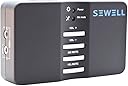
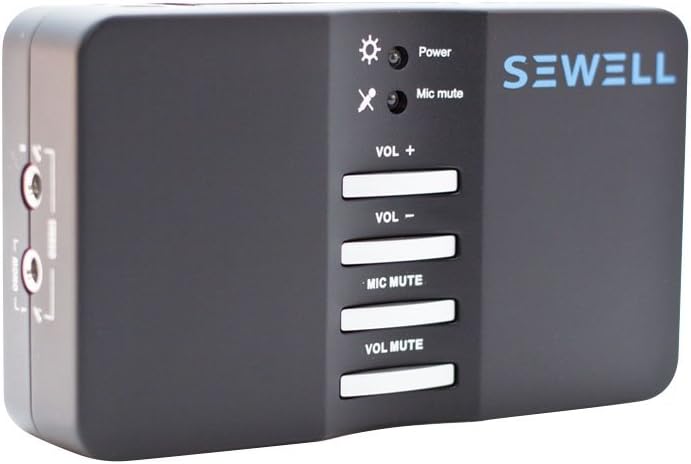
The Sewell Direct Sound Box SW-29545 is a compact external USB 2.0 sound card delivering versatile 7.1 channel analog and digital audio output. It features dual microphone inputs for stereo recording, supports 44.1 and 48 kHz sampling rates, and offers plug-and-play portability for laptops and desktops, making it an ideal upgrade for immersive gaming, music, and home theater experiences.
| ASIN | B004Y0ERRO |
| Audio Output Mode | Stereo, Surround Sound |
| Best Sellers Rank | #870 in External Sound Cards |
| Brand | Sewell |
| Customer Reviews | 3.9 out of 5 stars 379 Reviews |
| Global Trade Identification Number | 00685289295455 |
| Hardware Connectivity | USB 2.0 |
| Hardware Interface | USB 2.0 |
| Hardware Platform | Laptops, PC |
| Item Weight | 7.2 ounces |
| Manufacturer | Sewell Direct |
| Maximum Sample Rate | 48 KHz |
| Mfr Part Number | SW-29545 |
| Model Number | SW-29545 |
| Platform | Mac, Windows 8 |
| Surround Sound Channel Configuration | 0.0, 7.1 |
| UPC | 639767408653 685289295455 |
D**E
Works great on my Mac Mini with OS 10.6
I wanted something that would allow me to get multi channel analog audio, out of my Mac computers, without having to use a surround sound receiver. All My media comes out of my Mac (DVD, CD, MP3, audio/video from the web and computer software, etc.) and I have self powered speakers, so I don't need the expense or large footprint of a receiver. This USB SoundBox 7.1 is just what I was looking for, and works great on my MacMini desktop computer and MacBook laptop with OSX 10.6 Full multi channel output capability and excellent sound quality. Plug and Play operation + Apple operating system, makes it to set up for 2, 4, 6, or 8 channel operation. The supplied software is for PCs only, I don't need it to run it on my Mac. It has a blindingly bright flashing blue power Led, on top, that I covered with black electricians tape, as it was a bit distrating. Comes with a nice long USB cord with full size conectors, and it gets its power through the USB cord. No wall wort, Yay! All inputs and outputs are clearly marked in English. Lightweight and compact (not much bigger than a deck of cards), it will easily fit in a laptop case. I highly recommend this to anyone who has a Apple Mac computer. I think the sound quality is better than the Macs built in audio ports. It looks to be the same as the Vantec USB External 7.1 Channel Audio Adapter: Vantec USB External 7.1 Channel Audio Adapter (Black) Enjoy!
C**B
Killed my sound system
I bought this in anticipation of the new laptop I was getting. I wanted to be able to use the 5.1 sound system that I had used on my old desktop with the new laptop. I was able to install the drivers and hook everything up easily. When I turned it on it seemed to be working fine. So I switched the sound system from normal mode to music mode. A few seconds later one of my rear speakers started making a loud popping sound, and the front speakers started making a crackling sound. I immediately unhooked the sound system and hooked it back up to my old desktop, and the popping and crackling were still there. I don't know what happened, but this killed my sound system.
D**S
Easy to use and good sound quality
I needed this basically for an additional set of audio in and out ports. My PC's built in ports are being used for my headset, I needed to get a line in and line out for a second device, and this allows me to do that with a single USB line. I plugged it in and it was immediately detected and worked fine, but a few of the ports didn't show up until I installed the included driver. The only complaint is that the blue light on top (which blinks if you don't have the driver installed or stays on steady if the driver is installed) is really bright, to the extent that if I shut off the lights and my monitor, it's the brightest thing in the room, which was a minor annoyance when trying to sleep. I had to cover it with tape. As for some more specialized advice, the second device I'm using this for is an amateur radio. I have this connected to my TS-820S for use with soundcard modes, and it has a good 2dB improvement in signal reception signal-to-noise over the on-motherboard ports, and I get signal reports back that are slightly better, but it's very variable. You can buy better sound cards for this purpose, but let's be honest - this probably isn't going to be the weakest part in your system. Definitely the best value for your money for any purpose. By the way, this product is exactly the same as Vantec USB External 7.1 Channel Audio Adapter (Black) , Diamond External Xtreme Sound 7.1-Channel USB Audio Device , StarTech.com 7.1 USB Audio Adapter External Sound Card with SPDIF Digital Audio Sound Cards ICUSBAUDIO7D , and Sabrent USB-SND8 8-Channel 3D USB 2.0 External 7.1 Surround Sound Box with Digital Output . The prices vary, so shop around.
A**N
Great little device for the price!
My computer already has the standard analog jacks that I use with a Logitech 5.1 speaker system for day to day use and gaming. I also connect the computer to my main TV and use the computer's digital output (RCA Orange) to connect to my home theater system for when I watch movies/tv shows from the computer. I got some Turtle Beach DX11 7.1 headphones that I wanted to use to play Xbox 360 and PC games late at night when people are sleeping. The headphones come with Turtle Beach's DSS surround sound processor. They work great on the Xbox 360, but for PC I ran into a problem. The DSS only takes analog stereo input and digital input via an Optical cable. My computer doesn't have an Optical audio output, so I started looking around for a new sound card. I saw this product and it seemed like a perfect solution at a really great price. I liked that I could move it easily from computer to computer in the future. It is a great little device and it was very easy to install. The included software had some nice features, but it was lacking one that I didn't realize I needed until after it arrived. After I got everything hooked up and tried playing some games I noticed that according to the manual and the LED lights on the DSS I was only getting a stereo digital input from the Sewell SoundBox, which is then processed by the DSS using Dolby Headphone to create an "expanded" stereo sound. I played around with all the settings I could find and I couldn't find a way to get any of my PC games to output digital Dolby 5.1 or 7.1. I put in a DVD and used Cyberlink PowerDVD 10 to play it. As soon as I switched the audio to S/PDIF and played the movie the lights on the DSS indicated it was now getting a digital Dolby signal and processing it as surround sound. It sounded great in the headphones. After doing some research I discovered that most PC games output their sound via a "multi-channel Linear PCM ("LPCM")format" that can't be sent over any kind of S/PDIF. So it is up to the sound card to convert it by using Dolby Digital Live to encode the multi-channel LPCM audio into a Dolby Digital bitstream. The Sewell SoundBox unfortunately does not have Dolby Digital Live, so I can't convert PC game audio into Dolby 5.1 or 7.1. It would work great for an analog setup (like my 5.1 speakers) or using a program that outputs Dolby Digital (like PowerDVD), but for PC games it won't do true surround sound via the optical output. Still a nice device overall, it just didn't meet my particular needs. I ended up returning it and ordering the Creative Labs USB Sound Blaster X-Fi Surround 5.1 Audio System SB1090 . It is only 5.1 instead of 7.1, but it supports Dolby Digital Live and I like the USB portability.
W**S
Decent sound card with horrible drivers
I totally agree with one of the reviews that mentions drivers are outdated. The CD that comes with the card is totally useless and so is the manual. Thankfully, it works right out of the box when you used on a Windows 7 machine. The problem arises if it stops working which it seems to happen quite frequently (and randomly). I set up 4 channel sound with the card but it would stop sending output from 2 channels. I had originally set it up with a Mac mini and it worked fine (after lot of playing around with settings. Thanks to Apple too). However, once I disconnected from Mac I never got it to work on my mini again. I thought it was a compatibility issue and didn't give up. I went back to Windows and it had stopped working on windows too. I tested my speakers with my desktop and the built-in sound card and they appeared to be working fine. The card didn't appear to be busted as the sound quality from two channels was perfectly fine. It had to be a driver issue. I didn't use SPDIF out as that was not my requirement anyway. I did manage to get it working under Windows 7 eventually after lot of frustration. But it would again output from only two channels after reboot. I tried the CD for drivers but using that CD is like reading IKEA assembly instructions. Nothing is marked clearly. So I just gave up. I figured for couple of bucks more I can get creative and at least they are guaranteed to work under Windows. I wanted to give this card a chance as I read a review that someone got it to work with a Mac. So I thought it would be easy to share this between my machines. Good sound and hardware looks sturdy but I assume its either bad drivers or I got a lemon. Didn't want to waste more time and hence, I returned them. 3 stars for sound and fast refund.
Z**K
High Value Product
I purchased this to use with my Home Theater PC (HTPC) with 3 goals in mind: 1) provide an all-digital optical connection to my receiver, 2) provide two stereo analog audio outputs (to receiver & HDTV), 3) get 5.1 sound from the content (when present), 4) hopefully get higher quality analog audio than the on-board sound chip. This Sewell product is well packaged and of good fabrication quality. The main L/R out and optical out both worked out of the box even before loading the driver/software. After the load the headphone output started working also. These are the only three ports I needed (besides the USB), so I did not test the other I/O. Bonus features that I probably won't use include four pushbuttons (volume up, volume down, mute, and mic mute). I tested the first three, they all worked (the Mute does not operate the optical output). This unit also has 2 mic inputs (L/R). This is unusual but potentially very useful for making stereo recordings direct to a laptop/PC. Bypassing the PC's on-board sound card and using the receiver's D/A convertor instead assures me that the audio quality is going to be much better. Plus now I can decode 5.1 embedded audio when present. I won't comment on the analog output quality difference other than a quick check confirmed it is working without noise or distortion. The included software deserves a mention. The GUI is easy to understand and offers easy setup for your sound system. It offers a couple of dozen sound FX and other toys, but the first thing to do is make sure this feature is turned OFF. Otherwise you are going to have problems with consistent sound quality. In summary, this is a good product more than worth the asking price. There are other USB sound cards available for a few dollars less, but with less I/O, or lacking other features such as the stereo mike inputs.
A**L
Try the "Behringer UCA202 Audio Interface" Toslink Optical instead. - Works better with PC and Mac
It's bass heavy sound. Trible is not very clear. Heavy distortion under Windows-10 at high volumes. Sounds better under OS-X Yosemite however the Toslink optical connection does not work under OS-X Yosemite ( Need Driver / Kext to make it work ). Tos-link optical connection does work under Windows-10 with Driver installed. This device only works under Windows-7 I think I am going to return it and try the "Behringer UCA202 Audio Interface with Tos-link Optical" instead. I need this to connect my PC to an AV receiver with surround sound 7.1. Update: the "Behringer UCA202 Audio Interface" with Toslink Optical works and sounds much better. Works out of the box with MS-Windows-10 and OS-X Yosemite. No drivers or kexts to install. Works out of the box, Vanilla. Works with Dobly Digital 7.1 Surround Sound. http://www.amazon.com/dp/B000KW2YEI/ref=pdp_new_dp_review
H**Y
Working good on Windows 10 using S/PDIF optical output for 5.1 channel.
My laptop does not output 5.1 channel sound through internal sound card or HDMI, so I need to buy an external USB sound card to connect my laptop and Vizio sound bar. This Sewell card works well. I followed other reviewers' suggestion to installed driver for "Sandberg USB Sound Box 7.1 driver". After installing the driver, open "USB multi-channel audio device" on task bar, and select "6 speakers" and enable "S/PDIF output" and "Xear". And then go to control panel -> hardware and sound -> sound -> playback -> Digital output (USB sound device) -> property -> supported devices. Select DTS audio and Dolby Digital, and click test, I can hear sound from subwoofer and each speaker, separately. This confirms my sound card does output 5.1 audio to my sound bar over optical cable. I also wanted to test 5.1 sound by some videos. Unfortunately, most online videos including youtube does not support 5.1, even the video title said it is 5.1. I had to find some other videos and downloaded them and tested by VLC player. They work well. The size of this box is small as a deck of cards, although it looks big in the photo.The blue light of power indicator is pretty bright but it does not bother me. I saw some other reviewers used electrical tape to cover it.
P**Y
Five Stars
Perfect
B**B
Terrific Product
Great, it works as advertised... I love it. I built a server that needed sound, and I didn't have any PCI slots left for a sound board. So I connected it to an available USB port, attached the cable from my speakers (5.1) and away it went. I now have great sound, it doesn't get any easier. Didn't even need to install any drivers (running Win 10 Pro)
M**T
Win and Mac sound - nice one
Took a bit of a gamble on this one, but it certainly paid off. An exellent bit of kit. Works on Win7, as well as OSX Mountain Lion. It's not easy to get 5.1 sound out of a Mac, but this does it - with reservations of course! Doesn't always work 100% but it's way better than anything else I've researched, and it's almost certainly a USB problem not this box. Analogue output does work - after you've enabled it - google for "CM6206 Mac", it's not intuitive, read the web pages on "how to..." Win7 works very well - surprisingly, as I bought it for a Mac! The Control Panel tools are very good for adjusting stuff, once you find them. All PCs & Macs should have these things built-in - can't understand why they don't. I think I will buy some more of these once I've moved house & sorted the computers out a bit. Loving the 5.1 sound, yum. 5 stars for sound quality, -1 star for having to spend hours searching to find the info on how it works.
P**K
Device in itself is fine as is quality of audio
Bought to add analog audio to an HP N54L. Device in itself is fine as is quality of audio, but getting almost daily system lock/crashing on Windows 8.1, with the C-Media driver(s) the culprit. Though I understand the driver issue is local to my computer, the lack of a fix made this device unusable. The seller and delivery were fine, but think twice before buying for an N54L. Have replaced with this, which is producing as good if not better sound, but for a LOT less ยฃ (delivery takes an age though) : - http://www.amazon.co.uk/gp/product/B003ZM0XIY/ref=oh_aui_detailpage_o02_s00?ie=UTF8&psc=1
N**K
Does the job, but doesn't do much more than that.
Let me start by saying that this little box does what it is supposed to do - outputs stereo, 5.1, or 7.1 surround and acts as a line in if you do not have these I/Os built into your PC. From my perspective, there is no noticeable noise or delay, though I have not tried the SPDIF input/outputs. The software that comes with it (or downloaded from Sewell's website, in my case) is decent, and it does have many features and sound enhancements that can be configured to your liking. But this is where the pros of this sound card stop. The output is extremely loud and does not seem to be easily changed. You can slightly decrease it by messing with speaker distance settings and using the 'Smart Volume' feature, but it does not get much better. In my case, level 4 (of 100 in Windows) was comfortable. You can see how this would be a problem - fine adjustment of volume needs to be done within each application, and some programs/games do not have individual volume settings. Also, there is no option to upmix stereo sound to 5.1 or 7.1, as is present on most high-end sound cards and even on the generic Windows driver. This means that if the sound source is 2 channels, it will only play on the front L/R speakers and sub. Don't get me wrong, it does the job I want and for $30, you can't go wrong. Just don't expect too much else from it.
Trustpilot
2 months ago
2 months ago