Buy anything from 5,000+ international stores. One checkout price. No surprise fees. Join 2M+ shoppers on Desertcart.
Desertcart purchases this item on your behalf and handles shipping, customs, and support to Vietnam.
🚀 Elevate your workspace with lightning-fast, seamless WiFi that keeps you ahead of the curve!
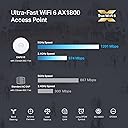
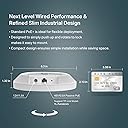
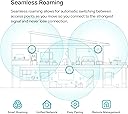
The TP-Link EAP610 Omada is a sleek, ceiling-mount WiFi 6 access point delivering AX1800 dual-band speeds with 1024-QAM and OFDMA technology. It supports mesh networking and seamless roaming for uninterrupted coverage, managed effortlessly via cloud and the Omada app. Powered by PoE+ for easy installation, it offers enterprise-grade security with WPA3 and MU-MIMO, making it ideal for professional environments demanding reliable, high-speed wireless connectivity.


| ASIN | B09XM74VQL |
| Antenna Location | Business, Home |
| Best Sellers Rank | #4 in Computer Networking Wireless Access Points |
| Brand | TP-Link |
| Built-In Media | 12V / 1.5A DC Power Adapter, Ceiling/Wall Mounting Kits, EAP610 V2, Installation Guide |
| Color | white |
| Compatible Devices | Personal Computer |
| Connectivity Protocol | Wi-Fi, Ethernet |
| Connectivity Technology | Ethernet |
| Control Method | App |
| Controller Type | Switch |
| Coverage | Extensive |
| Customer Reviews | 4.6 out of 5 stars 1,494 Reviews |
| Data Transfer Rate | 1800 Megabits Per Second |
| Frequency | 5 GHz |
| Frequency Band Class | Dual-Band |
| Is Electric | Yes |
| Is Modem Compatible | Yes |
| Item Dimensions L x W x H | 6.3"L x 6.3"W x 1.32"H |
| Item Type Name | Access Point |
| Item Weight | 0.39 Kilograms |
| LAN Port Bandwidth | 10/100/1000 megabits per second |
| Manufacturer | TP-Link |
| Maximum Upstream Data Transfer Rate | 1201 Megabits Per Second |
| Mfr Part Number | EAP610 V2 |
| Model Name | EAP610 V2 |
| Model Number | EAP610 |
| Number of Antennas | 2 |
| Number of Ports | 4 |
| Operating System | Open Wrt OS |
| Other Special Features of the Product | WPS |
| RAM Memory Installed | 256 MB |
| Security Protocol | WPA3 |
| Special Feature | WPS |
| UPC | 840030707773 |
| Voltage | 12 Volts |
| Warranty Description | Limited Lifetime Warranty |
| Wi-Fi Generation | WiFi 6 |
| Wireless Communication Standard | 802.11ax |
| Wireless Compability | 802.11ax |
S**E
The perfect solution!
I've messed around with trying to place my router in my house, moving it around, changing antenna, putting in boosters... everything to try to get a better signal. I had heard about these on a podcast and decided to give them a try and they work really well. I went with the Omada ones because I picked up the OC300 as well. It has been SOOOO easy to add new access points where needed. I have one on each floor and one outside and paired with the OC300 makes setting up a breeze. Pros: * Easy to set up - if you don't get an OC200 or OC300 (or use a Raspberry Pi or computer to run their software for free), you simply log in, set up your WiFi networks and you're on your way. With the OC200/300, you just "adopt" the device and it sets everything up. I now change my WiFi every time I have people over so I can personalize it to them and it keeps them off my primary network. * POE - Don't want to run power to where you want this? No problem! Just run an ethernet cable and power it over that. * Comes with everything you need for mounting * Great signal strength and covers a lot of area. * I've bought all of mine on sale but I would pay full price if needed one in a hurry. Extremely good value for what you get. * There are hidden solutions you can get but people have commented how it looks like I have "professional wireless" in my house. These look just like what you'll find in an office, if that is important to you. Cons: * None - I've been very happy. I've switch everyone in my family to these along with an OC200 to run them. Since they have asked me to help them with their networking stuff in the past, it has made my life really easy to be able to run these. I highly recommend them.
C**S
Business-class power, right at home
I am running a full TP-Link Omada ecosystem in my home, and this is my fourth EAP670 V2 access point. At this point, I’m not testing them anymore — I’m standardizing on them. The EAP670 V2 has been extremely easy to set up and even easier to manage through the Omada controller. Adoption is quick, firmware updates are simple, and configuration across multiple APs is seamless. Roaming between units is smooth, and coverage is strong and consistent. What really impressed me is how well these handle load. I regularly have over 150 devices connected across my network at any given time — a mix of IoT devices, streaming TVs, gaming consoles, cameras, and work equipment — and these access points don’t break a sweat. No random drops, no slowdowns under pressure, and no instability when the network is busy. The ultra-slim ceiling-mount design also keeps the install clean and professional looking. The 2.5G port is a big plus if you’re running a multi-gig backbone and want to avoid bottlenecks. If you’re already in the Omada ecosystem or planning to build one, the EAP670 V2 is a solid choice for performance, reliability, and scalability. After four installs, I have zero regrets.
C**G
Amazing AP for the price!
This AP just works. This replaced a couple of work-horse Asus RT APs which I used for many years. I had to use two because one couldn't cover the entire house (two floors + basement). This AP has quite a bit more range/signal strength. It's mounted on the ceiling of my 2nd floor and has very good signal all over the house, including in the corner of the basement. It's also faster when connected with my WiFi 6 devices. Impressive. I use VLANs to segment my trusted, guest, and IoT networks. The Asus APs supported that (using Fresh Tomato firmware), but the simplicity of the UI of the EAP670 made it so much easier to set up and visualize. I was able to mimic the SSIDs of the Asus routers and all clients quickly connected. Another feature which, for me, was very important: PoE. I have a TP-Link switch with 8 PoE ports. Some of them are used for Reolink cameras, but having a spare port, it simplified the wiring and look of the installed AP. One wire for everything. This AP is a steal for it's capabilities. Easy to manage, great signal strength, and looks sleek. Definitely will recommend to others.
M**O
I should've bought sooner.
So i've purchased 3 of these for the house and i continue to be impressed. Easy setup with the APP. Basically you can set one up and plug in the others and they set themselves up. They are nice and simple, so to me they look fantastic. They can be powered via the adapter or POE. They work great POE so far. I purchased some Renewed or used or returned so i paid way less than you would new. There only one rj-45 on the back for internet. The WIFI coverage is impressive even around lots of old plaster, lath and concrete. One on the 2nd floor, one in the basement and one in the garage. Signal is strong but worth the extra money for me to set it up the way i did.
J**E
Great Coverage, but Band Steering Needs Work
The Omada Access Point delivers excellent coverage and integrates smoothly with the Omada Software Controller, making setup and management simple. Speeds are fast and reliable once connected, and roaming between APs works well in my setup. My only complaint is the “seamless” band steering between 2.4GHz and 5GHz — it’s not truly seamless. I’ll sometimes have full Wi-Fi bars but can’t load anything for a few seconds while it switches bands, which can be frustrating during calls or streaming. Overall, it’s still a great AP for the price, but I hope TP-Link improves the band steering in future firmware updates.
N**L
EAP670 V2 absolutely fantastic access point, works at distance, everything has stable WiFI!
I've had routers from many of the usual manufactures; Asus, Netgear, Tplink, Linksys, etc. They are ok, but have issues, I already have good router and I just need them to work as bridges or for their wifi, but they are pretty poor at doing just this function. In fact, I would say most work ok at routers but I don't need them for that, but are poor at WiFI with unstable, unreliable WiFi connections if they connect to devices at all!! I come across Omada range which is really commercial grade WiFi gear but I focused on their access points specifically the EAP670 V2. They are fairly easy to setup, but there is a learning curve which mobile and web app make reasonably easy to setup if you are familiar with wifi routers in general, if not, the learning videos are quite helpful. I have around 100 wifi devices in the home, and I mean everything connected flawlessly and was stable with EAP670 V2, especially in mesh and roaming mode, they would move to another EAP670 V2 as needed. I would caution not turning on all roaming features, just the core ones only, since some older devices just don't work well but EAP670 basic defaults worked well in most cases. I was so impressed I bought the OC200 to help manage all the EAP670 I had purchased, and place strategically around the home to cover all the blind spots but at the sametime minimize overlaps, ensuring to place each of access points at least 12 meters apart to keep interference low between devices. The software looks like its based on opensource SDN technology (a good thing). I would say that Omada brand has made excellent use of its features/capabilities but the most important thing has maintained a level of quality and reliability that truly shocked me after spending 18+ years working with other wifi routers and expecting another so so slight improvement, but the improvement here in terms of quality, reliability and stability overall is a great leap forwards. I have device on wifi network that parodically just failed to connect or stopped working, these now just stay connected and work flawlessly, that amazing! It should have been this way a long time ago, but I guess you have to wait for large leap forwards in quality, reliability and stability. I've had access points and controller for over a month now, working flawlessly. I highly recommend the EAP670 V2 and OC200 controller. I haven't tried Omada brand switches and routers but if their access points are this good it may worth considering in the future. I use Mikrotik brand of switches, routers and I really like them for their deep level of configurability (not for faint of heart or everyone), quality, stability and reliability, interestingly also based on open source technology.
A**R
Perfect for setting up a dedicated wireless video streaming network (home)
(Note: this review is geared toward home consumers with a single unit in mind, not businesses) I have a router from my ISP that has wireless and wired ethernet ports that I've been using for the last few years. Lately, after I'd added yet more 'smart' bulbs and plugs and audio streamers to my network, I noticed that my Chromecast was having trouble keeping up, no matter how low I set the picture resolution (kept running out of buffer). At first, I thought it was the streaming device itself. On a lark, I ordered this up, figuring that the Chromecast might run better off an ethernet port with a WAP connected to it (that's 'wireless access point'; get your mind out the gutter... lol). Sure enough, with this installed, and the Chromecast reconfig'd to use the new WAP as its network... all latency problems are gone. Meanwhile, my old existing network is now free to handle the rest of my traffic, without the Chromecast choking to death. Tests via the 'stats for nerds' within Chromecast showed a speed bump from maybe 2K bps, to 10K bps through the ethernet connection. No more buffering problems whatsover, even at 1080p. Setup is fairly easy. The manufacturer has a phone-based app that can do the setup and control. Just note that when it starts up, it defaults to the non-consumer setup. Switch it over, and with the WAP powered on (and your phone connected to your home network), it will discover your WAP. However, you'll still need to enter the 20-character SSID that's on the back of the unit, into the app. That's in small print, so you'll want a magnifier--or, better yet, also record it (phone, paper, etc.), so that if you ever need it again, you'll have it. These are designed to be mounted high up -- ceilings or walls. The unit comes with a wall wart (unless you connect this to a PoE-enabled device, you'll need this). It does come with a mounting plate. I haven't mounted mine yet; it's working just fine as I'm testing it out before mounting. Except for that minor issue with the control app, having to switch it over every time you start it... the rest of this turned out to be a great solution to my issue. Yes, I paid $100 for a WAP (again, NOT what Cardi B sings about), but that's cheaper than upgrading my internet service with a higher fixed cost every month, new equipment, etc. At some point, I expect the radio to go out in my router (this is what the 'wireless' is called, in hardware). But until then... this will serve just fine for my needs.
D**M
Fantastic system, very happy with this AP setup
I was tired of fiddling with mesh networks so I finally decided to go with an actual AP system on my next home. During construction I wired the entire house with ethernet and ordered 3 of these units along with the hardware controller. I can honestly say it's been one of my best technology purchases. The Omada system was easy to set up (it's worth noting I am an IT professional by trade so I have a respectable familiarity with networking) and I have literally had zero problems with this system over the last year. It just runs flawlessly and silently in the background to the point that I sometimes forget the name of Omada app because I so rarely use it, literally log in every few months to see if the APs have a firmware update and that's about the extent of having to mess with it. Every time I've had a WiFi issue (which has been rare) the root cause was my starlink router, the APs just chug along doing their job without issue. The speeds are always within 1-5% of hardwire speed on my desktop so no major loss of throughput by virtue of being wireless. I plan on buying a 4th unit for my basement soon and potentially an outdoor on to expand my coverage outside. The mounting for the APs is kind of annoying. All my units are ceiling mounted, however the ethernet plug on the unit faces horizontal rather than vertical making the wire through the drop into the plug a bit of a pain. I ended up buying right angle Ethernet adaptors which helps some but it definitely takes a little bit of fiddling, however once they're up you shouldn't need to bother with them for a long time.
M**R
WiFi booster
Has given us WiFi in part of the house which could only get minimum signal. Now getting 500 meg it's even faster than the WiFi down stairs
R**J
Reliable, stable, and a great balance for home or small business
I’m running a full Omada setup at home with a managed switch and controller, and this has been part of the system for about 3–4 months now. It integrated smoothly and adoption was quick. For everyday use — phones, laptops, streaming, and smart home devices — everything has been very stable. No random disconnects, and roaming between APs is seamless when moving around the house. The Omada ecosystem also feels very secure and easy to manage, which gives me peace of mind. One thing to keep in mind is that the unit is on the larger side. It looks clean once mounted, but if you’re looking for something very compact or low-profile, that’s worth considering. There are higher-end models available if you want top-tier performance and don’t mind paying more. But for most home users or small businesses, I think this model offers a really good balance between performance and price. Overall, very solid and dependable. I’m happy with it.
D**S
Produto excelente!
Produto excelente!
S**O
Ideal para oficinas medianas
Excelente calidad de transmisión de datos, alimentan 50 usuarios sin problema a velocidades de 800mb
H**.
Great for General Streaming, Poor for Latency-Sensitive Applications
It has three times the average latency to the router (3 ms) when used as wireless access point compared with my AX92U router directly via wifi(1 ms). Both devices were tested using the 802.11ax (Wi-Fi 6) protocol for connection, with OFDMA and MU-MIMO enabled, yet I could not get the average latency down to 1 ms for the TP-Link, both devices were tested via an AX211 client. I would strongly recommend considering alternatives for gaming such as the Archer AXE75, which has been tested to excel in latency-sensitive applications, including usage as a wireless VR link where latency is key and critical to the experience therefore tested, for the same price, but I had to buy the EAP670 v2 because I wanted POE and the devices aesthetics when mounted on a wall is better with a high WAF.
Trustpilot
2 months ago
5 days ago