Buy anything from 5,000+ international stores. One checkout price. No surprise fees. Join 2M+ shoppers on Desertcart.
Desertcart purchases this item on your behalf and handles shipping, customs, and support to Vietnam.
๐ Elevate your workspace, elevate your hustle!
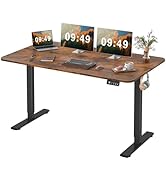
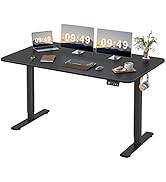
The Furmax Electric Height Adjustable Standing Desk combines a large 48x24 inch premium wood desktop with a quiet, durable electric lift system featuring memory presets. Its sturdy T-shaped steel frame ensures stability across a height range of 28.7 to 46.4 inches, promoting healthier work habits by enabling seamless sit-stand transitions. Designed for modern professionals seeking ergonomic efficiency and style, this desk supports up to 145 pounds and integrates safety features like anti-collision and overheat protection.


| ASIN | B09W2MZ5FX |
| Additional Features | Adjustable Height |
| Assembly Instructions Description | Included |
| Base | Metal |
| Base Color | Brown |
| Base Type | Leg |
| Best Sellers Rank | #17,655 in Home & Kitchen ( See Top 100 in Home & Kitchen ) #40 in Home Office Desks |
| Brand | Furmax |
| Brand Name | Furmax |
| Color | Brown |
| Customer Reviews | 4.4 out of 5 stars 4,988 Reviews |
| Desk Design | Standing Desk |
| Desk design | Standing Desk |
| Finish Types | Laminated |
| Frame Material Type | Steel |
| Furniture Finish | Laminated |
| Furniture Leg Material | Alloy Steel |
| Hutch Material | Wood |
| Included Components | Cable Hole, Headphone Hook |
| Includes All Assembly Tools | No |
| Is Customizable? | No |
| Is Electric | Yes |
| Item Depth | 24 inches |
| Item Dimensions | 24 x 55 x 48 inches |
| Item Dimensions D x W x H | 24"D x 48"W x 28.7"H |
| Item Type Name | Home Office Computer Desk Memory Preset with T-Shaped Metal Bracket,Brown |
| Item Weight | 39.7 Pounds |
| Lifting Mechanism | Electric |
| Manufacturer | Furmax |
| Manufacturer Part Number | 20FW |
| Material Type | Metal |
| Maximum Height | 46.4 Inches |
| Maximum Weight Recommendation | 145 Pounds |
| Minimum Height | 28.7 Hundredths-Inches |
| Model Name | Electric Height Adjustable Standing Desk |
| Model Number | ST241 |
| Mounting Type | Freestanding |
| Product Dimensions | 24"D x 48"W x 28.7"H |
| Product Grade | New |
| Recommended Uses For Product | Working |
| Required Assembly | Yes |
| Room Type | Office |
| Shape | Rectangular |
| Size | 48 Inch |
| Style | Modern |
| Style Name | Modern |
| Tabletop Thickness | 0.6 Inches |
| Top Color | Brown |
| Top Material Type | Wood |
| Warranty Type | Limited |
| Working Surface Diagonal Length | 56.56 Inches |
K**E
Great Budget Standing Desk with a Few Small Assembly Tips
The desk arrived right on schedule and was packaged securely. I went with the black color and the finish looks clean and solid in person. It feels sturdy once fully assembled. Putting it together was pretty straightforward. The included tool is enough for most of the job. Youโll only really need a second person when flipping the table upright โ everything else can be handled solo. The tabletop comes in two sections, but once assembled they sit almost perfectly flush. Thereโs barely any visible gap between them, and it looks seamless from normal viewing distance. The height adjustment is smooth and quiet, which I really appreciate. One small downside: the small wood screws that connect the two tabletop pieces (using the steel bracing plates) could be better quality. The heads can strip if youโre not careful. A few tips from my experience: 1. Make sure youโre using the correct size screwdriver so it fits snugly in the screw head โ thatโll help prevent stripping. 2. Avoid using power tools unless youโre absolutely sure of the bit size. The included hand tool actually works well. 3. The bracing plate holes may look slightly misaligned with the pre-drilled holes. That seems intentional to help pull the two tabletop pieces tightly together. Tighten both screws gradually instead of fully tightening one at a time. 4. Pay close attention when installing the rotating shaft that connects the legs. Both legs need to be set to the exact same height before attaching it. Measure and adjust using the leveling screws at the bottom to make sure everything lines up properly. Overall, Iโm happy with the purchase. For the price, it feels like a solid, good-looking desk that performs well.
S**E
Nice Desk
Easy assembly. Works as advertised. Perfect no frills desk. Sturdy, metal legs. I have 2 monitors on it, keyboard, mouse, and still have extra space. I am 6'2" and the desk goes up high enough for me.
S**I
Value for money
I replaced my L-shaped desk with this desk, I think this was a good decision for work from home desk. The L-shaped desk was only 18" wide, not leaving enough space for keyboard after placing 32" monitor. Arrived on time, well packaged. Sturdy and good finish, I bought mushroom color. Very easy to assemble with one tool provided with the package. You need second person only to turn around the table, otherwise one person is enough. Top board is in two pieces but becomes quite flat hardly leaving any gap between the two pieces after assembly, see pictures. Very smooth and low-noise movement. The small wood screw heads' hardness can be improved, they tend to loose shape while tightening. These screws are used to tie the two top boards together via steel bracing plates. Some tips for assembly: 1. To avoid shearing of screw heads use the right size of the screw driver that fits well in screw heads. 2. Do not use power tools, better try with the tool provided with the package if you don't have the right screw driver. 3. The tie-in bracing plates' holes don't seem to match the pre-drilled holes in the boards, which is true. But I think this is kept purposely so that the two pieces press against each other well in the final assembly for a minimum gap. You need to work on each of the two screws progressively, do not tighten one screw fully. 4. Follow the assembly instructions specially while assembling the rotating shaft (that transmits motor torque to the other leg), which states to maintain the same height for both legs before assembling this shaft. Better you measure the height and adjust using the adjustment screws at the bottom of the legs. Overall this is a good value for money. In the past I have helped my two sons in assembling their tables, which were of course kind of custom made and much more expensive. For me this one is really a good desk.
S**S
Cheap desk, it works, assembly instructions need improvement(read this)
This is probably the cheapest, electrically powered, 55-inch wide standing desk on Amazon. You usually get what you pay for and this thing manages to cross the finish line without long-term injuries. My main concerns are I) rather thin, particle board desktop II) dubious assembly instructions and III) no completion certificate. I) The desktop is particle board with laminated edges and surfaces. While that's fine for the price, be sure to check for grievous damage as soon as you unbox the desk for assembly(other reviews show also). Mine just had a minor crack that would not warrant sending the whole thing back so I just accepted it. Being so thin, I'm worried about putting my desktop computer, giant-ass monitor, UPS, etc. on it. I'm sure it will be fine, but def not for hoisting lovers, resting weights between reps or performing emergency surgery upon. II) The graphic assembly instructions cover the main steps but wouldn't fly at IKEA academy in Stockholm or Gothenburg (ok, maaaaybe Malmรถ if research the easy instructor and register early to get a seat). Here are amendments to the assembly steps you should read before beginning each step: Step 1 - Hand-tighten these bolts to snug, plus one-quarter turn. Do NOT over-tighten to avoid shearing out the threads in the holes. Notice upright tabs on B7 are facing front. Step 2 - NOTICE the leg assembly has rotated 180 degrees, this will happen a lot in the instructions. Also, go ahead and screw the plastic feet pads all the way so you'll get an idea that this thing is even when complete. Step 3 - Leg assembly is now upright, but has rotated 180 degrees(again!). When screwing down the desktop supports(B6), screw down until not even snug, ensure they are evenly aligned with the outside edges of the legs and the leg assembly and support holes are centered, then tighten down(see note above about tightening to snug plus a quarter-turn). Step 4 - Looking good, good-looking! The AC adapter retaining bracket has a screw hole but there's no hole for it on the crossbar *shrug* Step 5 - Get a male hex socket that fits in the hole at the top of each leg and make sure the legs are lowered down so they will be aligned BEFORE you insert B8. If either is misaligned with the other by 1/6 of a turn, B8 will fit but your desk will be forever tilted to one side an annoyingly few millimeters. Step 6 - I lightly hammer these wood pegs in to one side before going to mate the desktop halves. I use a light-duty electric driver to tighten the screws down on the metal joining plates to just less than snug, then once everything lines up square I *hand* tighten. Since this is particle board, again, do NOT over-tighten or the screws will rip out that tasty particle board material and you will be left with tears and fist-shaking (skywards). Step 7 - Check yo self and that the leg assembly is oriented with the motor on the left. Now you're tightening down the screws with a felt/rubber washer in between. Easy to over-tighten here, don't do it man! Step 8 - screw on the control module, there's some play here if you want it sticking a bit ahead or behind the front of the desk so make a potentially life-changing power call and DO IT. Step 9 - wires! No EE degree required, all the plugs are fitted uniquely, but you may want to run the wire from the control module to B11 behind the motor. If there's fire/sparks/crackling stop immediately, unplug everything and call your emergency contact for house stuff. Step 10 - adhesive cables guide, whatever floats your boat, personally I use velcro straps like a baller. Step 11 - I hate these stupid wire brackets, they usually pop out and end up stabbing someone. If you're going to install it, pinch it hard like you're taking your relationship into potentially new and exotic places. Step 12 - Look, you made it! Medals for everyone! Stick in the 1992-era cable port cover if it really lends to a sense of accomplishment or just toss into the recycling bin and use something way more awesome like a USB hub, camera holder or a little, comical periscope with an eyeball in it. III) Wow, you read this far? YOU deserve the completion certificate! Go photocopy one from a kindergartner's wall, then carefully apply blank mailing labels and write your name on it and then send mom a pic! Cheers
Z**I
Incredible price for a high qality desk
Easy to put together. It goes up slowly and easily. It is not bumpy or rough so things dont fall when it goes up or down. I'm 5'1 and when fully raised it comes to just about my chin, so the height is amazing. It's perfect for everything. The cost was exceptional. It feels like a steal with the price I paid for it
P**T
Good Desk
Good desk, went together easy and looks nice. Not the most solid tabletop seeing as it's two pieces but it works just fine for what it needs to. Customer support was also fantastic and helped me out with everything with great timing
A**A
Perfect for Work-at-Home / Amazing Value for Price
This review is the "brown" 55 x 24 inch Electric Height Adjustable Standing Desk (for work proprietary reasons, I cannot provide a photo): I mulled over which standing desk to purchase for quite some time before finally selecting this model, and I'm so happy I did. I had originally bought a huge corner desk (not adjustable) for work-from-home tech job, but I found that sitting for 8-hours a day, particularly from home, was killing my back and my neck. I knew I needed a standing desk, but I was so hesitant about the purchase because I didn't want to break the bank on another desk when I had only had the first desk for less than 3 months. This desk is relatively easy to put together. I had it done in about 30/45 minutes. I've been using it now for about 5 months, and I raise and lower it multiple times a day while working. It has never faltered. It's got 2 programmable settings for height, so obviously I keep one at my standing height and the other at my sitting height, and I can easily toggle between the 2 while I'm working. I did purchase a monitor stand that attaches to the back of the desk and holds the monitors (dual) above the surface of the desk, so I've got more space. The desk is actually much larger than I thought it would be, but I imagine the size would be impacted a bit if the monitors had to rest on the desk. I'm not sure how or why, but the cost of this desk has dropped about $20.00 since I purchased mine. All in all, I would HIGHLY recommend this desk if you're on a budget and would like the option of standing/sitting while working. The motor has never had one issue, and I really do like the faux wood grain of this desk. It's not "cheap" looking at all. This is one of the better purchases I've made.
A**Y
Great desk, works as advertised, highly recommend
I enjoy this desk very thoroughly, I've had it for about 2 weeks, and it's done exactly what you'd expect a standing desk to do. Let me give the pros and cons: Pros: -It can go from its lowest setting to it's highest in about 20 seconds -The box came with zip tie/command strip thingies to attach any cords to the bottom of the desk so they don't just hang -It's very spacious and sturdy enough to support a 5'9, 210 lbs man leaning on it when in it's standing position -There is TONS of leg/foot room, and you could probably even store some small objects under the desk and still have uninhibited space -Height settings make it very easy to swap between heights with just the click of a button -Price is extremely affordable -Came with an extra piece for every single screw and bolt in case one went missing Cons: -This desk REALLY likes fingerprints, much like a Tesla Cybertruck, you cannot touch this thing without attaching a perfect fingerprint on the surface. However, it's very easy to clean off with a wet wipe so it doesn't really matter -I have had a small problem with the height settings where it would sometimes wipe the height that I set it to, and I'd have to reset it, but I didn't really read the instructions too closely, so maybe that's user error -The little screwdriver they provided is kinda bad, would recommend using an actual screwdriver when assembling Assembly time was about an hour and a half, but that was after I didn't read the instructions right and installed the desktop upside down (thankfully it was a super easy fix and didn't ruin anything) so if you're more vigilant than I, it should only take about an hour and 15 minutes realistically. All in all, it's an affordable minimalistic desk that has treated me well so far, I would recommend it.
Trustpilot
1 day ago
2 days ago