Buy anything from 5,000+ international stores. One checkout price. No surprise fees. Join 2M+ shoppers on Desertcart.
Desertcart purchases this item on your behalf and handles shipping, customs, and support to Vietnam.
⌨️🖱️ Elevate your desk game with ergonomic precision and wireless freedom!
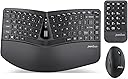
The PerixxPERIDUO-606A is a sleek, wireless 3-in-1 ergonomic desktop set featuring a compact split keyboard, a vertical 6-button mouse with adjustable DPI, and a separate numeric keypad. Designed for professionals seeking comfort and efficiency, it offers adjustable typing angles with a built-in wrist rest and a reliable 2.4 GHz wireless connection with up to 33 feet range. Compatible with Windows systems, it ensures easy plug-and-play setup without driver installation.


| ASIN | B09NDSNMB6 |
| Antenna Location | Office, home |
| Are Batteries Required | Yes |
| Best Sellers Rank | #418 in Computer Keyboard & Mouse Combos |
| Brand | Perixx |
| Color | Black |
| Compatible Devices | Laptop, Personal Computer |
| Compatible Operating System Family | Windows |
| Connectivity Technology | Radio Frequency |
| Customer Reviews | 3.6 3.6 out of 5 stars (251) |
| Global Trade Identification Number | 04049571006284 |
| Hand Orientation | Ambidextrous |
| Keyboard Description | Wireless Ergonomic Split Keyboard |
| Keyboard Layout | QWERTY |
| Manufacturer | Perixx Computer GmbH |
| Mfr Part Number | 11967 |
| Model Number | PD-606AUS-11967 |
| Movement Detection | Optical |
| Number of Batteries | 4 AAA batteries required. |
| Number of Keys | 104 |
| Operating System | Windows |
| Other Special Features of the Product | Ergonomic, Lightweight, Portable |
| Power Source | Battery Powered |
| Unit Count | 1.0 Count |
| Warranty Description | 12-month limited warranty (including 30 days return policy) for items directly bought from Perixx USA., 30 days return policy, and 1-year manufacturer warranty for items sold by Resellers and Distributors, e.g. Amazon.com. The buyer is obligated to return the product back to the manufacturer's headquarters at their own expense. |
B**Y
Love it but for smaller hands
I love this keyboard with it’s true 10-key pad with the 00 key and large bold numbers. It makes data entry so much quicker and I like that I can move the number pad where I want it. I always feel like the 10-key side of a normal keyboard is in the way. It’s a very compact typing keyboard and takes some getting used to but works great for me. WARNING: If you have large hands or longer fingers this won’t be comfortable. My hands aren’t large by any means, see pic for scale. Also I love the mouse design which really helps with my wrist pain.
L**R
Junk after one year
This product worked well for me for the first year. I am left handed and really appreciate the separate numeric pad that I use on the left side of the keyboard. With that said, after a year the mouse began acting sluggish and not responding for portions of seconds. Even when I supplied fresh batteries, the problem persisted. The keyboard and numeric pad respond just fine, but the mouse is now unusable, as it doesn’t respond to movements and clicks instantly like it should. This was a relatively expensive set to work for less than two years for me.
H**D
Good budget set of keyboard/mouse
Great price, no functional issues. Fairly quiet, nice ergonomic layout. The key press is heavier than I would like. It's acceptable and I'd probably make fewer typo errors but I think prefer lighter presses. The mouse click is fine.
J**T
Comfy but Buggy
This thing is buggy AF. But once you get used to the bugs it works fine. The CTRL key does not work for selecting multiple items, the five key occasionally works (I tried to use the number key just now but it wouldn't work so I typed it out). I also get weird cells selected in Excel and have to click on another window to un-select them. Probably should spend a few more bucks for the HP one which I have at my office(I use this one at home) and it works perfect 100% of the time. For the ergonomics it is great!
H**D
Love this set, but would tweak a few things
I use this set of input devices on mac. Traditionally I have used the Microsoft Sculpt, which in my mind is just about perfect. However, sculpt has an annoying problem where over time the left mouse click fails. And eventually keyboard keys will fail. My cynical side says they have made these defects on purpose as it has caused me to purchase like 10 sculpt sets over the years. But I think I am moving away from these issues and going with this Perrix set which is a pretty good knock off. There are just a few issues which make me question the decision: 1. Typing feel is not quite as nice as sculpt, but close enough. 2. The mouse is a little too small for my large hands. I am adjusting 3. Mouse scroll wheel can't horizontal scroll, only vertical and click. 4. And the biggest issue, the window key is too small. This equates to the command key on mac and I use it all the time. This is almost a deal breaker, but I am trying to get used to it. Outside of these small issues, this set is wonderful. The ergonomics are great. They split keyboard and the magnet attached wrist rest that can raise the keyboard in the back make all the difference in putting your wrist in a natural position. Having the separate number pad is a complete game changer. It allows the mouse to be much closer to the keyboard, saving a great deal of awkward motion reaching for a mouse which is too far away. I personally don't use the number pad too often, but if I am doing a bunch of numbers related work, I turn it on and have a nice full sized dedicated number input device. The keyboard has good light indicators and an interesting scroll wheel at the center of the keyboard. This is an improvement over sculpt which removes this area for esthetic reasons. If I can get used to the small command key and the set can last longer than the sculpt, it looks like it will be my new go to. Looking good so far.
E**I
Comfy, but stricter than MS Sculpt layout
My trusted MS Sculpt keyboard was really at its end after nine years of heavy use. This Perixx looked like a nice replacement. The hands are placed more apart than the MS Sculpt, so where it would let you cheat a bit (hitting the y with your left index finger), this keylayout does not allow for that. That wil take some time getting used to. Overall, I like the keyboard and the feel of the buttons. It is just enough clicky but much quieter that my previous keyboard. I also like the more vertical grip of the mouse. It feels like a very natural position for my hand to be in. Let's see if it will hold out as long as the previous keyboard.
T**N
Wanted to Like
I needed a Wireless keyboard / Mouse combo to use at home and the office, where I go two or three days per week. I saw that the Perixx PERIDUO-606A has decent reviews. I liked its small, compact size and similar design to the MS Surface keyboard. Initialing I was happy with keyboard, keys feedback was okay, placement hands good, I did not like the smoothness of the keyboard, felt like my hands would sleep but would go away as I use the keyboard. Had keyboard for about 1.5 weeks and the wireless mouse started to act up, first I had to reset it, than the scroll feature kept causing the screen to loop and keep scrolling. Tried to reset, restarted laptop and it would fix it, but the continuous scrolling would comeback. wanted to like, great price, okay build quality. I needed a wireless keyboard/mouse combo to use at home and in the office, where I go 2 or 3 days per week. I came across the Perixx PERIDUO-606A, which had decent reviews. I liked its small, compact size and similar design to the Microsoft Surface keyboard. Initially, I was happy with the keyboard. The keys had okay feedback, and the hand placement was good, but I didn't like the smoothness of the keyboard. It felt like my hands would slip, but that feeling went away as I used the keyboard. After having the keyboard for about 1.5 weeks, the wireless mouse started to act up. First, I had to reset it, and then the scroll feature kept causing the screen to loop and keep scrolling. I tried resetting it and restarting my laptop, and it fixed the issue, but the continuous scrolling would come back. I really wanted to like this combo because of its great price and okay build quality.
M**S
I have been looking for a keyboard that was similar to the discontinued Microsoft Sculp. This keyboard has met my expectations and is easy to use, has great functionality and is a fraction of the cost. Deliver was super fast too.
一**庵
この製品はANSI準拠のUS配列のキーボード(101/104)なので、言語が英語の場合には合っていると思いますが。 日本語で入力する際には色々PC側の変更が必要になります。 「ひらがな」キーや「半角/全角」キーなどもないので、今まで日本語配列キーボードを使っている人は戸惑います。 私も導入してPCの設定でJIS配列に変換したり、 enterキーが小さい(英語キーボードはENTERが小さい、JISはL字で大きい)ので上の”」”キーをPowerToysでenterキーに変換しましたが、やはりどうしても様々なところで予期せぬ変換違いや動作違いがあって諦めました。 もともと使っていたのはMicrosftのergomomics Sculp仕様だったので、次のキーボードがなかなか見つかりません。 日本語にこのキーボードは合っていないというだけで、英語で入力される場合にはなんの不都合もありません。 【良いところ】 ・キーボード、マウス、テンキーが別々でマイクロソフト スカルプト エルゴノミック と同じです。 ・それぞれにON-OFFのスイッチがついていて、電池の消費を抑えられます。 ・手首の角度調整が手前上げ、奥上げ両方ができるようになっています ・キータッチも押し込みが気持ちよく、秀逸です。 ・パームレスト部分は樹脂で何かをこぼしたり、つけたりした場合でも一拭きで取れます。 大変よくできているキーボードです! ただ!ただ!! 日本語との相性が悪すぎる orz
H**T
Good product, good price!
J**R
No corresponde al teclado latino por lo que las teclas no son las adecuadas
A**R
Led indicators are good for Connect, Caps lock, Scroll lock which certain keyboards do not provide nowdays. Right Shift key should have been wider. Main keyboard power on switch should have been on the side or top rather than bottom of the keyboard. Separate Numeric keypad is good but numeric keypad is not as silent as the main keyboard. Mouse is for small-medium sized hand.
Trustpilot
2 months ago
2 weeks ago