Buy anything from 5,000+ international stores. One checkout price. No surprise fees. Join 2M+ shoppers on Desertcart.
Desertcart purchases this item on your behalf and handles shipping, customs, and support to Vietnam.
🚀 Elevate your desk game with the TS4 — where power meets precision in one sleek hub.
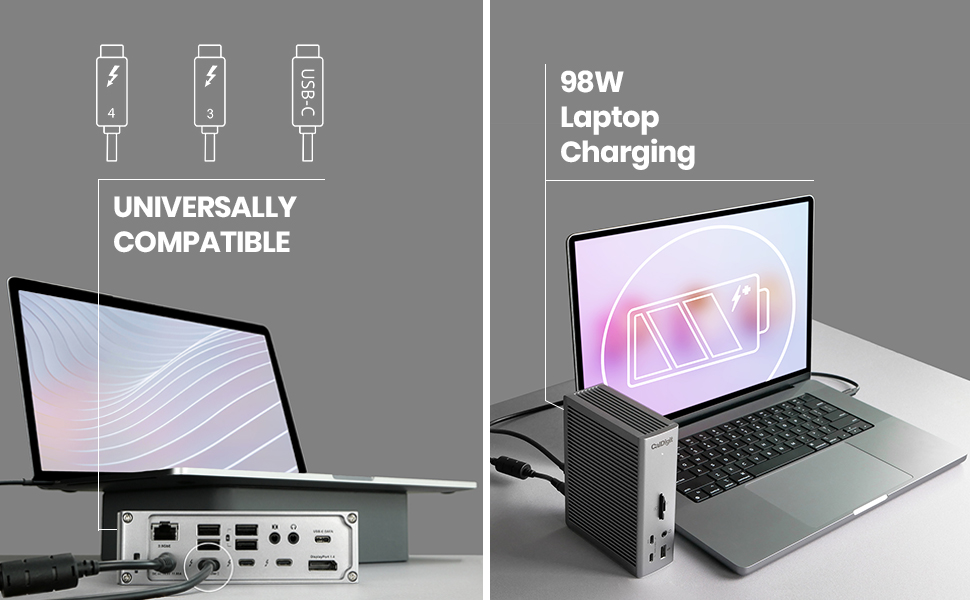
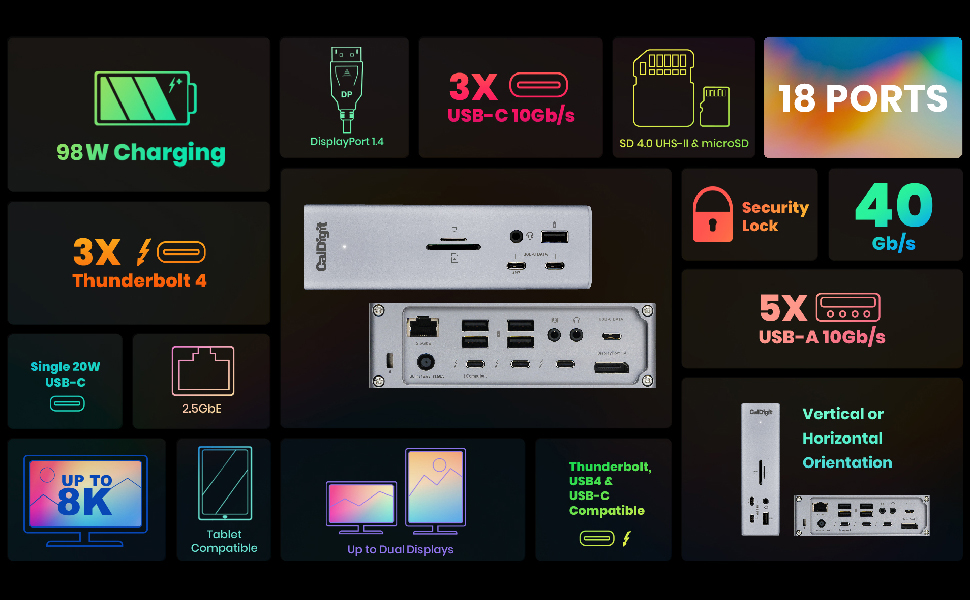
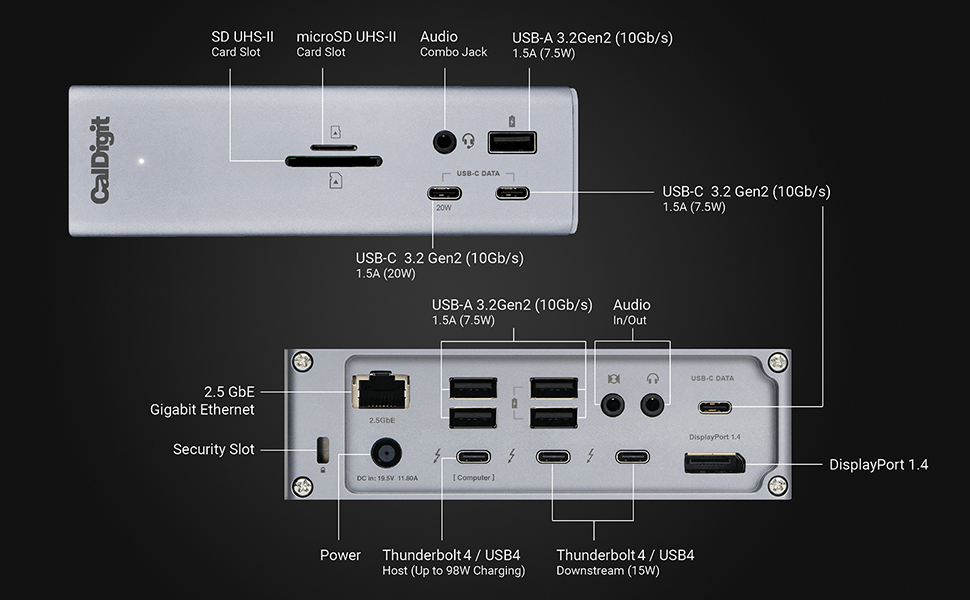
The CalDigit TS4 Dock is a premium Thunderbolt 4 docking station featuring an industry-leading 18 ports, including 3 Thunderbolt 4, 8 USB 10Gb/s, DisplayPort 1.4, SD/microSD card readers, and 2.5GbE Ethernet. It delivers up to 98W power delivery for fast laptop charging and supports ultra-high-resolution displays up to 8K single or dual 6K/4K depending on your system. Universally compatible with Thunderbolt 4/3, USB4, and USB-C devices across multiple platforms, the TS4 centralizes connectivity and power into a single cable, transforming laptops into full desktop workstations with unmatched stability and speed.


| ASIN | B09GFRPGWZ |
| Best Sellers Rank | 8,147 in Computers & Accessories ( See Top 100 in Computers & Accessories ) 66 in Docking Stations |
| Brand | CalDigit |
| Brand Name | CalDigit |
| Colour | Grey |
| Compatible Devices | Laptops |
| Compatible devices | Laptops |
| Customer Reviews | 4.4 out of 5 stars 254 Reviews |
| Hardware Interface | Thunderbolt |
| Hardware interface | Thunderbolt |
| Item Dimensions L x W x H | 11.3L x 4.2W x 14.1H centimetres |
| Item Weight | 1.41 Pounds |
| Manufacturer | CalDigit |
| Number of Ports | 18 |
| Product dimensions | 11.3L x 4.2W x 14.1H centimetres |
| Smart Home Compatibility | Not Smart Home Compatible |
| Total USB Ports | 3 |
| Total USB ports | 3 |
| Unit Count | 1.0 count |
| Wattage | 98 watts |
T**U
The TS4: an impressive piece of kit
The CalDigit TS4 is a genuinely outstanding piece of engineering that has moved me to spend time writing this review. The TS4 solves a problem that isn’t obvious until you think about it: laptops are extraordinarily powerful, but they are not, by themselves, good “desk computers”. The moment you want to add a proper display, stable power, wired networking, audio devices, and peripherals, the experience quickly becomes messy, fragile, and unreliable. The TS4 exists to resolve that complexity. The genius of the TS4 is not simply the number of ports it offers, but the way it centralises responsibility. Instead of the laptop negotiating power, displays, audio, and data independently - often badly - the TS4 becomes a calm, authoritative traffic controller. It even has an ethernet port. One cable connects the computer to the dock; everything else stays put. Sit down, plug in the Macbook once with the single proprietary cable, and work. In the past I found that power delivery is where many docks quietly failed. The TS4 does not. Its power supply is substantial, stable, and deliberately over-specified. In everyday use means that it doesn’t brown out, does not behave erratically under load, and does not demand the laptop to make uncomfortable compromises. My high‑resolution studio display, audio devices, and peripherals are all supported simultaneously without drama. You don’t notice this when it works well - and that is the point. The TS4 handles demanding displays easily, carrying video, audio, camera, microphone, and USB data in parallel without flicker, dropouts, or failures once properly initialised. It behaves like professional equipment rather than consumer gadgetry. What distinguishes the TS4 most clearly, however, is its emphasis on correctness and stability rather than shortcuts. Thunderbolt is immensely powerful but also exacting. The TS4 enforces clear roles - there is a computer port, and there are downstream ports - and it insists on doing things properly. The only thing to watch out for is that it can feel unforgiving during setup, but the reward is a system that, once established, stays established. Also, I got ChatGPT to advise me which cable goes where, and this simplified the process vastly. The TS4 doesn’t need constant attention once it is set up. There is also a great deal of thoughtful design evident in the small things: sensible port placement, a solid enclosure, a power supply that does not pretend to be smaller than it is, and a layout that assumes the device will live on a desk for years rather than months. If I had to summarise the TS4 in a single sentence, it would be this: the CalDigit TS4 turns a laptop into a proper desktop computer the moment you plug in one cable, not by magic, but by good engineering. The combination of power, straightforwardness and stability is rare. It is why the TS4 stands out, and why it earns my genuine respect having lived with it for over 3 years now.
T**E
Impressive!
My old desktop machine was starting to show it's age, so I looked for solutions around my much newer Win11 Samsung laptop and this is what I came up with! As a hobbyist photographer, 2 monitors and lots of storage is a must and the TS4 enables that beautifully! Currently plugged in to the dock are my wired internet, 2 x full HD monitors, 3x hard drives, wireless keyboard & mouse and my speakers - all running from just the one TB4 cable which also charges my laptop with hardly any noticeable slowdown on any device! The TS4 required literally no set-up and worked instantly with all my devices, though I'd guess that the latest version of Windows 11 is needed to take full advantage of this remarkable device. Yes it's a little pricey, even at £320 in the Black Friday sale, but it's reliable and solidly built and should last for a few years before the next leap in connectivity technology renders it obsolete. Definitely recommended!
M**H
Excellent dock with great customer support
I recently got an LG 32GS95UV for my work from home setup and it lacks the KVM feature that many monitors have. So I decided to pick up a Thunderbolt 4 dock and the CalDigit TS4 seemed to tick all the boxes. The 96W charging tops most monitors that I saw and the amount of ports on the dock makes it so that one cable is all I need to move from my work MacBook to my personal MacBook. The dock features a layout that means you can leave the front completely free of cables unless you need to plug something in quickly. This is great for a clean setup that doesn’t involve cables coming out from both sides. The dock is built like a brick, in a good way, it’s completely made of metal with rubber layer on the vertical side, or optional rubber feet on the horizontal side. The LED is small and not offesnive, and the dock saves horizontal space unlike other docks that are shorter but much longer. The most important thing about this dock for me, and this is not advertised on their website (it’s listed as a max of 4K 144Hz), is that it can drive the display at 4K 240Hz resolution. I see no difference between directly connecting the monitor or going through the dock. This works with both the built in DP port, or plugging a DP-USB-C cable to the Thunderbolt port on the back. Amazon let me down with this dock, I got it during the Black Friday sales on the last day, and it arrived with a USB-A to USB-C cable. I assume someone bought this and swapped the cable then returned it as new, and Amazon didn’t verify the return correctly and just put it back in the new stock. Amazon declined to offer a replacement and only offered a refund, which means I’d end up losing on the Black Friday sales, and it’s a toss whether the person processing my return sees that a cable is missing and charges me for the issue. I thought I’d give CalDigit support a shot even though I understand this is completely not their fault, but they came through and just sent me a free Thunderbolt 4 cable to the address on the order. This was not something I expected and I’ll probably be a CalDigit customer for life after this. Update: I ended up sending the dock back, but only because I decided to upgrade to the TS5 Plus. The TS4 Plus was great, and the 4K 240Hz was also good, but connecting any device to the other ports on the back would drop this to 120Hz. I decided to try the TS5 Plus before my return period was over, and even though the host is a TB4 device, the grouping of ports on the back gives me more flexibility. This is still a 5 star dock, I just have a setup that needs a different port arrangment.
R**T
The best computer Thunderbolt Dock out there
I recently purchased the CalDigit TS4 Thunderbolt 4 Dock, and it has been an absolute game-changer for my workspace. This dock has exceeded my expectations in terms of build quality, connectivity options, and overall performance. Impressive Connectivity: The CalDigit TS4 Thunderbolt 4 Dock is a connectivity powerhouse. With four Thunderbolt 4 ports, USB-C and USB-A ports, an SD card slot, and audio jacks, it provides a comprehensive solution for connecting all your peripherals in one central hub. Sturdy Build Quality: The dock's build quality is commendable. The brushed aluminium finish not only looks sleek but also adds a premium feel to your workspace. The compact design helps in saving desk space and contributes to an organized setup. Power Delivery: The power delivery is a standout feature. It not only efficiently charges my laptop but also ensures that all connected devices receive ample power. This eliminates the need for multiple power adapters cluttering the workspace. Negatives: Price: While the TS4 offers a robust set of features, its price may be a deterrent for some users. There are more budget-friendly options on the market that might suit users with less demanding connectivity needs. The CalDigit TS4 Thunderbolt 4 Dock is a robust solution for those seeking extensive connectivity options and efficient power delivery. While it comes with a higher price tag, the build quality and performance justify the cost. Despite these drawbacks, the TS4 remains a solid choice for users looking to enhance their workspace connectivity.
R**G
Worth every penny - revolutionised workflow (MacBook Air M1)
Worth every penny. I do professional photo & video work, as well as music production for fun. All of this on a MacBook Air M1 with 2 ports. [Slight ramble incoming - I've added some backstory in case others are in a similar predicament] I got sick of constantly juggling hard drives, devices and power cables, all with unreliable USB dongles/hubs that were *still* limited by ports and were prone to ejecting/cutting out randomly. A simple task like backing up one hard drive to another became an ordeal. Everything was becoming friction and it was hindering my work and efficiency. It got to the point I was considering spending £2.7k to upgrade my MacBook Air M1 to a Mac Studio M4. After a lot of back and forth, I realised I would be paying nearly £3k just to have more ports. Although an increase in performance would be great, I can still do my work with the machine I've got. An M1 Air is still incredibly capable for creative work. So I started shopping around for Thunderbolt hubs and narrowed it down to OWC's hub, as I have purchased gear from them before. They are expensive but high quality. However, after tentatively diving into Reddit, the CalDigit TS4 continually appeared as the recommendation over the OWC offering and others. After some digging into specs, their website, YouTube, etc, I took a punt at the CalDigit. At the time of writing this, the unit cost £360, which I would have said was an insane price to pay for a USB hub. I'm now ashamed I didn't fork up the money sooner, and it is worth every penny! It's COMPLETELY streamlined my workflow and saved me from needing to pay £££ for a new machine just to have more ports. The unit feels high quality, very Apple-like in its design, I haven't had a single issue with it so far. Some folk complain about it heating up - checking it now and it is definitely warm, but never worryingly hot. No different to a laptop that's running warm after heavy use. Devices currently plugged in: - Laptop hooked up via TB4 - 4 separate external SSD drives - SATA USB Dock (which contains 2 SATA drives) - Focusrite Saffire audio interface - MIDI Keyboard - Monitor (Asus 27" ProArt) - CFexpress reader - Almost always have an SD + MicroSD card plugged in simultaneously - There's *still* spare ports for anything needing plugged in without removing something else I can't stress enough how coming home, putting the laptop on the desk and plugging in ONE cable allows everything to be connected in its rightful place, hooked up to the monitor, all while powering the laptop and (if needed) there's still 1 more port free on the laptop. Combine this with the CalDigit Docking Station Utility - when I'm about to leave the house, I simply hit "Eject All", does what it's supposed to do, and I can walk away knowing everything is securely disconnected. Long story short, if you are a creative professional - get it. Not only are you streamlining and simplifying your workflow, you're future-proofing your setup. This hub can carry over to your next machine upgrade without worry about lack of ports. Amazing device.
G**S
Not cheap, but a great one
I had an iMac and a MacBook Air, and I wanted both a desktop-like experience and mobility. However, managing files, programs, updates, and setups between the two computers was cumbersome — not to mention the doubled cost of software licenses. Then I replaced them both with a MacBook Pro and CalDigit TS4 hub. Now I finally have what I always wanted: a powerful desktop computer with multiple monitors, a full-size ergonomic keyboard and mouse, a wired network connection, plenty of USB-A and USB-C ports, and card readers. And when I travel, I just disconnect a single cable and I'm ready to go with all my files and programs. The CalDigit Thunderbolt hub isn't cheap, but it's worth the investment. No problems, no connection delays, fast transfers. I'm very happy with it.
C**E
CalDigit TS4 Thunderbolt 4 Dock: A Costly Frustration for Multi-Monitor Workflows
As a creative professional who relies on multiple high-resolution displays for work, I was excited to purchase the CalDigit TS4 Thunderbolt 4 dock to streamline my workflow. Unfortunately, my experience with this dock has been far from satisfactory. At a hefty price of £400, I expected the TS4 to deliver seamless performance and reliable connectivity. However, I have been plagued by frequent crashes and inconsistent display output. Sometimes, one or both of my 27-inch Dell monitors would fail to connect, leaving me with a single display or no display at all. These issues have been incredibly disruptive to my workflow, forcing me to troubleshoot and reconnect my devices constantly. The frustration of dealing with these problems has far outweighed any benefits the dock may offer. While the TS4 boasts a comprehensive selection of ports and a sleek design, its performance has been a significant letdown. To make matters worse, the customer service from CalDigit has been virtually nonexistent. My attempts to reach out for support have been met with long delays and unhelpful responses. Key Issues: Frequent crashes and system instability Inconsistent display output, with monitors failing to connect or displaying errors Issues persist even after updating firmware and drivers Lack of customer support, with long wait times and unhelpful responses Recommendations: Consider alternative Thunderbolt 4 docks with a proven track record of reliability and responsive customer support Seek professional support if you encounter similar issues with your CalDigit TS4 dock I strongly advise potential buyers to carefully weigh the risks and potential benefits before investing in the CalDigit TS4 Thunderbolt 4 dock. The high price tag and lack of customer support do not justify the frustrating performance issues I have experienced.
S**V
Solid Docking Station — Worth Every Penny
I’ve been using this dock to charge my laptop and simultaneously connect to two external displays — and it performs flawlessly. It handles power delivery intelligently, supports charging and display output together, and helps reduce cable clutter. Previously, I used several cables directly on my Mac and ended up with overloaded ports that even got damaged. Now, with a single compact dock that supports multiple devices efficiently, I feel much safer and more confident using all my gear together. For anyone plugging in multiple devices or using dual displays, this dock is a worthwhile investment.
Trustpilot
3 weeks ago
5 days ago