Buy anything from 5,000+ international stores. One checkout price. No surprise fees. Join 2M+ shoppers on Desertcart.
Desertcart purchases this item on your behalf and handles shipping, customs, and support to Vietnam.
โก Scan smarter, faster, and sharper โ because your documents deserve the best.
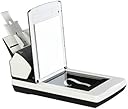
The Fujitsu fi-7260 is a professional-grade duplex scanner delivering up to 60 pages per minute at 600 dpi optical resolution. Its integrated flatbed supports scanning of delicate or thick materials, while intelligent sonic paper protection prevents jams. Equipped with Abbyy FineReader OCR, it converts scans into editable documents, making it ideal for high-volume, precise document management in demanding office environments.
| ASIN | B00GY2GIBS |
| Box Contents | Computer Scanner |
| Brand | Fujitsu |
| Brand Name | Fujitsu |
| Color Depth | 24 |
| Connectivity technology | USB |
| Customer Reviews | 4.0 out of 5 stars 25 Reviews |
| Global Trade Identification Number | 00097564308109 |
| Greyscale Depth | 8-bit |
| Item Type Name | Fujitsu PA03670-B555 Document Scanner |
| Item Weight | 19.4 Pounds |
| Item weight | 19.4 Pounds |
| Light Source Type | 7 Seconds |
| Manufacturer | FUJITSU IMAGING (SCANNERS) |
| Media Type | ID Card, Paper, Photo, Receipt |
| Minimum System Requirements | Windows 7 |
| Model Name | fi-7260 |
| Model name | fi-7260 |
| Network Connectivity Technology | USB |
| Optical Sensor Technology | CCD |
| Resolution | 600 |
| Scanner Type | Document |
| Scanner type | Document |
| Standard Sheet Capacity | 80 |
| UPC | 097564308109 |
| Wattage | 41 watts |
T**M
Like a new pair of shoes...it takes a while to get used to, but then you love it.
Unless you're familiar with higher-end capture software, the scanning software that comes with this scanner, called PaperStream Capture, can be very daunting, overwhelming, and seem like a ginormous waste of time. However, as you figure out how to use it, you can see that it really is quite powerful and not that hard to use. I will say, however, that the developers need to hire a new UX/UI designer, because the interface for setting up scan profiles is pretty bad. One reviewer stated that the software wouldn't allow them to put scanned images in different folders, but this simply not the case. There are a number of ways to accomplish this task, such as using zonal OCR to make it automatically pull data from documents and route the images to specific folders based on that data. Upgrading to the (unfortunately expensive) PaperStream Capture Pro opens up a whole new world of cool features, too, like the ability to do some seriously complex indexing on the fly and build an entire workflow for not only scanning, but quality control and document processing, such as scanning receipts and having a data field associated with the image files for things like vendor name or transaction amounts that can be exported in a CSV file to be consumed by spreadsheets and accounting software. These little scanners are amazing, really. I have over 97,500 scans on one of my two fi-7260s (see attached screenshot), and have never replaced any of the rollers and rarely even clean the thing. I also have an fi-6670, which costs roughly three times as much, and that scanner has to be cleaned every few hundred pages, and its rollers only last about 10,000 pages. The image quality is remarkable on this scanner, considering the low price, low cost of operation, and moderately fast speed (most professional scanners are a lot faster than this one, but 60 pages per minute is borderline ludicrous speed for consumer scanning and faster scanners get more expensive by orders of magnitude). One thing to note: while the ADF will scan a single page up to 215 inches in length, 1) that's really hard to do because the paper goes flying through the feeder too fast to keep it straight, and 2) the flatbed doesn't scan a full 14" legal document. My only real complaints are the clunky software interface and the fact that I'll sometimes have an issue with PaperStream Capture where it won't recognize that the scanner is connected and I'll have to delete and reinstall PaperStream IP, which is the TWAIN driver for Fujitsu's fi-series scanners.
T**Y
Great scanner, so-so software
I own an earlier version (the Fi-4220) of this scanner which became obsolete when Windows XP was retired and no drivers were made available for later operating systems. This scanner is much faster than the earlier one. I would've given it five stars except for the bundled paper stream capture software which is a disappointment. I used the Fi-4220 with its bundled software and I bought the Kofax VRS option and I was very happy for many years. Koufax VRS is worth the $650 it costsif you want to be able to dynamically adjust image quality without rescanning. Paper screen capture attempts to do this but fails miserably. I ended up buying Nuance power PDF advanced and Kofax VRS to use with this new Fujitsu scanner and I'm very happy with the results.if you are less picky about image quality that I am you might be satisfied with paper screen capture. In any case I think you'll like the scanner.
R**W
Loved, Now Hate
When I first got this scanner, it worked great! After a year or so I think they updated the driver and now it will not hold the settings, and errors out after scanning a few pages. I've spent 4 days trying to get this to work with no luck. In the beginning it was a 10, now it is a -1.
G**E
Third party software may be necessary.
The scanner itself is great; however, the software appears to be severely limited. I find it necessary to use 3rd party software (ABBYY Finereader 12) to perform the actual scan and cleanup. I am extremely disappointed by the software that comes with the scanner.
I**C
Perfect Scanner for Small Offices
Very important to all who have a lot of documents to scan, this model keeps the highest canning speed up to the resolution of 300 dpi even for duplex and color scanning. LED light source is excellent and there is no warm-up delay. Very quiet. Self turn off after settable period of time is a nice touch. One upgrade is the processing software. The one that comes with the scanner needs to be upgraded to PaperStream IP. It is free from Fujitsu site.
Trustpilot
1 month ago
1 week ago