Buy anything from 5,000+ international stores. One checkout price. No surprise fees. Join 2M+ shoppers on Desertcart.
Desertcart purchases this item on your behalf and handles shipping, customs, and support to Vietnam.
โจ๏ธ Work smarter, not harder โ comfort and speed in every keystroke!
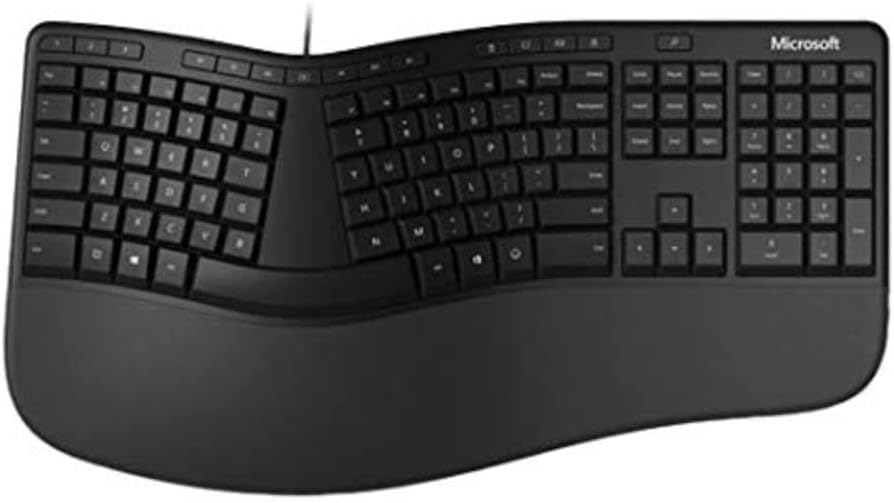
The Microsoft LXM-00004 Wired Ergonomic Keyboard combines an ergonomist-approved split design with a premium cushioned palm rest to reduce fatigue and promote healthy wrist posture. Featuring dedicated smart shortcut keys and an integrated number pad, this wired keyboard delivers reliable speed and accuracy, making it the go-to choice for professionals seeking all-day comfort and efficiency.
| ASIN | B07YGNN6N1 |
| Best Sellers Rank | #1,565 in Computer Keyboards |
| Brand | Microsoft |
| Color | Black |
| Customer Reviews | 4.3 4.3 out of 5 stars (761) |
| Date First Available | October 4, 2019 |
| Item Dimensions LxWxH | 20 x 12 x 3 inches |
| Item Weight | 2.25 pounds |
| Item model number | LXM-00004 |
| Manufacturer | Microsoft |
| Operating System | Windows |
| Power Source | Corded Electric |
| Product Dimensions | 20 x 12 x 3 inches |
| Series | LXM-00004 |
S**S
The Keyboard if you have carpel tunnel
This is the KEYBOARD if you suffer from Carpel Tunnelโฆmy pain went away with in a week. Iโve been using this design for 10 years and love it.
J**S
Love this Keyboard!
Great keyboard! Easy and comfy to use. The keyboard I use at work is exactly the same one and I love it so much I decided I wanted one for home also. Other than it being wired, I would definitely recommend it.
S**4
Excellent but could use a few adjustments
I ordered this after two Adesso wireless ergonomic keyboards failed. So far, this keyboard is doing well. The USB cable is long enough so it doesn't clutter my desk. I was used to a keyboard with a lighter touch, but am getting used to this heavier touch. Being in my 70s, I urge the manufacturers to make the white lettering and numbering larger. When typing and I glance down, it takes a few seconds to confirm which number or letter I'm aiming for. There's room on the keys for this to be done. Pause/Break could be switched with Print Screen, and the center divider could be a bit narrower. To solve the faint lettering and numbering problem, I bought English Keyboard Stickers Full Set Big Letter, Universal PC Computer Laptop Desktop Keyboard Replacement English Keyboard Stickers, Black Background with White Lettering-2 Pack. The combination is just right.
D**L
Expensive But Nice
This is a wired, ergonomic keyboard. It is well built and works flawlessly.
F**4
This is not a Microsoft keyboard.
This is not a Microsoft keyboard. Misleading description. The box says, โdesigned by Microsoft.โ It is identical to a keyboard made by Incase and selling for less than half the price at other sites. Way overpriced.
J**E
Disappointed with key spacing
This product is for home use. I was using the Microsoft 4000 keyboard and decided to upgrade. It works fine except the keys are spaced differently and hard to get used to. For some reason I'm having trouble with the 'caps' button. It keeps coming on while I'm typing, Very irritating. This did not happen with the 4000 keyboard. Otherwise, that is the only complaint. I've been using this new version for many months and the cap button comes on when I least expect. Very annoying.
R**D
Flat keyboard not ver ergonomic.
I didnโt like this product. It is flat. Not as good as my older model. I am disappointed. Sending it back.
J**R
It is all what you are accustomed toโฆ
Not like my former keyboard, and for me - itโs an uphill climb.
S**N
Empecรฉ a usar este teclado 10 aรฑos antes, debido a muchos cambios en mi vida. No lo traje conmigo porque es de gran tamaรฑo. Usรฉ varios otros productos en los รบltimos 10 aรฑos, uno mรกs cercano fue Microsoft Sculpt Keyboard. Esculpir bien tambiรฉn, pero caro y de mala calidad, el ratรณn se rompe despuรฉs de un aรฑo. ยกEl teclado se rompiรณ despuรฉs de 3 aรฑos y encontrรฉ esto! Realmente disfruto su tamaรฑo, lo conveniente que es usar la escritura a ciegas, no es necesario mirar las teclas debido a que cada una de ellas estรก en una posiciรณn prรกctica. Suficientemente suave para no cansarse despuรฉs de todo el dรญa de trabajo. ยกยกPerfecto!!
A**R
I got this to replace my broken Microsoft Ergonomic 4000, which was iconic at the time. I'll mostly compare it to that. This keyboard is very similar to its predecessor though brought into the modern age, even bringing an emoji button. At first I thought of this as a gimmick though admittedly I've started to find it a good time saver. ๐ The central bulge is less pronounced than previous iterations, though the feeling is about the same. I prefer the key layout quite a bit. Everything is a bit more square and lined up straight now. That uniformity has helped me learn this keyboard more quickly than expected and it feels good to use. I'm currently missing a few keys, especially the control keys and symbols though am quickly adjusting. The hot keys are more sensible than the 4000 and I think I'll likely use all of these. It's solid and sturdy and feels well grounded without being overly bulky. The keys are very quiet for their height, making it a good option for offices or wherever you want to not disturb others. In particular, although it doesn't have a split space bar, it's very easy to press quietly from the edges now. The wrist rest is very classy and feels very natural. Going back to the 4000 now feels a little gross for some reason. The software doesn't allow you to remap the Office key, which is frustrating. Overall very happy with this. certainly the best keyboard I've used. I've started to miss it when on other computers.
A**S
The photo shown US keyboard layout but I received a UK keys layout.
S**S
I really like this keyboard. It's easier to reach the Alt and Ctrl keys. It's also more comfortable to write on it. The Alt key on the right side is not there. I'm using Linux Mint and in Linux Mint you can transform the AltGr key to a Alt key. But you must pay a cost for that. You don't have a AltGr key after that. If you can live without it then you have a very good keyboard. The Office and Emoji keys can with difficulty be used to other things. But the best is to wait until Linux Mint has done something with the Office and Emoji keys. Those keys are new so it will take a while. I have never used it with Windows so I don't know what you can do there.
D**R
this is actually a great keyboard, have had Microsoft Sculpt for the last 6 years or so and they are so hard to get hold of now and the ones that are available are just crazy money. I was lucky to get this when it was half price and thought I would give it a go. I wasn't overly keen on going back to a wired keyboard having had wireless for so long, but this hasn't been an issue (only when I pick up the keyboard to clean and realise that it's attached). Really happy with this, comfortable to use for long periods, and the keys are light to use, with a good response. would recommend this keyboard if you like ergonomic keyboards, but also a good starter keyboard if you are looking to move to an ergonomic one.
Trustpilot
3 days ago
3 weeks ago