![Canon PIXMA G620 Wireless MegaTank Photo All-in-One Printer [Print, Copy, Scan], Black,Works with Alexa](https://m.media-amazon.com/images/I/61+cYWmW0QL._AC_SL3840_.jpg)





Buy anything from 5,000+ international stores. One checkout price. No surprise fees. Join 2M+ shoppers on Desertcart.
Desertcart purchases this item on your behalf and handles shipping, customs, and support to Vietnam.
📸 Print like a pro, save like a boss—Canon PIXMA G620 keeps your memories vivid and your workflow smart.
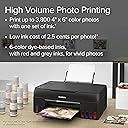
The Canon PIXMA G620 Wireless MegaTank Photo All-in-One Printer combines ultra-high ink capacity with a 6-color dye-based system to deliver up to 3,800 vibrant 4x6” photos per refill at an ultra-low cost per print. Featuring seamless Wi-Fi connectivity and Alexa integration for smart ink management, this compact printer is designed for photo enthusiasts and small businesses who demand professional-quality prints, easy setup, and multifunction versatility in one sleek device.

| ASIN | B08XZQVWZW |
| Additional Printer Functions | All In One |
| B&W Pages per Minute | 3.9 |
| Best Sellers Rank | #39,599 in Computers ( See Top 100 in Computers ) #110 in Ink Tank Printers |
| Brand | Canon |
| Built-In Media | PIXMA 21-GPHOTO Wireless MegaTank Photo All-In-One Printer, Documentation, Set of Ink Bottles, Power Cord |
| Color | Black |
| Color Pages per Minute | 3.9 ppm |
| Compatible Cartridge | Canon PG-245 (black), Canon CL-246 (color) |
| Compatible Devices | PC, Smartphones |
| Control Method | App |
| Controller Type | Amazon Alexa |
| Customer Reviews | 4.1 4.1 out of 5 stars (1,049) |
| Display Type | LCD |
| Dual-sided printing | Yes |
| Duplex | Automatic |
| Hardware Interface | USB |
| Ink Color | Black |
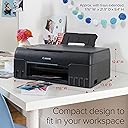
| Item Dimensions D x W x H | 44.7D x 48.5W x 25.7H centimeters |
| Item Type Name | Multifunction Printer |
| Item Weight | 8.84 kg |
| Manufacturer | Canon USA |
| Maximum Copies Per Run | 100 |
| Maximum Copy Resolution Black and White | 4800 x 1200 |
| Maximum Copy Resolution Color | 4800 x 1200 dpi |
| Maximum Copy Speed Black and White | 3.9 ppm |
| Maximum Media Size | 8.5 x 14 inch |
| Maximum Print Resolution Black and White | 4800 dpi |
| Maximum Sheet Capacity | 50 |
| Maximum print Resolution Color | 4800 x 1200 dpi |
| Model Name | Canon PIXMA G620 |
| Model Number | 4620C002 |
| Model Series | PIXMA |
| Number of Drivers | 2 |
| Number of Trays | 1 |
| Other Special Features of the Product | wireless |
| Output sheet capacity | 50 |
| Paper Size | 8.5 inches |
| Print media | Glossy photo paper |
| Printer Connectivity Type | USB, Wi-Fi |
| Printer Output Type | Colour |
| Printer Type | Inkjet |
| Processor Count | 1 |
| Resolution | 4800 x 1200 |
| Scanner Type | Flatbed |
| Series Number | 620 |
| Specific Uses For Product | Home, Small Office |
| Total USB 2.0 Ports | 1 |
| Total Usb Ports | 1 |
| UPC | 013803332810 |
E**L
I bought this computer for my small business where I make printed vinyl stickers. And I mean I make a TON of stickers. Every single week day and even some weekends I am printing sheets upon sheets of stickers on the g620. On multiple occasions I've had to run this printer for over an hour at a time with NO breaks. I got this printer right before the busy holiday season. From Nov all the way to the end of January I was printing 1,400+ large 3inch stickers a month. It is the end of February right now and my ink tanks are only half way down. My Black and Gray being the lowest but still barely under the half way mark. My stickers look great, I have countless reviews mentioning the vibrancy of them and the print quality since I have been using this printer. With all that being said I can only use this printer for my stickers. I would lose my mind if it was my only printer and I had to print my admin stuff on it. The reason being, it is very slow and only has one tray. I use a completely different canon for my invoices, envelope printing like addressed and branding I do and my shipping labels. I would never be able to use this for office things efficiently. But thats not what this printer is for anyways and I knew that before buying it. It was incredibly easy to set up and connect to the wifi the day I got it and I have not had to re-connect it once since the day I bought it and set it up. But to be honest all my canon printers have always been awesome about always staying connected and ready to go. I wish it had a lcd screen or even a backlit display. It would have been helpful the first day during set up. But honestly I very very rarely have to read something on the screen anyways because it works exactly as it should. If you are going to be running your printer hard, and would like to have it for as long as possible I would look into getting the canon care pak. I have care pak on every canon printer in my home which and always will. My previous printer from canon (different model than the 620) I printed almost 20K pages with for a year and a half and worked it into the ground and the main tray pick up roller finally broke. Canon had a brand new one expedited and at my door in two days with a return label for the old one ready. All because of care pak. They didn't even care that I pushed it past its limits and that I basically stress tested it for a year straight lol. Not even a two minute phone call and the rep had me taken care of. For someone like me whose business depends on these printers I could not have been happier. It's the best value for a piece of equipment the world knows can be finnicky. I have an almost 10 year old canon printer still working up stairs that has been through several moves, sitting in storage, all the things. And it still connects to the internet fine and works. Which is why I swear by canon. I have never had another printer brand actually just work when it's supposed to and not make a fuss.
A**O
This All-in-One printer/copier/scanner is simply amazing. I use this printer to print photos, at the highest quality possible, both in color and black and white. The quality is stunning--as good as my Pixma Pro 9000 mark II, which has an 8-color system as opposed the G620's 6-ink system (Yellow, Cyan, Magenta, Red, Black, and Grey). But don't let the fewer ink colors fool you; this printer does absolutely fantastic when printing photos. And it does so economically! The ink tanks are just huge and the ink is very affordable. I've printed well over 150 8-1/2 x 11" prints and barely begun to use the ink. There's no way I could have done that on a cartridge printer without a lot of cartridges and a lot of expense. Installing the ink is easy, since the bottles (and I'm still on my original set) are keyed to each specific tank. There's no way to put the wrong ink into the wrong tank by accident. Each tank refills in seconds. Set up was easy--basically rip the tape off, load ink, load software and do a calibration. The software was quickly downloaded from Canon. A quick test print determined that I had to adjust the default density of the prints, because it was too dense/dark. Moving it one setting lighter in the Canon software made it ideal, and that's using Canon approved paper with the Canon driver and Canon paper choice. I would highly recommend Canon's pro-luster paper with this printer, BTW. It's a great default paper. Experimenting with other papers, I found that Hahnemuele Glossy Photo Rag Baryta makes absolutely stunning images with very deep blacks and great color depth. The setting I would recommend is to 1) Set the printer options in your driver to semi-gloss,and use Hahnemuele's ICC profile for the Canon i6400 printer. In the Advanced printer settings, select Paper Abrasion Prevention. I use Qimage Pro for printing, as it makes it easy to use paper profiles. This All-in-One isn't perfect. It's fairly slow in printing, so don't expect instant print results. But the results are worth the wait. There's no automated paper feed for the copier or scanning features of this All-in-One. Sheets have to be laid down by hand over the glass for scanning or copying But these complaints are very minor IMHO, unless you're scanning a lot of documents. Print size is limited to 8-1/2" wide, so unfortunately, you can't print 13"x19" prints. The printer is very economical because the ink lasts a long time. In fact, the costs are competitive with color laser prints, but with much higher quality results. This printer is very highly recommended; you won't be disappointed with it. I've ordered the gear to set up my own paper profiles, because I really like how this all-in-one printer/scanner/copier prints color images.
H**S
My Canon PIXMA MX492, which I used for general document printing, died three days ago after more than 7 years of problem-free service, so I had to get a replacement. Since I'm an avid photographer, and haven't owned a good photo printer in many years (I have had two Epsons, which eventually developed serious problems), and had good results with this last Canon, I decided on a G620, which is designed for both document printing and making excellent photo prints, according to reviews. I ordered the G620 on the day the old printer died and received it the next day. Setup with my Windows 11 PC was easy and I had no issues, installing the printer on my Wi-FI network so that I could locate the unit without a cable in a convenient spot several feet from my PC. At the end of the setup process, the G620 printed two test prints on the regular paper I had loaded in the rear tray. They looked perfect. It was ready for use. I decided to first make a color photo print on letter size Epson glossy paper. The only adjustment I made was some sharpening before sending it to the printer. I used the High quality setting in the driver. The print was terrific, as beautiful as any print I've made from a home printer. Detailed with accurate colors. I was impressed and pleased. But this euphoria was short lived. I loaded a second sheet of glossy paper and opened a monochrome photo in PS. I sent this image to the printer and waited patiently for it to print, hoping that the grayscale print quality (using the High quality setting again) would be as pleasing as the color print I'd just made. Indeed, the print quality was excellent, highly detailed with good tonal transitions---BUT, there was a 0.5" horizontal mark near top center of the image that appeared to be created by a roller, and to the left of this mark were several vertical, wavy scratches extending about another 2.5 inches below it. A disaster! I was appalled that a brand new printer would make one good print to tantalize and then ruin the second one. I went on the Canon Community forum to see if anyone else had reported this issue, and sure enough I found another G620 user whose prints had the same marks (he had posted photos of them). His printer was not I think brand new, and he had cleaned the rollers and performed another maintenance task, but the marks continued to appear on his prints. The moderator responded by recommending he have it repaired by Canon. I decided to sleep on the problem and make a decision in the morning. This morning I turned on the printer and fired up the PC to see what would happen if I made another photo print. No changes of any kind were made to the printer or Wi-Fi network since the day before. I opened a black and white photo in PS and sent it to the printer, and got an error message in the driver: "Printer not responding". Overnight, it apparently had given up any pretense of working. I had no desire to exchange it for another G620, since I had no confidence that another unit would not have similar issues. So I packed it up and returned it to Amazon this afternoon for a full refund. I don't know what I'm going to buy now, but it's unlikely to be a Canon printer. It seems the manufacturing quality control might not be as rigorous as in the past, or perhaps my luck with their printers has simply run out. At a minimum I need another basic printer for documents, but I had also wanted to make high quality photo prints again, so a printer that can do both is desirable. Unfortunately, from the research I've done so far it appears that all models of home photo printers tend to have or quickly develop mechanical issues. Perhaps the wisest solution is to get an inexpensive document printer and continue to use labs to produce high-quality photo prints (and leave the printer problems to them). I will figure out what to do while waiting for the refund!
S**R
I’ve owned this printer since October 2023 and it’s now February 2026. I’ve enjoyed it’s ease of use, connectivity, print quality for photos and documents, and scanner capability. This is not my daily use printer. I use it for printing photos for our home and for use with my watercolor painting. I’ve noticed that I have to print a test page to keep the print heads from drying out between uses which is not a bother. I wish it had a backlit screen. I have to turn on a lamp or the room light to read the screen. This printer can print double sided….but not automatically like the Canon G3290 (this is my daily use printer) is able to. To print double sided, you have to flip the paper and place it back into rhe feed tray.
C**E
I bought the Canon PIXMA G620 for my small business to print marketing materials, thank you cards, and similar projects. Overall, I’m really happy with it, but there are a few things worth knowing before buying. One of the biggest limitations is the paper thickness it can handle. Canon lists the maximum supported weight as 275 GSM on their website. You might be able to get away with printing something slightly thicker like 300 GSM, but you’ll probably end up with roller marks or paper jams if you try to do that regularly. I ran a single 300 GSM index card through mine, and it printed fine mechanically, but that’s as far as I pushed it. I can’t say how well it would hold up long term with paper that thick. The paper I use consistently is Hamilco’s 100 lb (270 GSM) double-sided glossy cover stock, and it prints beautifully with this machine. It’s thick, has a premium feel, and gives my marketing materials a professional look. The colors come out vibrant and sharp, and the gloss finish adds just the right amount of shine without being too reflective. I tried other papers, including photo paper, but most were either too glossy, too thin, or showed fingerprints easily. The Hamilco paper is affordable, easy to find right on Amazon, and I’d highly recommend it if you’re looking for a thicker, classy paper for marketing use. I saw other people mention in their reviews that the screen is hard to see, and while I’ll admit it’s small and you have to be looking straight on at it to read it, it’s really not the end of the world. Once you get familiar with the menu, it’s easy to navigate. Setting it up was simple. It took me about ten minutes from start to finish, and most of that time was spent installing the drivers and software. I also recommend downloading Canon’s PosterArtist software. It makes it easy to adjust print settings, change paper sizes, perform maintenance, and even design materials directly. I’m using the free trial right now, but the paid version isn’t expensive and seems worth it if you print a lot. Overall, this printer does a great job for the money. The colors are vibrant, the setup is quick, and it’s perfect for thank you cards, flyers, and general marketing materials. As long as you stay under that 275 GSM limit, you’ll get consistent, high-quality prints. I’m very happy with it and would definitely recommend it to other small business owners who want great results without spending a fortune.
Trustpilot
2 months ago
2 weeks ago