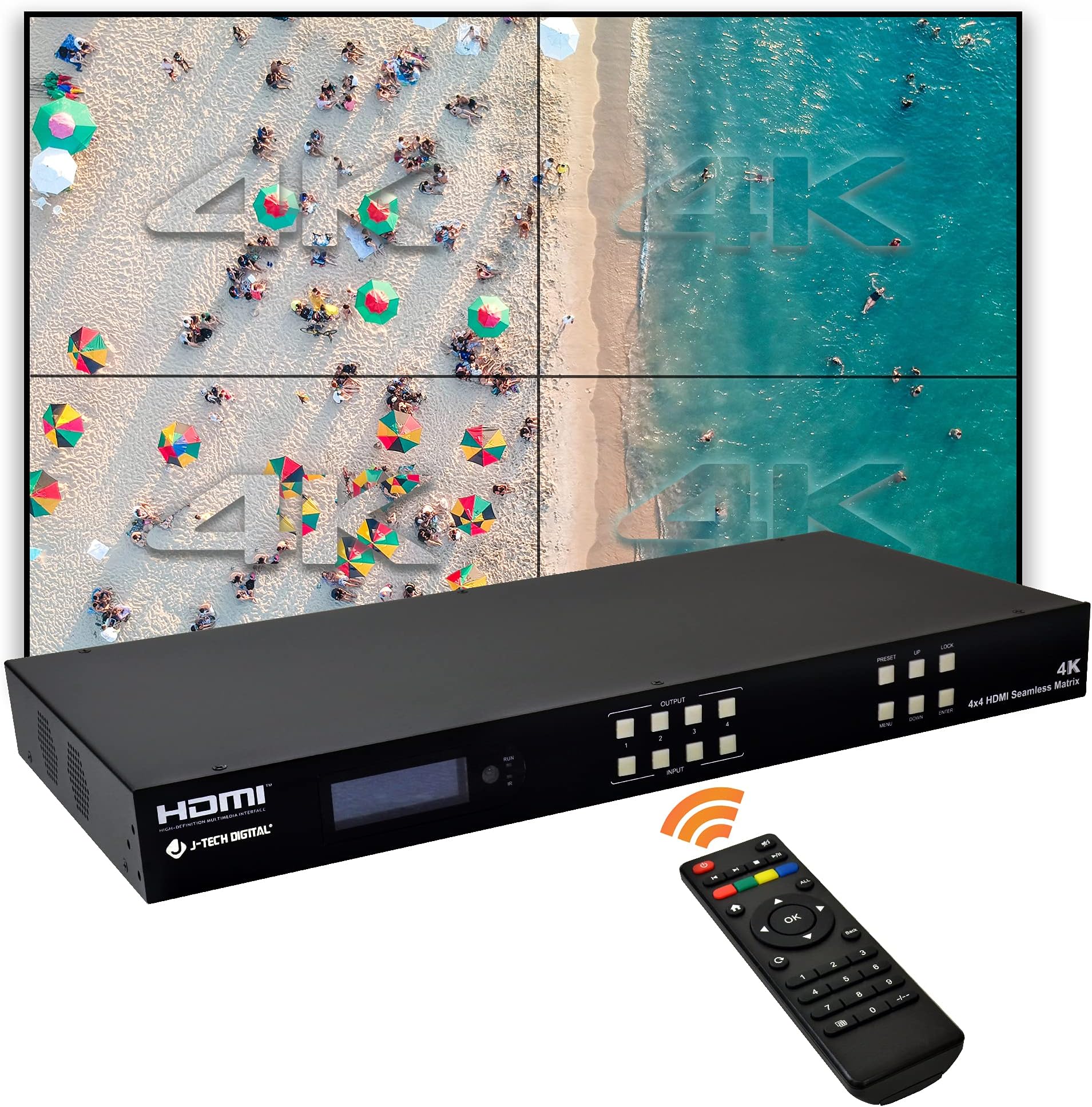
The JTECH-VWM04 is a 4-input, 4-output, seamless switching matrix, video wall controller and multiviewer device all rolled into one.While in matrix mode, seamlessly route any of your 4 available input signals to any combination of outputs without delay or picture loss. Want to view more than one signal on your single display at a time? No problem. Engage the multiviewer function on your output port and choose from 5 different multiviewer layouts, including 2x2, 1x3L, 1x3U, 1x4 & 4x1.Reinvent your interior space by taking advantage of the video wall function and have any source signal stretched across all 4 output displays. Arrange your output displays in up to 10 different video wall configurations, including 2x2, 1x4 and 4x1. 10 different video wall configurations means the user gets the exact style and creative expression they desire.Features:3 Different Operation Modes – Matrix | Video Wall Controller | MultiviewerSeamless Switching (<40ms switching speed)Output Scaling – 1080P / 720P / 2560 x 1440 / 1920 x 1200 / 1360 x 768/ 4K@30HzHDMI Specification – HDMI 1.4, HDCP 2.2Supported Audio Format – PCM8 Customizable routing and display mode presetsAdjustable custom audio delay (0 – 250 ms) per outputHDMI Video Output Port Mute functionVariable Video Placement – Offset video content on both “x” & “y” axes & rotate 180°Individual HDMI Output Color Settings – Brightness | Contrast | Saturation | Hue | RGBCustom Source Selection and Crop & Zoom function for complete picture-in-picture customization Default IP Address – 192.168.1.168 Supported Video Resolutions (Input) – 480p / 576p / 720p / 1080i / 1080p / 4K 30Hz / 4K 60Hz 4:2:0Supported Video Resolutions (Output) - 480p / 576p / 720p / 1080i / 1080p / 4K 30Hz 4:4:4 Review: Debated on 3 or 4 stars, but I've got it working now, and it is working well. It was however a pain to set up and get operational. The instructions in the manual (provided on a USB drive) are lacking essential information. First, the displays for the video wall are 1-top left, 2-top right, 3-bottom left, 4-bottom right (it doesn't tell you that anyplace, and it is critical information to get the video wall working). Second, my top two monitors are mounted upside down (to minimize bezel thickness), and I had endless problems getting the video flip/inversion to "stick". The solution I finally found was to do the flip in the switch, not the PC, get the video wall working, then save the configuration as a preset. Input 1 to video wall=preset 1, input 2=preset 2, 3=preset 3, 4=preset 4, normal operation = preset 5. So now I can invoke video wall from any input, and revert to 4 separate screens when desired (all of my inputs to the matrix switch are from a PC). Notable disappointment: The Multi-view options only work on a single output, and the other outputs are blank when using that capability. You can't do multi-view on one output with any other output on. If this were of high importance to me, I would have knocked off another star, but it isn't something I expect to use. Auto scaling did not work well for me, I ended up hard setting my input and output resolutions. I've got 5 video outputs from my PC, and they are not all the same resolution, so I have to resort to the lowest common resolution for video wall to work. Nor are my monitors all the same resolution (but at least the 4 in the video wall are the same size). So to summarize in a sentence: I am satisfied with the product and it will serve my purposes, but it was very difficult to set up. Once I got all the presets programmed to do what I wanted, it is easy to use, but it took about ten hours to get it set up the way I wanted. Review: We tried several other video multiplayer’s and this was the only one we found that could work without connecting to/through computer. Easy to connect and allows you to rotate picture especially since the TCL’s we bought didn’t have that capability. Once installed set to 2X2 and changed the orientation of the top 2 TVs and voila we had a video wall where we can watch 1,2,3 or 4 different shows. Can’t wait for football season!! Was able to connect surround sound to receiver to tv and 4 (cable, Firestick, PS5) inputs to D-Tech digital box for easy connection to shows we want to see. Pricey but it was exactly what we needed to create our home theater. Highly recommend for anyone wanting to do the same.



| ASIN | B096H6MJRQ |
| Customer reviews | 3.9 3.9 out of 5 stars (8) |
| Delivery information | We cannot deliver certain products outside mainland UK ( Details ). We will only be able to confirm if this product can be delivered to your chosen address when you enter your delivery address at checkout. |
| Label | J-Tech Digital |
| Manufacturer | J-Tech Digital |
| Product Dimensions | 43.69 x 20.6 x 4.19 cm; 3.3 kg |
C**L
Debated on 3 or 4 stars, but I've got it working now, and it is working well. It was however a pain to set up and get operational. The instructions in the manual (provided on a USB drive) are lacking essential information. First, the displays for the video wall are 1-top left, 2-top right, 3-bottom left, 4-bottom right (it doesn't tell you that anyplace, and it is critical information to get the video wall working). Second, my top two monitors are mounted upside down (to minimize bezel thickness), and I had endless problems getting the video flip/inversion to "stick". The solution I finally found was to do the flip in the switch, not the PC, get the video wall working, then save the configuration as a preset. Input 1 to video wall=preset 1, input 2=preset 2, 3=preset 3, 4=preset 4, normal operation = preset 5. So now I can invoke video wall from any input, and revert to 4 separate screens when desired (all of my inputs to the matrix switch are from a PC). Notable disappointment: The Multi-view options only work on a single output, and the other outputs are blank when using that capability. You can't do multi-view on one output with any other output on. If this were of high importance to me, I would have knocked off another star, but it isn't something I expect to use. Auto scaling did not work well for me, I ended up hard setting my input and output resolutions. I've got 5 video outputs from my PC, and they are not all the same resolution, so I have to resort to the lowest common resolution for video wall to work. Nor are my monitors all the same resolution (but at least the 4 in the video wall are the same size). So to summarize in a sentence: I am satisfied with the product and it will serve my purposes, but it was very difficult to set up. Once I got all the presets programmed to do what I wanted, it is easy to use, but it took about ten hours to get it set up the way I wanted.
D**I
We tried several other video multiplayer’s and this was the only one we found that could work without connecting to/through computer. Easy to connect and allows you to rotate picture especially since the TCL’s we bought didn’t have that capability. Once installed set to 2X2 and changed the orientation of the top 2 TVs and voila we had a video wall where we can watch 1,2,3 or 4 different shows. Can’t wait for football season!! Was able to connect surround sound to receiver to tv and 4 (cable, Firestick, PS5) inputs to D-Tech digital box for easy connection to shows we want to see. Pricey but it was exactly what we needed to create our home theater. Highly recommend for anyone wanting to do the same.
Trustpilot
1 month ago
3 weeks ago