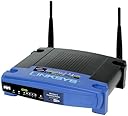
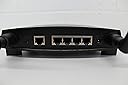
🚀 Upgrade your network game with the legendary WRT54GS — speed, security, and style in one box!
The Cisco-Linksys WRT54GS Wireless-G Broadband Router with SpeedBooster is a versatile all-in-one networking powerhouse combining a Wireless-G access point, a 4-port 10/100 Mbps full-duplex switch, and a router. Featuring SpeedBooster technology, it delivers up to 35% faster real-world wireless speeds while maintaining full 802.11 compliance. With robust WPA security, SPI firewall protection, and compatibility with open-source firmware like OpenWRT, it’s a favorite among professionals seeking reliable, customizable, and high-performance home or office networking solutions.
| ASIN | B0001D3K8A |
| Best Sellers Rank | #331,487 in Electronics ( See Top 100 in Electronics ) #2,032 in Computer Routers |
| Customer Reviews | 4.2 4.2 out of 5 stars (714) |
| Date First Available | May 2, 2006 |
| Is Discontinued By Manufacturer | Yes |
| Item Weight | 1.1 pounds |
| Item model number | WRT54GS |
| Language | English |
| Manufacturer | Linksys |
| Product Dimensions | 1.89 x 7.32 x 7.87 inches |
V**N
With Linux inside it is *amazing* what this router can do! - Get OpenWRT and you'll be amazed!
This review is targeted to those geeks among us who like to color outside the lines. I have 2 WRT54G routers and now have this WRT54GS router. To be honest, the first thing I did when I received my GS router is boot it up and load the OpenWRT firmware on it. It's quite amazing what you can do using OpenWRT as a base. [...] My favorite is the wireless remote control truck. I actually am using my oldest unit as a wireless web server. Here are two different sites running on it, one even running PHP: I am actually using disk space shared from another server (NFS mounted, there are also other ways to mount disk for you non-Linux people). People have turned them into wireless radios, vehicle tracking devices and more. You can wire up serial, USB, hard drives, sound, and more on these things. You can also hook up other antenna for other applications (outdoor directional, etc). If you like to color outside the lines you might also use Linux as your primary desktop operating system (all my computers at home and at work run Linux exclusively). For those of you I would suggest this and for your laptop pick up a Linksys WPC55AG PCMCIA card. This card uses the Atheros chipset and works well with the Madwifi drivers (probably should do a review under the card). This is a great combo and for the most part nearly 100% driven by open source software on both the router and the card drivers. NOTE: Nearly everything I have just discussed will void your warranty so continue at your own risk. I have been using these routers for a couple of years now and still haven't been able to render one unusable. At < $50 for the WRT54G and < $80 for the WRT54GS it might be something you want to risk. Also, it is important to note that there are several versions of each of these routers and they all are a little different (internal switches are a different model, Broadcom MIPS processors are a little different, speed etc). There is even one version that comes with less RAM and a proprietary version of the firmware. I believe this is the Linksys WRT54GS v5. I wish the version number was listed as part of the model number so you know which one you are buying. The one I just received a couple of months ago was the WRT54GS v3 and it works GREAT with OpenWRT. I guess it's a roll of the dice which version you will get. If you get a v5 I would send it back. I believe they are also coming out with another model that will continue using the Linux firmware. It appears that this new version will be called the WRT54GL. If you have a choice of versions get the v3, or wait for the WRT54GL to come out so you know what you are getting. I don't believe it even says anywhere on the box what version is inside. The only place you will find this version number is on the label on the bottom of the unit. At any rate, you Linux experts/users and tinkerers go check out OpenWRT: You'll find a nice Wiki and great Forums. Void Main
D**.
Great performance and a good price
I have been running the WRT54GS for a few months and it has been fantastic. My main objective was to run the WRT54GS as a centrally located stand alone unit - not hooked up to a computer. For installation it was necessary to hook up the WRT54GS to a computer via the provided Ethernet cable, but once up and running it is independent. After initial setup, setting changes can be done through the wireless network using a browser, and in case of a crash a laptop can be hooked up to redo the setup if necessary. We have had several severe thunderstorms and power spikes that are typical for our area. These have sometimes caused problems with other equipment (despite being on APC surge protectors or UPSs). The WRT54GS has only once needed to have the power unplugged and plugged in again to establish normal operations, and then with no loss of settings. Our building has provided a great deal of interference for an ad-hoc network between computers. The WRT54GS equipped with a pair of Linksys high gain antennas solved the problem, and provided a single internet connection. I got a range expander for dead spots, but so far I have not needed to use it. Using the Intel PRO/Wireless 3945 Mini Card on Dell laptops we achieve 54 Mbps everywhere in the building, even where the signal is weakest. Reception is even good in the courtyard outside. We get similar performance using the Linksys WMP54GS in our desktop PCs. Our 10 Mbps cable modem link (to Brighthouse/Warner Cable) is the slowest part of the network. Other companies offer better speed and range performance with proprietary technology, but the WRT54GS gave us the same great performance no matter what wireless hardware we were using. It was also the best solution for the price. Our initial installation of the WRT54GS was problematic, requiring a firmware update. However, a couple of calls to Linksys technical support was all it took. I received a tech person within a few minutes and after going through the settings step by step they answered all my questions. They log all tech calls so even a new tech on a different call is instantly aware of the history of any problem. The setup software works well, but fails if there is no internet connection. Otherwise, it works great and makes installation easy. The default settings allow for a quick start even without the setup software, and the advanced features allow for sophisticated security and access solutions. The manual (on CD) is also excellent.
V**C
I"ve had this router for over one year and it's working perfectly.
C**M
Il semble que cet appareil G soit désuet refus du technicien de l’installer. Merci d’avoir procédé au remboursement.
Trustpilot
2 months ago
5 days ago