Buy anything from 5,000+ international stores. One checkout price. No surprise fees. Join 2M+ shoppers on Desertcart.
Desertcart purchases this item on your behalf and handles shipping, customs, and support to Vietnam.
🖨️ Print smarter, save bigger, and stay effortlessly connected!
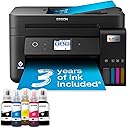
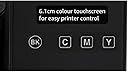
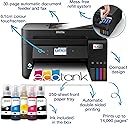
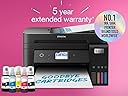
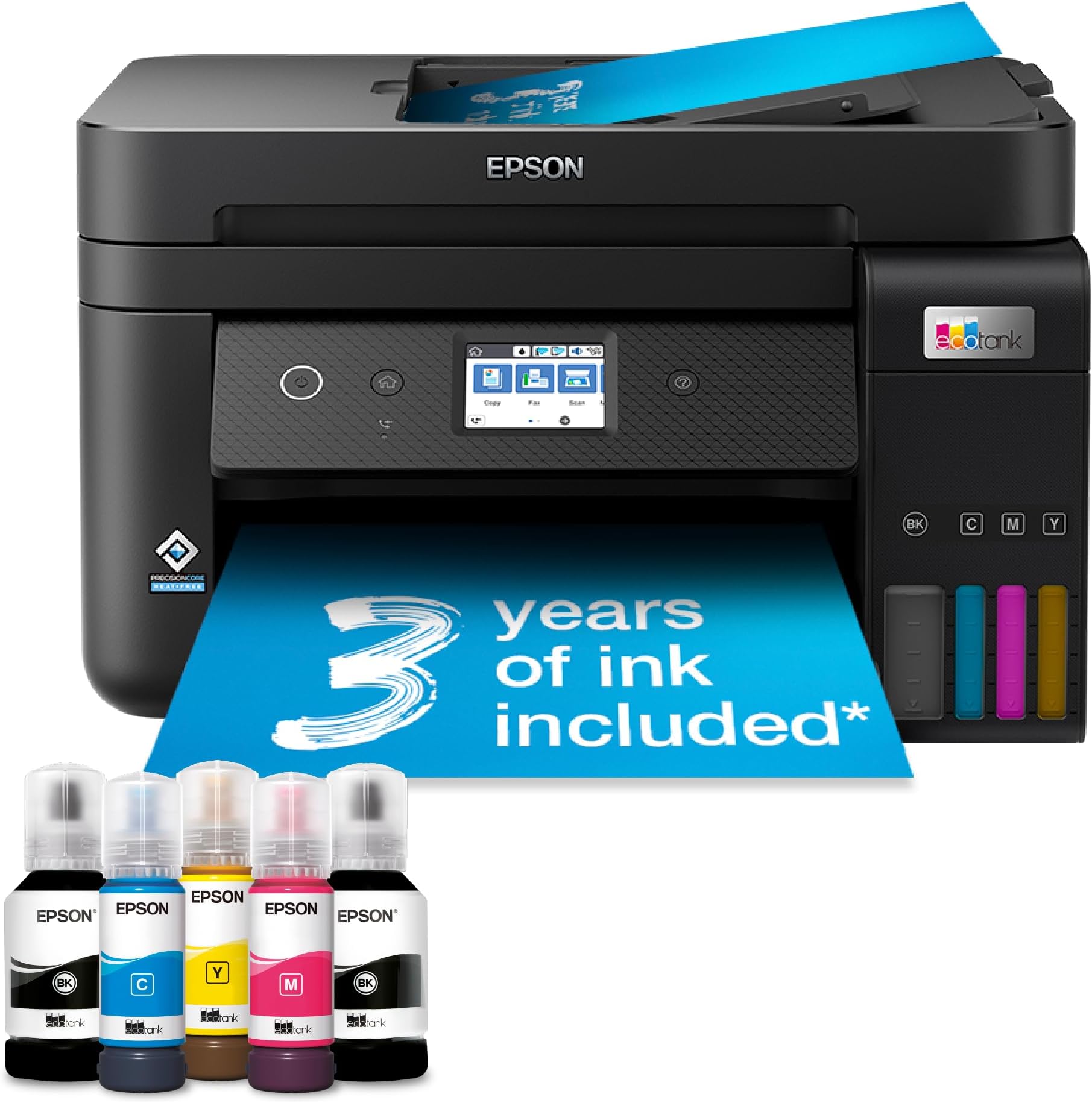
The Epson EcoTank ET-4850 is a compact, multifunction inkjet printer designed for home and small office use. It features ultra-high capacity refillable ink tanks that can print up to 3 years without replacement, automatic duplex printing, a 30-page document feeder, and a 6.1cm color touchscreen. With Wi-Fi, Wi-Fi Direct, and Ethernet connectivity, plus the Epson Smart Panel app, it offers seamless wireless control from mobile devices. PrecisionCore Heat-Free Technology ensures energy-efficient, high-quality prints at speeds up to 33 pages per minute (B&W). This printer delivers exceptional cost savings and convenience, making it ideal for professionals seeking reliable, eco-friendly printing solutions.


| ASIN | B09GL18WLH |
| Additional Printer Functions | Scan |
| B&W Pages per Minute | 33 |
| Best Sellers Rank | 34,382 in Computers & Accessories ( See Top 100 in Computers & Accessories ) 20 in Ink Tank Printers |
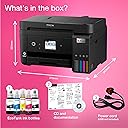
| Box Contents | Printer |
| Brand | Epson |
| Brand Name | Epson |
| Color Depth | 48 bpp |
| Color Pages per Minute | 20 ppm |
| Colour | Black |
| Compatible Cartridge | EcoTank |
| Compatible Devices | Laptops / PC / Smartphones / Tablets |
| Connectivity technology | Wi-Fi |
| Control Method | App |
| Controller Type | Android |
| Customer Reviews | 4.3 out of 5 stars 421 Reviews |
| Dual-sided printing | Yes |
| Duplex | Automatic |
| Hardware Interface | Ethernet |
| Initial Page Print Time | [~15-20] seconds |
| Ink Colour | Black |
| Item Dimensions D x W x H | 34.7D x 37.5W x 23.1H centimetres |
| Item Type Name | Inkjet Printer |
| Item Weight | 6.7 Kilograms |
| Manufacturer | Epson |
| Maximum Copy Resolution Black and White | 600 dpi |
| Maximum Copy Resolution Color | 4800x1200 dpi |
| Maximum Copy Speed Black and White | 33 ppm |
| Maximum Print Resolution Black and White | 600 dpi |
| Maximum Sheet Capacity | 200 |
| Maximum Supported Paper Size | A4 (210 x 297 millimeters or 8.3 x 11.7 inches) |
| Maximum print Resolution Color | [Haute résolution] |
| Model Name | EcoTank ET-4850 |
| Model Number | C11CJ60401 |
| Model Series | ET(EcoTank) |
| Model name | EcoTank ET-4850 |
| Network Connectivity Technology | Wi-Fi |
| Number of Trays | 1 |
| Other Special Features of the Product | Network-Ready |
| Output sheet capacity | 250 |
| Paper Size | A4 |
| Power Consumption Size | 12 Watts |
| Print media | Glossy photo paper |
| Printer Output Type | Colour |
| Printer Type | Inkjet |
| Printing technology | Inkjet |
| Product Warranty | 1 Year |
| Resolution | 4800 x 1200 |
| Scanner Type | Photo |
| Special feature | Network-Ready |
| Specific Uses For Product | [VARIOUS] |
| Total USB Ports | 1 |
| Unit Count | 1.00 count |
S**Y
Ink lasts a really long time. Printer works as expected 99% of the time. Great printer.
Such a good printer! Usually not temperamental like most printers. 99% of the time, I press print and it prints without any delay. Ink lasts FOREVER. I print a few text pages with colour a week at least. Every now and again we will print posters or photos. When I first got it I was printing lots of full-colour posters and flyers every week. The ink levels never seemed to go down! Eventually had to buy new ink some months ago, but it was the first time since getting the printer 3 years ago. The settings can be a little bit fiddley, and the only way I can connect to it seems to be over the network. No cable included to plug-and-print. If you have different settings selected on the printer than the settings you choose to print with from your device it throws a warning. Changing the settings on the printer can be annoying and sometimes it's not clear what settings you should choose as they don't directly match the ones on the computer. But it's not the worst problem to have. Really great value for money, both in terms of the printer itself and how long the ink refills last. I will never buy an ink-cartridge printer again! Paper jams are rare, I don't really recall any so far. Scanner might be more likely to jam when doing multiple pages, but I don't scan too often so can't comment on that. I wouldn't call it a compact size but for a printer/scanner it's fine. It's slow to print if you are printing in good-quality, but that's expected of a printer in this price-range I think. You can scan directly from the printer and have the printer connected to a google drive where files are automatically uploaded, or you can scan from your device and save to your device. I think you can email the scans either. Had an issue where my laptop stopped connecting one day, was messing around with settings for far too many hours before I decided to just reset everything and start all over again. But since then and before that time, we haven't had any issues connecting any devices.
J**G
NICE AND COMPACT, EASY TO SET UP, CHEAPER WITH INK TANKS RATHER THAN CARTRIDGES!
I've just received an Epson ET-4850 printer with scanner and document feeder after years of HP printers being my go-to. First impressions, thumbs up for the easy instructions on initial set-up like filling the ink tanks for the first time, very clean and you can see the ink level. No more crazy expensive cartridges and the ink bottles give you 70ml (colour bottle with more in the black colour bottle) which is taken up on first set-up, so you will need to think about ordering some spare bottles as your ink gets used up. I have and the 3 colour and 1 black genuine Epson ink bottles cost me £34.00, which is way cheaper than the small amount of ink you get in cartridges. I'd say don't go for the super cheap replica ink as it will certainly be adulterated and your print quality will be poor. When it came time to try printing I hit a snag and the printer would not release print jobs from the printer history, turns out the printer driver was version 1 and what was needed was driver 2 which I downloaded from the Epson site, it took a bit of finding out but got there in the end, but still wouldn't print or scan, went online for some general assistance and was instructed to check the printer spooler and set it to automatic, did this turned computer and printer off and on again and finally could print out and scan fine. Size-wise its nice and compact, quite expensive compared to other printers but I'm hoping it will be worth it!
V**K
Print quality is excellent at a relatively low cost
Only had the printer for a couple of days but I am very pleased with it. My ten year old HP Photosmart needed replacing and after carefully reviewing the market I decided on this Epson tank printer. No more expensive cartridges and so far excellent prints. Setting it up was fairly easy but the multi-language instructions were a bit overwhelming!!! Connecting the printer to my WiFi and PC plus my phone and iPad was straightforward and all the controls were easy to use. The associated APP is very useful and easy to use. Although it’s early days, I think the print cost will be significantly less than my old HP cartridge printer. Overall I am delighted with this printer.My worries about the ink bottles being messy were unfounded as there was no spillage and filling the tank was very simple. The touch screen is rather small but is easy to use and the paper feed is very easy to fill. Overall, a very good product. I wouldn’t go back to cartridges.
A**R
Great printer, with caveats
I purchased the EcoTank ET-4850 to replace an ageing Epson WorkForce WF-3520. In writing a review it's impossible to not make comparisons. This review covers the points most noticeable to me. I would say the older WorkForce printer swings it in regards to build quality. It's a heavier beast and just feels a bit more sturdy. But the EcoTank has a smaller footprint, which is a bonus. This is an Apple household (two Macs and iPhones) and so in advance of delivery I installed the Epson Smart Panel software on my phone. It's mostly a rubbish app in my opinion. I couldn't use it set up WiFi on the printer because the instructions were so unclear on how to do so. The PASSWORD the app requires is the password found behind the ink tanks(!) and not your WiFi password, even though the app requested this password as part of the WiFi set up..... The password is visible behind the EcoTanks on the ET-4850. So I ended up setting the WiFi up manually using the printer's colour touchscreen. The screen is a bit of a chore. It's small and a bit fiddly. The fact is, that's it's a huge downgrade from the WorkForce's LCD screen. It looks like something Epson got out of a Christmas cracker. It's poor, but mostly serviceable. Installation on the Macs went as smooth as silk on MacOS Sonoma 14.1.1 and all scanning and printing functions have been fully tested. In terms of print quality, I've no complaints at all. We've not printed colour photos (typically a weakness with 4-colour inkjets), but I've printed a reasonable amount of colour work on card and glossy photo paper, including artwork, and I'm extremely satisfied with the results, which are better than the old WorkForce printer by a mile. Contrary to another review it will print duplex and collate pages, e.g 1 ... 10 or pages 10 ... 1, depending on your print settings. NB: None of the documentation I perused before purchase told me which WiFi bands this printer supports. I can confirm it only supports 2.4Ghz and not 5Ghz. Also, it is not clearly stated everywhere, but the UK version of the ET-4850 comes with TWO huge black ink bottles and one each of the three colours, albeit in smaller bottles. It's a huge amount of ink and I'm inclined to accept the three-years of ink claim is *plausible*. Overall I can highly recommend this printer. It does lose a star for the poor screen though and the disappointing set up via the app.
B**N
Great product but takes time to set up
Last month I purchased and returned the Epson ET 2861 because having set it up I discovered that it could not Air Print from my IPhone, nor could I print duplex. I set the ET 4850 today and I am pleased to say it does both and has a sheet feeder. It takes a bit of time to set up but it prints and scans rather well ( like most modern printers) and if you have the time to set up Epson Connect you can scan from the device to designated email accounts, Dropbox, Google Drive and other Cloud services. Emails and documents can be sent remotely to the printer. No surprises here but the ability to control the device from your smartphone using Epson Smart Panel is rather good and the online set up of the printer is straight forward if you have the patience. A good bit of kit but a novice might find setting up all the available services a bit of a challenge. At first sight the presence of a CD disk was a bit of a worry (just bin it if you don’t have a drive) as were the instructions as to how to set the device up as a fax which I rather think is a redundant means of communication.
N**S
A Disappointing 'Upgrade'
From a Loyal Epson Customer I am writing this review as a long-time, and formerly happy, Epson user. I owned two Epson ET-4760 printers—one for my home and one for work—and they were absolute workhorses. They did exactly what they promised, day in and day out, without a single glitch. Naturally, when it was time to upgrade, I stuck with the brand I trusted and purchased the EcoTank ET-4850. To put it bluntly, this has been a mistake and a source of constant frustration from day one. Where my old printers were reliable, the ET-4850 has been anything but. The print quality is inconsistent, forcing me to reprint jobs, which wastes expensive paper and ink. It sometimes prints duplicate pages or simply stops halfway through a document for no reason. The connectivity has been a nightmare; the Wi-Fi disconnects repeatedly, and I have never once been able to successfully connect or use the scanner feature over the network. The final straw is that the printer is now completely unusable. It refuses to connect to my Wi-Fi, no matter what I try. I have restarted it, reset it to factory settings, and gone through every troubleshooting step I can find. It just comes back with the same unhelpful message: "wifi connection problem 202620. Contact support service." To say I'm disappointed is an understatement. I paid a significant amount for what I believed was a premium, reliable machine, only to get constant headaches. And the worst part? The warranty has now expired, so I'm left with a very expensive paperweight. I can't return it, and I can't get it fixed without likely spending even more money. If you are considering this printer based on positive experiences with older Epson models, I would strongly advise you to look elsewhere. My trusty ET-4760s were flawless. The ET-4850 has been a complete downgrade in every way that matters: reliability, connectivity, and value for money. Save yourself the frustration.
S**E
I love Epson
Since my last Epson needed replacing (because it doesn’t work with a 64bit computer) I tried other brands that quite frankly don’t cut the mustard. Back with an Epson and it’s great, very responsive, no waiting for printing to come through, good print quality and reasonably priced ink. I usually get a friend to set things up for me but as it was an Epson I did it myself and it was soooo easy, anyone could do it. My last Epson printer has been working for 20 years, and still works if I use one of my older laptops so I’m hoping this one will last just as long. No brainer, if you need a reliable printer that responsive and easy to use, this is the one.
M**.
Disappointing to be considering replacement after twelve months.
The machine has been good but after ten months seems to be suffering age problems. Paper pick up is deteriorating.
R**D
very happy
Great product and a good price
F**8
IMPRIMANTE DE QUALITE
Commande reçue hier. Imprimante très facile à installer grâce à une application à installer sur Smartphone. Pilotes imprimante, fax, scanner sous Windows 10 sont installés grâce au combo téléchargé depuis chez Epson. IMPORTANT : Cette imprimante commandée chez AMAZON France arrive directement d'Angleterre et est donc livrée avec un câble d'alimentation à brochage Anglais. Heureusement j'avais un vieux câble Epson brochage Français, ce qui m'a permis de démarrer l'imprimante. Après contact avec AMAZON France, rien ne peux être fait car la machine n'est pas disponible chez AMAZON France . C'est donc au client de s'acheter un adapteur prise Anglaise pour prise Française !!!!!!!
J**D
Économique mais de petits défauts
Très économe en encre, mais des soucis de driver, de connexion WiFi et de chargement de feuilles A3. Rien de grave, mais agaçant
F**I
Velocità qualità stampa e di scannerizzazione durata ricambi di stampa economicità di esercizio
Ottima qualità veloce ottima durata delle “bottiglie “ di inchiostro consegna estremamente sollecita rapporto qualità prezzo buona multifunzione stampante che accetta diversi formati di carta fax scanner che se necessario fascicola in più copie
J**S
Blanca o negra, sorpresa,
Había pedido una 4850 pero eh recibido una 4856 , la blanca. La presentan negra y la envían blanca. Ahora los contrastes que tengo en mi estudio cantan, todo nego y la impresora blanca. Deberia haberla devuelto pero la tengo que emplear y es bastante farragoso lo de la devolución. Creo que cuentan con eso y te quedas con lo que hay. La impresora funciona como es de esperar, bien y la instalaciones bastante sencilla.
Trustpilot
1 month ago
4 days ago