
Buy anything from 5,000+ international stores. One checkout price. No surprise fees. Join 2M+ shoppers on Desertcart.
Desertcart purchases this item on your behalf and handles shipping, customs, and support to Vietnam.
🎯 Elevate your game with pro-level precision and freedom!
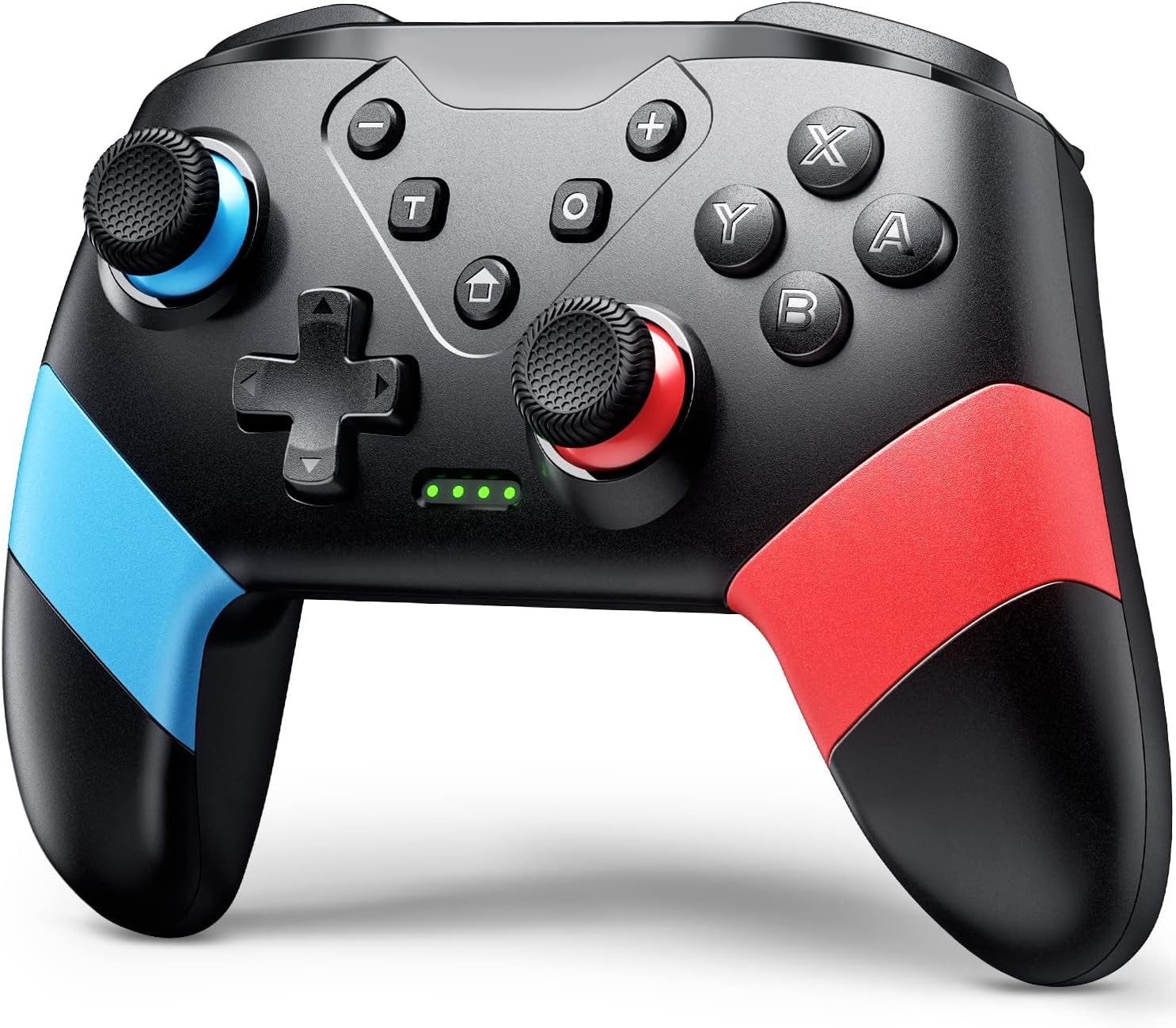
The VOYEE Switch Controller is a versatile, wireless pro controller compatible with Switch, Switch Lite, OLED, and PC. Featuring 16-key programmable buttons, a 6-axis gyro sensor for motion control, and 4-level vibration feedback, it offers immersive and customizable gameplay. Its ergonomic design and 15-hour battery life ensure comfort during extended sessions, while a 33ft wireless range provides freedom of movement. Ideal for gamers seeking a high-performance, budget-friendly alternative to first-party controllers.


| ASIN | B097XLJX89 |
| Additional Features | Ergonomic, Rumble, Turbo |
| Best Sellers Rank | #366 in Video Games ( See Top 100 in Video Games ) #16 in Nintendo Switch Controllers #25 in PC Game Controllers |
| Brand Name | VOYEE |
| Button Quantity | 10 |
| Color | Red+Blue |
| Compatible Devices | Nintendo Switch, Switch Lite, OLED, PC |
| Compatible Video Game Console Models | Nintendo Switch, Nintendo Switch Lite |
| Connectivity Technology | Bluetooth, USB A |
| Controller Type | Gamepad |
| Customer Reviews | 4.4 4.4 out of 5 stars (4,528) |
| Hardware Platform | PC |
| Item Dimensions | 5.9 x 2.59 x 4.17 inches |
| Item Weight | 6.88 ounces |
| Manufacturer | Dongguan Chenhao Electronic Technology Co.,LTD. VOYEE |
| Manufacturer Part Number | S03 |
| Model Number | S03 |
| Package Quantity | 1 |
| Power Source | Battery Powered |
S**.
Good Quality for a Low Price
I wasn’t sure what to expect because of the low price, but this controller exceeded my expectations. It feels solid, works smoothly with no noticeable lag, and all buttons respond well. The built-in rechargeable battery is also very convenient so I don’t have to keep swapping batteries. Definitely a great value.
M**L
Actually a pretty decent controller
Actually a really great controller for the price! Works great and pretty sturdy. The buttons are loud when you press them, but you just sound like you’re going crazy on someone so I’m not mad about it lol. It will automatically power off of your idle for too long (idk probably 30 mins or so), which is great for keeping my battery filled, especially if your an idler like me. Keeps a charge for a good amount of time and pretty sturdy.
A**R
Guide on How to Use the VOYEE Switch Controller (Console Pairing, Turbo, Button Mapping)
Yes, the turbo works for the bench method in Pokemon Legends ZA for shiny hunting if you have a rubber band or something to press down on your control stick for you IRL. But no, it will not run macros for you. Here is a general guide on how to use this controller! ********How to pair the controller to your Switch or Switch 2:******** (Note: I was unable to do this while the controller was plugged in.) 1. Turn on your console. 2. On the home screen, click the Controllers icon at the bottom. (Looks like a joycon.) 3. Select 'Change Grip/Order' 4. On your controller, press the 'Home' and 'Y' buttons simultaneously. You do not need to hold. 5. Wait a moment. Green dots should move on the bottom of your controller. Once they have stopped moving and you see a controller has been connected, you can press A, then Home and leave that menu. Your controller is now paired! (If your controller goes to sleep due to inactivity, pressing the Home button again will wake it.) ********How to use the Turbo function on this controller:******** 1. Press the 'T' button on your controller and the button you wish to be repetitively input into your game simultaneously. For example, if you want to press 'A' over and over again, press 'T' and 'A' at the same time. (You don't have to hold--but you might have to try twice.) 2. To change the speed of your input, press the 'T' button and the up or down button of your D-Pad simultaneously. 'T' and the up on your D-Pad will increase the speed. 'T' and the down on your D-Pad will decrease the speed. 3. To turn off turbo inputs, press the 'T' button as well as the button that you originally selected for the input. For example, if you chose to have the 'A' button on turbo mode, then to turn this off you would need to press 'T' and 'A' simultaneously again. You can have turbo running for multiple buttons at once (A, B, Y, X, ZL, L, ZR, R). But it will not function for the M1, M2, +, -, D-pad buttons, or control stick clicks/directions. D-pad up and D-pad down are exclusively used to control the speed of Turbo. If you want to use turbo on one of the buttons in the category that is ineligible for Turbo, such as the + button, then you are able to circumvent the limitations by changing your button mapping. ********How to change your button mapping:******** 1. Go to the home page of your console. 2. Select 'System Settings' at the bottom (looks like a gear) 3. Find the 'Accessibility' section 4. Select 'Button Mapping' and 'Edit Controller Mapping' for your controller 5. Change the mapping for one of the Turbo-eligible buttons (like R) to an ineligible Turbo-button output (like +) then save. This makes it so that if you use 'T' and 'R', instead of the R button output, you will get + as your turbo output. Buttons that turbo works on without any mapping needed: A B Y X ZL L ZR R Buttons that would require button mapping for turbo to work: D-Pad buttons Control stick presses - and + buttons (Note that the 'Button Mapping in Quick Settings' toggle in System Settings allows you to access this menu by holding your Home button. Selecting 'Reset Controller Mapping' restores default settings for button mapping.)
�**�
Great paired with Android TV as a remote and gaming controller.
Works pretty good on Google TV. GeForce Now, Luna and Xbox Cloud Gaming work well. GeForce is the best experience in my opinion. Feels light, but pretty solid. Good option for kids that brake things easily. Thumbsticks feel snappy in a good way. Buttons feel and sound kinda clunky which can be annoying if you're playing in the living room at 4am. I actually use the controller on the TV as the remote. You can also control the VR 360 videos on YouTube with this controller. That's a fun experience with the kids. Disneyland/world 360 VR videos.
A**R
Works great with Switch
Solid cheaper option for a second controller. No issues.
R**S
Good controller for switch 2.
Very nice game controller, it’s a bang for the price, easy to connect to my Switch 2, battery life it’s ok for game many hours, and it’s comfortable in hands.
A**A
This is the #1 alternative to a first party controller
This is one of the best third party controllers I've ever used, especially considering the price (which was $16 for me at the time of purchase). The controller is comfy, I love how the ZL and ZR buttons are actually triggers akin to an Xbox controller. The nice pop of color is great too. Turbo function works great and even has 3 different speed settings to use in different scenarios. And it's wireless too! Most other controllers like this are wired only. Highly recommend this controller!
M**T
Good Controller, but should not be your Primary
This wireless controller is a decent controller for the price. The quality of the controller is not great but not terrible. It is very light weight and you can feel it has a lot of empty space under the plastic grips. The buttons are responsive and we have not had any issues with lag or buttons not working. We it them for a Nintendo Switch console and the pairing is easy by simply holding the "House" button in the middle of the controller. After a few seconds you should see the lights on the controller flash and it will lock into whatever player the controller was assigned. 1 light for 1st player, 2 lights for 2nd player, all the way up to 4 lights for 4th player. The controller is a bit noisy, in the sense that every time you press a button you can hear a rather loud plastic clacking sound. The size of the controller is on the larger side and the buttons are also big. The battery life has been great and last several days without needing to charge. Charging is quick and uses a standard USB C port. Overall, this is a good controller to have so that others can play together but you will probably not want to use this as your primary controller LIKES: Affordable Great Battery Life Bigger size Great Battery Life DISLIKES: Not the best quality Loud Clacking sounds when you press buttons
V**S
Embora seja mais leve que o original, não deixa a desejar quanto ao desempenho e não compromete a jogabilidade. O Modo turbo é um diferencial para a experiência.
M**D
عيبها انها تحتاج الي سلك للتوصيل علي الكمبيوتر
Trustpilot
1 month ago
1 week ago