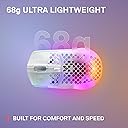
🔥 Game light, game bright — the Aerox 3 Wireless is your ultimate wireless weapon 🎮
The SteelSeries Aerox 3 Wireless is an ultra-lightweight (68g) gaming mouse featuring a high-precision 18K DPI TrueMove Air optical sensor co-developed with PixArt. It boasts a stunning 3-zone PrismSync RGB lighting system with 16.8 million colors, an IP54-rated AquaBarrier™ water and dust resistant design, and an impressive 200-hour battery life. With lag-free 2.4GHz wireless and Bluetooth 5.0 connectivity options, it’s engineered for pro-level performance and durability, making it a top choice for gamers seeking speed, accuracy, and reliability.


| ASIN | B09CHD9TPX |
| Additional Features | Gaming |
| Antenna Location | Gaming |
| Are Batteries Included | Yes |
| Are Batteries Required | Yes |
| Battery Average Life | 200 Hours |
| Best Sellers Rank | #16,321 in Video Games ( See Top 100 in Video Games ) #628 in PC Gaming Mice |
| Brand | SteelSeries |
| Built-In Media | Item |
| Button Quantity | 6 |
| Color | Ghost |
| Compatible Devices | Laptop |
| Connectivity Technology | USB, Wireless |
| Customer Reviews | 4.3 out of 5 stars 549 Reviews |
| Enclosure Material | ABS Plastic |
| Hand Orientation | Ambidextrous |
| Hardware Platform | PC |
| Item Weight | 0.07 Kilograms |
| Manufacturer | SteelSeries |
| Mfr Part Number | 62610 |
| Model Name | Aerox 3 Wireless Ghost (2022) |
| Model Number | 62612 |
| Mouse Maximum Sensitivity | 18000 Dots per Inch |
| Movement Detection | Optical |
| Movement Detection Technology | Optical |
| Number of Batteries | 1 Lithium Ion batteries required. (included) |
| Number of Buttons | 6 |
| Pattern | Aerox 3 |
| Power Source | Battery Powered |
| Range | 5.0 meters |
| Special Feature | Gaming |
| Style Name | Wireless |
| Theme | Rainbow |
| UPC | 810052981130 |
| Unit Count | 1.0 Count |
| Warranty Description | 1 Year |
A**W
SteelSeries Aerox 3 Wireless: My Upgrade from the G502 Wired
I’ve been a Logitech G502 wired fan for years (I had 3 previously and went through 1). That hefty, tweakable mouse was my go-to for gaming and pretty much everything else. Lately, though, I’ve been curious about going wireless—less clutter, more freedom. I picked up the SteelSeries Aerox 3 Wireless, and honestly, I was a little worried about how it’d stack up, especially with response time. Turns out, I had nothing to stress about—it’s awesome. Here’s why I’m loving it. Wireless Life: No Lag Worries Coming from the G502, I was hooked on how instant it felt with the cable. I didn’t want a wireless mouse to mess that up, especially for fast games like Valorant. The Aerox 3’s 2.4 GHz mode and TrueMove Air sensor totally deliver, though. Clicks land quick, movements are spot-on—no delay at all. It feels just as sharp as my old wired setup. Bluetooth’s handy for casual stuff, but 2.4 GHz is where it shines for gaming. I was overthinking it—this thing’s great. Weight: So Light, So Nice The G502 was heavy—around 120 grams with weights—and I didn’t mind it. Then I tried the Aerox 3 at 68 grams, and wow, what a difference. It’s so light I wasn’t sure at first, but now I love how easy it is to move. My wrist feels way less tired after long sessions, and those honeycomb cutouts keep it cool and comfy. It took a minute to get used to, but I’m sold on lighter mice now. Built Tough with a Splash of Protection My G502 took a beating and kept going, so I wondered if this slimmer mouse could handle me. It’s sturdier than I expected—no creaky flex, and the clicks are rated for 80 million presses, so it’s in it for the long haul. The IP54 water and dust resistance is a huge plus, too. I’ve had a few close calls with drinks near my desk, and it’s nice knowing a little spill won’t ruin it. It’s tough in all the right ways. How It Looks and Feels The Aerox 3’s got this neat perforated design—RGB lights peek through the holes, giving it a sleek, almost see-through look. It’s a lot flashier than the G502’s bulky style, and I’m into it. It’s smaller, better for claw or fingertip grips, which was an adjustment after the G502’s big shape. But it glides super smooth with those PTFE feet, and at 68 grams, it’s effortless to use. Battery life’s solid (200 hours on Bluetooth, 80 on 2.4 GHz), and the USB-C cable’s nice and soft. Only downside? No spot for the dongle, but I can live with that. Wrap-Up Switching from the G502 wired to the Aerox 3 Wireless was a leap, but I’m so happy I took it. No lag to fuss over, it’s crazy light, built to last, and that water resistance is a lifesaver. For Prime day deal of $67 bucks, it’s a steal. If you’re nervous about going wireless, don’t be—this mouse has it all covered.
M**S
Amazing!
- Shape & Material This mouse is two times as expensive as the Razer Mamba Wireless. I loved the shape of the Mamba. It fits the hand so well. Now with the Aerox 3, the shape doesn't fill the palm that well, but its matte texture is on point. I prefer a smooth or lightly textured finish on larger mouses and a matte finish on smaller mouses. The matte finish on this mouse makes up for the flat form. - Battery Life The battery life on this device is much better than Mamba Wireless. I hated having to charge the Mamba Wireless every two or three days. That mouse always runs out of battery when I'm editing a video or working. So, this mouse is a lifesaver for me. - Weight I could immediately tell how light the mouse is when I picked up the Amazon package. It almost felt like an empty plastic packaging in my hand. I knew it was going to be very light but I didn't imagine it to be this light. Mindblowing! - Switches The mechanical switches feel just as solid as the Rival 650, which is another mouse that I really like from SteelSeries. I have nothing to complain about this mouse. It completely exceeded my expectations for it. This is my first superlight mouse. I haven't tried the G Pro X Superlight yet so I can't tell if the Logitech alternative is any better. For now I'm really happy with the purchase.
G**N
My favorite mouse
Super lightweight and last long.
F**E
Decent quality.
Decent quality.
E**.
Glad I didn’t listen to reviews
I bought this mouse because it ticked all of the boxes (Bluetooth/Wireless functionality, USB-C charging, Waterproof, with RGB for giggles). Before I grabbed it, I admit to being a bit worried, as I had read a ton of reviews complaining about the shape, how recessed the side buttons are, issues with the structural integrity, etc. I am so happy that I went with my gut feeling. From my experience, I can only say that a lot of people who review this mouse have been holding it wrong, trying to keep their finger resting on top of the side buttons at all times. As a guy with average sized hands, this mouse is fantastic in a relaxed fingertip grip with the thumb resting just under the back side button. You can push the side buttons from this position with ease (only having to stretch the tiniest amount to reach the one in front). I have had no complaints using it as my daily driver for just over a month, and I much prefer it over the Logitech G403 and Razer Deathadder I had been using. As for build quality: my one-year-old has thrown this thing off my table onto hardwood multiple times, loves banging it around like a hammer and slobbering over the primary buttons if given the chance: none of this has stopped it from working as well as it did the day I got it. My only gripe is that, sometimes when waking the mouse from sleep, it will reconnect faster if I just turn it off and on again. It’s a small thing that I don’t feel should dissuade anyone that likes a claw/fingertip grip from buying this mouse.
V**A
Short battery, but very light and ergonomical
Battery life is a bit short, but that's to be expected given the light weight. I have smallish/average sized hands and this mouse feels excellent. Easily one of the best I've tried. I just wish the wireless dongle is USB-A. The side buttons are much too slim for my tastes, but again it's probably due to the weight. But I'd gladly trade that for slightly fatter side buttons. Overall very nice mice. UPDATED REVIEW: there seems to be some issues connecting with the mouse if I let it sleep for any amount of time. I eventually have to plug it directly with cable until it starts working wirelessly again.
A**R
Works great love it.
Love it works great. When not in use or on standby it gos to sleep. When battery is low it will flash red, and flash green when done. I love the colors and it's lighter than my old mouse. I been using steelseries for 14 years and this new model is amazing
D**N
Broke itself after only a year
Mouse worked fine for a year then randomly decided to stop working and only works in little spurts for a second. Tried factory resetting, reinstalling steelseries gg, using different wired cables. The mouse just randomly broke itself and I have been gentle with it.
J**N
Sehr gute leichte Gaming Maus
Sehr gute Wireless Maus. Sie funktioniert super gut. Beide Modi über Bluetooth und den 2.4 Herz Dognle funktionieren beide gut und auch Ruckelfrei. Sehr zu empfehlen.
J**B
Good lightweight gaming mouse
Very lightweight and fast wireless gaming mouse. Seems to have faster response than the razer viper. Only problem is over time things get stuck inside the mouse due to its semi open design.
M**O
ME GUSTA
📝 DESCRIPCIÓN Ratón inalámbrico para gaming con batería recargable y conectividad versátil para varios dispositivos. * En Amazon puedes encontrar un modelo similar y más económico, de la misma marca: https://amzn.to/48LO9xw 🧾 ESPECIFICACIONES - Tecnología: Bluetooth 5.0, 2.4 GHz inalámbrico - Sensor óptico: TrueMove Air, 18,000 CPI - Batería: Recargable - Autonomía: Hasta 200 horas de duración - Botones: 6 mecánicos, 60 millones de clics - Peso: 68 g 📦 CONTENIDO • Ratón inalámbrico • Dongle USB • Cable Usb-C • Guía de instalación 💶 PRECIO 6 de Noviembre de 2024: 59,99 € 🟢 PROS • Batería duradera de hasta 200 horas • Dos tipos de conectividad inalámbrica • Diseño ergonómico y cómodo para largas sesiones • Sensibilidad ajustable hasta 18,000 CPI • Clics mecánicos duraderos • Batería recargable • Luces Led RGB 8️⃣ VALORACIÓN Este ratón ha sido un excelente descubrimiento para las sesiones de juego del niño y para un uso ofimático. Me gustó este ratón por su diseño gaming y por venir con batería recargable, con hasta 200 horas deautonomía. Siempre he utilizado la marca Logitech, pero me decidí a probar este modelo por las buenas críticas y por tener la conexión tanto por Bluetooth como la de radio 2.4 GHz por usb. Ambas ofrecen una respuesta muy rápida, casi como si estuviera usando un ratón con cable, sin que al nivel que tiene el niño le haya notado lag. Viene con tecnología Quantum 2.0 que optimiza el rendimiento, y se nota la baja latencia en plena partida. Tiene un sensor óptico TrueMove Air, con hasta 18,000 CPI, que ofrece una precisión impresionante tanto en juegos como en tareas normales. Es la primera vez que utilizo un ratón de estas características y gracias a su botón central, puedes cambiar rápidamente de modo, adaptándose a lo que necesitas en cada tarea. Los clics son mecánicos y son muy satisfactorios, con un sonido nítido y una respuesta que se siente muy sólida, y que están diseñados para durar mucho. Por el momento ningún problema. El diseño es lo que más me ha gustado. Es ergonómico y se ajusta perfectamente a la mano, lo que lo hace cómodo durante largas sesiones de uso. Tenía este modelo y otro de Logitech y claramente, este modelo por diseño y sensaciones, me hacía sentir más cómodo. Es un poco más pesado que el Logitech, pero también es algo que me gusta más. Otro aspecto que le encantó al niño, es que viene con iluminación RGB. Es una iluminación sutil pero bonita. Además de verse bien, te da alertas sobre el estado de la batería, lo cual es práctico para no quedarte sin energía en mitad de una partida. Puedes descargarte el software SteelSeries Engine, que te va a permitir personalizar completamente las funciones del ratón. He podido programar cada una de las teclas según mis necesidades. Además, puedes guardar varias configuraciones, para cambiarlas rápidamente sin tener que volver a programar. Desde el software, también es súper fácil actualizar el firmware, asegurándome de que siempre está funcionando a su máximo rendimiento. También puedes modificar los modos de iluminación de la rueda del ratón, lo cual es muy útil para recibir alertas de batería o notificaciones del juego de forma visual. En general, es un ratón versátil que funciona muy bien tanto para juegos como para trabajo cotidiano. ✅ CONCLUSIÓN Este ratón ofrece una excelente relación calidad-precio, con una batería muy duradera y una conexión inalámbrica fiable. Ideal tanto para gamers como para usuarios de oficina. 👍 MUY RECOMENDABLE ✳️ Espero que mi comentario ✍️ te haya podido servir de ayuda 😃
S**L
Great, but be wary of the battery life
Great mouse - very light and glides nicely. Lighting looks very good and comes with a nice braided cable. Haven’t tested the Bluetooth, as for the 2.4G mode it is very responsive and I feel no difference to my old wired mouse. It is easy to map the 3 extra buttons to whatever using the steelseries engine, as well as configure the lighting. The battery life is on the shorter side - it is clear they prioritised a lower weight over battery, as depending on usage and settings it can run out quickly. However it works perfectly well plugged in and charging. Lastly, this hasn’t been a problem for me but if crumbs or debris were to make it inside the mouse, to disassemble it and remove them you’d have to remove the mouse feet which from a repairability standpoint is disappointing, as battery replacements will similarly need to do this. Also if you’re left handed like I am, this mouse is almost symmetrical apart from the side buttons, so is suitable for left handed use.
O**D
Light and smooth dual-mode mouse with USB-C
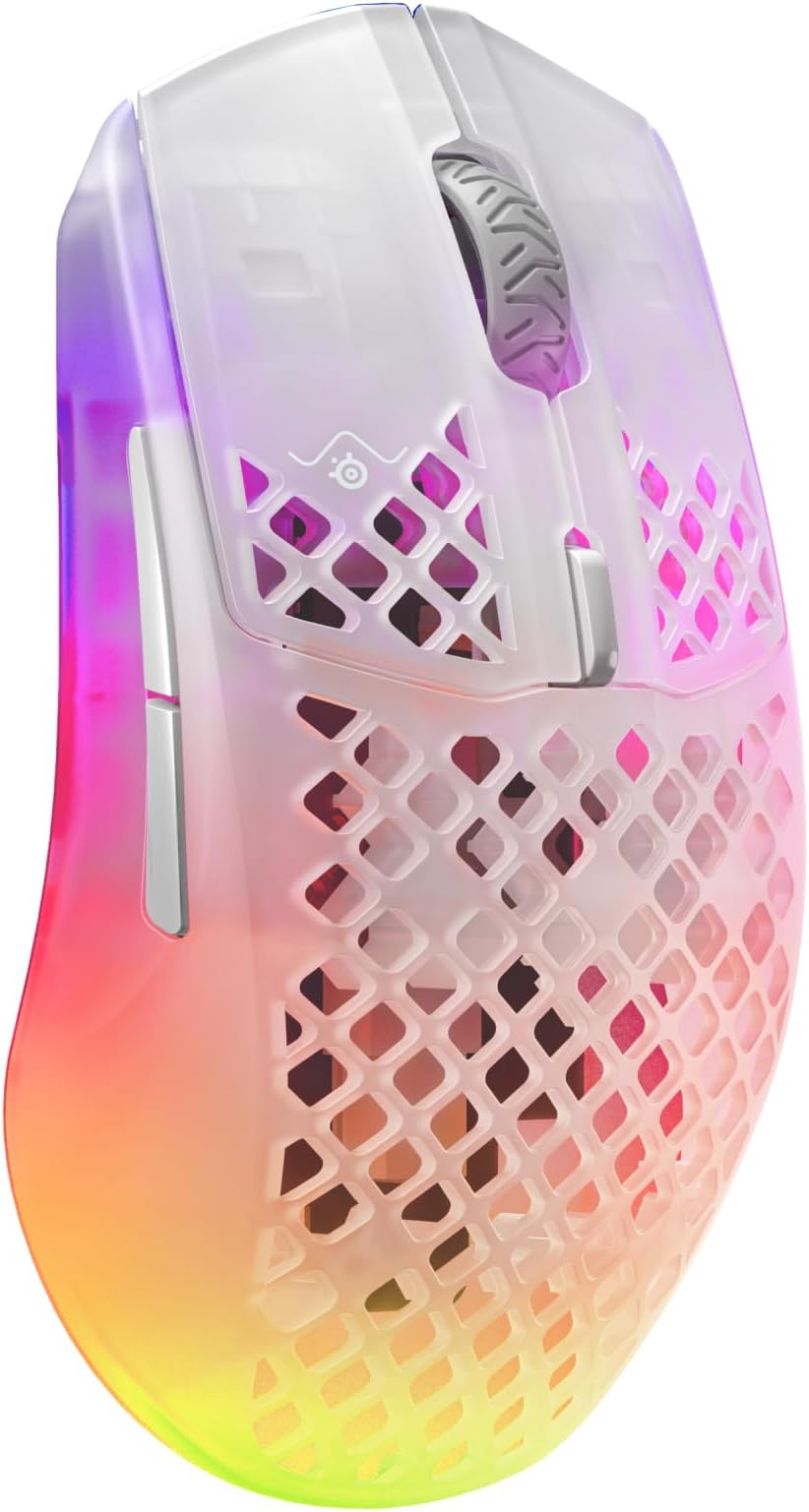
Warning fairly long and detailed The first th8ing to know about the Aerox 3 Wireless is that there is an original and an 2022 update.. That update fixes complaints about the original Aerox 3 Wireless. You can tell them apart by looking at the bottom. The original mouse has four small circular PTFE feet, the updates mouse has two wide PTFE feet. Those feet are very smooth, making the mouse really glide over my desk. The Aerox 3 Wireless It is available in two colours: Snow (White), Onyx (Black) and this Limited Edition Ghost. The Ghost Edition is the Snow Edition but with more transparent sides, to really shows of the RGB lighting. The default light level is ridiculously bright, but easy to adjust with the SteelSeries software. I set the brightness level to about 40% percent. The RGB lighting is highly configurable and can be turned off – but if you are going to do so, the Snow Edition is cheaper. A interesting thing about the SteelSeries software is that it noted that some Windows mouse acceleration enhancements were turned on, recommended turning those of for this mouse, and even provided a “Fix this now” button to do so. I did so, and did experience any problem. There’s more, but ther two biggest things that make a gaming mouse, other than the RGB light show, are low weight and high precision. This mouse is just 66 grams and its precision, which is advertised at 18.000 CPI, which isn’;t the highest available, but more than you really need. Immediately after connecting the mouse, I pressed the CPI button to get a lower resolution and faster moving mouse. I am happy with the way the mouse clicks and scrolls. Manufactures claim extreme durability for click switches nowadays, so it should take month or years before I can say something useful about it other than that they seem work just fine. The mouse clicks are audible, but silent compared to the noise of the key clicks on my Apex Pro keyboard, The most important things about any moue are its shape and size. This mouse has a regular shape. It is only slightly different from the mouse I was using, and I adapted within a few minutes. To me, the lower weight was the bigger difference, and a difference I like. Switching back and forth, I quickly found the old mouse to be heave in comparison. While quite a few mice still use the annoying mini-USB port for charging (Logitech is particularly late to adopt the much more convenient USB-C), the Aerox 3 features an USB-C port, as a modern mouse should. The included USB cable is a reasonably nice quality braided cable, but not a pure USB-C cable. It has an USB-A connector for the computer end and an USB-C connector for the mouse end. You can connec the cable and charge the mouse while using it. The manual does not tell you how long to charge, I charged it for about half an hour. The included USB dongle is a bit larger than most mouse dongle, so it will stick out a bit more, which makes it less suitable for laptops. It lacks a logo or model name on top, but has plenty of text on the side to not confuse it with other dongles. Not that you need that, its size literally makes it stick out. There is a real design shortcomings that may turn you off this model; the Aerox 3 Wireless does not have space to store its USB dongle. What I happen to like, but may be turn-off for some is that this mouse dongle isn’t the typical USB-A dongle, but an USB-C dongle. As I type this, that dongle is connected to an USB-A port through a USB-C/USB-A adapter from Graugear (not too expensive, and sturdy metal instead of plastic), but you can connect to an USB-A port without any additional expense; the box includes an female USB-c to female USB-c adapter that allows you to connect the dongle to the included USB cable. The Aerox 3 Wireless is a dual-mode mouse. A little button on the bottom let’s you choose between Bluetooth, RF wireless and Off .When I switched it to Bluetooth, my Windows 10 laptop recognized it just fine. I considered the Logitech Wireless Pro, but it lack Bluetooth and has a mini-USB connector. The Logitech Superlight Pro X2 has USB-C, but is even more overpriced. The G309 is more affordable, but feels unbalanced with a battery, and the expensive Logitech PowerPlay mat you need to use it without a battery uses proprietary technology that is incompatible with Qi. The Logitech MX Anywhere 3S seems ideal for casual n the road use, but smallish for intensive desktop usage. The Razer Cobra Pro may look better on paper – and is surely priced like it – but it is a Razer mouse, and one of the nasty things Razer does is to shape their mice to only accept their own non-standard USB cables. I also know, from trying to claim warranty for a defect Razer Viper Ultimate, that their product support is worse than a bad joke. The Corsair M75 Wireless is very comparable, but 89 grams instead of 66, and I like the looks of the Aerox 3 better. In conclusion, I am happy with this mouse. I don’t know how well their advertised “aqua barrier” prevents it from getting wet, and it is too expensive to deliberate test it, but the shape is fine, the mouse clicks are fine, the scroll whel feels good, the smooth feet make it glide over my desk and the low weight makes it a joy to use. I like a bit of RGB, and the transparent side allow me to set a lower brightness than the Snow Edition, to save juice and make the battery last longer.
Trustpilot
3 weeks ago
2 days ago