Buy anything from 5,000+ international stores. One checkout price. No surprise fees. Join 2M+ shoppers on Desertcart.
Desertcart purchases this item on your behalf and handles shipping, customs, and support to Vietnam.
📸 Capture, Connect, Create — Print Your Memories Instantly!
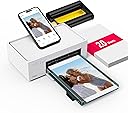
The Liene M100 is a portable 4x6'' photo printer using advanced thermal dye-sublimation to produce vibrant, durable photos instantly. Featuring a built-in WiFi hotspot, it supports up to 5 devices simultaneously without relying on external networks. Compatible with iOS, Android, PC, and laptops, it offers seamless app control with real-time status updates and creative editing tools. Designed for hassle-free use, it includes 20 sheets of glossy photo paper and a cartridge, making it the perfect compact printer for home or mobile use.


| ASIN | B0983NX3L6 |
| Additional Printer Functions | Print Only |
| Best Sellers Rank | #738 in Office Products ( See Top 100 in Office Products ) #1 in Desktop Photo Printers |
| Brand | Liene |
| Built-In Media | photo printer, power adapter, paper cassette, ink cartridge, photo paper |
| Color | white |
| Color Depth | 24 bpp |
| Color Pages per Minute | 1 ppm |
| Compatible Devices | Laptops, PC, Smartphones |
| Control Method | App |
| Controller Type | iOS, Android, Windows |
| Customer Reviews | 4.5 4.5 out of 5 stars (2,185) |
| Dual-sided printing | No |
| Duplex | Manual |
| Global Trade Identification Number | 06971398600728 |
| Hardware Interface | USB Type C |
| Initial Page Print Time | 59 Seconds |
| Ink Color | Cyan, Magenta, Yellow, Black |
| Item Dimensions D x W x H | 7.48"D x 9.88"W x 7.48"H |
| Item Type Name | photo printer |
| Item Weight | 2.2 Pounds |
| Manufacturer | Hannto Technology Co., Ltd. |
| Maximum Copies Per Run | 20 |
| Maximum Copy Resolution Color | 300 dpi |
| Maximum Media Size | 4 x 6 inch |
| Maximum Sheet Capacity | 20 |
| Maximum print Resolution Color | 300 x 300 dpi |
| Model Name | DHP513 |
| Model Number | DHP513 |
| Model Series | DHP513 |
| Number of Trays | 1 |
| Other Special Features of the Product | Borderless Printing, Network-Ready |
| Output sheet capacity | 20 |
| Paper Size | 4x6 Inches |
| Print media | Glossy photo paper |
| Printer Connectivity Type | USB |
| Printer Output Type | Color |
| Printer Type | Thermal Dye Sublimation |
| Processor Count | 1 |
| Resolution | 300 x 300 |
| Scanner Type | Photo |
| Series Number | 5 |
| Specific Uses For Product | Home |
| Total Usb Ports | 1 |
| Warranty Description | 1 year |
| Warranty Type | 12-month warranty |
K**D
The best 4x6 printer you can buy at this price range
I have had the printer and printed 20 pictures with it already. Let me first say the picture quality is perfectly acceptable for this price and as an amateur photographer I love it. More than love it actually, the print quality is as-good-as if not better than Walmart and CVS prints. The colors are accurate. The fine details are there and not smudged. There's no weird effects on the images from an AI or other algorithms that you can't turn off. You can print exactly what the picture is, no hidden enhancements, only those you choose in the app willingly. This is important - the Kodak Dock Plus has image processing that cannot be turned off and makes the images look way over sharp and creates those borders around edges you'll hate. This printer does not do that. It prints as expected. I'm very happy to see that all the fine thin details are crisp and clear, such as those bothersome hairs you can't comb back. They print and look good, just like the picture on a screen, no white edges or mis-aligned colors. No blurriness. I was specifically looking for accurate true reproduction of fine edged details, this printer delivers that. Colors are rich and vibrant, and more importantly, accurately rendered. The Kodak printer was brightening my photos and increasing saturation without my say-so. This printer gives me prints with colors that look just like the real thing. The app works well, is easy, and has effects and editing tools you may enjoy. However, this important bit of advice for Android users: you have to turn off your mobile data before you connect to the printer's WiFi. Otherwise the app will tell you the printer cannot be found! This is because Android by default will reroute all network calls to whichever connection type has active internet access. Obviously the printer is not a source of the internet. The printer is not going to be found as connected to the internet. I tried the Kodak Dock Plus before this. The Kodak prints much poorer in quality, smudging fine details, and with terrible color accuracy due to a variety of issues. I returned that to try this one, and boy am I happy I did! Did I mention you can print with your PC with this one but not with the Kodak? Yeah, they didn't list that fact for the Kodak and that's a problem for me. This printer has a much wider range of devices that will work with it. For the price, you're getting a really good amateur printer. You'll need to quadruple your budget for the next level up, so if you're primarily an amateur photographer that wants 4x6 prints done yourself, this is the printer to get.
B**Y
good quality prints on the go
what is so special about this photo you may ask? let me tell you: this is a photo from a Thermal printer that I got to do prints on the go without needing external WiFi. in the description says "fingerprint proof, waterproof, anti-oxidation, and non-yellowing" but is missing scratch resistant. this photo was in the back of my BF's Subaru for idk how long, bouncing around with stuff on top that would have destroyed any other photo, or even paper, and when I pulled it out to inspect it, it only had a little smidge on it that came off with no issues or residue left behind. still has a nice glossy look to it as well. another cool feature about this printer is I have a little power inverter ($25+ tax at harbor freight) that I was able to use to print a photo in my car (with it running for full battery power) with no issues, hiccups and printed perfectly easy to set up, easy to use, the print quality is amazing and the photos are pretty tough. a little expensive to start (a little over $100) but after that it's $40 for extra paper and cartridges. This is based off of MY personal use of this item and how awesome it is. there is NO endorsement going on, no one is getting paid.
B**B
A Great Photo and ID Printer!
I bought this as my primary printer is a color laser printer, and so I needed something that could handle picture and ID photo printing. I despise inkjet printers since I don't use them often enough to keep the ink from drying out and clogging the nozzle. That left a dye sublimation printer like this little Liene. It's as reliable as my laser printer even without regular use, delivers prints that are every bit as good as photo printing services, and it's relatively cheap per print if you buy the cartridges in bulk. It's also extremely easy to use, especially from a phone. Just connect to the printer Wi-Fi, open it's companion app, and you're off. I also use it for ID photo prints and not only is it great for that, but the app even helps you size and crop the photos to match the size/composition requirements. Overall this is is an amazing little printer!
C**N
La impresora funciona muy bien. Me preocupa un poco el gasto de la tinta o que se seque en el interior. Un poco de problemas al armarla (colocar las charolas y demás) porque el manual no es totalmente específico. Al imprimir, los bordes izquierdo y derecho no salen completos comparado con la foto original en el mismo tamaño.
S**N
This product is easy to use and prints amazing pictures. I like the convenience of printing instant pictures. It is small and compact. Perfect!!
D**A
I couldn't do without it! My project is still on the go. Just make sure you use the Liene cartages most suitable for the device, not the compatible ones as they are 1/16th of an inch too long and the cartrage doesn't lock in.
A**R
I usually get stuck with connecting to wi fi or setting things like this up, but this one is made so simple. They give you different options on how to print (from computer via cord, app, etc). I chose to use the app and was very happy with the simplicity. Read and follow the instructions and it’ll be very easy.
A**R
Had it working once. Won't connect. Android. Have to run it through a hotspot which is ridiculous. No direct connection available. Very glitch
Trustpilot
4 days ago
2 weeks ago