🎮 Stream Like a Pro, Game Without Limits!
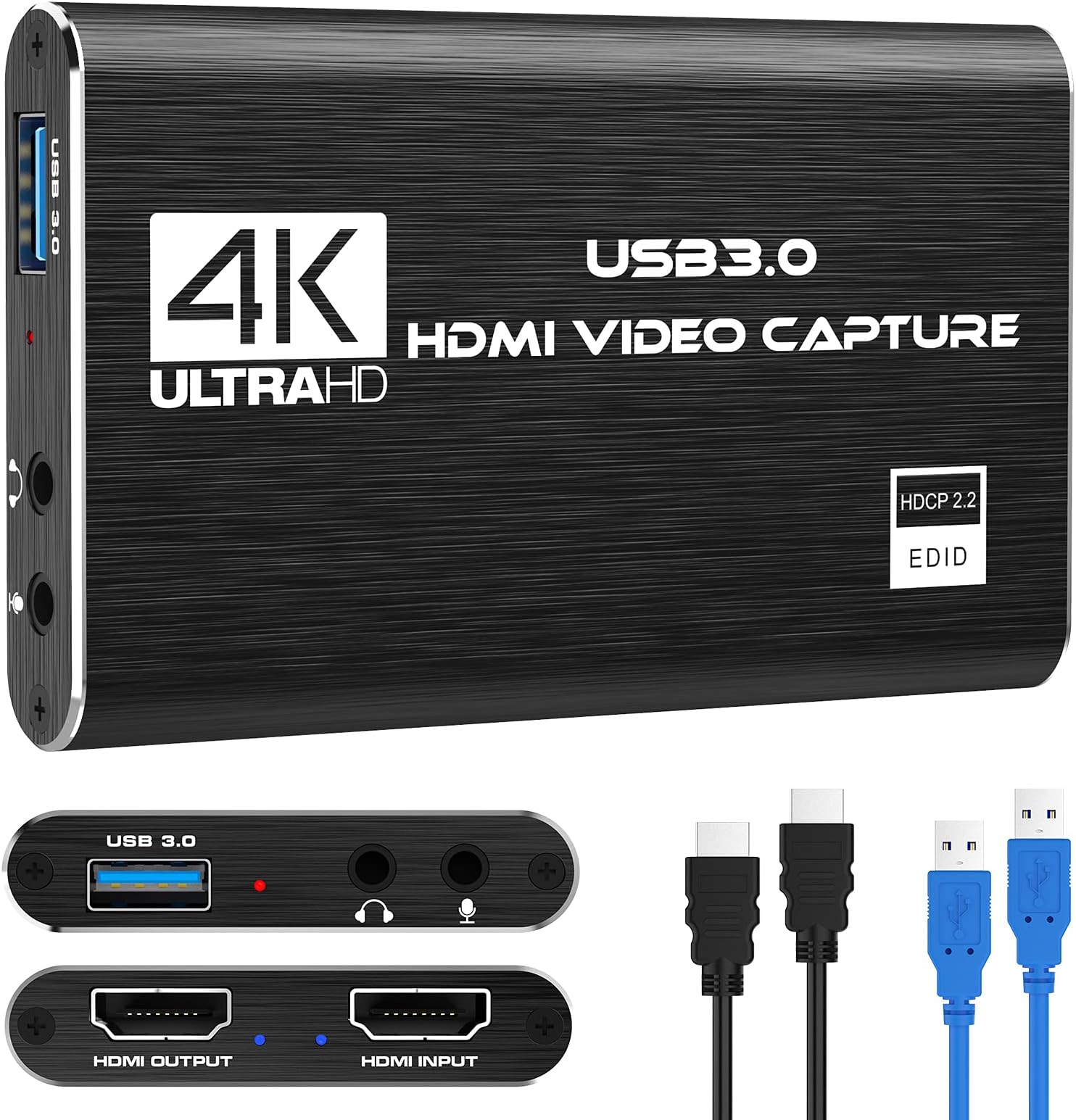
The Rybozen Capture Card delivers crisp 1080p 60FPS video capture with ultra-low latency via USB 3.0, supporting multiple platforms including Nintendo Switch, PS4/PS5, Xbox, and PC. Its plug-and-play design requires no drivers, while HDMI loop-out ensures zero lag gameplay during live streaming. Ideal for content creators seeking professional quality and seamless setup.


| ASIN | B097DKNS1M |
| Best Sellers Rank | #1 in External TV Tuners |
| Brand | Rybozen |
| Color | Black |
| Customer Reviews | 4.3 4.3 out of 5 stars (1,904) |
| Date First Available | December 28, 2020 |
| Item Dimensions LxWxH | 3 x 2 x 1 inches |
| Item Weight | 6.4 ounces |
| Item model number | V316B-FR |
| Manufacturer | Rybozen |
| Operating System | Windows |
| Product Dimensions | 3 x 2 x 1 inches |
| Series | V316B-FR |
R**H
My gamer sons loves it
The Elgato 4K X capture device delivers excellent performance for high-resolution streaming and recording. Setup was straightforward and the device integrates smoothly with streaming software. The video quality is sharp with minimal lag, even at higher resolutions. It’s a great option for content creators or gamers who want reliable capture without complicated setup. While it’s an investment, the build quality and performance justify the price if you’re serious about streaming or recording gameplay.
K**S
Worth the money especially if you are new to streaming!
Very easy to use! no lag and easy to set up! hooks right up to everything and turns right on! only thing i dont like is when i turn on my ps5 it no longer turns my tv on and switches right to the hdmi like it used to but im sure that can be figured out lol
A**R
Better than expected, 4K pass through (only 60fps) but full 4k streaming, No drivers needed. 10/10
Overall best bang for the buck. READ THIS REVIEW! So I couldnt find any info on what hz this could run at and that was important to me. I run 4k displays and wanted to record things from time to time. For my girlfriend this works great, and for many tasks it works fantastic. Read until the end for my view. Facts: Using numerous cables I got the same results on pass through: 4K 60F HZ / FPS, no noticeable latency (did not measure), also I dont believe HRD passed through I will verify and update my review. 1080P HZ / FPS. This is sufficient for most higher end gaming if you are doing a live broadcast. Which I will address below. I personally just use an OBS with a remote stream typically but I wanted any easy to plug in, low work, low effort solution when I needed to plug in fast. This product did EXACTLY that. For simply making a video tutorial, recording my screen for desktop use, server use, etc. This was amazing. And not only that at this price point it is cheap enough to use this to remotely manage video out on my servers. +2 points right there. I wish it would handle 4K pass through (not record I dont care about getting over 30-60FPS which I was able to get) to my main display when I play a game for when friends want to watch. But thats fine I can do a remote stream for them if it is important for me to get 4k @ 120-240hz which most cards barely handle anyway. Now the best part. I plugged this into my pc, multiple Mac machines. No setup, no drivers needed. My obs 100% picked it up immediately. From opening the box to streaming I was setup within 5 minutes. Cables were supplied. I wish they had a newer one (which they might already have) with USB c or at least a higher HDMI pass through. Due to how cheap these were and how reliable / easy it was for compatibility I actually plan to buy some for remote sever management uses instead of using long HDMI cables when I needed to do bare metal work for servers without network based management. Overall everyone told me to not buy this. Wrong, buy it until you are ready to commit to a higher priced product if you need the resolution / Frame rate. The recording quality was 100% spot on of what I saw on my gaming computer, connection was easy as can be, streaming was the easiest thing I have done yet.
S**Z
Tutorial on how to use this, plus my thoughts
It works great. FYI if you want to record your PS3 with it, make sure to buy a splitter first. The quality is great and easy to set up using OBS. Simply add a Video Capture Device source to Sources, and set it to "USB3.0 Video" and configure your settings to your likings. If you wish to hear it, click on the gears icon underneath the Audio Mixer section and set the Audio Monitoring to "Monitor and Output."
N**N
this thing is great
capture card works great, any issues i had were due to the settings of OBS or the equipment i used, not the capture card itself. you're able to display video to two separate devices at once, in my case a laptop and a TV, so i'm able to record from my laptop while playing on my TV. setup took like 10 minutes, and the capture card is able to handle fast moving stuff on screen, such as fortnite and sonic racing crossworlds. the cables are also very secure, so i'm able to have the capture card dangling off my desk from the wire it came with and the hdmi cable it came with, but you probably shouldn't do that. overall very satisfied especially for the price.
J**N
Dear Consumers
For what you get, this is a great start into capturing video and some audio albeit I would much prefer still to use my pc to handle my audio, it works very well in streaming at 4k and even has a pass through for the same 4k resolution My issue first arrived with how loose the hdmi connectors felt, they dont seem to snugly fit even with the supplied hdmi cords and the cords themselves while supporting 4k dont seem to be entirely built for it The device also does not allow HDR pass through, so if you're enjoying HDR content while streaming, unfortunately you have to forgo it until you remove this device The device only has minimal to undetectable audio lag which even they give you advice on how to rectify so points there and it doesnt get hot so that helps too All this to mention you are essentially having the easiest setup I have ever seen with one of these So for the money and the budget as well as for travel, I highly recommend it as a starting capture card, for travel, or as a backup Sincerely, A gamer
A**.
At this price point, it's fantastic
For the price point, it's solid. My previous capture card was having issues, so was looking for another since I run my cable to my laptop to watch due to not having a tv. It works fine with OBS. Sound and image match up, as some cards are known to have a slight delay so audio and image don't match up. I haven't noticed such a delay on this one. At first I thought the image colors were slightly muted but then ran side by side comparison with amazon running the same movie as I did through the capture card, and figured out it was just the movie I was watching. The only thing I wish would be that it had a USB-C output instead of just coming with an adaptor to plug into a USB-C as it comes with double sided cord and the output on the device is only usb or HDMI.
Trustpilot
2 weeks ago
1 week ago