🚀 Unlock your world with the ultimate 5G WiFi powerhouse!
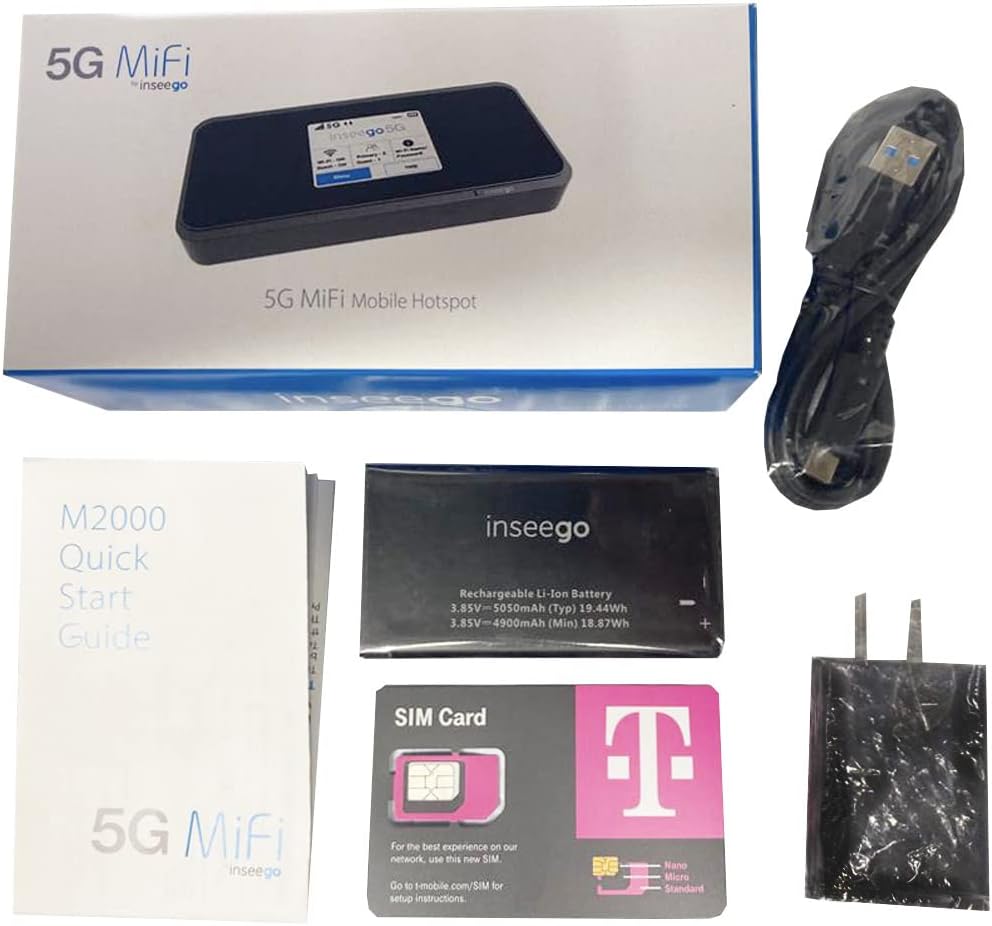
The SIMBROS INSEEGO M2000 is a professional-grade portable hotspot featuring blazing 5G connectivity paired with WiFi-6 technology, a robust 5050mAh battery for all-day use, and enterprise-level WPA2 security. It includes a T-Mobile 5G SIM card and OEM Type-C charger for seamless activation and reliable performance, making it the go-to device for millennial managers and remote professionals who demand fast, secure internet wherever they go.
| ASIN | B09742XJB1 |
| Antenna Location | Security |
| Best Sellers Rank | #109,813 in Cell Phones & Accessories ( See Top 100 in Cell Phones & Accessories ) #2,284 in Cell Phones |
| Brand | SIMBROS |
| Built-In Media | Power Adapter, USB Cable |
| Color | Black |
| Compatible Devices | Personal Computer |
| Connectivity Protocol | 5G, Wi-Fi |
| Connectivity Technology | 5G, Wi-Fi |
| Control Method | App |
| Controller Type | App Control |
| Coverage | wireless connectivity |
| Customer Reviews | 3.5 out of 5 stars 233 Reviews |
| Frequency | 5 GHz |
| Frequency Band Class | Dual-Band |
| Global Trade Identification Number | 00850013285280 |
| Is Electric | Yes |
| Is Modem Compatible | Yes |
| LAN Port Bandwidth | 1000 Mbps |
| Manufacturer | TMOBILE |
| Maximum Upstream Data Transfer Rate | 400 Megabits Per Second |
| Mfr Part Number | INSEEGO M2000 |
| Model Name | INSEEGO M2000 |
| Model Number | INSEEGO M2000 |
| Number of Ports | 1 |
| Operating System | A variant of Linux |
| Other Special Features of the Product | WPS |
| Security Protocol | wpa2-enterprise, wpa-enterprise |
| Special Feature | WPS |
| Unit Count | 1 Count |
| Warranty Description | 1 Year Manufacturer |
| Wi-Fi Generation | Wi-Fi 6 |
| Wireless Communication Standard | 802.11ax |
| Wireless Compability | 802.11ax |
H**C
Yup, This Is the Real Deal
As a current T-Mobile customer, I’ve been eyeing this product for a while. The $335 price tag on the T-Mobile website for this MIFI device, though, is a bit tough to swallow. But when I saw this incredible price of $200 via this Amazon retailer, I decided to pull the trigger. This review is not about the unit itself. You can find a well-written and very positive review on this product at PC Mag’s website. Just google “T-Mobile Inseego 5G MiFi M2000 Review – PCMag” to find it. And, this review is not a comparison between the Inseego MIFI device at T-Mobile vs the Inseego MIFI device sold through Verizon. Both, in fact, are pretty identical. The only comment I will make about these two Inseego MIFI offerings is that, IMHO, T-Mobile offers better long-term value. Although you can readily find the Verizon Inseego device for $200, T-Mobile currently offers access to a more expansive 5G network, and the $50/mo for 100GB plan can’t be beat. But that’s not why you’ve come to read this review. I think what you, the reader, is asking yourself is this: Is This the Real Deal? The answer is … YES! I know this because I used to have this same product when it first came out at T-Mobile (right after they merged with Sprint) and took it for “test drive” before returning it. I returned it and cancelled the MIFI plan back then because I came to the conclusion that I didn’t really have enough use (100GB after all) for it and I thought then (as I still do now) that $335 is pretty expensive. But my needs have changed since then and I think that having this portable MIFI device would indeed be beneficial: My car has an infotainment system that requires wifi to stream music/movies; I find myself on the road more for work and need reliably accessible wifi wherever I may be to connect my laptop to the internet; I’ve invested in a cloud-based dashcam which needs a steady wifi connection wherever so that I can access the dash cam remotely on those instances when my car and I are separated. My phone’s hotspot and the allocated 40 GB of hotspot of data can only do so much for me. So, I’m glad devices like this exist. Here are some things to note. 1. Because this purchase includes the T-Mobile sim card, all you really need to do to activate the MIFI device is to contact T-Mobile customer service. I find that the way to avoid any possible “service fees” and to be able to do it in the comfort of your home is to download the T-Mobile app on your phone and to contact them through the app. 2. It’s probably best to activate when you have a lot of down time (like one night around 10p) because in a best case scenario, I think you would want to budget 2 hours for the T-Mobile online customer service rep to actually go from start to finish in activating it. Hoo-boy. I think that the lengthy interaction may be due to the customer service rep likely not having a lot of experience in activating a MIFI device not purchased through T-Mobile (they’ll need to obtain verifications; check the IMEI number; ask about the Sim Card; etc…) … or they may be servicing several calls simultaneously. 3. Honestly, the fastest way to purchase and activate is to just do it via their website. Once you input the required information, T-Mobile will send you the MIFI device that’s ready to go. But that’s the $335 way. 4. Be forewarned on a potentially long online conversation. But, we’re talking about $200 vs $335. I guess you’ll have to ask yourself if your patience for answering questions over the course of two hours is worth saving $135. 5. To help expedite your online interaction, you’ll want to take a photo of the screen that shows the IMEI number (MENU > About). BTW, what you’ll also see on this screen along with the IMEI number is a field for “Wireless Number”. That’ll be blank until T-Mobile sets up your account. 6. You’ll also want to take a close-up picture of the included Sim Card (with all of the numbers). When you speak with customer service via your phone, the chat line allows you to attach pictures. So, you’ll want to send to them a pic of both the IMEI number and the info on the Sim Card. That will help them speed up the activation process a bit. After all, they are just going to ask you for that info anyway. 7. Once everything has been completed, the MIFI device will then turn “ON” about 2-3 hours later. So, yes, 5 stars. It’s the same device that you would otherwise get on the T-Mobile website. It is the Real Deal.
J**.
DO NOT BUY!! REFURBISHED, NOT NEW
I purchased this item to use on the road. Took 4 days to arrive. First thing I noticed was the battery and charging cable look like they were not direct from the factory. I tried charging the Mifi when the device displayed a message that I wasn’t using the factory charger so charging would be slower. Waited for the charge to finish and turned the device on. The device booted but it would not broadcast a SSID!!! Tried to factory reset and see if that would fix the issue of a missing Wi-Fi signal. No luck. I tried everything and could not get the device to broadcast a signal!!! Amazon said they would send me a replacement in 4 days. I could not wait for the item to arrive so I went to TMobile purchased one direct. This one came with the factory issued charger and battery and works flawless. Just a warning!! AMZ Cell Seller is selling REFURBISHED Mifi as new. DO NOT BUY!
C**R
Works with Google Fi Data Only SIM
EDIT: Updating to say it did work in Brazilia, Brazil and Caldas Novas, Brazil. I think I had to change the APN to "h2g2" instead of "fast.tmobile.com", which was fine in Mississippi. It generally connected to 3g/4g/LTE bands and not 5G like my (Samsung S22) phone, but it was still a viable option with the data only SIM. --------------- I put my Google Fi Data only SIM in it, and turned it on. Within a few minutes it was connected, but then after a few more minutes went to "Invalid SIM." I told it to update the firmware. I had to reboot once so it could briefly connect to the data and download it. Rebooted. I was stuck on a home screen telling me "Click to Update" but telling me the battery has to be 40%+ to apply the update (even though it was over 50% already). I couldn't get past this Update screen. I let it sit and charge to above 60% and the update then worked. It rebooted and then applied another update? All I know is it went through the process twice. Finally I had it updated to 2022-11 firmware. It hasn't given me "Invalid SIM" again. I've seen download speeds (over WIFI) hitting anywhere from 65-330 with 3/5 bars of 5G. I have the 5000mah battery. Looks like it'll last from 15-20 hours based on the drain. I got this device because it has the International LTE bands that work in Brazil. All I know so far is it works in Mississippi. I know my Google FI Phone's Voice/Data SIM worked last year in Brazil, but I'm curious about the Data Only SIM in this hotspot. Will update.
A**S
Device is USED not NEW…but works well
Despite the writing on the advertisement of the device on Amazon the device was clearly in used condition. All the parts were inside but so were fingerprints, some type of dried sauce on the screen and a used SIM. The device had not even been reset and had 10 alerts for previous users dating back almost a year. Given the condition of the device it should have been sold at the refurbished price. As I describe my experience and set up you should know I am a full time RVer and I work from home…wherever that may be. I tend to travel 6-7 months out of the year to some pretty remote places. I usually just use my phone and tablet hotspots which means I usually have to rotate my connections on all my devices as I switch hotspots. In addition I also use AT&T for my cellular service. I was hoping that this T-Mobile hotspot would help me reduce the number of times I have to switch hotspot connectivity. I also hope it will help me get better reception where AT&T has limited service. So now…on the plus side, I was able to get the device reset to factory settings and started service immediately after visiting a T-Mobile store. I paid $35 to add the device to my daughters existing plan and another $55 for the monthly 100GB plan with no contact. In addition I was able to change the network name on the device with my preferred SSID and password as well as other things such as alerts, sleep, and gps settings. Using the web interface via the my.mifi option is very easy. I especially like that I was able to connect the hotspot device to my TP-Link router using a Belkin USB-C to Ethernet device. As such my primary PC which is connected with Ethernet cable to my router sees a hard connection. Likewise all my other devices such as printers, smart lights switches and smart tvs all just still point to my router. Fortunately I have not needed to use tech support so can’t rate them with anything other than an assumed 3 stars. I will update my review if things go awry. In the meantime I hope that the vendor will reduce and recompense me for the price I paid for a “new” device when this one was clearly a “used” device. UPDATE: The Belkin USB-C to Ethernet adapter when plugged in only showed up as draining the device since it also had an output C port. There I had to replace it with a straight BENFEI USB-C to Ethernet adapter.
S**N
Doesn't seem to be the original charger. Issues getting updates. Still good value
It took 6 times before the update downloaded. When I connect the charging cable, it tells me "Slow Charging. The connected charger will take longer to charge. To charge faster use the original charger and cable." This is what came in the box. It now works fine, but charging takes weird amounts of time. I've had it plugged in overnite and it's only 97% charged.
A**R
Great signal
I'm in a weird rural area where internet options are just not cute or fun. This device gets great service through T-Mobile. Check the T-Mobile availability map on their website and if you're good on that map, this thing should work for you. The battery seems to drain pretty quick, but also charges up fast. Not so much a problem as I'll be using this as my primary internet so it'll be plugged in often. It is $50 extra on the T-Mobile account. Once the SIM Card was activated I got great internet right away. I tested it in two locations: One in the city and one in a rural area. Both places have coverage with T-Mobile, and both had great internet speeds. I clocked in at 266 Mbps Download and 40 Mbps upload speed at 3/5 bars of service. Soooo much cheaper than Starlink, which was my go to if this device didn't work.
A**R
Low power and low bandwidth
I had high hopes for having a 5G hotspot now that T-Mobile's 5G service is available in my area. However, I was disappointed in this unit's performance. The signal strength for the 5GHz band is insufficient. I received -67dB at 2 meters or 7 feet, which means it would not work through any walls so I could not place the unit where my 5G reception is best. The signal strength for the 2.4GHz band is an okay -55dB at the same distance (smaller numbers are better). However, I cannot use that band due to how crowded it is in my area. I only got 2.2 Mbps download speeds as measured by fast.com, which is half of what my phone can do at the same location. I was unable to confirm that the unit was actually using the 5G network. The manual has a short sentence in it that states that the unit may display 5G even when it is really using 4G/LTE. Maybe this had something to do with the slow performance. Like a couple of others have mentioned, I too kept getting the "charging slowly, please use charging cable that came with the device" message even though I used the provided changer and cable. I did not use it enough, however, to experience the battery dying while plugged in. I did get a bunch of messages saying that the battery was fully charged and I should unplug it so it does not like being constantly plugged in. When I unplugged the charger, the unit only lasted a few hours. I did not look to see if I received the 3500 mah or 5000 mah battery. Given that the unit is the size of a mobile phone and has a supposedly larger battery, I would expect at least 24 hours of operation before a recharge is needed. Given that it is not doing as much work as a mobile phone, it should really last days on a single charge. Setup was extremely easy and the web access works well.
A**.
Won't work with non-T-Mobile SIM cards
Had problems initially connecting with the T-Mobile SIM that came with the unit. The unit would connect with a strong signal for a few minutes, then shut down with an "Invalid SIM" message. Shutting down, removing and reinserting the SIM, and restarting seemed to solve the problem - for about 5 minutes until it shut down again with the same message. Problem resolved when I figured out the MiFi was trying to connect to the T-Mobile CellSpot extender in our house, instead of to the carrier network. Turning off the CellSpot solved the problem, but other CellSpot users may find this a problem if they need to keep the CellSpot running at the same time. Tested reception and throughput unscientifically at different locations with varying cell signal strength around town: almost 500 mbps download, 60 mbps upload with 5 bars of 5G signal, down to 1.45 mbps download and .04 mbps upload at 2 bars of 5G (barely connecting). One more small issue - be careful that the unit doesn't turn on accidentally in a jacket pocket or if bumped around in a backpack or messenger bag. IMO the InseeGo case is too bulky, but a bit of bubble wrap and a rubber band does the trick in my messenger bag. ### More The unit is advertised as being unlocked, but I later discovered it won't work with non-T-Mobile SIM cards. One clue is that the splash screen keeps displaying the pink T-Mobile logo, even after changing SIM cards and doing a factory reset from the device menus. Somehow it must be hard-wired for T-Mobile only. Glad I discovered this before my trip overseas! Am returning the device to Amazon.
Trustpilot
2 months ago
3 weeks ago