Buy anything from 5,000+ international stores. One checkout price. No surprise fees. Join 2M+ shoppers on Desertcart.
Desertcart purchases this item on your behalf and handles shipping, customs, and support to Vietnam.
๐ผ๏ธ Print Like a Pro, Save Like a Boss!
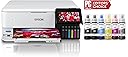
The Epson EcoTank Photo ET-8500 is a wireless all-in-one inkjet printer designed for professionals and creatives who demand vibrant, lab-quality photo prints and versatile media support. Featuring a cartridge-free 6-color Claria ET Premium ink system, it offers ultra-low cost per page and up to 2 years of ink supply per refill. Its intuitive 4.3-inch color touchscreen, dual front trays plus rear feeder, and multiple connectivity options (Wi-Fi, Ethernet, USB) make printing seamless and flexible. With auto-duplex printing, high-resolution scanning, and support for thick media including CDs/DVDs, the ET-8500 blends professional-grade output with smart, cost-effective convenience.


| ASIN | B08R57JK88 |
| Additional Printer Functions | Copy |
| B&W Pages per Minute | 16 |
| Best Sellers Rank | #14,515 in Office Products ( See Top 100 in Office Products ) #27 in Ink Tank Printers |
| Brand | Epson |
| Built-In Media | EcoTank Photo ET-8500 all-in-one, Quick Setup Guide, Power Cable, CD-ROM (User Guide, software), 1 bottle of 552 Photo Black (70 mL), 1 bottle of 552 Black (70 mL) and 1 bottle each of 552 Cyan, Magenta, Yellow, Gray (70 mL) (4) |
| Color | White |
| Color Depth | 24 bpp |
| Color Pages per Minute | 12 ppm |
| Compatible Devices | Laptops, PC, Smartphones |
| Connectivity Technology | Ethernet, USB, Wi-Fi |
| Control Method | Voice |
| Controller Type | iOS |
| Customer Reviews | 4.2 out of 5 stars 1,195 Reviews |
| Dual-sided printing | Yes |
| Duplex | auto |
| Hardware Interface | Ethernet |
| Ink Color | White |
| Item Dimensions D x W x H | 24.1"D x 15.9"W x 13.7"H |
| Item Type Name | Inkjet Printer |
| Item Weight | 24.46 Pounds |
| Manufacturer | Epson |
| Maximum Copy Resolution Black and White | 600 dpi |
| Maximum Copy Resolution Color | 4800 x 1200 dpi |
| Maximum Copy Speed Black and White | 16 ppm |
| Maximum Media Size | 13 x 19 inch |
| Maximum Print Resolution Black and White | 5760 x 1440 dpi |
| Maximum Sheet Capacity | 10 |
| Maximum print Resolution Color | 4800 x 1200 dpi |
| Model Name | EcoTank ET-8500 |
| Model Number | ET-8500 |
| Model Series | Epson EcoTank |
| Number of Trays | 1 |
| Other Special Features of the Product | Borderless Printing, Double Sided Scanning, Wireless, Touch Screen, Display Screen, Auto-Duplex |
| Output sheet capacity | 10 |
| Paper Size | Legal, Letter, A4, Executive, 8" x 10", 5" x 7", 4" x 6", 3.5" x 5", A6, Half Letter, #10 Envelope, User Defined (2.2" x 3.4" to 8.5" x 78.7") |
| Power Consumption | 207 Watts |
| Print media | Paper (plain) |
| Printer Connectivity Type | Ethernet, USB, Wi-Fi |
| Printer Output Type | Color, Monochrome |
| Printer Type | Inkjet |
| Printing Technology | Inkjet |
| Resolution | 4800 x 1200 |
| Scanner Type | Photo |
| Special Feature | Borderless Printing , Double Sided Scanning, Wireless, Touch Screen, Display Screen, Auto-Duplex |
| Specific Uses For Product | Office, Photo |
| Total Usb Ports | 2 |
| UPC | 010343952485 |
| Unit Count | 1.0 Count |
| Warranty Description | 1-year limited warranty |
| Warranty Type | limited warranty |
| Wattage | 207 watts |
A**M
Excellent print quality, easy-to-use software, very long lasting ink
This review is for an Epson ET-8500 printer/scanner/copier. ET stands for Eco Tank as the printer uses tanks of ink filled by the user from bottles. The tanks last far longer than the ink cartridges we've all been using and the price per page is far less. The 8500 prints 8.5x11 and 8.5x14 as well as smaller sizes like 8x10, 5x7, 4x6 and printable CDs, DVDs and BDs. The scanner has a maximum resolution of 4800 x 1200 dpi. I bought this printer to replace an Epson RX 580 we bought in late 2006 and for which we must have spent several printer's worth of money on ink. Our primary use has been and remains printing photographs. We feel we require a six-ink printer for this task which limited our printer choices. We have never had any brand other than Epson dating back to the dot matrix printers we used with our homemade PC XT so I will be unable to compare the performance of this printer to other brands. We were sorely tempted to buy the ET-8550 vice the 8500 for the occasional need to print 11x14s and larger as it was only an additional $50 but we simply didn't have the table space for it. The price of this printer has come down significantly from when it was first introduced, so if you're thinking you can't afford it, look again. The unpacking and setup on the 8500 were simpler and more trouble-free than other printers I've used in the recent past. The printer can be connected to your computer via a shared wireless or wired network or a primary tier USB link. You can also print from a thumb drive (USB memory stick), your camera's SD chip, wirelessly from a smart phone or tablet. Epson provides the printer with a unique email address and any images sent to that address (from anywhere on the planet) will automatically be printed by your printer. If you have a voice assistant on your home network, you can control your printer with voice commands. All in all, a very capable and well thought out device. We were nervous about filling our ink tanks the first time. The thought of a bottle of printer ink spilling seemed an absolute nightmare. But, as might have been expected, the process was utterly fool-proof (and you're reading a top notch fool here). The tops of the ink bottles and ink tanks are keyed so you cannot put ink in the wrong tank. Ink does not come out of the bottle till it is inverted on the proper tank and flow stops when the tank becomes full. The first filling will also have to fill all the tubing and what not between the tanks and the print nozzles and so will fill the tanks slightly less full than all further bottles. Loading paper is also painless. The printer has two cassettes: one for 8.5 x 11 and one for 5x7 or smaller. The printer can take thicker paper by two routes in the back: the rear paper feeder at the back on top, and the rear paper feed slot, in the rear. Here is my one unpleasantness concerning this printer but fortunately for you and Epson, the unpleasantness was almost entirely my fault. Either route may be used for thicker paper, such a heavyweight photo paper or thick cardstock. The Rear Paper Feeder at the top rear will still take your paper through almost 90 degrees of bend but not the hard 180 that it experiences coming from the cassettes. Paper loaded into the Rear Paper Feed Slot at the printer's rear, will traverse a completely flat path. Theoretically, you could put a sheet of thin glass through there... but please don't. I have used both with 80 lb (thick) photo paper with no problem whatsoever. The unpleasantness I mentioned was caused when I became confused as to which route was which, deciding that the feeder was the slot and the slot was the feeder. This led me to two lengthy calls to Epson tech support where two different techs spent an inordinate amount of time and effort trying to convince me I had made a mistake without insulting a sacred Epson customer by telling me I had made a mistake. When I finally came to my senses, I wrote a long and heartfelt apology to Epson Tech Support for what I had put them through. Very embarrassing. The printers output on plain paper, card stock and three different grades of photo paper has been absolutely perfect. There will always be some difference between your screen and your printer, particularly with the printer straight out of the box and no attempt having been made to match up the two, but the prints have been more than satisfactory to this point. And I have yet to see any of my ink levels - now visible directly through graduated translucent windows on the printer's front - so much as budge. A good portent. I have looked at refill ink bottles and the cost for a full set is slightly more than a set of cartridges for my RX 580 cost but provides several times the quantity of ink. Interestingly, the colors of inks used has changed. My RX 580 used to use Cyan, Light Cyan, Magenta, Light Magenta, Yellow and Black. The ET 8500 uses Cyan, Magenta, Yellow, Photo Grey, Photo Black and Black. That last one is used for text and is not used for photographs. The Photo Grey and Photo Black are not used on text. I only have my eyes, but in my judgement, the prints from the ET 8500 are superior to those from the old RX 580 in accuracy, detail and color. Text documents are crisp and clear. Image quality on plain paper is more than acceptable though I understand there are other brands that do it slightly better. If I had to do it all over, I would again buy the ET 8500. Ease-of-use, economy and beautiful output make it the ideal choice. And I will never again buy a printer that uses cartridges. Never.
B**K
Epson ET-8500 versus Canon G620
I am an accomplished amateur photographer, not a professional or a techie. I take photos with an iPhone 12 and a Panasonic SLR. I do not make highly technical adjustments to the images. Both of these printers produce excellent results. I purchased them for two reasons: saving on ink, and printing photographs with accurate colors. I have used Canon Pixma printers for decades, so I first tried the G620. Although I do most of my shopping on Amazon I purchased it at Best Buy for ease of potential return. It cost $330 (rounded up by a penny). THE CANON G620: PROโs: It was easy to fill the six ink tanks. Canon cleverly designed the tops of each one so they can only be inserted into the correct tanks. No problem connecting to my wi-fi. Documents printed quickly and looked fine. The first 4x6 print I did was acceptable but not as good as I had expected. I corrected this quickly per the next bullet. By default my Windows laptop installed its own drivers for the printer. These are not as good as Canonโs. I went to the Canon website and downloaded and installed their drivers for the 6 series. Voila, very good photos, with accurate color and sharp edges! Thanks to other Amazon reviewers for calling this to my attention. Photos printed quickly enough. CONโS: The most significant one, and why I switched to the Epson, is the paper handling. There is only one input tray, at the rear of the printer, which takes all sizes and types: 8x11 plain paper, 4x6, 5x7 and 8x11 photo paper, etc. At first I didnโt think Iโd mind changing the paper, but after a while I did, per next bullet. The display on the top of the printer is small, dim and awkwardly placed. I thought I might not need to use it that much, but every time you change paper you have to. You need to pull the output tray out manually. No big deal if you are at your desk, but if you are in another room and want to print out an item on your phone you have to go the printer. A minor inconvenience but a nettlesome one at times. THE EPSON ET-8500:. PROโs: Equally easy to connect to wi-fi. Even easier to set up. The correct drivers were downloaded automatically. A terrific screen on the right front of the printer. Large, bright, easy to use. Two input trays at the front, one for 4x6 and 5x7 photo paper, the other for 8x11 paper of either type. Another input tray at the back! I use this on the relatively few occasions I print 8x11 photos, and I keep plain paper in the front tray. This is extremely convenient. When you send an item to the printer it wakes up even if itโs turned off. The G620 did not do that. The output tray comes out automatically; no need to pull it. There is a button on the screen for pushing the output tray back in and closing the front. That bright tilt-able front screen has every setting you need and is very intuitive. Everything I printed came out fine and quickly. The photos were equal to Canonโs in quality, plus there is an Epson app for making further adjustments to them. I downloaded it and found it easy to use. CONโs: The cost: $700. Thatโs more than double the Canon G620, which is a significant consideration. Two others that are not significant. The photo tray can be a little tricky to pull out and a tight fit when reinserting (it goes well toward the back). This can be relieved by first pulling out the 8x11 tray underneath it, giving your fingers more room. Not really a con but when the printer is finished the screen shows two items: a little Home icon on the left and a larger โTroubleshootingโ message next to that. Some users might think that means there was a problem, but itโs just in case there was. Touch Home and youโre set, then touch the Close Tray button on the bottom right. BOTTOM LINE: You may be wondering, Why spend that much more? And, why not buy a Canon Ink Tank printer of equivalent cost? Re the first, for the convenience of the paper handling and ease of use of the screen. I keep printers a long time and the cost spreads out over the years, especially not needing to buy cartridges. Re the second, I did research those, but prefer the size of the Epson, which is comparable to the G620. The higher priced Canons that I looked at were bulkier. I hope this helps others. If I omitted anything you think should be included, or if you have questions or a difference of opinion, leave a comment and Iโll respond to it.
L**1
Unmatched Quality for Images and Photos
This is an 'initial impressions' review after setup and a few weeks use. - Best Use Case: If, like us, your printing needs are 80% creative (artwork, photographs, etc.), 20% light document printing and occasional scanning, then this printer will meet your needs. Even though you won't be buying a new cartridge with a thimbleful of ink every 100 pages, I would not recommend this printer for high-volume workplace printing. It's not built for speed and you'll be filling the paper tray too often to be productive. Likewise, unlike a more office-oriented printer, the ET-8500 does not have a feeder for the scanner. - Unboxing / Setup: While it did take about an hour to set up, the process went much easier than I anticipated based on the reviews I read. We have it connected to our home network via Ethernet and I was able to do all necessary configuration via the printer's touch screen. Aligning the print heads is a rather lengthy process, so be prepared to spend some time on this. Our old printer would semi-self align by scanning the alignment samples once they were printed. With the ED-8500, I had to manually select which alignment settings looked best, which slowed the process considerably. - Hardware Quality: Overall, the printer feels well-built and worth the money. That being said, I do agree with other reviewers who state the paper trays feel a little chintzy and possibly easy to damage if you don't handle them with kid gloves. No problems thus far, however, so I'm simply crossing my fingers with the hoping for the best. On the flip side, I love that the output tray fully retracts into the printer when not in use. Touch screen operation is a veritable godsend compared to the wonky, practically useless LCD on our old printer. In fact, with a thumb drive or (full sized) SD card, you can perform many operations straight from the touchscreen. - Software: While it did install applications I'm not likely to use, Epson's software is much less intrusive, in my opinion, than you-know-who's naggy, resource consuming bloatware. I can't speak to the smartphone application as I have no need for it thus far. I'm also pleased to report that the printer will work without Alexia, which I will never have a need for. No problems with the software and we're able to print from any computer on the network without issue. - Scanning: As I stated above, there's no feed for the scanner, so you'll have to manually change pages if you have a multi-page document to scan. Not a problem for us, though, and my wife loves that she can scan a document straight to her thumb drive without having to bother me while I'm working. Overall quality is more than adequate for all but the most demanding scanning jobs. - Ink: With its foolproof design, filling the six ink tanks couldn't be easier, and after six weeks of use, including approximately 200 pages of image laden documents using the highest quality print level (which would have eaten up two 'XL' cartridges in my old printer), the ink levels in the ET-8500 have barely moved. Furthermore, refilling all six tanks cost only a little more than those two 'XL' cartridges would have. Very happy in this regard. - Print Quality: Even on regular paper at regular print quality, the ET-8500 hands-down smokes anything in its price range. Amp up the print quality and print to photographic paper and the results are absolutely jaw-dropping. Seriously, my brother is a professional large-format printer / sign maker, and the print quality from the ET-8500 rivals his $75,000 4' x 8' flatbed. Rich, vibrant colors pop from the page and are sure to impress even the toughest critic. This, in my opinion, more than makes up for the ET-8500 not being the fastest horse in the race. I will update my review should anything go south, but for now I give the ET-8500 a big thumbs up. For the quality you get, it is well worth the price in my opinion.
D**2
Epson EcoTank ET-8500 is Junk
This is quite possibly the worst printer I've ever used, and Epson customer service does not follow through on anything. I use this printer for my business where I print orders on regular paper, cards on cardstock, and photos on premium photo paper, all of which this printer states it can handle, but none of which works consistently. Documents that should print from tray 2 (paper tray) print on photo paper from tray 1. Anything printed from the rear paper feeder (usually 110 lb cardstock) must be fed one sheet at a time and must be pushed through manually or it will make a loud sound and cause a jam. I contacted Epson about the issues just before the warranty expired. They had me do several things to the printer, take a bunch of photos of ink levels, label on the bottom, etc., and they listened to the awful sound coming from the printer, but completely dropped the ball on sending me a replacement. I called back and no one has a record of the phone call, the photos I submitted, or anything. I do not recommend this printer or anything from Epson.
R**E
Good printer, Do setup when you have patience
This is replacing like a 10 year old canon mx600 or something like that. I absolutely despised that printer. This is my family printer. Homework, family photos, etc Out of the box this is still a printer. The initial setup is a pain in the ass and I recommend doing it when you're in a good mood and have a lot of patience. All the little packaging, tape and little foam pieces they wedge inside of the printer. You're going to be going crazy trying to remove it without pulling too hard and breaking some fragile plastic. Some of the ones that are deep on the inside. I recommend using a pair of scissors, grabbing it and just twisting it off rather than trying to yank it. They give you a CD with some printer software on it. I don't know who even still has CD drives these days lol. The only software I recommend downloading is the Epson smart panel for your phone or tablets. Using that app I was able to print pictures easily and update the printer. Compared to my last home printer, the print speed is much better. The quality is much better. It has three separate trays I believe and one back feeder for paper. I really like the way the ink works in this printer. I'm still early on but it seems to be a much better way to do it rather than the cartridges. Navigating the printers menus using the touch screen is much better than any printer I've used in the past. Its alot quieter than my last printer as well. So far I've printed a few 4x6 photos and some standard documents. Everything has come out really well so far. I bought this on sale for $500 bucks. I'd say it feels worth it especially since I spent around $350 on my last printer around a decade ago and I always hated that thing. It never felt worth it. My one critique currently would be that the output tray extends automatically and it seems like that motor could be a point of failure in the long run. So much so, that I think its a better idea to just leave it extended most the time.
M**S
Great printer but feels like a rip off
Great Printer, if you use high quality paper and all the correct settings with a matching profile. However, I just noticed that the larger (A3+) version (ET-8550) is now suddenly available at the same price ($499) that I paid for this smaller (A4) version, which feels like a rip offโฆ
A**Y
Original ink lasted me 3 years!
*Update in Dec 2024* Still going strong! Today for the first time in 3 years it finally forced me to refill the ink tanks. 3 YEARS! Still prints beautifully. So grateful for my Epson printer. *Original Review* I bought a Cricut for Christmas and needed a great 3 in 1 printer to print stickers, print docs front and back, print 4x6, 5x7, and 8x10 photos, as well as scan my ultrasound photos. (I did not use this for sublimation, but hear that it can be great for that too.) This thing exceeded my expectations. Iโve been using it almost every day for 5 months and it still is almost filled completely full with ink, which I can see on the front of the machine. Setup instructions were super easy and was a pleasure to get through. Before this printer I had returned 2 other printers that disappointed me. (I ended up tossing my old one years ago because the HP printer dried up so quickly.) This printer feels like it was built to last. The doors and cassettes click into place, feeling very satisfying and never leaving me wonder if I pushed it in all the way. Iโll probably never use ink cartridges again. Eco tank is the way to go. First of all, I had no idea when I bought it that you can scan and print photos using the app on your phone. Itโs made things so much simpler to manage and edit. One thing I wish it had was color sliders to tweak the images a bit before printing. The scan bed is AWESOME. Itโs very basic with a thin plastic lid, but Iโm comparing it to the scan job the scanners at Office Max did. Those were terrible, costly if you have multiple images needing scanned, and always came out blurry with noticeable glares. (The employees also wanted to argue about HIPPA with me with my own ultrasoundsโฆ) This printerโs scan does a phenomenal job. With 300 dpi it is crystal clear with no glare! And I love that it saves directly onto your phone. A USB or SD card is only optional. You can choose to scan in color, grayscale, or black and white. For ultrasounds, definitely use the grayscale. The photo print quality is very good as well. Not sure if itโs as good as WalMart prints when it comes to color, but the quality is pretty similar. Sometimes the photos appear slightly blue, but I think itโs the photo paper Iโm using. The white paper may have a slight blue hue to it. As a photographer, Iโm content with saving me the trip by using this printer instead for my own personal needs. The main con I can think of is that it does print slow if you choose higher quality prints. (May take 3 minutes to print a photo.) If you need speed, this may not be your guy. If you choose Normal quality prints it goes a lot faster, but documents appear very pixely. I had a paper jam once, but it was very quick and easy to open up the printer and pull it out. I have yet to try printing with the cardstock paper feed in the back. Iโve been printing thin cardstock from the top feed and that seems to work out just fine. Another con is sometimes when Iโm printing from the computer I have to turn the printer off and on again because for some reason it doesnโt always get the signal to print. Not sure what is going on there, but it doesnโt happen too often. Overall, I am still elated with my purchase 5 months later. Never had a printer that made me smile weekly before. This was worth every penny.
G**N
Very happy! ALMOST perfect.
I have a home based small business - I print a lot of user guides, invoices, etc. Long time Epson user, most recently had a Epson Workforce Pro WF-4820 to compare this to. On the plus side, the ET-8500 is smaller, quieter, and even plain paper prints that combine text and photos look better. And of course, the ink tanks are a big advantage. I don't know how many thousands of dollars of ink I bought for that 4820. The marketing says the ET-8500 produces "lab quality color prints" and I do use my printer for photos on occasion. What they say is true. On premium glossy paper, the photo quality is absolutely outstanding! :) A couple of minor negatives - The biggest one is that the tray holds much less paper. Not a huge deal but worth knowing if you're a heavy user. The ET-8500 is a little slower for duplex printing but otherwise speed is good. I had one bit of confusion as I was trying out all the functions - I loaded a sheet of paper in the rear feeder to try it, and pressed "copy". Even though the printer recognized I had put paper in the rear feeder, instead it copied nothing and spat out a piece of paper from the main tray. I assumed the rear feeder didn't work. A call to Epson Support was very well handled though, and I learned a) this is NOT an automatic document feeder - a feature the WF-4820 did have (but that I hardly ever use) - it is only an alternate way of loading a sheet of paper (such as for loading a sheet of photo paper when you have plain paper in the main tray) AND it will not feed paper from the rear tray for copying - only for printing. I'm not upset about this, but the documentation was sorely lacking in pointing this out and there were no error messages. Lastly, the printer looks very nice when all closed up. When you print, it automatically opens and extends the output tray. Nice. But it doesn't put it away again - you have to do that manually from the front panel. Sure would be nice if there were an option to retract it automatically when the printer goes to sleep.
S**H
Doesnโt work
The product doesnโt work at all. Itโs very heart breaking as I waited for it desperately
T**O
Great printer
Easy set up, great color and b&w printing. Love the ink tanks, and the printing is crisp and clear. Normal printing speed for an inkjet
G**6
Gorgeous photos; economical ink tanks. Worth the price.
Excellent printer for photos and text. Four paper feed options, The six ink tanks produce superb colours and detail. The ink view windows, though, are difficult to see through, not like the ones shown in the advertisements. There is, of course, a digital estimate in the usual printer popups. Having said that, this thing is rather expensive, but the photo resolution is as good as the expensive pro version photo printers. I spent hours researching all the Epson printers that do photos, and this one had the best reviews, both on the product page and YouTube. (Some of the YouTube videos show the 8550, which is exactly the same as the 8500 but handles wider paper. Same guts and capabilities as the 8500,) Stop looking around and spend the extra money โ you will like this printer and the things it prints.
M**S
Connectivity Issues
The printer does not stay connected to my wi-fi network, cannot connect/detect my phone consistently. The printer disconnects from the network randomly during pictures being printed resulting in half printed images. The Epson Apps (Epson Smart Panel & Epson Creative Print) can never find the printer so therefore cannot use the Apps. The connectivity of this printer is not worth the hassle. I regret this purchase. The few photos I was able to print were great quality. But this printer only works when it wants to connect to your wifi network & devices, which is rarely.
D**E
In shock - this is a photo printer studio in my home
Wow. A friend recommended the Eco-tank when I mentioned my old HP gave out and I didn't know what to buy to avoid the new subscription dystopia we now fund ourselves in. This model was pricer, but I can't believe the quality of the photos we printed as tests. I don't think I could tell the difference between a professionally printed pic and the one in my review. The pic is a little over-exposed, but the printer also gives you the option to troubleshoot/calibrate after every print. The setup was super easy and ink seems to last. Replacement cost for ink is also very fair. If you're concerned filling the ink will be messy like I was, don't be. They've created an impressive mess-free filling process. Buy this printer! You won't regret it!
Trustpilot
3 weeks ago
2 months ago