


Desertcart purchases this item on your behalf and handles shipping, customs, and support to Vietnam.
๐ Connect Smarter, Measure Sharper โ Industrial Precision Meets Seamless Integration
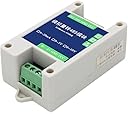
The Taidacent 10/12 Bit AD Multi Channel Converter module transforms analog signals (4-20mA, 0-5V, 0-10V) into RS485 Modbus RTU/TCP data streams with high precision and industrial-grade durability. Featuring overvoltage and overcurrent protection, it supports up to 2000 meters communication distance and customizable settings, making it an essential tool for professional PLC and industrial control system integration.


| ASIN | B08SK4THPM |
| Best Sellers Rank | #567,877 in Tools & Home Improvement ( See Top 100 in Tools & Home Improvement ) #2,632 in Power Converters |
| Brand | Taidacent |
| Brand Name | Taidacent |
| Customer Reviews | 4.4 out of 5 stars 9 Reviews |
| Interface | RS-485 |
| Interface Type | RS-485 |
| Manufacturer | Taidacent |
| Maximum Supply Voltage | 30 volts |
| Minimum Supply Voltage | 8 volts_of_direct_current |
| Number of Channels | 1 |
| Number of Items | 1 |
| Number of Pins | 10 |
| UPC | 792323453761 |
| Unit Count | 1 Count |
| Upper Temperature Rating | 60 ยฐC |
T**G
Work great once got the documentation
Simple and working as it should. Seller need to provide the information to setup the device and not only the specification what it can do. Without the information on how to setup the parameter, it will take forever to figure out. Coding: 8-bit binary Data Bit: 8 Bits Parity Bit: None Stop bit: 1 Error Checking: CRC Baud rate support: 2400/4800/9600 ****factory default is 4800 **to change the baud rate, write to address 0x07D1 (00 for 2400, 01 for 4800, 02 for 9600) Read modbus "holding register command" to read the first 2 register for the data, as simple as that. ***seller please update the spec. to include this info.
A**A
Changing Modbus ID
Unit comes with default Modbus ID 1 and Baud rate 4800. To change Modbus ID, write new ID to Holding Register 0X07D0 (default is 1) To change Baud Rate, write 0,1,2 for 2400,4800,9600 to Holding Register 0X07D1 (default is 1)
H**E
Incomplete- the instructions state that settings can be configured with software but missing
The instructions indicate the modbus ID and baud rate can be set with config software but no software is provided. Jumber settings or downloadable software should be provided to allow configuring these values.
F**.
Documentation provided
Device setup for reading values i.e. using Modbus Scan Device ID =1, Data bit 8, Parity bit none, stop bit 1, error checking CRC. Addresses for analog IN1 are 40001or 40065 and for analog IN2 40002 or 40066 * connect to RS-485 to Modbus TCP and slap it onto SCADA
C**.
It works, document is poor.
Modscan PLC content 1 0 IN-0 2 1 IN-1 65 64 IN-0 66 65 IN-1 2001 2000 Modbus ID 2002 2001 baud rate (02=9600) Which address is to switch between 4-20mA input and 0-5/10V input?
Trustpilot
1 month ago
3 days ago