Buy anything from 5,000+ international stores. One checkout price. No surprise fees. Join 2M+ shoppers on Desertcart.
Desertcart purchases this item on your behalf and handles shipping, customs, and support to Vietnam.
📺 Elevate your streaming game — don’t just watch, experience!
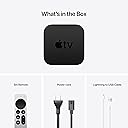
The 2021 Apple TV 4K (2nd Gen) with 64GB storage delivers stunning 4K HDR visuals powered by the A12 Bionic chip, immersive Dolby Atmos sound, and seamless integration with Apple’s ecosystem. Featuring a redesigned Siri Remote and private listening capabilities, it’s the ultimate smart media player for professionals who demand premium entertainment and smart home control in one sleek device.
| ASIN | B0933D8TNB |
| Batteries | 1 Lithium Ion batteries required. (included) |
| Date First Available | April 30, 2021 |
| Item Weight | 1.7 pounds |
| Item model number | MXH02LL/A |
| Manufacturer | Apple Computer |
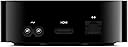
| Product Dimensions | 2.72 x 5.81 x 6.05 inches |
G**S
A Minor Update to an Excellent Streamer
Photos are a comparison of the last 4 generations of AppleTV: 3rd generation, HD, 4K, and this newest box; and the old Siri remote vs the new remote. If you liked the previous generation of the AppleTV, the original 4K, then you will like this new iteration. Because, it is near as makes no difference, exactly the same. Oh, there are spec sheet differences like higher frame 4K video for uncommon content and extremely modern TVs. And the processor has been bumped a couple generations, but I can’t tell the difference; it was plenty fast before and it’s plenty fast now. The remote is better. I had given the previous AppleTV 4 stars because the remote was a fragile, quirky, easily lost, tiny, button poor collection of Apple’s worst design impulses. I bought brightly colored cases for my remotes so I wouldn’t lose them, or forget which end was which. The new remote is more substantial, easier to perform such basic actions as skipping forward in videos. Has a mute button! Now I don’t have to volume down to zero to mute. With a power button so I don’t have to do the square button long press, slide and click to sleep. I can grab it and figure out which end is which without fumbling. Perhaps most importantly, my wife, who never figured out the old remote, uses this one without issue. From such small gifts come an additional star. Readjusting to the new remote continues. I still have muscle memory for the old remote and tend to press the play button when I mean to talk with Siri, and the mute button when I mean to pause. I’d say the old remote is better at swiping left or right, but the new remote is massively better at single directional clicks; it’s practical now to skip forward in single hops instead of swiping around and hoping I land about where I want to scrub in a timeline. The new remote also has a hard to discover feature where resting your thumb on the side of the “track wheel” while pausing video will enable a kind of iPod scrolling through videos. Very precise and makes skipping over commercials in Tablo much easier. Apps that don’t use the standard playback controls don’t necessarily get this feature. Owners of previous generations can just buy the new remote separately and save themselves the cost of a new box when there are no other compelling features. For example, the new color calibration feature using the iPhone 12 will work with older boxes too. I bought a new remote from Apple for the original AppleTV 4K in my bedroom and it paired in seconds and has been a pleasure to use. The larger size is a surprisingly important feature as it’s easier to find even when amongst the folds of an unmade bed, and fits my hand better. If it’s comparable to the old remote, it will need charging every 4-6 months with ample onscreen warning. I would not worry about the non-replaceable batteries. I doubt the typical remote will be charged as many as 20 cycles in its lifetime. By the way, do not charge it unless the AppleTV warns you as you don’t want to wear out the battery with too many cycles. This is not a device you want to daily charge. For those who are buying an AppleTV for the first time, I recommend it if the following is true: you use an iPhone, you have adequate network speed for 4K content, somewhere around 50-100 Mbit should be adequate, you buy iTunes content like movies and TV series. If you want HomeKit automation. If none of these are true, then some other streaming box is likely a better fit. Apple designs the best low wattage computer chips in the world today, and it is no surprise that the 2+ year old A12 in this box leads to a snappy interface. Apps launch fast, list of thumbnails scroll smoothly and briskly. I’ve never complained of a lack of speed with an AppleTV 4K of either generation. My most commonly used app is YouTube and it is fine, if not as full featured as the iPhone version. The occasional 4K video looks excellent on this platform. If you’d look at my network traffic reports, you see I go through videos by the terabyte. The only hiccup had been the occasional loss of pause button functionality, which they finally fixed. And I wish it were easier to turn on close captioning and leave them on. The large number of movies in Dolby Vision and Dolby Atmos in the iTunes library give my TV, a Sony A80J, a chance to show what it is capable of. Details in the dark and eye searing highlights come through and give me my money’s worth. And my library frequently sees movies I’ve already paid for refreshed in Dolby Vision. Recently, the Indiana Jones movies suddenly showed up in these formats, nice. On the other hand sometimes, a movie will require a second purchase to get Dolby Vision, and that’s aggravating and something I've yet to do. I should mention the existance of an Apple TV app on many modern televisions, including my Sony A80J and my LG CX. It is adequate at finding and excellent at displaying iTunes content—I can't tell any difference in quality between using a real AppleTV or the integrated app on my LG CX—but I'm not going to log into Google TV to see how it works on the Sony. I'd prefer privacy, something I'm not going to get from smart TVs from ad-revenue driven corporations. Dolby Atmos, is a nice to have feature, and many movies will feature it and its near mandatory rainy or helicopter scenes. The first chance I had to get into my new TV room’s attic, I put in overhead speakers for Atmos. And I just did the same in the basement media room. Well worth crawling around pulling some speaker wire. As a bonus, Apple has recently started remixing selected music tracks in an Atmos compatible format: Spatial Audio, which places the listener in a much more immersive location in the sound field. So, for times when you really want to listen to foreground music it’s a great feature. I’m not a fan of the TV+ app as it is too focused on selling content and services. There are many 3rd party apps, and I watch a lot of Hulu and VRV. The Channels app is a good to have if you have an antenna and an HDHomeRun. The Tablo app is a must to have if a bit slow if you own a Tablo network DVR. Cord cutters can pretty much fill there content needs and get away from cable television. The Netflix app, when I used it, was one of the better implementations I’d seen. I’d say very few people will notice a difference between the 32 and 64 GB versions. Maybe, with slow networks with a lot of rewatched content or large games. Save a bit of money. I’ve not been gaming on this box or its predecessor, not my thing and the games I tried did not compel. Still it has plenty of horsepower for most games. You will need a Bluetooth controller though as Apple has removed the gyroscope functionality from the remote. Not that the original Siri remote was a good controller anyway. Happy this still has a Gigabit Ethernet port as wired networking is reliable networking. As my home uses HomeKit, this acts as my hub, a centralized computer tying together the switches, thermostats, garage openers, and other smart devices in the house. A reliable system, although if you don’t need a streaming box, a HomePod Mini is cheaper and will also act as a hub, albeit sans Ethernet. Harmony remotes are no longer being made as modern streaming boxes control receivers and TVs so well. The AppleTV coexists with my Sony TV and Yamaha receiver to the point I go months without touching their remotes. All I really need is to turn the system on and off, mute, and adjust the volume and this does so well and reliably. As a developer, I’d say Apple has gone well out of its way to make porting iOS apps to tvOS almost easy. The introduction of Combine and SwiftUI should make it possible for developers to repurpose their apps to the Mac and the AppleTV with little initial effort. Certainly, I’d recommend any iOS developer own an AppleTV and think of which features might be useful on the big screen. As someone who uses an AppleTV every day, I appreciate the high level of technology, reliability, integration with other tech, speed, frequent software updates, new features delivered for free, and Apple’s privacy focus. As I just recently added a TV to my new home, I was happy to pick up this new model to replace an AppleTV HD, but I probably would not have replaced a first generation 4K with this model. However, I purchased just the remote for the original 4K model in my bedroom and have been happy with the decision.
G**R
The Road Less Traveled
Update 2025: After a having a few years under my belt with Apple TV … and their updates … I have switched all my previous fire devices to Apple. Why? First and foremost Fire devices are so riddled with advertising they have become difficult to use. Also, their last two GUI updates have not improved navigating content. Amazon has made it clear that they will continue to interject as much advertising as they can and lay out their screens to accommodate that. Second, I found a remote cover to make the Apple TV remote usable. Third, Apple's updates have improved the user experience not used them to hawk products. Yes, of course, they advertise their new content in the beginning of a show but it's easy to skip. Forth, they have aligned their prices to be reasonable. Fifth, you have much more storage which is a huge asset. Sixth, it's audio capabilities are second to none. Seventh, once you get used to its content scrubbing technique it's actually a much better system than Fire devices. Apple, however, still has a problem with their Siri voice system which quite frankly sucks and although their picture quality hits all the marks of resolution (plus Dolby Vision) it's still softer than a comparable Fire device. I therefore would recommend Apple TV's as the best streaming device I have ever used. But you still have to have an Apple ID to set one up and it's more difficult to do if you don’t have an Apple device. However, one must also consider that Apple allows you to share, with Five other Apple members, some things you could purchase like Apple TV plus. These people do not need to live in your home. This is a much more intricate discussion which I will not take on but something worth researching if you are evaluating what streaming device to buy. Even though I have TVs that I can use streaming service apps on I much prefer a standalone streaming device for remotes, future updating and audio capabilities to be used with AVR receivers. Just something to also consider. OLD REVIEW: This will be a difficult review to write. Let me start by saying I rejected the previous Apple TV device because of the ridiculous remote ... sent it back. I decided to give Apple another try as it appeared the remote issue was addressed. I own several other streaming devices, Firestick 4K, Roku Ultra and Chromecast with Google TV which is my least favorite. I am of the opinion that if you are totally streaming you need at least 2 different brand streamers as there will be ongoing issues whether they be server related or licensing agreements. As an example, the recent tussle between Roku and Google which led to YouTube TV being removed from Roku. Since I basically dislike the Chromecast, that left me with the Firestick and Roku. The Roku's remote is bulky/eats batteries and the Firestick's new GUI is just bad. So, here enters Apple TV🙄 Now at this point my expectations are low for any device but at $179 to $200 one would expect a substantial bump up. The Remote: So let's start with the remote because everyone is giving it a big thumbs up. Apparently my hands are not shaped like everyone else's because this remote is not even remotely ergonomic. I don't know what kind of snobbery it takes to make a remote so slick and buttons so much in the wrong placement on the remote so as to meet the classy requirement they feel is necessary. Firestick has them beat by leaps and bounds. The twisting of one's wrist to use the voice button and reaching to get to the touch/click pad makes my thumb and wrist ache in record time. The rectangle design, thinness of remote and slickness only adds to the discomfort. This remote gets a 👎🏼 It may be better than the previous remote but the mindset that made it held onto what's wrong with Apple designers. GET A GOOD CASE TO COVER IT. The Home Screen: Apple TV defaults to it Apple's App for the Home Screen button which I changed in Setting under the TV Entry. I also changed the Top Shelf to show 'Up Next'. (Issue) Because my streaming devices are plugged directly into my Marantz receiver, then receiver to TV, Apple TV could only allow me to control the receivers volume. Regardless of having HDMI CEC on it could not recognize the connection and therefore I could not use power on and off for both devices as I do with Firestick. (Menu) Now I realize that Apple has very little content and has to fill up space but SERIOUSLY do we need to see pic icons from space? Could we not have the ability to choose Channel pic sizes so more can fit into the top Menu? And why, for god's sake, can't you put a highlight or drop shadow on the channel you are hovering over? The 'now it's bigger' is not apparent especially if the channel background colors are similar. Have some consideration for people who have vision problems. (¿) And why is 'Recently Watched' at the very bottom of the menu on the Apple TV App. Oh wait ... I know ... so you have to pass by all the advertising. Silly me. Not all that classy. Despite these glaring issues the Home Screen simplicity shines. The ability to drag and drop items into a folder is a nice touch. It does not fatigue the eyes as the Firestick's over abundance of information does. It does what a main menu should, be a table of contents. Now back to the shameful part. Search for something. Apple shamelessly puts itself first in line. You have to go to the very bottom of the screen to see other options. But even worse what you won't see is any reference to Netflix. The Firestick will take you there if you ask to open something specifically in Netflix. Bottom line search is adequate for services linked to it but not as good as Firestick who is service neutral. Speed: Sorry geeks with speed testing equipment, I find the Firestick as responsive in every regard. Channels open a bit faster on Apple TV but it lags in other areas in terms of backing up or switching from one channel to another. Video: Apple TV has a more soft but crisp appearance over Firestick. Less harsh. Audio: Apple TV is the winner here. It matches sound quality much better and has higher end performance. Navigation: Apple TV consistently performs better with Siri for FF, Rewind and other voice commands in all Channels across the board. Firesticks scrub, when available, is by far the best of all devices showing exactly where you are in small pics across screen. Apple TV's scrub is poor by comparison. It's frustrating that an expensive device from Apple can't do better. Airplay: I simply don't use this function all that much so my comments on it would not be helpful. Alexa capabilities: Perhaps someday Apple and Amazon will learn to get along. Until then Firestick rules with Alexa/Echo capabilities. I know Apple has it's own comparable device but it does not have the the same overall reach that the Echo world does and certainly not at a price point everyone can afford. It seems Amazon has been more generous with access than Apple (not withstanding I say generous with a big caveat toward profit). Conclusion: There are small pieces here and there I did not cover but the question is .... is Apple TV worth the $'s they ask for it. The answer is NO unless there is some Apple related specific purpose you have for it. This is not startling news or anything I didn't already know but my reason for keeping it relates to sound quality and eye fatigue. I hope a cover for the remote will make it less painful to use. I have I-devices I could control it with but they are no more pain free or convenient than the remote itself. If Apple would get off it's high horse and make Apple TV more user friendly, especially with the remote, it would certainly go a long way to commanding the price it asks. As it stands it only appeals to a niche market of Apple devotees who require certain amenities. Since I want 2 distinct devices this will replace my Roku.
Trustpilot
2 weeks ago
1 month ago