Buy anything from 5,000+ international stores. One checkout price. No surprise fees. Join 2M+ shoppers on Desertcart.
Desertcart purchases this item on your behalf and handles shipping, customs, and support to Vietnam.
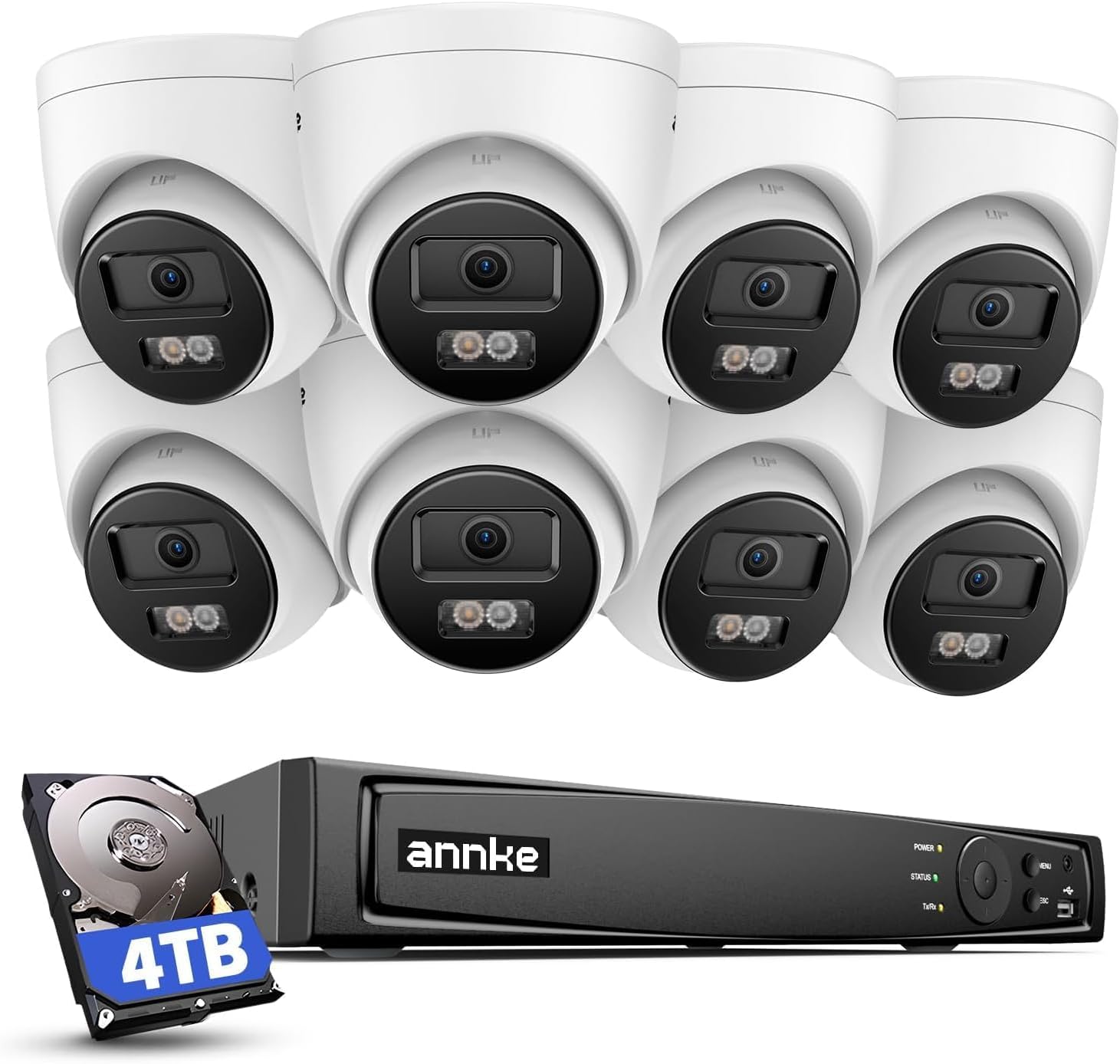
🔒 Elevate your security game with ANNKE’s 4K AI-powered watchtower!
The ANNKE 16CH 4K PoE Security Camera System combines ultra-high-definition 8MP cameras with AI-driven human and vehicle detection, spotlight color night vision, and built-in audio recording. Featuring a 4TB pre-installed HDD with expandable storage, this plug-and-play system supports up to 16 cameras via Power over Ethernet for seamless installation and remote monitoring through the ANNKE Vision app. Ideal for professionals seeking reliable, crystal-clear surveillance with smart alerts and extensive coverage.


| ASIN | B08R85W2JD |
| Best Sellers Rank | #113 in Surveillance DVR Kits |
| Brand | ANNKE |
| Color | H800 Turret Camera system |
| Compatible Devices | Cameras, Laptops, Personal Computers, Smartphones, Tablets |
| Connectivity Technology | Wired |
| Customer Reviews | 4.4 4.4 out of 5 stars (166) |
| Date First Available | December 24, 2020 |
| Focal Length Description | 2.8 mm |
| Frame Rate | 30fps |
| Hardware Interface | Ethernet |
| Item Weight | 27.6 pounds |
| Item dimensions L x W x H | 20.47 x 17.13 x 11.61 inches |
| Item model number | AU-N46PCK4-V4-98DM-P |
| Lens Type | Wide Angle |
| Low light technology | Night Vision |
| Manufacturer | ANNKE |
| Memory Storage Capacity | 4 TB |
| Night Vision Range | 100 Feet |
| Number of Channels | 16 |
| Operating System | Embedded/Proprietary |
| Other camera features | 4mm lens, IP67 Waterprood |
| Power Source | Corded Electric |
| Product Dimensions | 20.47 x 17.13 x 11.61 inches |
| Recommended Uses For Product | Home and Business |
| Recording Mode | continuous motion detection |
| Smart Home Compatibility | Smart Home Compatible |
| Special Feature | Audio Recording, Automatic Overwrite, Night Vision, Privacy Masking, Smart Playback |
| Video Capture Resolution | 4K UHD 2160p |
| Video Input | RJ45 |
| Viewing Angle | 83 Degrees |
A**R
High quality cameras
I recently upgraded to this ANNKE 16-channel 4K PoE security camera system after replacing an older Reolink setup, and overall I’ve been very happy with the switch. The image quality is excellent, footage is high-resolution and very clear during both daytime and nighttime, with sharp detail that makes a real difference (compared to fuzzy nightime clarity on the older Reolink cameras). Setup was mostly straightforward, though I did run into some initial difficulty configuring the recorder. Thankfully, ANNKE support was responsive and helpful and walked me through troubleshooting until everything was working properly. One important tip for those new to using ANNKE products: set up an ANNKE account and link the recorder to your account. This is essential for remote viewing, managing the system, and receiving notifications, and once configured, the mobile app works reliably and is easy to use. With the included 4TB hard drive, which is also expandable to 8TB with an additional hard drive, I’m getting around two weeks of storage with all 8 cameras with constant recording enabled, which is more than enough time to go back and review events when needed. We also recently had a baby, and this system has been great for additional use cases beyond the outdoor security. I’ve used some of the cameras as indoor nanny cams, which has been incredibly helpful for monitoring and checking in throughout the day. The on-camera AI object recognition is a bit more limited compared to some other solutions, it primarily identifies people and cars, but it’s still very useful and honestly more than enough for my needs. Alerts are relevant without being overwhelming. Considering the overall performance, features, and reliability, this system is a great value for the price paid (around $750). If you’re looking to upgrade from a basic camera setup or want a solid, scalable security system with good storage and image quality, I’d definitely recommend this ANNKE product.
M**K
great upgrade from my previous Annke system
Let me start by saying that I wasn’t going to write this review, but I was showing off my new NVR surveillance system to a friend of mine and he had a lot of questions as he never had such a system so I decided to write a review so he can take advantage of it and I’m also hoping this will help other folks. This isn’t my first Annke product, this is actually my 3rd NVR that I purchased in the past ~10 years. I’m using cameras for my home to be able to see what is going on around my house(especially if I’m not there),keep an eye on kids and “for fun”. That being said I wired my entire exterior with cameras when I was making major renovations years ago, so I have CAT5 POE cabling already in place(more on that later). This simplified set-up. Annke has a lot of products, the one I’m writing a review for is AU-N46PCK-I91DM08-4TB system that comes with I91DM 8MP cameras. As I mentioned at the beginning, only after having a conversation with a friend that was also interested in purchasing a surveillance system, I realized I can help others by doing this review. My goal is to review this particular product but also give others some tips on what to look for when choosing a surveillance system for home use. By no means this is an exhaustive list but it’s a good start in my opinion. There are several things you should consider when buying a surveillance system: 1. Camera resolution, image quality, sensor size – if the picture doesn’t look good, no one cares about the specs. Many people are confused with terms/keywords (4k, ultra HD, 5MP, 8MP etc) and how they relate to surveillance cameras. This particular camera model included in the package that I’m reviewing has 3840*2160(8MP), 4k resolution with 1/2.4" Progressive Scan CMOS sensor. Camera model: I91DF 4k term is borrowed from cinema industry and it simply implies the camera is of high resolution. Most modern higher end home-use cameras offer 4k. What you should really focus on are other things like image sensor size, quality of sensor etc. This particular model has 1/2.4" Progressive Scan CMOS according to the specs, but what does it actually mean? It refers to physical dimensions of the image sensor in the camera(diagonal length of the sensor). You’re probably like, this means nothing to me, tell me more. You see, the larger the sensor more light gets to the camera and this can lead to better image quality. This is especially important at night when there is not a lot of light. So how do you decipher sensor size from 1/2.4 ? When comparing sensors smaller numbers after the "/" indicate larger sensors. Other common sensor sizes are 1/1.8, 1/2.8, 1/2.7, 1/2.5. A 1/2.4 sensor is larger than 1/2.5 sensor, A 1/2.5" sensor is larger than a 1/2.7" sensor, which in turn is larger than a 1/2.8" sensor. Sometimes it’s not that easy to find the sensor size for the camera as some manufacturers only specify the resolution, for example: 4K+ Ultra HD 12MP CMOS (4640 x 2624). Resolution refers to the number of pixels a camera sensor can capture. It's measured in megapixels (MP), where one megapixel equals one million pixels. Higher resolution means more pixels, which translates to more detailed images. More pixels mean you can capture finer details, which is particularly important for tasks like reading license plates in surveillance Sensor size is the physical dimension of the sensor itself, typically measured diagonally in inches (e.g., 1/2.3", 1/1.7", 1", etc., where a smaller number means a larger sensor). Larger sensors have larger pixels (or can accommodate more pixels without making them too small), leading to better light gathering capabilities. This means better performance in low light, less noise, and a wider dynamic range. In security cameras, higher resolution might be prioritized for detail, but sensor size impacts how well that detail is captured, especially in varying light conditions. There’s a lot more to image quality than just resolution, image sensor. You would have to look at pixel quality, lens quality, or even image processing as software can significantly enhance image, but that goes beyond the scope of this review as many times you won’t be able to tell from product description, you just have to try it out and see if it’s “good for you”. Enough about “theory”. I’m very satisfied with the quality of the image of these cameras. There is a big difference between my previous Annke model that only supported IR(infrared). This system offers few modes of Night vision: Night vision with light – light in front of a camera stays constantly ON Black&White - Infrared Smart light compensation – a mix of both above settings. If you have some minimal light(for example coming off of a street light), these cameras will make the image look amazing compared to the standard IR camera. You will be pleasantly surprised ! When I first hooked up the cameras and it was already dark outside, I literally looked out through the window, because when I was looking at the image coming from the camera it looked like it’s still not dark, so I was confused. That’s how big of a difference these cameras have – look at the picture attached to the review. Both pictures were taken at midnight. With the new cameras, you can clearly see the shadows coming from the tree in front of my house and even though this was midnight it looks like it’s not even that dark outside ! Look at the shadows on a car and compare to the one from the older camera! Not to mention the reflections visible on the older cameras. I’m also including a picture from the back camera that doesn’t have any supplemental lighting and it only uses IR. Even so, you can see the details and the image is not as “washed out” as from the older cameras The cameras also have a light in front of them that comes on when motion is detected. You can configure camera (on individual basis) to either use that light or use the smart feature that doesn’t rely on a light. I recommend playing around with settings and see what works best for you. Your setup will be heavily dependent on amount of light your cameras are getting. In my case there is just enough light from the street lights, so I use a different config for those cameras vs cameras facing back yard. 2. Number of cameras - this is probably another thing us typical users look at. How many cameras am I getting. This NVR supports 16 cameras and comes with 8. 8 is plenty for my use ! But if you need more you can buy more or re-use cameras from your older model as many times they will work, but may not give you same image quality. I like how each camera is individually packed, it comes with drill template, sticker, mounting bracket, mounting screws, waterproof sleeves for the connectors and a manual. My previous camera didn’t require mounting bracket. You attach mounting bracket to your wall with screws, connect the cable and then attach a camera. After that I recommend that you connect all cameras, set up a system to the point that can you see the video from cameras on your phone, go outside and adjust the cameras video angle to suit your needs. 3. Remote viewing. Let’s face it – we live in a world when 99% of users will be using their mobile application for accessing either live view or playback from the NVR. Annke offers application called “Annke Vision”. When you first turn on your NVR one of the steps in the setup wizards walks you through setting up an application. Live viewing: While live viewing the image you can switch from HD to basic mode (use basic only if your mobile connectivity is slow, otherwise stick to HD). You can listen to audio and audio is also being recorded. While viewing the video live you can also take a picture or record the video to your phone. Multiple cameras can be viewed live at the same time, you can pick how many cameras you would like to view(1,4,9,12,16). You can also configure compensation light or as they call it supplement light, you would do it mostly at night. I have mine set to “smart light compensation”, but you can also choose black and white night vision(in other words Infrared) or colorful night vision(the light on the front of the camera will turn on to illuminate viewing space. Playback: You can view video stored on the NVR. There is a calendar that will show a dot next to each date that has a video. I hooked up mine on 12/29 and it’s a month later and I still can view that video, while I have all cameras set up to record highest quality, full frame, H265 compression. Once you select a date you want to view, you can either select to see video from the very specific time or if you’re looking for more granularity you have the option of selecting: event, person or vehicle. What this means is that you will see lines on the timeline that will indicate camera detected that specific activity and you can quickly scroll to it. You can also switch to “timeline playback”, this view will show you tiles(shortcuts) to those events which are even easier to use and focus on that specific activity ! The timeline view is useful if you then want to view video leading to that event. You can then download that activity to your phone(videos up to 5min), so if the video is longer just trim it. Video is then downloaded directly from your NVR to your mobile phone. Downloaded 5 min video took 120MB of space and it was in 3840x2160 UHD quality. Downloaded video also includes audio! Pictures attached to this review show the playback functionality capabilities to filter on events (all, human,vehicle) – you get to pick if you want to look at them using tile view or schedule view. I find the tiles easier to use, but that’s more of a personal preference. 4. Configuration features Motion zones. If you’re familiar with Ring video doorbell this will make sense to you. You can define “zones”(areas that camera should disregard) when marking the motion on the timeline. In other words if you have some plants like I do in front of the house that would move when it’s windy outside you can exclude those plants from the motion trigger. The video will still be recorded, the only thing that won’t be “marked” on the timeline is that motion occurred. Otherwise your timeline will be cluttered. Motion zones are defined for each camera on NVR itself. You can define sensitivity threshold and specify if you want to detect humans and/or vehicles. Privacy mask Although I’m not using it this feature is good for someone that doesn’t want camera to capture specific viewable area(maybe a license plate, house number etc) Other features: Video tampering detection, video loss detection 5. Storage. You need to store videos, images somewhere. This unit comes with one 4TB Seagate SkyHawk surveillance hard drive, but NVR is expandable up to 2 drives. I pulled my 3TB WD Purple drive from previous unit and connected to this system. So now I have 7TB of storage for local recording. If you’re thinking about adding 2nd hard drive just keep in mind, there are special surveillance hard drives designed to be on 24/7, unlike your computer hard drive that is powered off when the computer is sleeping/off. SATA connector (cable for connecting a 2nd hard drive) is included as well as hard drive mounting screws! On top of that this system supports variety of video compressions as listed on amazon product description: H.264+/H.264/H.265/H.265+ H.265+ drastically reduce storage required so 4TB drive will be plenty of storage! 6. Camera connectivity. This one is important as well. For cameras to work, they need a power source, that power either comes from NVR or through a separate cable. As I mentioned I already had ethernet cables wired. POE means Power Over Ethernet, this means that camera is getting power from NVR. This is important when you’re looking for cameras because this means a single cable can supply power to your camera and transfer video. There are four sets of 100 ft cables and four 60 ft cables that you get with this unit. I ended up replacing one of my older cables with the new ones but ended up leaving the rest. 7. What’s included and packaging Mouse, HDMI cable for hooking up NVR to your TV/receiver, ethernet cable for connecting NVR to your local network, NVR manual, 16 cameras. Each camera is individually and securely packed. Hope this review helps someone.
J**.
Protection Starts With ANNKE
I wanted to share my positive experience with the ANNKE Security Camera System. I upgraded from a LOREX 8-channel HD setup to the ANNKE 16-channel 4K PoE system, and it has been a game-changer for my small business. The jump from HD to 4K resolution has made a huge difference. The video quality is incredibly sharp and clear. The AI motion detection feature is another standout, as it can accurately detect people and cars, something my old system couldn’t do. I also transitioned from coax cabling to Power over Ethernet using the Cat6 cables. While this required some effort, the installation was straightforward. A single cable now handles both power and data, reducing clutter and simplifying the setup. Installation of the Annke Vision app on my iPhone has also been a positive experience as well. The setup process was straightforward and took just a few minutes to setup and register. The app interface is user friendly and easy to navigate. The Annke Vision app is a good compliment to the security system for remote surveillance. The highlights for me includes exceptional video quality, additional channels for expanded coverage, an upgradable hard drive that supports up to 16TB of continuous recording, and advanced AI motion detection. These features made upgrading to the ANNKE Camera System an easy decision. I hope this review helps other business owners and homeowners consider the ANNKE Security Camera System for their security needs. This investment has significantly enhanced the security of my business, and I am confident it will provide the same level of protection and peace of mind for others.
M**P
After looking at other nvr systems I settled on this one to replace an old dvr setup. Install was really easy, it is very much plug and play. Motion detection is easy to set up and I am really impressed with the night colour vision. The pictures I included were taken at different times of the day, one at 9.35 pm when it was dark, and the other around 6.40pm when it was still daytime. Not much difference at all, and the picture quality is spot on. Just need to fine tune a couple of things ( including switching of the ir sensor to give me all night colour vision), there's plenty of options to set it up in so many ways. I've read many reviews (here and elsewhere), saying the phone app could be better. All I can say is, it's a lot better than the app on my previous system. True, you cannot fast forward the video, but with the Motion alerts you get a timeline and a short video to show the event. Only installed it a few days ago, but so far I like this a lot. If you're looking for a high spec system with excellent cameras (don't take my word for it, check them out on YouTube) I definitely recommend this system. And no, I don't work for Annke🤣
B**G
Very good system and fairly easy to fit depending on your DIY ability and where you want the cameras and system. When fitted it is very easy to set up and the picture quality is good, I need to mess around the with settings a bit more but it’s much better than HD options. The down side is the app. You can only watch footage back in normal speed but the function on the system is very good. All in all, I would easily recommend this system to anyone.
G**D
Had these for around nearly 2yrs now.. running non-stop. I’m very tech-wise and don’t generally even take the instruction manuals out the box for anything and that was also the case here, but they really are just a plug and play CCTV kit. With mine I’ve also routed all the wires through the attic so nothing trailing and very neat. Great quality videos and playback (depending on what recording setting you have it on). The instructions say that you should only have 1 camera on full max resolution, but I have run all 4 before without an issue but I do find the recording and playback can be a bit sluggish so I’ve reduced 3 down a bit to help with this. May try swapping the HDD out for a fresh SSD at some point to see if this helps recording/ playback speed but not needed. Caught many things on them from wildlife to annoying neighbours do completely stupid ignorant stuff, so defiantly worth it just for the laughs/ piece of mind! Motion detection can be a bit naff to setup as can be either to sensitive or not enough but you can use the grid to mark out areas pretty well. I don’t use the alerts option either as where some are they would be going off all the time. Cameras are also heated so “shouldn’t” and haven’t frozen over in winter time. App works great, but doesn’t do very recent playback well, found must be around 20min+ for app to playback. Only thing I couldn’t and still can’t get working is the colour night vision.. no idea if it’s even an option but it’s advertised but not in settings. Also wish these recorded sound, that would have been great. Would buy again, or would like to purchase/ obtain a more expensive CCTV set to compare quality!
E**R
The setup for the first camera was a bit tricky but nothing that reading the instructions a couple of times couldn't sort out. I did contact the supplier to say I had an issue and they responded within 24 hours as they state, by which time I had sorted the problem out. Put an hour to one side to sort the first camera out then the rest you can set up in just a few minutes each. There are many configurable parameters with this kit so take the time to go through each one to optimise your system for your requirements. The instructions are very good, in English. I gave four stars for picture quality as I find it difficult to reach the full potential of the cameras in preview mode.
S**E
Well…..let’s start……very happy with product……pros……4K cameras are great…..picture fantastic…..each camera has microphone and records sound too…..if enough light then colour video in darkness is also fantastic…..see pictures etc…….I’ll post two of each - all at night …..believe me when I say they were taken at late at night etc…….the video recorder is also well made and easy to set up etc……the whole package has enhances the security around my house for problems I had with neighbours etc……thinking of getting more cameras as system is expandable etc. Cons…… remote is disappointing as software took me two weeks to understand what to do etc…..yes easy to record and play back but the extra settings needs more time to understand and remote does not navigate the menus very well etc……I’ve gone back to using the mouse etc. The app is easy to use and plays al, cameras live etc…..although play back and rewind videos recorded don’t work very well ……might be my broadband connection or mobile signal can’t cope with 4K recorded videos etc…..that said I also have learnt that it could be the sub stream set to high quality etc……sub stream being playback not live stream etc…….also the Ethernet cables I choose not to use as I purchased better outdoor cable that was also coloured black instead of grey etc……all in all I was glad I bought this system and paid more money for the better quality etc……yes it takes time getting use to the interface …..could be better ….. but I’m well happy etc…..cameras are well built and weather proof ….been running for a month now and no trouble etc……. I would buy again etc……note…..software allows for blanking out areas for not recording …..and where motion alerts can be zoned out etc…..ie moving trees etc……well packaged…..not tried Annke support as all working etc……I .still need to play around with some of the settings etc …… ps……set up on the table fresh out the box……then it’s ready when you install cameras outside etc…..god luck
Trustpilot
1 month ago
1 month ago