Buy anything from 5,000+ international stores. One checkout price. No surprise fees. Join 2M+ shoppers on Desertcart.
Desertcart purchases this item on your behalf and handles shipping, customs, and support to Vietnam.
🎯 Elevate your creative edge with ASUS ProArt – where precision meets productivity.
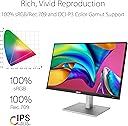
The ASUS ProArt Display PA278CV is a 27-inch professional-grade monitor featuring a WQHD (2560x1440) IPS panel with 178° wide viewing angles. It delivers 100% sRGB and Rec. 709 color accuracy, Calman Verified calibration, and supports USB-C connectivity with 65W power delivery. Designed for creative professionals, it includes Adaptive Sync, DisplayPort daisy-chaining, and ergonomic adjustments, making it a versatile and reliable choice for photo and video editing.


| ASIN | B08TX3F74X |
| Adaptive Sync | FreeSync |
| Aspect Ratio | 16:10 |
| Aspect ratio | 16:10 |
| Best Sellers Rank | 12,488 in Computers & Accessories ( See Top 100 in Computers & Accessories ) 257 in Monitors |
| Box Contents | Monitors |
| Brand | ASUS |
| Brand Name | ASUS |
| Cable Length | 27 Inches |
| Colour | Black |
| Colour Gamut Value | 1 |
| Compatible Devices | Computer |
| Contrast Ratio | 1000:1 |
| Country of Origin | Taiwan |
| Customer Reviews | 4.5 out of 5 stars 410 Reviews |
| Display Technology | LED-backlit IPS LCD |
| Display Type | In-plane switching(IPS) |
| EU Spare Part Availability Duration | 2 Years |
| Global Trade Identification Number | 04718017910040 |
| Hardware Connectivity | DisplayPort, HDMI, USB, USB Type C |
| Has Color Screen | Yes |
| Image Brightness | 350 cd/m² |
| Image contrast ratio | 1000:1 |
| Item Dimensions D x W x H | 9D x 24.2W x 20.6H centimetres |
| Item Type Name | Monitor |
| Item Weight | 8.4 Kilograms |
| Manufacturer | Asus |
| Maximum Display Resolution | 2560 x 1440 Pixels |
| Model Name | ASUS ProArt PA278CV |
| Model Number | 90LM06Q0-B01370 |
| Mounting Type | Wall Mount |
| Native Resolution | 2560x1440 |
| Network Connectivity Technology | DisplayPort, USB, HDMI |
| Picture Quality Enhancement Technology | ProArt Preset, ProArt Palette, Calman |
| Pixel Pitch | 0.233 |
| Power Consumption Size | 32 Watts |
| Product Features | Adaptive Sync, USB Hub, Color Accuracy, Wide Gamut, Daisy-chaining |
| Product Warranty | 2 year manufacturer |
| Refresh Rate | 75 Hz |
| Resolution | QHD Wide 1440p |
| Response Time | 5 Milliseconds |
| Screen Finish Type | Matte |
| Screen Size | 27 Inches |
| Screen size | 27 Inches |
| Screen surface description | Matte |
| Series Number | 27 |
| Shape | Rectangular |
| Specific Uses For Product | Photo Video Editing |
| Total HDMI Port | 1 |
| Total Video Out Ports | 1 |
| UPC | 192876898864 |
| Unit Count | 1.0 count |
| Viewing Angle | 178 Degrees |
| Voltage | 240 Volts |
| Warranty Type | [LIKELY] Limited Warranty |
J**Y
Brilliant monitor if you don't need 4K, forget the speakers
Most of my screen time is spent in Firefox, Outlook and Word. I was concerned that changing to a 4K monitor would mean text that was too small to work with. The ASUS PA278CV monitor seemed to be a suitable. In fact, it's brilliant! Clear text, great definition, colours and connectivity, versatile stand and, a reasonable cost (Amazon) compared to 4K. I was also concerned that moving to a 27" from a 22" would be overkill for my small computer desk, but it's a perfect fit. I have reduced peripheral vsion on the right-hand side (hemianopia) but the width of the screen encourages me to scan to the right; a positive attribute that I hadn't expected. Downside? Speakers are quiet and fogetable apart from Windows system sounds. The supplied instructions use pictograms that are not the most informative. Written instructions can be downloaded at ASUS Download UK, and are almost essential. With those instructions I found two more USB-A ports on the side of the monitor. At the moment I'm using HDMI input, but I will be trying DP. The USB-C connection to a Samsung S8 tablet, automatically changed the tablet to DX mode and, the ASUS monitor produced a great version of the tablet screen. My Windows 10 set up with an ancient graphics card was happy to switch to 75Hz refresh, but the 11th gen Core i5 running Windows 11 in Intel UHD graphics will only run 64Hz. Neither computer will run HDR. I need to try the USB-C input as a KVM. There is also a free 3 month download of Adobe Creative Cloud to try. In summary, I couldn't be happier and, it looks good with the nearby ASUS ET12 router. Update 1 September 2024 As with all of my ASUS kit, it has performed faultlessly. I'm a stroke lived-experience person for several Universities and the Stroke Association, and that means 90 minute Zoom or Teams sessions using separate speakers and a webcam. Additionally, DESNZ webinars on Net Zero. The height adjustment is superb for that, and again, I never have dry eyes or eye strain at the end of those sessions, although I am certified as sight impaired. Update 16 September 2025 The inbuilt KVM works fine for switching between the USB-4 and HDMI inputs. The mains input appears to be defective withing the monitor but continues to work if I don't reposition the screen. ASUS provided a free warranty update to 5 years, so if it becomes a problem, I'll send in back under warranty.
G**N
Great product, worth the money
The most I have ever spent on a monitor and was so pleased with the product. Fantastic colour on screen with super brightness, lots of adjustment available.
J**R
Superb Quality
Needed a monitor for photographic and video work. This monitor is superb quality and ideal for the job in hand. Well made and easily adjustable. Controls easy to find and self explanatory. We now have two of these monitors.
A**D
Great monitor
Very nice monitor, nice colours and clarity
A**F
Great monitor for photos editing
After some research I decided to replace my old monitor and decided on this model, I did consider the later version but this one suits my needs and was less expensive. The screen is evenly illuminated (unlike my old monitor) and glare-free and having a USB hub declutters my desktop and allows better USB powered speakers to be installed. Initially had a problem with the display that I though was the graphics card but a change of driver sorted the problem. Having the ability to simply change settings via an app is great and much simpler and convienent that diving into the computer settings.
K**E
The calibration was close but not perfect
I bought this monitor as an amazon warehouse deal supposedly due to a cosmetic scratch (which I can’t find) so I suspect it may have originally been returned as although the colour calibration was good it wasn’t quite right, but this was quickly correctly with spyder. The colour certainly wasn’t bad though and 99% of people would barely see a difference between the before and after. The display itself it very adaptable with the stand allowing landscape and portrait viewing in addition to height and tilt adjustment. The resolution is good but noticeably not quite as good as my iMac but then that is a 5k screen so understandable! It was plug and play with my iMac which made life so much easier. I did get a bargain as a warehouse deal but feel happily worth the full price as well, and I say that as a pro photographer who needs correct colour and a good display.
J**S
Great, well designed monitor!
For me the perfect size and resolution - 27"/QHD. Really good colours, and generally well designed. Everything looks great on it, and I would highly recommend it. Unless you know you specifically need 4K, QHD is a great resolution, and I can't personally see the difference from 4K.
J**N
BUY IT !
Fantastic monitor for photo editing. Would definitely recommend. I edit astrophotography and fine art. Very happy, no problems.
S**A
Fiyat performans canavarı.
Şuan ki fiyatına bakmadım ama ben aldığımda bu fiyata daha iyi bir cihaz yoktu. Ağırlıklı video işleri ile ilgileniyorum o yüzden Rec 709 ve dcip-3 %100 veriyor olması benim için çok önemli. Fotoğraf ve baskı işlerinizde srgb %100 veriyor. Adobe rgb yi %88 civarında veriyordu sanırım bilginize. Fotoğrafçı olarak kullancakların dikkatine : Fotoğraf makinenizin renk profili adobe rgb ise onu srgb ye çevirmeyi unutmayın. Renk doğruluğu konusunda oldukça iyi tüm testlerini inceleyip alma kararı almıştım. Calman tarafından renk kalibrasyon sertifikasına sahip bir şekilde geliyor cihaz. Yani monitörde gördüğünüz ile baskıya baskıdan çıkan içerik aynı geliyor. Usb type C ile 65w laptop şarj edebiliyor bu cidden güzel bir özellik. Aynı zamanda typec üzerinden şarj ederken görüntüde aktarabiliyorsunuz. Type c den bilgisayarınıza bağladığınızda assus un sitesinden " Pro Art Chroma Tune " uygulamasını mutlaka indirin. Tek tık ile renk modları arasında geçiş yapmanıza ve başka kişilerin yaptığı kalibrasyon ayarlarını monitörünüze ekleme olanağı tanıyor. Bence çok kullanışlı bir uygulama. Beğenmediğim özellikleri Öncelikle şansıma kutudan displayport kablosu çıkmadı. Neyse ki amazon güvencesi ile aldığım için hemen gönlümü aldılar. Cihazın usb3.2 portları o kadar ters bir noktadaki ne flaş bellek neden başka bir şeyi yerinizden kalkmadan takmanız neredeyse imkansız. Menüsü gayet anlaşılır ama yönlendirme tuşlarına alışmanız biraz zaman alıyor. Ürünün en baştan savma bölümü bence standı. Daha sağlam olabilirdi tam göbeğinde bir boşluk var ve oradan esneme yapıyor çok özenli yapıldığını düşünmüyorum.
A**Y
Rapporto qualità prezzo eccezionale
Dopo la morte del mio monitor Benq da 24", cercavo un qualcosa da 27" che potesse andare bene per grafica e post-produzione fotografica. Senza andare a spendere un patrimonio, che non ho manco nei sogni, per monitor di altri livelli destinati all'uso specifico fotografico (vedi Eizo, per esempio), dopo varie nottate insonni, la scelta è ricaduta su questo Asus ProArt. Qualità costruttiva ottima e robusta, definizione ottima, colori fedeli anche grazie alla calibrazione Calman in fabbrica e non stanca granchè gli occhi anche standoci ore. Risoluzione 2k, per me ideale, che si posiziona a metà tra il fullhd e il 4K. Comode le connessioni USB. Menu di configurazione davvero ben fatto, permette un gran numero di personalizzazioni oltre ad avere dei comodi preset. Utilissime le anteprima grafiche a schermo dei formati A4/B5 e il righello. Stand (che non utilizzo in quanto è stato montato su un braccio) robusto e pesante, al contrario di altri in plastichetta fragile che si piegano con la forza del pensiero. Inclusi nella confezione cavo AC, HDMI e USB type-C. NON è presente il cavo Displayport che ho dovuto acquistare a parte (attenzione perchè Amazon lo indica come incluso). Istruzioni praticamente assenti, va scaricato il manuale dal sito. Come detto, paragonarlo a monitor che costano ALMENO il triplo non è corretto e non ha senso, ma per 300 € non credo esista qualcosa di meglio con questa qualità. Spedizione veloce, imballo ottimo.
D**N
Färg
Mycket bra
G**N
Just what i wanted
Great monitor looks good and build quality seems solid. Very happy
K**.
Perfekter Monitor für kreative Arbeit – Präzise Farben und top Verarbeitung.
Als Grafikdesigner war ich auf der Suche nach einem zuverlässigen, farbtreuen Monitor, der meine kreativen Arbeiten bestmöglich wiedergibt. Nach einiger Recherche habe ich mich für den ASUS ProArt PA278CV entschieden – und er hat meine Erwartungen in jeder Hinsicht übertroffen. Was mich begeistert: Der 27-Zoll-WQHD-Bildschirm (2560 x 1440) bietet eine gestochen scharfe Darstellung, bei der selbst kleinste Details perfekt sichtbar sind. Farben werden dank der 100 % sRGB- und 100 % Rec. 709-Farbabdeckung absolut präzise dargestellt. Besonders als jemand, der regelmäßig mit Photoshop und Illustrator arbeitet, ist die werksseitige Kalibrierung ein riesiger Pluspunkt. Ich musste kaum Anpassungen vornehmen – die Farbwiedergabe war direkt aus der Box heraus beeindruckend genau. Die Ergonomie und Verarbeitung sind ebenfalls hervorragend. Der Monitor lässt sich in der Höhe verstellen, drehen, neigen und sogar ins Hochformat bringen – perfekt für Layout-Arbeiten und längere Design-Sessions. Trotz der vielen Funktionen bleibt das Design schlank und hochwertig. Ein weiteres Highlight ist die USB-C-Konnektivität mit Power Delivery. Ich kann mein MacBook direkt mit einem einzigen Kabel verbinden, das gleichzeitig Bild, Daten und Strom überträgt – extrem praktisch und reduziert den Kabelsalat auf meinem Schreibtisch. Auch für Videoschnitt und Fotobearbeitung ist der ProArt PA278CV ein echter Gewinn. Die gleichmäßige Helligkeit, das blendfreie Display und der hohe Kontrast sorgen für ein angenehmes Arbeiten über Stunden hinweg. Fazit: Wer einen professionellen Monitor für Bildbearbeitung, Grafikdesign oder Videoschnitt sucht, wird mit dem ASUS ProArt PA278CV absolut zufrieden sein. Präzise Farben, hohe Auflösung, vielseitige Anschlussmöglichkeiten und eine ausgezeichnete Ergonomie machen ihn zum perfekten Begleiter für Kreative. Eine klare Kaufempfehlung!
Trustpilot
3 days ago
3 weeks ago