Buy anything from 5,000+ international stores. One checkout price. No surprise fees. Join 2M+ shoppers on Desertcart.
Desertcart purchases this item on your behalf and handles shipping, customs, and support to Vietnam.
🎮 Dominate with speed and precision — the Viper 8K Hz is your secret weapon.
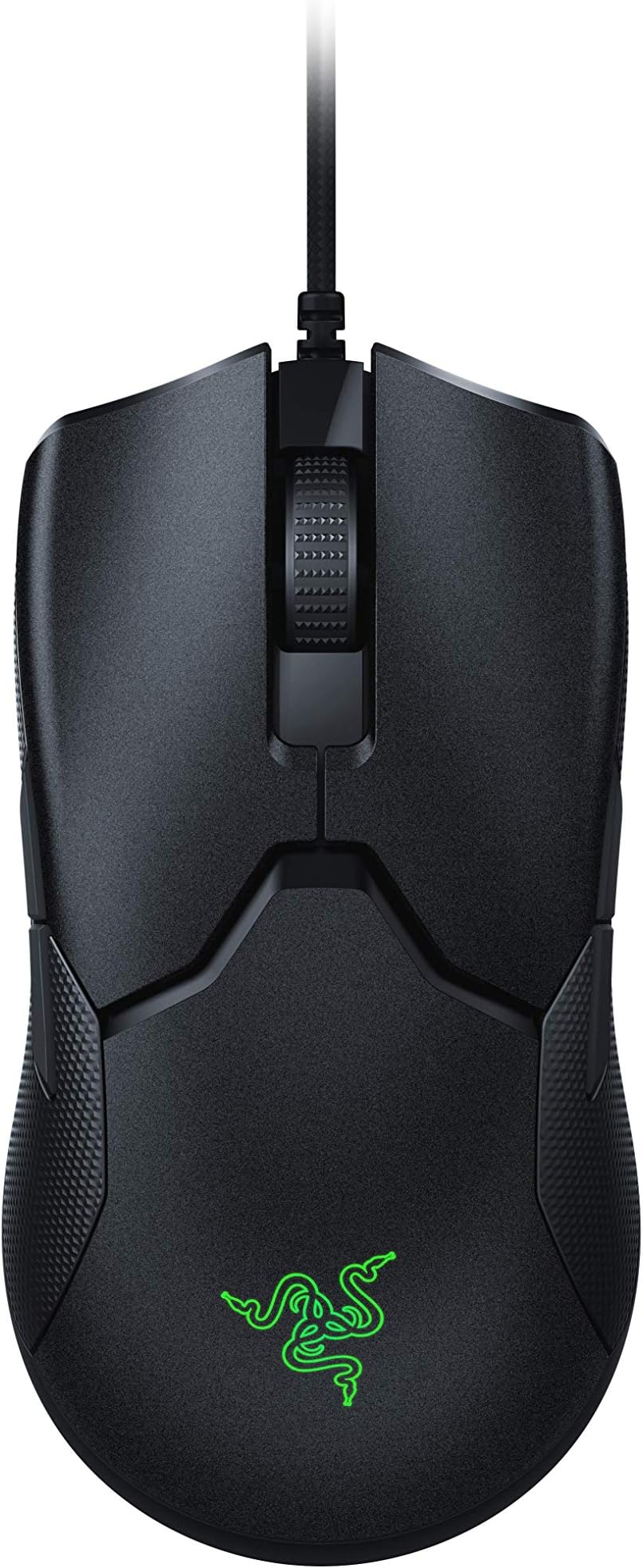
The Razer Viper 8K Hz is an ambidextrous wired gaming mouse engineered for esports pros and enthusiasts. Featuring an industry-leading 8000Hz polling rate for near-zero latency, a Focus+ 20,000 DPI optical sensor for pixel-precise tracking, and a featherlight 71g frame, it delivers unmatched speed, accuracy, and comfort. Its 2nd-gen optical switches ensure ultra-fast, durable clicks, while onboard memory supports up to 5 customizable profiles, making it a plug-and-play powerhouse for competitive gaming.
| ASIN | B08P1PWN2Q |
| Additional Features | Lightweight |
| Antenna Location | Gaming |
| Are Batteries Included | No |
| Are Batteries Required | Yes |
| Best Sellers Rank | #4,930 in Video Games ( See Top 100 in Video Games ) #235 in PC Gaming Mice #702 in Computer Mice |
| Brand | Razer |
| Button Quantity | 8 |
| Color | Black |
| Compatible Devices | Personal Computer |
| Connectivity Technology | Wired - Speedflex Cable |
| Customer Reviews | 4.6 out of 5 stars 7,920 Reviews |
| Enclosure Material | Plastic |
| Global Trade Identification Number | 08886419333135 |
| Hand Orientation | Ambidextrous |
| Hardware Platform | PC |
| Item Weight | 2.5 Ounces |
| Manufacturer | Razer Inc. |
| Mfr Part Number | RZ01-03580100-R3M1 |
| Model Name | Razer Viper 8K Hz |
| Model Number | RZ01-03580100-R3M1 |
| Mouse Maximum Sensitivity | 20000 Dots per Inch |
| Movement Detection | Optical |
| Movement Detection Technology | Optical |
| Number of Batteries | A batteries required. |
| Number of Buttons | 8 |
| Operating System | Windows, Macos |
| Pattern | Standard |
| Power Source | Corded Electric |
| Range | 5.0 meters |
| Special Feature | Lightweight |
| Style Name | Viper 8K Hz |
| Unit Count | 1.0 Count |
| Warranty Description | Two year warranty. |
A**R
I keep coming back to this amazing mouse.
I have gone through a handful of really amazing gaming mice in the last few months including the Glorious Model O and Model O-, the Zowie s2, Logitech G203 (amazing at $25), and this Razer Viper. I can't say enough good things about this mouse. It's incredibly light and glides incredibly well on my mousepad. The grips on the side are a great feature. They make other mice feel slippery once you get used to them. For me, the one minor thing that I would change about this mouse is the buttons on the side should stick out a little more. They are not in so far as to cause issues or misclicks, but I like to really feel where the mouse buttons are at all times. I do like the big thumb buttons on the Zowie S2 over these. One of the best features of this mouse is the scroll wheel. I use the wheel button in games frequently as I hold my mouse with 3 fingers on top (middle finger resting on the scroll wheel and ring finger on right mouse click button). The button press and tension is perfect - not too stiff, and not impossible to click at will. The scroll wheel movement is super smooth and tensioned where I like it. It also has a great rubber grip with a low profile texture that holds your finger very well. Button clicks are tuned very well on this mouse. Pronounced enough that you get a solid click with a bit of travel. I have never had an instance where there is an accidental double-click or a time where I needed to click quickly and it wasn't able to deliver. They feel great. The electronics in the mouse are some of the best available. Button switches are laser actuated so no delays or debounce issues. The sensor is spot on. One thing that I love about this is that you don't need the software to run it. I hate adding bloatware on my machine and yes, sorry Razer, I have uninstalled synapse and every other driver software that isn't system critical so I could save some performance when I run games. You can config this mouse with Synapse if you would like, but you really don't need to - it's plug and play. Keeping Synapse around will allow you to get the sweet RGB logo throbbing in sync with your other Razer peripherals. Otherwise, there is a DPI button on the bottom and an indicator light to let you know what your setting is and you are good to go. I did end up replacing the skates on this with Hyperglides. Hyperglide does not make drop-in glided for this, so I had to cut my own using the originals as templates. I used a very sharp exacto knife and traced the cut around the outside of the originals carefully. I used the bottom skate from a hyperglide cut for Zowie s2 and the top glide cut for Razer Death Adder. You could use the Death Adder glides, but the bottom one won't match exactly with the stock viper because there is not quite enough material. The curve is the same so, in a pinch, you can drop it in, but it will not match the stock exactly. Once I cut the shapes to match the stock glides, I beveled the edges and wet sanded them smooth down to 3000 grit sandpaper. I also used a little rubbing polish, but I don't think it was really necessary. The cable on this is close to a paracable with lots of flex. At some point, I am going to upgrade to a hand made paracable, but for now, the stock cable isn't bad at all. Removing the shielding from the cable will give it more flex, but manufacturers are not allowed to do this per USB standards, I believe. Just a heads-up, if you decide to crack the Viper open and replace the cable, I have read it does not use a standard JST 2.0mm 5 pin inside the mouse. I believe it uses the smaller 1.5mm JST. Bottom line is that this mouse was designed with input from pro gamers and the end result shows. I am not normally a fan of Razer products and like the smaller gaming brands like Glorious, Ducky, Zowie, etc. but Razer is one hell of a company. They understand what it means to be design-led and always marry looks, experience, functionality. The packaging on this is your standard amazing razer packaging and the whole thing, start to finish, is worth every penny. Great job on this one, Razer. You got me this time.
T**E
Like a Glove!
This is an interesting mouse. Idk what Ibwas really expecting when I ordered it. I really like trying different types of mice and currently own a good deal of the more popular mice. The Logitech G305, 502, steelseries Rival 500, 600. Evga Torx carbon, Razer Basilisk, Deathadder and now the Viper. Corsair M65 elite and an Alienware AW558 that came with a monitor I bought. All have their plus and minus, but until I recieved the Viper I was using the Deathadder. The Viper is a pretty small mouse. I was surprised how thin and short it actually was. I have somewhat small hands so it doesnt bother me. It's ambidextrous, but feels surprisingly comfortable in the hand. It almost feels like it's not made for either hand in a way. It's great how they managed that. The left and right click feel very satisfying, almost like a deathadder, but not quite as light, closer to the deathadder than any other mice I own though. The side buttons are pretty close to flush, but still has that razer satisfying click. I think Razer has the best buttons of any mice I've used and that's no different here. The buttons are small, but it's a small mouse so... the cord is AMAZING for a stock cable and easily the best cable of any mice I've used to date. It almost feels like a shoelace. A quality show place that is somewhat stretchy. I havent had time to use the mouse over a long period of time, well, because it just came out, but I have no problem saying it's well built and should hold up nicely. It's a bit on the expensive side. If you have a little rodent you like using now then I would stick with what you have until you find this on sale or a warehouse deal. Its apsolutely worth picking up, especially if you're already in the market. I personally dnt find how light it is to make a difference, I think that's all marketing garbage and the market has just swung atm to wanting lighter mice. You would have to be one weak wrister fella for 20 grams or so to make a difference. Doubly so for thinking you can move a 60 gram mice faster than an 80 gram mouse, but hey, if you do have wrist issues then you should be looking for anyway to game without pain or the least amount of strain on your wrist possible. I would say it's good for that. Overall, I'm pleased. Its something different and fits good in my palm. Might be a little small for palm grip if you have meat hooks for hands, but I'd say it's great for fingertip or claw grip anyway. Use Amazon's return policy to your advantage!
S**E
Pleasant Surprise
To be honest, I've had less than favorable experiences with Razer products around 2014-2016 and moved away to other brands like Zowie, Logitech, SteelSeries, HyperX, etc for all my gear. With the recent trend of lightweight mice with holes, I started to wonder what the fuss was about with this mouse (having no holes weighing 69grams). Pros: - Coming from an FK2, it fit me perfectly with my 18cm x 9cm hands (fingertip grip + base of my thumb). - Onboard memory FINALLY. Synapse no longer mandatory for setting it up with your preferred DPI. - Optical switches. Feel a little different (idk hollow?) compared to OMRONS or HUANO switches, but eliminate delays. - Extremely tactile scroll wheel with 24 steps (HUGE upgrade from Zowie wheels) and still smooth and relatively quiet - NO HOLES lightweight design - Turning off the RGB LED gives it a clean look (no logo outline can be seen when its off) -Ambidextrous design but in a way that you will NEVER accidentally click the side buttons on the other side. Cons: - Can't see anything wrong with it after a week of use - So far the only thing that could be wrong with it are people complaining that the mouse feet aren't as smooth like those on the Model O and new mice coming out but its still great for stock feet (it's fine for most people, especially if hyperglides arent a must for you, there could be aftermarket ones later anyways like most cases) GOOD JOB RAZER. definitely a step in the right direction. maybe not step, more like stride, it was a big one.
D**S
Quality product.
Some have stated in reviews of the placement of the side buttons I would agree they don't feel natural they seem sunk in slightly and a bit harder to manage. but after some hours it seems fine just a bit of adapting for me. other than this slight issue for me it's a great product.
X**S
Razer is back to its roots in 2005: At The Top
Here's a bit of a dramatic history lesson; if you don't care for it and what the raw details, skip ahead. ----------------------------------- Anybody who grew up when competitive gaming first started booming knew there was only one thing that truly kept it all together: a compelling, new-age, tailor-made passion. In the mid 2000s, Razer got widespread attention with the releases of their Diamondback and Copperhead mice. They were their first mainstream products, and man did it feel surreal to experience what would be known as the first gaming peripherals. The color lighting in motion, the clicks, the premium feel of something engineered for us few (at the time) gamers was something that I'll always thank Razer for. Logitech was still making exclusively office supply mice, and the closest thing to gaming mouse was the Microsoft Intellimouse 3.0. They took the first step forward, because they knew that what was about to come was based on a fiery passion that every user reading this review knows by heart: competitive gaming. Now I'm not going to sit here and say they reigned forever. Logitech, Zowie, and Finalmouse have been IMO dominating the market for competitive mice, and I say that with no regret. I'm a personal advocate of the Zowie ZA series, but I've used all mice from the Sensei/Kinzu to the Deathadder 2013 to the Logitech G Pro. The Razer Viper puts the company finally back where it belongs. ----------------------------------- I won't get into what you can get from their advertising. Let me explain how it actually performs in your hand: -The shape and weight works in perfect unison together. I personally didn't like the Zowie FK1/2 despite its praise, but I do to this day love the ZA11. I appreciate the contact at the base of my palm as a sort of pivot point, and I have my fingers operate the mouse with a claw grip. This mouse is a dream if you use your mice similarly. -The mouse wheel is by far the best I've ever used in any mouse. It has absolutely, I mean zero, wobble, it is extremely quiet to the point of being silent, the clicks are subtle yet firm, and the weight is just like the mouse itself: light. -The clicks, from a feel standpoint, are different. I enjoy the silent switches you find on silent mice, but I can understand those who like the Zowie style which is like a banging click that gives you strong feedback and assurance. They do feel mushy, I am not going to lie, and they will take time getting used to, because pushing them too hard is a thing, and I do have concerns about how long they will last. I am hoping my muscle memory will get adjusted from my Zowie mouse and it will actually turn out for the better. From the limited time I've used it, I do believe that with a softer touch, these will be something that I cannot get away from. -With the softer touch, I do feel a bit quicker on the clicks. The softer touch required to fully depress them makes your fingers feel a lot more nimble, which is awesome. Less strain, more gain. -The opposite side buttons are near impossible to accidentally press. I actually like having the option to do with ease so because extra binds are always something I enjoy. But if that's a concern of yours, drop it. For this reason, the hypershift keys are a godsend.
J**E
Ok yes there is a difference
It's a $70 mouse as of this writing. There is a difference... wow there is. This is my daily driver for work. TLDR: Proper gaming peripheral designers put substantial thought into how the user will use their products and when they do an amazing job you get a mouse like this. You can read lots of gushing glowing reviews about this product but let me add another perspective to the conversation. For use in an office setting this mouse has been reliable and consistent with its performance. There have been no issues with build quality. No need to worry about a button some coming unset and having to push on just the right spot to get it click back into place. The cloth cord eliminates the dreaded "sticky plastic usb cord" phenomenon that we've all, well most of us at least, have had to contend with. Also I'm a big fan of being able to adjust the sensitivity of the mouse on the mouse and not in OS. Also I'm a big fan of the light weight but also solid feel in my hand. Why not wireless? I switched to a wired mouse for stability reasons. We live in the age of dongles and garbage usb docks and hubs. The manufacturers of these critical pieces of hardware have produced for the most part products that either flat out don't do what they claim to do, do what they claim to do but have stability issues due to poor thermal management, or are too simple in functionality and you don't get that many more ports out of the dongle. I bought this mouse to address the second scenario, thermal performance of my usb dock. The wireless mouse I was using would start to glitch and behave erratically on me as the dock got hotter. Not this mouse. If you can afford it I wold recommend buying this mouse. Also show some love to your mouse and get a proper mouse pad or gaming mat.
A**C
Best mouse I have ever used
I wanted to work on improving my aim and so I bought this mouse since it was very lightweight which means less force to start and stop moving it. I can definitely tell the difference, even just using it for work I could tell there was much less strain on my hand/ wrist. Previously I was using the Razer Lancehead due to its good reviews on reliability and I used all 4 side buttons for extra functionality at work. While I still have my Lancehead which has been reliable I wanted something better. I can tell the feel in the hand with the Viper is so much better even though its still ambidextrous. I had just gotten used to more of a claw grip due to the mice I have used in the past but the Viper really works for more hand styles. With my small hands the feel is like an in between a claw and palm grip but I can tell it would be good for either. I can tell the main issue with the lancehead other than weight was how flared out the back was. Another good thing about the Viper is the cable it comes with. Due to the limited space on my desk I'm forced to have my JDS Element 2 above my mouse mat which previously would move your mouse a little if you let go because of the strained against it. The cable the viper comes with allows more leeway before it gives out. Side grips are also a benefit and I have not had any issues with it pealing off or anything. Definitely give this mouse a try.
I**T
After using this mouse for 1.5 years I realized Ambidextrous mice are very uncomfortable
Ambidextrous mice are not good, if your right handed go with a right-handed ergo mouse, you'll thank me later. There are way too many design compromises to make a mouse ambidextrous that lead to a really lousy shape. This mouse doesn't deserve half the good reviews it gets. The protrusion on the sides where the buttons are pushes hard against your ring finger and throws the mouse rotated to the left rather than straight in your hand causing your index finger to not align with the left mouse button, it ends uo right against the scroll wheel, and is overall really uncomfortable. Also the left click button being so low (to keep the mouse ambidextrous both left & right click buttons are level) makes you have to put your fingers into a very unnatural and fatiguing position to reach it. The right-handed ergo style mice raise the left click button up to be within comfortable reach If you get one and use it daily, plan on replacing it after every 1-2 years, the left click button on mine was good out of the box but over time developed lots of side play back and forth. Also the rubber side grips are really nice when they're new, but wear down, especially where you thumb hits the left one, mine basically had a hole in it after a little over 1 year. The weight is pretty good though. Nice and relatively light. After using a boat load of different mice, I've found that the cooler master mm720 is pretty much the best mouse on the market right now. Check it out and try that instead, you'll thank me later.
R**E
Good for shooting games
Nice mouse for esports lovers, whether it is cod, valorant, apex legends, or final game in shooting it gives more reliable headshots
I**.
Perfeito
Vindo da razer era de se esperar uma qualidade tao boa, vou fazer 1 ano usando esse mouse e até agora tá sendo o melhor que já tive
O**R
Excelente mouse
Adquirí el ratón más que nada para actualizar mi hardware. Había tenido en mi poder un mouse de Microsoft durante siete años y funcionaba por infrarojos. La verdad es que el puntero bailaba mucho y se lo atribuía al tapete. Mi sorpresa y reacción al ver lo suave y preciso que es este mouse en comparación con el que tenía me hizo sentirme más a gusto en la computadora y ser más preciso en los juegos. Aunque el ratón está hecho específicamente para jugar, es un excelente compra para todos aquellos que trabajan durante tiempos largos en la computadora. Diseñadores, dibujantes, arquitectos tendrán la posibilidad de escoger la velocidad exacta a la que necesitan que se mueva el puntero. Los botones de acceso rápido son también muy útiles tanto para juegos como para la vida diaria. Es también muy ligero y funciona bien sobre varias superficies. Agarré el precio por debajo de los mil pesos mexicanos y creo que en ese rango es una excelente compra.
O**Z
Razer ürünü olarak beklentileri karşılıyor
Bozulan logitech faremin yerine aldım. Hemen CS2 de denedim. Çok çabuk alıştım ve hissedilir oranda daha iyi nişan aldığımı hissettim. Hafifliği çok yerinde. Hızlıca çekip hedef almaya çalıştığınızda overshot olmuyor. Tam istediğiniz noktaya geliyor. Rekabetçi oynayanlar bilir flick shot için çok iyi. Sol ve sağ tuş basış hissiyatında biraz boşluk hissediliyor. Ama tuşların dönüşü olduköa hızlı, tek tek tıklarken sorun çıkartmıyor. İleri geri tuşlarını kullanmak için uygulamayı indirip ayarlamam gerekti. Ancak sonradan uygulamanın arkada çalışmasına gerek olmuyor. Teker bunnyhop için çok iyi değil, o amaçla alınmasını tavsiye etmiyorum. Razer yazılımı birçok şeye olanak sağlıyor ve kullanımı kolay. Ancak sisteme gereksiz yük bindirmesiyle ünlü olduğundan arkada çalıştırmıyorum. Ne yazıkki program çalışmazken rgb yi kontrol edemedim. Şu an karşılaştığım tek sorun da bu. Sizin için sorun değilse kesinlikle almayı düşünün.
I**N
Trust me it’s worth every fils, penny, cent I promise.
After using a cheap gaming mouse for almost a year which i thought I was satisfied with, but when I switched for this Razer mouse (this is the 2nd product I buy from them) I IMMEDIATELY !!! felt the difference. I swear mouse flicks, tracking, general use and the glide over the mouse pad felt Significantly different it LITERARY feels like part of your hand
Trustpilot
3 weeks ago
3 weeks ago