Buy anything from 5,000+ international stores. One checkout price. No surprise fees. Join 2M+ shoppers on Desertcart.
Desertcart purchases this item on your behalf and handles shipping, customs, and support to Vietnam.
🚀 Power Your Network Like a Pro – Don’t Get Left Behind!
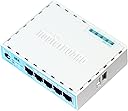
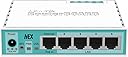
The Mikrotik RB750GR3 is a wired router featuring a powerful 880MHz dual-core CPU, 256MB RAM, and five Gigabit Ethernet ports. Its compact turquoise white design complements any setup, while RouterOS Level 4 offers advanced networking capabilities for professional-grade performance and reliability.
| ASIN | B01MSUMVUB |
| Antenna Location | Home |
| Antenna Type | Internal |
| Best Sellers Rank | #14,298 in Computers ( See Top 100 in Computers ) #290 in Routers |
| Brand | Mikrotik |
| Built-In Media | 24V 0.38A power adapter |
| Color | white |
| Compatible Devices | Gaming Console, Notebook, Personal Computer, Printer, Smart Television, Smartphone, Tablet |
| Connectivity Protocol | Ethernet |
| Connectivity Technology | Ethernet |
| Control Method | Touch |
| Controller Type | Push Button |
| Customer Reviews | 4.6 4.6 out of 5 stars (1,291) |
| Data Transfer Rate | 470 Megabits Per Second |
| Frequency | 880 MHz |
| Frequency Band Class | Dual-Band |
| Global Trade Identification Number | 00709257380070, 04752224002761, 05395481556784 |
| Is Modem Compatible | No |
| Item Dimensions L x W x H | 28L x 246W x 165H millimeters |
| LAN Port Bandwidth | 1000 Mbps |
| Manufacturer | Eva Solo |
| Maximum Upstream Data Transfer Rate | 1000 Megabits Per Second |
| Mfr Part Number | RB750Gr3 |
| Model Name | RB750Gr3 |
| Model Number | RB750Gr3 |
| Number of Antennas | 3 |
| Number of Ports | 5 |
| Operating System | RouterOS |
| Other Special Features of the Product | LED Indicator |
| RAM Memory Installed | 256 MB |
| Security Protocol | WPA2-PSK, WPA-PSK, WPA3, WPA-Enterprise, WPA2-Enterprise, WEP |
| UPC | 709257380070 619201252721 |
| Unit Count | 1 Count |
| Voltage | 45158 Volts |
| Wireless Compability | 802.11n |
K**S
Good
Works perfect
N**M
Useless
Not working properly
L**S
I bought this because it was cheap among the many other options. I needed something that could do port forwarding better than the Virgin Media 'superhub' as the options on there are: Open to the world, or closed. I stumbled across Mikrotik in a YouTube comments section about a UniFi USG. I own two UniFi AP lites and it was the obvious choice. But I saw the price of this and did some reading about the functionality it gives for it and thought I'd give it a shot. Hardware wise, this has more to offer than the USG, so I took that as better value. Little did I know that this unassuming plastic box can do pretty much any kind of packet pass-through you can dream of, even if the configuration is totally wrong. This is networking without the stabilisers; consider it a challenge, and a very rewarding one at that. If you want something simple with a plain web UI and simple options, this is not the router for you. The kind of person who buys a Mikrotik product for the home is one who is sad enough to list networking as a hobby. I hope by now you've decided whether this sounds like the sort of thing you'd like to get into. My theory on Mikrotik after using it for a few months is: if you learn the Mikrotik way, everything in networking is easier after that point. It is recommended that you download the Winbox software and interact with the settings that way, it is quick to use and reliable. My first goal was to get this hooked up to my modem mode 'superhub' and get internet access. This can be done using the quick set options within the interface, and within 20 mins of unboxing it for the first time I at least had internet access. The default Firewall rules are sensible, but I looked online at various guides of how I can secure it down a bit, of which there are a few decent YouTube videos that actually describe why you are clicking certain check boxes and what the impact of it is - much of the RouterOS terminology is largely unique to Mikrotik and best practice networking manuals. Even in the age of the internet, there are few easy to follow guides that properly explain RouterOS, so having a strong networking background would be advantageous as you watch the odd how-to guide. I struggled a bit trying to set up a NAT port forward from a specific IP into my home, but after some research and creating an account on the Mikrotik forum I got the advice I needed and the rule is now working. Rather handily you also get a little indication how how much data tx/tx the rule has had going through it. So with the internet up and running everything was good. I had my access points hooked up to it, DNS/DHCP policies were configured and it all just worked. The Routerboard didn't cut out, LAN latency was minimal, and packet loss when playing games was gone! I've had this running for 4 months and not had a single problem with my home internet. If you want a cheap, reliable router for home or a small business packed full of enterprise grade features. This is the most cost effective choice... That is if you don't value the time you spend learning how to configure it! I'll be making a few more Mikrotik purchases soon I think.
R**S
muito bom o produto.
R**E
ottimo router per gestire un piccolo ufficio che necessita di segmentare la rete o applicare delle regole specifiche. Non è molto adatto per una persona inesperta, si deve essere un po' esperti nelle reti. Se si ha un po' di manualità si possono seguire le istruzioni online (ma si deve capire l'inglese).
L**K
Ich habe einige Jahre Erfahrungen im Netzwerkbereich, das hier bei Amazon gekaufte RouterBoard hEX war jedoch mein Erstkontakt mit MikroTik. Ich kannte die Firma und Produkte zwar schon vorher vom Hörensagen, hatte jedoch immer den Eindruck von "Spielzeug" oder "Bastelware", daher bisher niemals wirklich große Lust mir das näher anzusehen. Wie habe ich mich doch geirrt! Im Nachhinein, nach etwas Stunden Einarbeitungszeit: Die gebotene Leistung und die Konfigurationsmöglichkeiten sind für den Preis der helle Wahnsinn! Der hex ist bei einem Projekt im Einsatz bei dem es wirklich sehr sehr günstig sein musste, und ersetzt ein in die Jahre gekommenes ALIX-Board mit BSD als Firewall. Es braucht schon etwas länger Einarbeitungszeit. Auch mit einiger Erfahrung im Netzwerkbereich ist das Konzept von RouterOS anfangs gewöhnungsbedürftig, weil anders. Nicht schlecht - nur anders! Die Doku ist ausreichend, könnte aber besser strukturiert sein. Nach einigen Stunden: Die UI ist meiner Meinung nach einfach altbacken, die CLI dafür super. Wenn man länger mit MikroTik Produkten arbeitet ist das wohl alles absolut kein Problem mehr. Für mich war MikroTik/RouterOS jedoch komplett neu, und das einarbeiten dauerte im Vergleich zu anderen Herstellern/Produkten dann doch eben etwas länger. Ich habe aber schlussendlich immer alles gefunden was ich gebraucht habe. Die Einarbeitungszeit hat sich definitiv gelohnt, da die gebotenen Features auf der winzigen und günstigen Hardware schlicht phänomenal sind. Meine Meinung hat sich also geändert, und meine Erwartungen wurden weit übertroffen. Nach meinem Erstkontakt: Für wen eignen sich meiner Meinung nach solche Boards, oder etwas allgemeiner gehalten: Produkte von MikroTik? Nicht wirklich für den reinen Heimanwender, der quasi nur "Ersatz für Fritzbox" sucht. Dafür ist routerOS schlicht nicht einfach genug. Es eignet sich auch nicht wirklich gut für sehr große Unternehmen, da fehlt dann doch noch etwas power, support und compliance. Ich habe gelernt das MikroTik eine wirklich interessante und gute Alternative ist für alle Anwendungsfälle die zwischen diesen beiden Extremen liegen. Also angefangen beim ambitionierten Laien mit Bereitschaft zum (längeren) Einarbeiten in Netzwerktechnik, weiter sehr gut für alle Arten von Lehr- und Ausbildungszwecke, nahezu perfekt für kleine bis mittlere Projekte mit hohen Ambitionen aber sehr engem Budget, bis hin zum flächigen Einsatz in KMU oder auch bei kleineren ISP. Ich bin schon etwas beeindruckt.
M**L
with change to apple ios 14, many l2tp-ipsec vpn’s from many firewall routers failed. this microtik with routeros >6.0 works! not for the noob, but its more easy to config then cisco catalyst. in fact this router is perfect to learn the networking technologies. the router comes with full routeros license with all functions and lifetime upgrades included. not only CLI, but using the wintool almost all configs are possible. a lot of documentation and a good user forum is available This small box handles my routing firewall requirements very well. vpn’s, vlans, ip routing. established home,game,office,guest segments. throughput is good, especially with the fast track technology (i use tp link switches in addition) lot of functionality for good price.
Trustpilot
2 weeks ago
4 days ago