Desertcart purchases this item on your behalf and handles shipping, customs, and support to Vietnam.
🚀 Upgrade Your USB Game — More Ports, More Power, More Productivity!
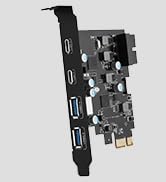
The YEELIYA PCIE USB 3.0 Expansion Card adds 7 ultra-fast USB ports (5 Type-A, 2 Type-C) to your desktop via PCIe x1/x4/x8/x16 slots. Supporting up to 5Gbps transfer speeds and broad OS compatibility, it’s a plug-and-play powerhouse designed for professionals needing reliable, high-speed connectivity for multiple peripherals. Perfect for enhancing workstation efficiency with a hassle-free installation and robust 2-year warranty.


| ASIN | B08PF8XR73 |
| Best Sellers Rank | #5 in Internal USB Port Cards |
| Brand | YEELIYA |
| Compatible Devices | PC Motherboard: For ASUS Z590/B550/AM4 TUF Gaming X570/ROG Strix X570-E,Gigabyte B560M/ GA-990FX-Gaming mobo/ M68MT-D3 mobo,MSI B450/X470/550,ASRock X370 Taichi etc., Standard Tower Case: For HP,CORSAIR 220t/3000D/3500X /4000D/5000D/7000D,NZXT H510 Elite/H5/H6/H9, for Dell Optiplex 7050/9020/OptiPlex 7040 ,Lenovo P520 etc., Support external USB wired devices: mouse, keyboard, mouse pad, keyboard pad,Headphone stand,for Stream Deck 6 key/15 key, usb small-power light,usb printer, etc. Compatible Devices PC Motherboard: For ASUS Z590/B550/AM4 TUF Gaming X570/ROG Strix X570-E,Gigabyte B560M/ GA-990FX-Gaming mobo/ M68MT-D3 mobo,MSI B450/X470/550,ASRock X370 Taichi etc., Standard Tower Case: For HP,CORSAIR 220t/3000D/3500X /4000D/5000D/7000D,NZXT H510 Elite/H5/H6/H9, for Dell Optiplex 7050/9020/OptiPlex 7040 ,Lenovo P520 etc., Support external USB wired devices: mouse, keyboard, mouse pad, keyboard pad,Headphone stand,for Stream Deck 6 key/15 key, usb small-power light,usb printer, etc. See more |
| Customer Reviews | 4.2 out of 5 stars 2,773 Reviews |
| EU Spare Part Availability Duration | 2 years |
| Hardware Interface | PCIE x 1, PCIE x 16, PCIE x 4, PCIE x 8, USB 3.0, USB 3.0 Type A, USB 3.0 Type C |
| Item Dimensions L x W x H | 4.72"L x 3.15"W x 0.98"H |
| Item Weight | 0.11 kg |
| Manufacturer | YEELIYA |
| Mfr Part Number | UP-7200 |
| Model Number | UP-7200 |
| Number of Items | 1 |
| Operating System | Windows 10 |
| Product Dimensions | 4.72"L x 3.15"W x 0.98"H |
| Style | Classic |
| Style Name | Classic |
| UPC | 712198855057 |
A**R
It works with no set up required
The card is completely plug and play on windows 10. Works as advertised
L**L
Works well but the ports can be difficult to access if not aligned perfectly with the case cutouts
Simple install - automatically recognized by Win10 - no drivers, no software, nothing to setup or config. The USB ports are *vertical* which can make plugging something into them difficult or even impossible, if the card doesn't line up perfectly with the openings in your case, or if the plug is large. Be prepared to purchase some new cables with slim plugs and plan on using the card for things that you typically plug in once and leave be. This isn't a good solution for things like memory sticks, cell phones, and anything else you're routinely connecting and disconnecting. If they'd have made the ports horizontally oriented, they wouldn't have been able to provide as many ports, so I guess it was a tradeoff between capacity and convenience. Just be aware of this before you purchase. It works fine for me as I'm using it for peripherals that are relatively permanent.
J**N
All the ports are functional and no latency
I've been using the extra USB c's for game controllers and headsets and I'm able to play time sensitive games flawlessly.
J**S
Pretty good performance, all drives sometimes go offline
Had a problem fitting card in slot, made it work by cutting away bracket on PC. I'm only using the USB 3 ports. When copying many files to a drive, in mid-copy ALL of the drives (even those not involved) will go offline and then come back within about a minute. The copy has failed, of course. Sometimes the drives will disconnect randomly overnight, but are re-connected when I check in the morning. Have tried manufacturer's driver and Microsoft's, which I'm currently using. I also have the power-saving option turned off in the Properties of each port, and this did seem to help, as the random dis- and re-connects seem fewer. When they work, I'm satisfied. When the don't it's very frustrating.
M**.
Definitely worth it/Power Limits for certain USB 3.0 and USB C Devices
There were no reviews when I first looked at this product so I was very skeptical about purchasing but for the first price of $18 along with an additional 10% off I had grab it for all it's offering. It raised in price after the first batch sold which is the norm with supply and demand so I'm happy I was an early adapter. Definitely a lot better than the Internal USB 3.0 HUB that I finally had to throw out after 6 years. This one is a lot sleeker, has a minimalistic aesthetic to it along with providing you with addition USB room. However, certain USB devices will not get enough power to run properly using this hub. For example, my Xbox Wireless Adapter will get power for ten minutes before automatically turning off, I just switched a random jump drive in my PC for it. External Drives work pretty well and don't give me that problem so it may be a software conflict between the hub and my wireless adapter. But overall a nice alternative to a MOBO with a few USB Ports or for people like me that like to have more than needed. Also for those wanting to use this hub for USB C displays, this will not work at all as it doesn't provide enough power just giving a heads-up. The additional USB C port are a godsend since cases with USB C ports are more expensive and some motherboards like mine only have 1 USB C Ports that I used for an external drive before getting this hub. Definitely a cheap and effective way to add USB C ports to your PC without the premium price point and the speeds are equal to what you'll get on your motherboard. Also, it doesn't require a SATA Cable to get up and running which is what a lot of USB Hubs need to get powered on.
V**Y
Can't recommend even 1 star for this product.
I bought this to replace another USB card, which only had 5 ports. Everything was working fine prior to installation. From the first boot up, everything USB related started acting badly, from internal USB devices (Corsair Commander Core XT and a Corsair Commander Pro), to the external devices (2TB, 8TB & 14TB external, two joysticks and Astro A40s). External transfers to HD's would just stop at random points. Verified that all drives were still good-to-go with chkdsk. iCue which controls the corsair products would randomly lose connection, yet neither of these devices are plugged into this card. That means that something, with this card, is messing with either power or IRQ's. Once I removed the card, everything went back to working normally. No more transfer problems and no more iCue/Corsair disconnects. I'll also note, this card, although listed as USB 3.0 has a LOT of caveats. READ the instructions prior to purchase. You can't use the USB-C for half of the normal products that you would use with USB-C such as external monitors. You can't use USB extensions as each USB port is severally underpowered. This makes sense as there is no internal power connector for the card and only draws power from the PCI-E 1x port. I can't recommend this product for anyone that would use this in 2023.
S**E
The EASIEST way to add reliable USB 3.0 and USB-C ports to a computer.
I was running into issue after issue in my streaming software with USB tree hub issues and not being able to have two simultaneous USB 3.0 video sources being input. I ordered this to "create" another USB tree, and haven't had an issue since. Install: As easy as I imagined. I built my computer so installing this took maybe three minutes. Simply took off my sideview glass panel, removed a bracket, installed into the PCI slot, and that's it. (installed in an NZXT H510 Elite case) Quality: No complaints here. Initial impressions was that it felt solid. I've tested other hubs like this in the past and they just felt flimsy. This feels strong and the PCB doesn't have much give to it. The input area is well centered and the connection points feel strong and do not have any wiggle in them. There are no gaps in between this and the brackets on the back of my case. To everyone having issues with the card not lining up, it is NOT this things fault, it is your CASE. Speeds: Again, no complaints here. I tested each individual port by transferring some large files and the speeds were exactly as I expected them to be on my PCI 4.0 motherboard. Overall, I highly recommend. Easy to install. Solid build quality. Fast.
A**S
Lack of necessary power output, and much slower speeds than MOBO
TL;DR: Since acquiring the expansion card on Oct 25, 2022, it has not been used frequently due to more convenient ports available. Recently, experiencing issues with power when multiple devices are connected to the expansion card. Transfer speeds with a portable SSD were below expected levels, especially with USB-C ports delivering slower speeds than USB-A ports on the same card. Not recommended for heavy usage or power-demanding devices. I have had this since Oct 25, 2022, and notably have not used this too often as i have other, more convenient ports. But over time I do use these occasionally, and have recently decided to use it more often for my more permanent cables(none of them stay plugged in forever). Occasionally my keyboard(with LEDs) will just flash its lights for a millisecond, and then turn off again, indicating a power issue. In hindsight this was always when I used this expansion card with multiple things plugged in. After recently getting a portable SSD for certain files, I noticed that my transfer speeds were not even close to what I am supposed to be receiving, and tried changing cabled and ports. The USB-C ports were giving me around 31MB/s of read, and a bit higher for write speeds on my SSD, and that same SSD, plugged into the USB-A ports on the same expansion card, the speeds went up around 2.5x. Quite the opposite of what it should be imo(with the whole USB-C being slower than the USB-A). Would probably not recommend this as I have seen similar expansion cards with the same ports, for cheaper (if the performance is the same then the cheaper is obviously better). Only useful for lightweight items, so don't try an external monitor without external power. Would have liked at least an option to add additional power to the card, as its advertised as not needing any, yet it badly does. Also something to note is that things are a tight fit when plugging them in. This is potentially due to my case, however that's my experience.
あ**し
usb3.0の旧バージョンが値下がり中か
製品が更新され新しいものはUSB3.0から3.2になっているようです。そりゃ3.2の方がいいですが、値段は7割。端子が不足で別に3.2でなくてもいいって人にはねらい目かな。つないで2か月、今のところつないだだけで認識して特に問題なし。
E**Z
Me sorprendió
Honestamente tenía miedo de comprarlo e instalarlo en mi PC, tenía miedo de que fallara e hiciera corto y perdiera lo que he invertido en ella Lo necesité ya que, quería conectar el Oculus y no desconectarlo, pensaba que tal vez no me reconocería el VR, sin embargo, todo lo que tengo conectado lo detecta sin problemas, no necesité instalar Drivers Me sorprendió realmente Bueno
C**N
Que funcione
Valido funciona
A**I
Excellent USB 3.0 expansion card
The product works as advertised. No extra no less. I am yet to test the usb-c ports. But all the usb-a ports are working properly. The card does not require any additional power supply. The card easily gets recognized on a windows 11 computer without any additional driver installation. Definitely recommended product.
T**S
Perfect Upgrade – Easy Install & Works Flawlessly!
Installed this PCI-E to USB 3.0 7-Port expansion card in minutes – seriously, couldn't have been easier. Just popped it into the slot, screwed it in, and I was good to go. No drivers needed, no bloatware, no hassle. Windows recognized it immediately and every port works perfectly. I now have more than enough USB 3.0 connections for all my peripherals, and transfer speeds are fast and stable. Highly recommend if you're looking for a simple and effective way to expand your USB options!
Trustpilot
2 weeks ago
3 weeks ago