🚀 Elevate your Wi-Fi game—never miss a beat or a byte!
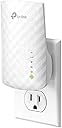
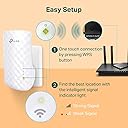
The TP-Link RE220 WiFi Extender leverages advanced dual-band 802.11ac technology to boost your existing network coverage up to 1200 sq.ft, supporting 30 devices with up to 44% more bandwidth than single-band extenders. Featuring a fast Ethernet port and OneMesh compatibility, it ensures seamless connectivity and easy setup, making it the perfect upgrade for busy professionals craving reliable, high-speed internet everywhere.


| ASIN | B07N1WW638 |
| Are Batteries Included | No |
| Best Sellers Rank | #230 in Computers ( See Top 100 in Computers ) #5 in Network Repeaters |
| Brand | TP-Link |
| Color | AC750 |
| Customer Reviews | 4.1 4.1 out of 5 stars (155,287) |
| Date First Available | 7 February 2019 |
| Item Weight | 90.7 g |
| Item model number | RE220 |
| Manufacturer | TP-Link |
| Operating System | Windows 98SE, NT, 2000, XP, Vista or Windows 7, 8, 10, Mac OS, NetWare, UNIX or Linux |
| Product Dimensions | 6.6 x 10.92 x 7.62 cm; 90.72 g |
| Series | [New Version] Wifi Extender=AC750 |
| Voltage | 120240 Volts |
| Wireless Type | 802.11ac |
H**N
Very good
Very good product
S**I
Strong extender
Very good
A**K
Great product that has extended the wifi range
This product is worth the money paid. Functioning well in shaded but extremely hot garage with no shutter. Just covered it with plastic cover to prevent dust collection. Been a month now and it has helped extend wifi coverage quite a bit.Used this to extend coverage for my outdoor security cams. The latency is hardly noticeable and speed is also quite gud
I**M
جدا ممتاز
N**F
Ba
Bad
O**I
جودة المنتج ممتازة
H**B
الجهاز كويس بس بيفصل لوحدة كل شوية ومش عارف ايه السبب ؟؟ ودي حاجة مستفزة بصراحة
B**I
Great product
Just got the delivery and worked awesome, I'm getting good wifi signals, Easy to setup
G**Y
جهاز ممتاز وبيدعم السرعات العالية جداً والتغطية ممتازة، الأفضل تشوف له ڤيديو مراجعة على اليوتيوب عشان تعرف تشغله ازاي
P**A
Es muy efectivo, facil de conectar y en efecto amplía la señal del wifi. Tiene ambas redes 5G y 2.4, puedes cambiar el nombre.
R**K
FACILE INSTALLAZIONE , EFFICACE
K**L
You will NOT require a degree in computer science or relevant networking certification in order to set this up, the app for your phone/tablet will do all the hard work for you, and the instructions are very clear as long as you follow each step and do not try to skip the first one (place it within 10ft of the router first time when setting up) As the room I was trying to cover is a bit of a dead zone I was unable to put it where I wanted in the house, as I also wanted to use the Powerline Lan feature for my system whilst extending the wifi for other devices. BUT as it says in the instructions the idea is to place it in a place that extends the wifi between the router and the target area, which using the socket outside the room it has done very well, only had a couple of drop outs but not sure that wasn't the site I was streaming from. The powerline lan works incredibly well, I have several others and have only ever managed to achieve half 5-6Mb/sec this one caps out my top internet speed of 14Mb/sec from a virgin 100mbit line. So VERY impressed with that, I have also had zero network drops since I switched to this powerline lan. Tested on a default virgin media hub v3 and an AC1750 router connected to the hub in modem mode, it had no issues finding and setting up the extender.
B**L
The fact is, this actually is a pretty decent, reliable and affective device — WHEN IT IS CORRECTLY INSTALLED, USED AND MOST IMPORTANTLY… UNDERSTOOD… The reality is that in this day and age, most people have excellent base-routers in their homes. Even the crappy service provider ones are fairly decent devices. The issue with these things, though, is that they are mostly exceptional devices only when they’re using their 5ghz connections. Where most people believe they’re having connectivity problems and their routers need ‘extending’ or ‘boosting’ is almost always when the device they need assisted is trying to connect to their dual-band base routers which can accept either a 2.4ghz or 5ghz device, but in many, if not most, cases the device needing help is ONLY a 2.4ghz item. And then this is where the problems begin. Home dual-band router these days will almost always prioritize an incoming connection-request from a device into its 5ghz frequency field, even if that request is coming from a 2.4ghz-only device. Result of this is usually connection failure. And so… the unsuspecting person believes it’s an issue with their router needing a boost. Wrong! It’s an issue with their router needing a little discipline! Lol. Not a boost. It needs to be taught to recognize those 2.4ghz devices out there and then to immediately allow those devices a priority to connect immediately to its 2.4ghz band — instead of its 5ghz band. Most routers, especially many newer ones, don’t do this especially well. So… those routers need help. And that’s when and where this beautifully affective extender comes in. This extender will very specifically have you set up two separate extended bands… one for your router’s 5ghz and another for its 2.4ghz. Once that’s done, and you’re ready to connect something to your WiFi, and it doesn’t work the first few times you try it, then try connecting those things to the now-available newly created ‘extended’ 2.4ghz band. Or if you’re using your phone to connect an item with its own app, like say, smart plugs and/or bulbs, then you absolutely MUST switch your phone’s internal WiFi signal over to that newly created 2.4ghz ‘extended’ network. I guarantee all your connectivity problems with those devices will disappear. So what’s really happening here is you are making ‘visible’ your home router’s 2.4ghz network to anything that wants to connect to it, whereas beforehand, that network was very likely ‘invisible’ to you prior to using this new extender because unfortunately while all these new dual-band routers are great, they definitely do not like things automatically connecting to their 2.4hhz bands. So you have to ‘force’ that connection down their throats as-it-were. There are other work-arounds to get your home router to connect to those ‘difficult’ devices, but this is by far the easiest solution — albeit it does mean having to spend some money on one of these WiFi extenders. And it just so happens this is a really good one to do just that. Don’t blame your router. It just wants to dictate to you which frequency your device must try to marry with. It usually still is, though, very, very good at projecting its own indigenous signal great distances reliably. You just have to find a way to have its 2.4ghz band show up in your devices. And that’s what these ‘extenders’ will do for you. So actually, they’re your friend, not your enemy — especially this particular TP-Link unit.
Trustpilot
2 weeks ago
3 days ago