Buy anything from 5,000+ international stores. One checkout price. No surprise fees. Join 2M+ shoppers on Desertcart.
Desertcart purchases this item on your behalf and handles shipping, customs, and support to Vietnam.
🚀 Boost Your WiFi, Boost Your Life — Never Miss a Beat!
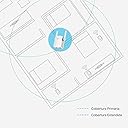
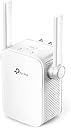
The TP-Link N300 WiFi Extender (TL-WA855RE) is a compact, easy-to-install device that expands your wireless network coverage up to 800 sq.ft with speeds up to 300Mbps on the 2.4GHz band. Featuring dual external antennas with MIMO technology and an Ethernet port, it ensures stable connections for both wireless and wired devices. Ideal for eliminating dead zones in homes, it supports a wide range of smart devices and offers a hassle-free setup with smart LED indicators to optimize placement.


| ASIN | B0195Y0A42 |
| Antenna Location | Gaming, Home, Office, Travel |
| Best Sellers Rank | #195 in Repeaters |
| Brand | TP-Link |
| Built-In Media | 300Mbps Wi-Fi Range Extender TL-WA855RE, RJ-45 Ethernet Cable, Quick Installation Guide |
| Color | White |
| Compatible Devices | Laptop, Smart Television, Smartphone, Tablet |
| Connectivity Protocol | ethernet, wi-fi |
| Connectivity Range | 800 Square Feet |
| Connectivity Technology | Ethernet, wireless |
| Control Method | App |
| Controller Type | Ring |
| Coverage | Up to 800 sq.ft |
| Customer Reviews | 3.9 out of 5 stars 120,471 Reviews |
| Data Transfer Rate | 300 Megabits Per Second |
| Frequency | 2.4 GHz |
| Frequency Band Class | Single-Band |
| Global Trade Identification Number | 00845973093853, 00882492783049 |
| Is Modem Compatible | No |
| Item Dimensions L x W x H | 3.15"L x 3.06"W x 3.04"H |
| Item Type Name | Wifi Extender |
| Item Weight | 0.12 Kilograms |
| LAN Port Bandwidth | 10/100 megabits per second |
| Manufacturer | TP-Link |
| Maximum Upstream Data Transfer Rate | 300 Megabits Per Second |
| Mfr Part Number | TL-WA855RE |
| Model Name | Wifi Extender |
| Model Number | TL-WA855RE V3.0 |
| Number of Ports | 1 |
| Operating System | Microsoft Windows 98SE, NT, 2000, XP, Vista or Windows 7, 8, 8.1, 10, Mac OS, NetWare, UNIX or Linux. |
| Other Special Features of the Product | Access Point Mode, Alexa Compatible, LED Indicator, Lightweight, Portable, WPS |
| Router Network Type | wireless |
| Security Protocol | WPS |
| Smart Home Compatibility | Smart Home Compatible |
| Special Feature | Access Point Mode, Alexa Compatible, LED Indicator, Lightweight, Portable, WPS |
| UPC | 882492783049 845973093853 845973099305 |
| Unit Count | 1.0 Count |
| Warranty Description | 12 months |
| Wireless Communication Standard | 802.11n |
| Wireless Compability | 802.11n |
S**R
Easy Installation - Performs as Expected
It's important to understand how this device is intended to work so that your expectations are properly set. An inexpensive extender of this type receives the signal from your main wifi router, and rebroadcasts the wifi data on a different signal, with its own SSID (the name for the signal you see on your cell phone when you search for a wifi signal in Settings>Wifi). This device creates that new SSID by appending _EXT to the name of your main wifi SSID. You'll often see both SSIDs; you should pick the one that will do the best for you depending on where you are in your house. Your phone might change between the two signals on its own, but you'll soon learn which signal covers best in each location in your house. Key to the operation of devices like this is that it be placed in a location that 1) allows it to receive a decent signal from the main router, and 2) covers the area of your house that is not covered well by the main router. If instead you locate the extender directly in the area with poor coverage, it will receive a poor signal from the main router just like your phone does. It won't be able to efficiently transfer data from the main router in that location. Think instead of placing the extender half-way between the main router and the area you want the extender to cover. You should experiment with different locations, bearing in mind how many walls, floors, or other obstructions lie between the extender and the main wifi router, and also between the extender and the area you wish to improve. The second important point to understand is that extenders of this type operate in a "half duplex" mode, meaning that at best, the data rate from the extender will be half of that provided by your main router. If you are already using most of the data capacity of your main wifi router to a certain device, it's unlikely that you'll be happy with the extender signal. In my case, I saw around 50 MBps from my main router when I was near the extender, and around 25 Mbps from the extender itself. This is more than enough for my casual web surfing, and youtube watching. Your results may be different. Of course, for significantly more $, you can change out your existing wifi router for two or more "mesh" routers. These routers are able to move full speed data between each other, and you can add units until you have the coverage you require. You'll see only one SSID, and your phone should move easily from unit to unit. But at this extender's price point, I got the coverage on my deck and in the corner of the family room that I needed. This item does not incorporate the fastest wi-fi specification. If your needs are more data speed intensive, you might go for a model with higher specs, for a modest increase in price. Setup was very easy. I used the PC method because I'm loath to put another app on my old 16GB cell phone. For that reason, I can't comment on the app.
R**R
I had thought this range extender would require complex computer savvy knowledge to make it boost the WiFi signal to my smart TV
As a 72 year old, dragged into the computer age these past 20 years, I had thought this range extender would require complex computer savvy knowledge to make it boost the WiFi signal to my smart TV in a separate room (separated from the room holding the router and WiFi source by a thick wall and our home's heating devices). But, I decided to try it since the TV programs pulled off the WiFi with Netflix and Amazon streaming kept cutting out, pausing, and basically driving us all nuts! Signal strength at the TV was only 2 bars, network information on the TV showed 21-24% signal, considered "poor" by their measurement. I bought the device, delivered REMARKABLY fast by Amazon, I found it to be actually much nicer-looking than the photo, and much smaller than I had visualized. Plugged it in next to my Windows computer, waited for the green light, noted the Windows computer showed nothing on the screen (not being a WiFi device). Opened my portable computer (a Mac), with concern that there would be challenges per previous observers at this site, found that the device actually was identified on the WiFi screen. Double clicked it, per easy-to-follow instructions, found the "admin" and "password" windows, typed in the correct words and...nothing happened other that a warning on the computer that it was "unable." I noted the customer support number (24-7 availability), made the call, 5-minute wait, tech support woman noted my story and asked, "do you have a smart phone?" I answered "An Android, by Samsung," she said "that will work, do you have the TP-Link there?" It was there, I filled in the information on the phone (easy, just follow directions), the phone recognized the network (with an _EXT addition, same password), and all seemed well. I unplugged the extender and took it to the room with the TV, plugged it in, re-set my TV network to the TP-LINK _EXT new network, put in the same password as my router, the TV recognized it and indicated it now had a 85-90% signal, increased from less than 25%. The booster brought in the streaming Netflix and Amazon shows without the pauses, my phone now has 5 bars all the way into my back yard, my portable Mac computer now has 5 bars everywhere in the house and in the back yard, and now I will enjoy retirement more than ever! This extender (using the 2.4 Ghz band, that matches my Cox router 2.4 Ghz), works perfectly, the support that was needed was available and great, and I am very happy with this purchase. By the way, a previous much more expensive extender from another company, a dual-band device, that I had tried 6 months ago worked so badly that I sent it back for a prompt refund by Amazon. This is a great device, simple to set up (except for the Mac glitch that was resolved with excellent support), and for such a low price, is a great bargain for anybody needing good WiFi signal extension.
M**M
A Solid Budget Extender That Gets the Job Done
This WiFi Extender is a surprisingly capable little device for its price. It helped strengthen the signal in areas of my home that my main router struggled to reach, like the far corners of the upstairs hallway. Setup was quick and easy using TP-Link’s app. Within minutes it was up and running without needing extra configuration or tech skills. What I appreciate most is its consistency. Some cheaper extenders work great for a few hours and then drop the connection, but this one stayed steady over days of use. It doesn’t make my WiFi faster than the main router, but it extends the usable range well enough to stream video or take video calls where I couldn’t before. That said, it’s not magic as signal strength does drop a bit the farther away you are from the extender, which is expected with a unit at this price point. Still, for the cost, the performance is absolutely worth it. I’d recommend it for anyone wanting a reliable way to fill WiFi dead zones without breaking the bank.
L**J
Difficult to get this working consistently
The product is fine. The problem I (and MANY MANY MANY) others had was that the device was losing communication with my router. It would happen at least once per 24 hours, but more often a couple times per day, so any devices connected through this range extender would not be able to use the internet until this thing was powercycled. So digging on the internet for a lot of my time, I found a work-around and finally what seemed like a solution. The work around, according to multiple articles, was to run a constant ping to the extender in intervals of 2.5 seconds or shorter. I didnt do that. Iam on day 3 now of it working without interruption. I had to search their site, download the 12/2019 US firmware, log into the device with a laptop that was connected to it, and manually install the firmware patch. You cannot just run a firmware update without downloading it first. Pretty inconvenient! Now I am not all complaints. It works well when it is working, and the issue now seems resolved. I got it for around $20 and it came pretty fast during quarantine. I hope this helps people who have it or another of their products and are experiencing the same type of issues. I will probably research and purchase a different brand in the future if I need something like this again.
O**R
The product did not deliver at all!
First of all, I should have returned this extender the moment I realized that no matter what I did the extender just did not deliver on its promises. It's likely either a bad one or just a cheap one. Who knows... But I don't get the good reviews then. Although I bought it a year ago, it was used barely for a month and only because I still thought I was doing something wrong. Buyers beware that I only was able to get just over 30Mbps out of this thing, no matter where I placed the device. And I tried 5 different spots in the house. My router's speed is over 150Mbps. 30Mbps is also not that bad if one uses it specifically for a dedicated device. Here comes an interesting part. In one of the rooms with the signal problem I have a Fire TV stick that I use for streaming. Get this: with the signal status "Fair" from my router vs "Very Good" from the extender, my router outperforms the extender anyway. It's as if the extender could not "sustain" the signal. It says 30Mbps, but the delivery is as if it was, oh I don't know, maybe like about 5Mbps. And it's the same story no matter where I placed this extender. I tried using WPS configuration, then I tried browser based configuration. It did not matter. The results are always the same: 30 Mbps per speed tests, but my Fire TV Stick, while streaming anything, was constantly interrupting and I would get a "waiting for a good signal" spinning wheel. I contacted the support recently, diligently took screenshots of everything that was happening, and the response was: "our range extender is just a product for network expansion. It will provide significant wifi signal strength and extend the wireless network to further areas, but it is unable to improve the wifi speed. So that is the reason why in the room with the signal problem you will get strong wifi signal from the extender but the speed is similar to the router's wifi speed in that room." This reply from then ignored everything I described to them which pretty much the same thing I wrote here. They did not get that for some reason the extender's speed keeps capping at 30Mbps and that it has a problem transmitting the signal that yo-yo-s between 0 to 30. So, in the end, $18 wasted, no biggie, but I am now not certain other extender don't have the same problem.
M**N
FINALLY! WIFI everywhere!
This is by far the best WIFI extender I have ever used. I have a multi level house and wifi is challenging. Full signal in some parts of the house and in others,..there is none. I have tried MANY MANY wifi units similar to this. I'm very tech savvy and pride myself in figuring stuff out with out directions. However, that is very different with some wifi extenders. They are complicated to set up and do not work good at all. I had good luck with the TP-Link light sockets with the echo and setup was a breeze. So I decided to take one more shot at yet another wifi extender. Choosing the TP-Link in hopes it would work just as good. I really don't understand these other reviews that state how hard it is to set up. This wifi extender is truly easy to set up. This is what i did,....Quick instructions right on the side of the box. Plug in the TP-Link, close to your router, the green light flashes, press the WPS button on your router, then press the signal button on the extender. The green light flashes, goes solid green, goes solid red then after 5-10 seconds the light stays solid green. The unit is now paired with your router. Now, Unplug the extender, walk to a midway point in your house close to the dead spot and plug it back in. It will blink green again, then solid green, then solid red, 5-10 seconds it turns solid green. Open any device you want to use for wifi, go to wifi settings and find your wifi name. Except the word _EXT will be after the device name. So if your normal wifi is GOOBER616 for example. It would now show as GOOBER616_EXT, Choose the Ext one and enter your normal password for wifi, and BOOM, FULL wifi signal. I now have wifi in every room in the house. If you plug the unit in and the light stays on solid yellow? Then move it to another socket closer to the router. Hope this helps anyone who has or has had a problem.
B**S
Exactly the features you need and nothing you don't
Short version: When used appropriately, this is a great device at a great price. Simple installation options and useful features. Stronger wireless transceivers than my Netgear cable modem/router. The key here is a lot if not most people don't know how or when to use these devices...so I'll try to help with that below. Long version: Let's assume you're buying this for your home to extend existing WiFi coverage. Before you do anything, conduct an analysis of existing networks in your area and what frequencies and channels they are using. On 2.4GHz, channel 1, 6, and 11 do not overlap. Ideally, you want to be using one of these channels without anyone else nearby using it so go ahead and reconfigure your router to meet that criteria. There aren't any overlapping channels on 5GHz and it may be used less by your neighbors so that could be worth pursuing for you as well. Next, try moving your WiFi router around to find the ideal spot to cover the entire house. If your router has external antenna(s), you can try using a more directional antenna if you think that'll help and your router has connections for it or reorienting existing antennas. If you find a perfect configuration with this that works everywhere in the home, run a new cable to that location for your Internet if necessary and you're done and didn't need this device. Now on to tips for setting up this device. Use a different SSID than your existing one by appending something like "_EXT". This will help you troubleshoot any issues in the future and help get you on the right network at the right times. Do upgrade the firmware on it after initial setup. Keep in mind, no affordable repeater seamlessly bounces you to whichever device has the best signal at any given second. That is handled by the client, i.e. your phone, laptop, etc. and it's not always perfect. I haven't tried it, but I think this device can be wired to your router. That is the best way to use this, but may not be required depending on your situation. If extending it using only WiFi, put it somewhere that has decent signal already and will reach to where you're lacking signal. The Power schedule and LED on/off schedules are nice touches. It increased my coverage and bandwidth 5x where I needed it to after an easy 5-10 minute setup including getting the firmware and applying it. I am a former networking professional. I didn't go in to extreme detail because this is a review, not a blog...research anything I mentioned where you have questions and the info is out there. Or have a buddy help you with it or a company that does residential on-site work and don't let them bill you more than an hour and a trip charge.
D**J
Does a very bad job at being a Range Extender.
Before I review this item, let me explain the reason of this purchase. ---IF YOU DON'T WANT TO READ THIS, SKIP TO THE NEXT SET OF ALL CAP WORDS--- We recently purchased a house back in May (yay first home!) and as a celebration my wife bought me a Netgear Nighthawk x6 and I bought a Modem at Costco so that Comcast wouldn't charge me the fee for renting the garbage they call a modem/router. The house we bought is a 3 bed 2 bath with a converted garage room, meaning it was remodeled into a bed room with AC, carpet, closet and window. It's actually the biggest room in the house. The last owner hated Comcast so he decided to cut aaaaall the lines throughout the house and I had to get a tech over to drop a new line and he dropped it in the living room in the wall between the garage room and the living room. This means my modem had to sit right there. I have a couple of 50' ethernet cables so I decided I'd leave the modem there and have the router in my office which was somewhat in the middle of the house but then everything in the garage room (my friend is renting the room) would have a crappy signal. So I decided to put the router next to the modem and run a cable to my office to a switch and plug all my devices wired (which I did anyways when the router was there). This worked great for most of the house and outside, except for the master bedroom. I get horrible signal on any device that is not a flagship. My Galaxy S7 would work fine but my Chinese tablet, my 3DS, my Vita, my Chromecast on the TV, my Raspberry Pi 3 with Kodi running would all get crap signal in the bedroom, on either 2.4ghz or 5ghz. If you shut the door, it's even worse. There's a hallway to get to the master bedroom and bedroom #2 and in that hallway, there is a wall outlet so I decided that I should put a repeater there to see if it would improve the signal. ---END OF LONG STORY--- Once I got this repeater, I plugged it in and connected to it using the Android App. Setup was very simple. I selected the current network and chose a name for the new network. I could also choose to keep the name the same but I wanted to pick which devices would connect to which connection. Now I know that a repeater works by "grabbing" the existing wireless network signal and relay it and by doing so, you lose about half the bandwidth. I'm fine with that because I am getting about 90mbps down and 11mbps up so half of that wouldn't not be too bad, especially when I'm in bed and about to go to sleep. Well this thing sucks. The signal I get is horrible. I made sure to place the device at a halfway point and I get a horrible slow connection (the 0.1mbps kind of slow) from it even when I'm standing in the hallway where it's plugged in. Sometimes, the connection just stops working and I have to go reboot it to get it going. I can't stream anything on Kodi or on chromecast (Netflix or Hulu) without getting a lot of interruptions. It was pretty much better to just connect to the weaker wifi signal from the actual router in the living room. I ended up running another 50' cable from the switch in my office to this repeater in the hallway (I also worked on lining the wire on the baseboard to look better) and I now have this repeater working as its own router. This has improved things a lot and I get a constant good signal and speeds but it defeated the purpose of just having a wireless repeater in the hallway. If you are getting this device (The N300 one) as a Range Extender, don't bother. If you are intending to plug an Ethernet cable into it and run it as a router, it works ok but no 5Ghz signal either way.
M**E
Fast delivery
After using this product, there is an improvement of Wifi signal strength. But internet is still slow. I supposed that could be due to my network issues.
M**9
الجودة ونطاق الاتصال ممتاز
H**Y
Me encantó!
Super!! Llevo ya usándolo un buen tiempo y no he tenido temas con la señal. Super óptimo y eficaz, sin variación y muy fácil de instalar y acoplar con el router de casa.
F**0
da restituire
non so se è il mio che ha dei problemi ma mi sto trovando malissimo. la configurazione senza vps con il modem telecom è da impazzire, col pc ha funzionato una singola volta per una mezz'oretta e poi ha smesso, con un galaxy s8 mai visto. il tasto reset sembra non funzionare sempre. inoltre la presa della corrente non è orientabile cosi che le antenne sono sempre rivolte in basso e in alto facendo si che la potenza del segnale vada per i vari piani invece che diffondersi nel piano. mi spiace ma pessimo acquisto anche concettualmente parlando
A**R
Awesome, Just does what it says.
First of all product is different from the pics. But working all fine.. didnt connected via wps but no issue when connected via pc. Took only 2 mins to setup. Now No problem in connection. Also my all devices connected to it without any password because it shows the same one as router. Just one problem tht product is different from picture... see for yourself in pic i uploaded. Besided tht great product and working flawless and good range.Thats why all 5 star, not gonna take 1 star down for how its looked, because product is newer version, but amazon should update photos of the product on website too. Thanks for quick delivery and for awesome product.
Trustpilot
2 weeks ago
1 month ago