🚀 Elevate your mobile workspace with style and power!
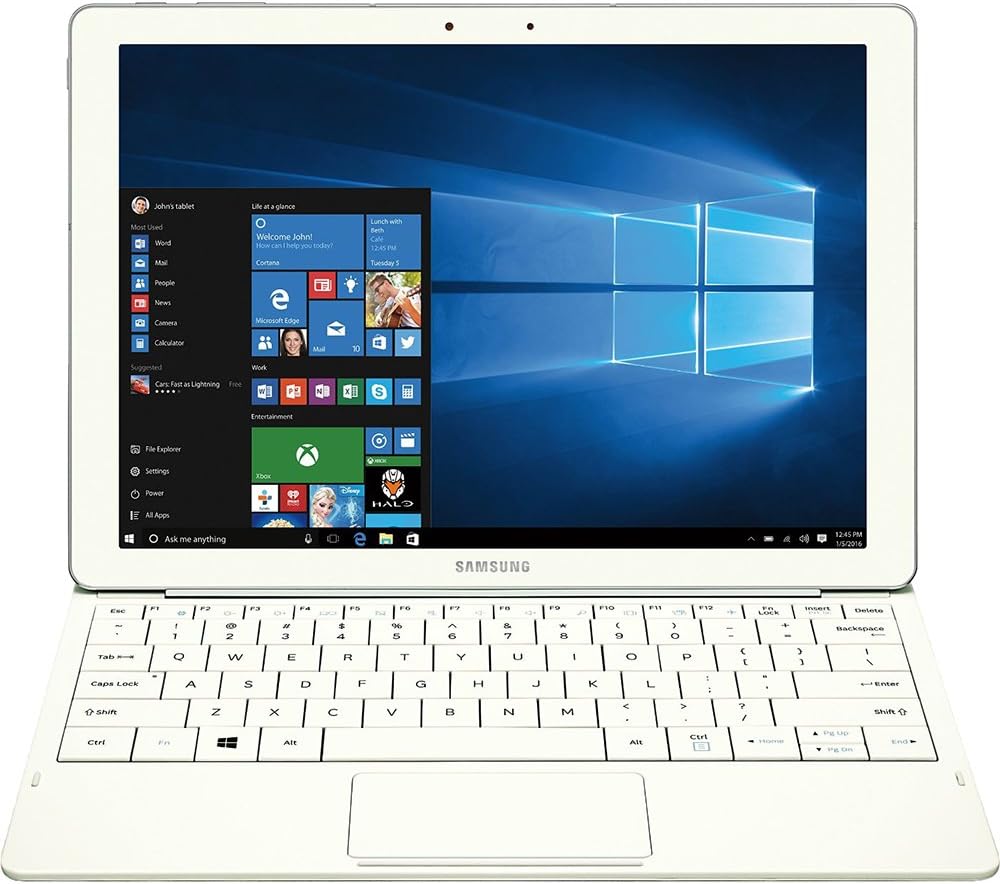
The Samsung Tab Pro S 12" is a sleek, lightweight Windows 10 tablet featuring a vibrant AMOLED display, Intel Core m processor at 2.2 GHz, 4GB RAM, and 128GB SSD storage. Designed for professionals on the go, it offers up to 10 hours of battery life with fast charging, making it a compelling alternative to pricier Surface and Apple tablets.


| ASIN | B01AZ7LXTE |
| Age Range Description | Adult |
| Aspect Ratio | 16:9 |
| Battery Average Life | 10 Hours |
| Battery Cell Type | Lithium Ion |
| Best Sellers Rank | #921,927 in Electronics ( See Top 100 in Electronics ) #7,443 in Computer Tablets |
| Brand | Samsung |
| Built-In Media | Travel Adapter^Keyboard Cover^Galaxy TabPro S^Quick Start Guide^Health and Safety^Customer Experience Brochure |
| CPU Model Number | Celeron M |
| Camera Description | Front, Rear |
| Cellular Technology | 4G |
| Color | White |
| Compatible Devices | Keyboard |
| Connectivity Technology | Wireless |
| Customer Reviews | 4.0 4.0 out of 5 stars (176) |
| Display Resolution Maximum | 2160x1440 Pixels |
| Display Type | LED |
| Generation | 1st Generation |
| Global Trade Identification Number | 00887276135571 |
| Graphics Description | Integrated |
| Hardware Interface | Solid State Drive |
| Human-Interface Input | Touchscreen with Stylus Support |
| Item Weight | 1.53 Pounds |
| Lithium-Battery Energy Content | 39.5 Watt Hours |
| Manufacturer | Samsung IT |
| Memory Slots Available | 1 |
| Memory Storage Capacity | 128 GB |
| Model Name | TabPro |
| Model Number | SM-W700NZWAXAR |
| Model Year | 2016 |
| Native Resolution | 1920 x 1080 |
| Operating System | Windows 10 Home |
| Other Special Features of the Product | Fast Charging |
| Photo Sensor Resolution | 5 MP |
| Processor Brand | Intel |
| Processor Description | Intel Core |
| Processor Speed | 2.2 GHz |
| RAM Memory Installed | 4 GB |
| Screen Size | 12 Inches |
| Specific Uses For Product | personal, gaming, business |
| Total Usb Ports | 1 |
| UPC | 887276135571 |
| Video Capture Resolution | FHD 1080p |
| Video Processor | Intel |
| Warranty Description | 1 year coverage for labor, 1 year coverage for parts, 6 months coverage for the battery |
| Warranty Type | 12 |
| Wireless Compability | 802.11abg |
| Wireless Technology | Wi-Fi |
R**S
Fantastic alternative for Surface Tablet Shoppers
I was anxious to get this, as I had been thinking about getting a Surface Pro for a while. I'd also been reading a lot of pro reviews about this, and I have to say, I'm very impressed by this tablet/laptop in its entirety. It's sleek, lightweight, solidly built, and runs everything I need it to quite well. I was also surprised that it does a decent job in some of the games I play, like Guild Wars 2, Tomb Raider, and Bioshock: Infinite. While it may not allow you to run these on anything much higher than low settings, the frame rates are well above 30 fps, which is good enough for me, and the OLED screen makes up for the trade off in graphics settings. It's a gorgeous display, as you've no doubt heard, or perhaps seen on Samsung's other S series tablets. Battery life FAR exceeds anything any Surface tablet offers, and recharge is FAST. My only complaints are the choice of a USB C port, but I do appreciate that Samsung wanted the latest and greatest, and that's remedied easily enough with an adapter. My other complaint, which is also minor, is in the keyboard build. I would gladly have paid an extra 20 bucks for something a little more robust in build quality. It works perfectly fine, as does the trackpad, but an excellent tablet like this should have an excellent keyboard as well. I'm more than happy with the price, performance, build, weight, battery life, and of course, that screen! So despite the complaints, I still feel compelled to give this 5 stars, and I recommend this highly if you're in the market.
S**N
Review for the Galaxy TabPro S 10" Tablet in White.
Light and thin. Okay keyboard Very affordable compared to the competition It has a gorgeous if over saturated display that can be toned down in display settings. If you want a super thin windows tablet with a great screen and exceptional battery life on the cheap this is it. Just remember with a core m 3 and 4 gigs of ram it's not a computing powerhouse but overall a good tablet. The combined cover and keyboard can be tough to fold correctly the first few times, but once you’re over the learning curve, you can easily rest the device on your lap and get to it. Hint the keyboard attachment isn't the only magnetic part of the cover. Align the camera hole and press firmly and magnets should do the rest. May need some manual alignment. The keyboard sits so close to the touch screen. Time and again, I’d reach to adjust the volume and use an F-key, I would instead accidentally move the cursor or click out of a program with my fat fingers. You get used to it and don't do that anymore after the first few hours but it's definitely something you should know about. The keys themselves are great, but not perfect. They’re large with a minuscule gap between them. That can lead to some accidental presses. They’ve got a satisfying click to them, and the typos due to space issues aren’t so bad just irritating. the keyboard is like the surface three keyboard. There's been major improvements in the surface line keyboards but this is what you have. The Galaxy TabPro S has a gorgeous amoled display. Which is a fancy word way of saying it’s got an OLED display, each pixel in the display is controlled individually for better contrast and lower energy consumption. In the last few years OLED displays haven’t really appeared in anything larger than a phone or smaller than a TV because of power restraints. The colors it outputs are rich/saturated a very particular kind of color saturation. Samsung mobile devices default settings tend to prefer pretty, saturated colors to accurate colors and the Galaxy TabPro S isn’t any different if you want accuracy your going to mess with the display settings default is saturated. It makes the windows 10 default background look incredible if nothing else. The Galaxy TabPro S costs $899. That’s cheaper than Apple’s Core M product, the MacBook ($1299), and the 12.9-inch iPad Pro with keyboard cover ($968). It’s even cheaper than the Core M version of the Surface 4 with keyboard cover ($1028).
J**F
A better iPad Pro than the iPad Pro
Finally a quality Windows tablet that does everything I cannot do on my iPad Pro (which I also love). The TabPro S is the perfect size for travel and will replace my Windows laptop, Macbook 12, and iPad Pro when I hit the road to visit with clients. The TabPro S keyboard will take a little bit to get used to, but I find it works very well after a few hours of break in period. For the next version of the TabPro S, I would like to see backlit keys and a microSD card slot. Update now that I have had some more time to use it: Battery life is good - consistently lasts at least 8 hours mixed usage of Chrome, MS Office, and media streaming. Charging is slow when the machine is in a sleep or hibernate state. It seems to only quick charge when completely shutdown. Holding the tablet from the bottom can be uncomfortable for long periods due to the keyboard attachment ridge digging into your fingers. The graphics driver that it ships with has some trouble with heavy flash pages and using the Netflix Windows 10 app causes the machine to blue screen every time. I am sure this can be solved via a driver update, but as of now, Windows update or Samsung update do not have any updates for the Intel driver (ships with a January driver date even though there is a March driver update). The touchpad area is quite small compared to a standard touchpad. Adjusting the sensitivity of the touchpad will go along way to making it a bit more usable. Waking up from lock has been a bit inconsistent in tablet mode. Sometimes the screen does not respond and the fix is to attach the keyboard and use CTRL+ALT+DEL to show the login prompt. This is pretty much the same experience I have had with other Windows tablet/hybrids which were eventually solved (like the Surface Pro/Book). The keyboard cover picks up dust very easily but is easy to clean. The magnet for the keyboard connection is quite strong, but I am not a fan of the U-type cover. I greatly prefer a silicone case/tear away keyboard like the iPad Pro combo so the tablet has some protection when the keyboard is not in use. The Apple USB-C HDMI and VGA adapters are not compatible with the TabPro S. USB and charging pass-through work, but the video output does not (bummer as they worked fine with an XPS 13). Still quite pleased with the performance and battery. It handles web/office apps just fine. I was able to get League of Legends to run at 60FPS with native resolution and all graphics turned to lowest settings. World of Warcraft runs at native resolution with lowest graphics settings at 20-50FPS depending on what is going on. I am curious to see what the Huawei MateBook ends up being like as that is probably the closest competition for this type of device. This is still a good device and hopefully the software issues can be worked out soon via driver updates.
C**N
Al principio dudaba, sin embargo es una excelente PC. hay que tener en cuenta sus caracteristicas, ya que es una PC para tareas no muy demandantes, en mi caso mi experiencia con ella es de lo mejor.
J**A
muy buen o, mu y bonito, y resi stente. el dise ño de la lap top es ta fre gona, buen precio
G**C
Muy en equipo para el uso que yo le doy que es moderado está muy bien lo malo que aquí no venía con el adaptador en otras tiendas buena incluido en el paquete
Trustpilot
2 weeks ago
2 months ago