Buy anything from 5,000+ international stores. One checkout price. No surprise fees. Join 2M+ shoppers on Desertcart.
Desertcart purchases this item on your behalf and handles shipping, customs, and support to Vietnam.
⚡ Power your outdoors smartly — rain or shine, voice or app, always connected!
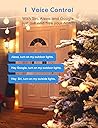
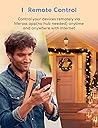
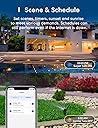
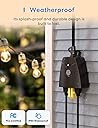
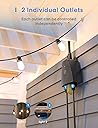
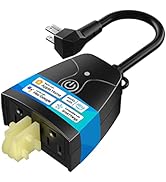
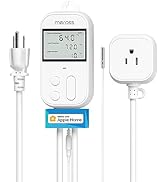
The meross Outdoor Smart Plug is a robust, IP44 weatherproof dual-socket outlet designed for seamless integration with Apple HomeKit, Siri, Alexa, Google Assistant, and SmartThings. It offers independent control of two AC sockets, smart scheduling including sunrise/sunset automation, and is FCC and ETL certified with enhanced safety features. Ideal for managing outdoor appliances with remote and voice commands, it ensures reliable connectivity powered by a Mediatek IoT chipset.


| ASIN | B08HQ2N235 |
| Best Sellers Rank | #17,797 in Tools & Home Improvement ( See Top 100 in Tools & Home Improvement ) #62 in Electrical Outlet Switches |
| Brand | meross |
| Brand Name | meross |
| Color | Black |
| Connector Type | Plug In |
| Customer Reviews | 4.4 out of 5 stars 3,931 Reviews |
| Included Components | 1 x Smart Outdoor Plug;1 x User Manual |
| Item Weight | 3.2 Ounces |
| Manufacturer | meross |
| Material | Acrylonitrile Butadiene Styrene (ABS) |
| Material Type | Acrylonitrile Butadiene Styrene (ABS) |
| Model | MSS620 |
| Number Of Poles | 2 |
| Number Of Wires | 4 |
| Number of Poles | 2 |
| Part Number | MSS620BHK |
| Plug Type | Type B |
| Smart Home Compatibility | Smart Home Compatible |
| Specification Met | Etl, Fcc |
| UPC | 680306681983 |
| Unit Count | 1.0 Count |
| Voltage | 110 Volts |
| Warranty Description | 2 Year Manufacturer |
C**G
No problems after first winter
Setup went fine. It has been out in the open albeit under a porch over the winter in MA without any issues
W**.
Nice Apple Home Based Switch
Installed under the crawl space for two ciruits - one lighting and dehydration and the other for fans. Works on the silly iPhone just fine in the Apple Home Base section. Programmable there. Easy setup. Decent value for the money. NOT waterproof at a high level, so be sure these are covered and/or protected from weather/rain, etc.
A**O
Best WEMO replacement
If you’re as mad as I am at Belkin for canceling the cloud support for all your WEMO plugs then you’re in the right place. My electrical Co-Op tech put me onto these and I’m sold. The outdoor plug even lets you control the two plugs independently!
S**S
Setup is confusing - for IoT on a separate VLAN (w/firewall rules) AND/OR combined 2G/5G network
Getting the setup sequence right is important - otherwise, it may appear that the device won't show up in the Meross iOS app. Even when it shows up in Homekit. Here's what I found (after some trial & error): First You must have a separately broadcast 2G network, the Meross only has 2G (and the instructions make note of the requirement for a 2G network) - a combined 2G/5G broadcast network won't work. Your iPhone has to be on the 2G network when you added the outdoor switch to your network/homekit/meross app. Second I have my IoT devices on a separate VLAN with firewall rules that prevent crossover from the IoT VLAN to my regular network (I do have firewall rules which allow my iPhone to connect to the IoT VLAN - one way only). Don't try to install and add the Meross app from the App Store - do this AFTER you have connected the Meross outdoor switch to Homekit. To connect to Homekit Connect your iPhone to your 2G network and turn on the Meross outdoor switch - you should see a green/orange light blinking (to reset the Meross, just hold down the power button until it resets). Under Settings, Wi-Fi, you should see the Meross_SW_XXXX "setup new device" -- click on that, you should see a dialog box with a request to add it to Homekit and WiFi. Once you click on allow/continue, next up will be Homekit. in Homekit, scan the QR code on the side of the outdoor switch or box. It takes a while to add it to Homekit. Once it it is added to Homekit, then download the Meross app from the iOS App Store and follow the app registration and installation instructions. The Meross MS620 outdoor switch should automatically be included in the available devices to setup in the Meross app. If you try to add the Meross app first and then add it to your network or Homekit, well, that didn't work for me. Only adding to Homekit first, then installing and adding to the Meross App worked. Why should I care if it is in the Meross App vs. Homekit? Unless I open some more ports (more firewall rules) to allow the Meross outdoor switch to send data back/forth across my IoT VLAN and regular network, Homekit automation won't work (e.g., turn Holiday lights on at dusk and turn off at dawn). You will be able to turn the switch on/off within Homekit (manually, just not via automation). The Meross app, with its own "Routines" (e.g., on at dusk, off at dawn) is able to send automation to the switch when it is on the regular network (i.e., non IoT VLAN) - provided you have the firewall rules setup to allow one way access from your regular network to your IoT VLAN.
J**N
Easy to set up
These smart plugs work great. Each outlet can be controlled separately. This can be used with Apple HomePod or the Meross app.
B**S
Not plug and play and limited operation smoothly. I do not recommend.
not plug and play very misleading. I have over 10 units. They worked well for about 6 months then started having problems. They would come on they wouldn't go off. Had to reconnect to Alexa, Then they stopped completely. Stating need to connect WIFI some were 12 feet away not connecting some were 75 feet away connected and working Hit and miss. Note, I have just one connected to a completely different location 10 miles away. That has the same issues. Company says, "Thank you for contacting Meross. We are truly sorry to hear about the unpleasant experience you've had with our device. To troubleshoot and resolve the issue, please follow the suggestions below: 1. Ensure that your smart device has a stable Wi-Fi and internet connection. 2. Access your router and assign a static IP address to the smart device. 3. Change and set a fixed 2.4GHz WiFi channel (preferably 1, 6, or 11) on your router to avoid congestion and high interference/packet loss. 4. If your router has too many connected devices, connect some of them to another router. 5. Disable "Fast Roaming" on your router's setting page (if applicable). If the issue persists, please provide us with the following information to help us diagnose the problem: 1. The brand and model of your router. 2. The MAC address or HomeKit setup code of the affected smart devices and your Meross email account. 3. The LED status of the device when it is not functioning properly(will it flash green or red or stay green?). Looking forward to hearing from you. Thanks in advance for your support. Best regards, Lydia Meross Customer Support"
J**.
Works great with Apple HomeKit! Simple setup, does NOT require another app (if you don't want to)
Lately I've been adding more smart home devices to my home (primarily revolving around Apple HomeKit), and I needed a HomeKit-compatible outdoor smart plug to control my workshop lights. The area I was going to use the smart plug was prone to being exposed to the elements, so I required an outdoor-spec smart plug. Based on the fact that my last two Meross smart home products (the garage opened and the indoor plugs) worked out great, I decided to try their outdoor plug. Out of the box, it was a lot smaller than I was expecting - the Meross Outdoor Smart Plug was replacing a similar remote-controlled plug (using a radio-frequency push-button fob) but it took a lot less space on the back of my workbench where I have all my cables organized. I also like how the rubber plugs (that are used to seal the plug holes when not in use) are attached to the housing, so I won't lose them if ever I have to unplug something in the future. With the smart plug attached to my workbench, I plugged in the smart plug, pulled out my iPhone, and went straight to the Home app. What I like about Meross products is that you do not need to install the Meross app to use them with Apple HomeKit; you can add Meross products to your smart home via the Home app directly; this was also true with their outdoor smart plug. All of the Meross products that I've purchased so far have the required HomeKit QR code decal, making setup and installation a quick job. You can install the Meross app optionally if you want a single interface for just your Meross devices, but it's not necessary. Now that I have integrated my workshop lights into my smart home, another smart convenience has been achieved! The response of the Meross Outdoor Smart Plug is quick and lag-free, it works with Siri commands (mine is "Hey Siri, turn my garage lamps on") and it is exactly the smart plug that I was looking for.
A**S
Great HomeKit Outdoor Smart Plug
I bought this to schedule lights we have on our deck to go on and off with home automations in HomeKit. The setup was very simple and what you would expect from any HomeKit enabled product. I simply plugged it in, opened the Home app, scanned the HomeKit sticker on the side of the plug, waited a few seconds, and then assigned the room and names for the outlets. I’d say it only took two minutes to set it all up. For those reviews saying it does not work with HomeKit, they clearly don’t know how to do it. After setup, I was able to add to my automations and control the lights on and off my network, as I have multiple Apple TV’s and HomePods that act as hubs. I’ve only had it running a couple of days, but will update on how well it holds up to damp conditions and rain. At this point that’s the only thing I’m worried about based on other reviews, but happy so far.
T**7
Great product. Works well in wet and cold environments.
Excellent product. Works really well even when really far from my wifi router. Being used for my outdoor Christmas lights and withstands our -45 Celsius winters. Good quality strong product. This is my second meross Outdoor Smart Plug. Easy to use with the meross app on iphone.
A**O
HomeKit compatible
Lo mejor es compatible con HomeKit de apple. Trabaja excelente
G**F
Second time purchase
Product Review: Meross Outdoor Smart Plug I’ve been using the Meross Outdoor Smart Plug for a while now, and it’s been a great addition to my setup. It’s perfect for controlling outdoor Christmas lights and other devices like garden lights or water features. The plug connects easily through Wi-Fi, works reliably with voice assistants like Alexa and Google Assistant, and handles outdoor conditions without any issues. I really like being able to schedule lights and turn them on or off from my phone. Overall, it’s a dependable, easy-to-use smart plug that makes outdoor automation simple.
H**.
Funciona muy bien
Funciona sin problemas con Apple HomeKit. Muy recomendable.
S**Y
Good Product
We have a google smart home system and all of our smart plugs are meross and we have been happy with it. I find them to be a great balance between affordability and reliability.
Trustpilot
1 month ago
1 day ago