Buy anything from 5,000+ international stores. One checkout price. No surprise fees. Join 2M+ shoppers on Desertcart.
Desertcart purchases this item on your behalf and handles shipping, customs, and support to Vietnam.
โก Elevate your workspace: Stream, charge, and connect like a pro.
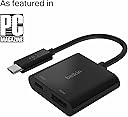
The Belkin USB-C to HDMI Adapter + Charge delivers stunning 4K UHD video at 60Hz while simultaneously providing up to 60W pass-through charging. Compatible with all USB-C devices including MacBook Pro, iPad Pro, and Windows laptops, this plug-and-play adapter combines portability with powerful performance, making it an essential tool for professionals who demand seamless connectivity and uninterrupted productivity.




| ASIN | B0893452HR |
| Best Sellers Rank | #27,472 in Electronics ( See Top 100 in Electronics ) #5 in DVI-HDMI Adapters |
| Box Contents | USB-C to HDMI + Charge Adapter |
| Brand | Belkin |
| Brand Name | Belkin |
| Colour | Black |
| Compatible Devices | Any USB-C devices, Laptop, MacBook Pro, Surface Pro, iPad Pro |
| Connector Type | HDMI |
| Country of Origin | China |
| Current Rating | 1 Amps |
| Customer Reviews | 4.1 out of 5 stars 2,302 Reviews |
| External Testing Certification | Nรฃo aplicรกvel |
| Global Trade Identification Number | 00745883799060 |
| Importer Contact Information | RP Tech India, Aristo house, Andheri East, Mumbai |
| Input Voltage | 240 Volts |
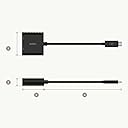
| Item Dimensions | 28 x 102 x 130 Millimeters |
| Item Package Quantity | 1 |
| Item Type Name | Type C ADAPTER |
| Item Weight Unit of Measure | 0.05 Kilograms |
| Item dimensions L x W x H | 28 x 102 x 130 Millimeters |
| Manufacturer | Belkin International Inc., Playa Vista, Califonia, United States, Belkin intrenational |
| Manufacturer Contact Information | Belkin International Inc., Playa Vista, Califonia, United States |
| Manufacturer Part Number | AVC002btBK |
| Model Number | AVC002btBK |
| Number of Items | 1 |
| Number of Ports | 2 |
| Packer Contact Information | Belkin international,Playa Vista, California, United States |
| Power Plug Type | Type C |
| Product Finish Type | Matte |
| Smart Home Compatibility | Not Smart Home Compatible |
| Specific Uses For Product | Laptop, Tablet |
| UPC | 745883799060 |
| Unit Count | 1 Count |
S**A
Great product
There is no lag, speed is good, product is compatible and compact at the same time. I'm using this for my Mac air and works flawless
M**A
IT JUST WORKS on my MacBook Pro 16'' 2019
Oh what a scam this aftermarket cables world is. I fell into this rabbit hole when I wanted to get my MacBook hooked up to a 4k monitor. Tried multiple cables and hubs, they all advertise displays upto 5k. But none of them support it at 60Hz, even the ones who blatantly advertise to do so! Amazon is so full of them, cheap Chinese knockoffs and what not. Belkin was my last resort. I would have gone out and returned my Acer 4k monitor (costing 55k) if this wasn't going to work. This quite simply would have been the last straw. With heartfelt emotions I write this review (in full 60Hz 4k resolution), this adapter JUST WORKS :) Buy it for your MacBook without a doubt!
D**R
Good quality and reasonably priced
Initially I purchased ugreen usb hub which contains usb A, hdmi and memory card reader since i wanted memory card reader as well. It was of good quality but kind of heating a lot and battery drains from laptop faster. So i was looking for alternatives and decided to purchase HDMI adapter and card reader as a separate devices since memory card reader is occasionally required for my purpose, but HDMI requires all the time for my second monitor with dell full HD from Macbook M1 air. After I started using this i was very much satisfied. As per my testing, this adapter consumes 5 watts to operate which is good. Lets look into the pros and cons Pros 1. No over heating compared to my previous hub (litte warm, but compared to ugreen aluminium body heat, its much much better) 2. Battery is not draining fast compared to my ugreen usb C hub 3. it has HDMI output as well as charging port. So no need to sacrifice another usb c port for charging in host devices 4. Works great with mac m1 and windows 11 5. No issues while mac awake from sleep which some users complained that other brand hubs are not recognised by mac when mac book wakes from sleep mode 6. Checked with 65 watts lenovo charger and 35 watts apple charger. It works good Cons 1. Made of plastic. Could have been in aluminium which will look good as well as good heat dissipation 2. When charging port is used in the adapter along with HDMI port, monitor will reconnect while charger is switched off 3. Type C port in adapter can be used only for charging purpose, it will not support any other connectivity like connecting type c pendrive or another usb hub 4. I am not sure this type charging port on this adapter is pass through charging because when I connect the apple charger to this adapter macbook just charging but mac is not recognising it as apple charger or another brand charger but only recognise the charging wattage. Its not the case if I connect the charger directly on c port regardless of if its apple charger or lenovo type c charger. Mac os was able to detect as apple or lenovo charger and its wattage along with how much power it can give as output. If anybodyโs wants the host device to recognise the charger type, i guess apple type multiport adapter is the only choice I havenโt tested this adapter with 4k monitor. So not sure how much heat it will generate if it connected to 4k monitor
S**R
Quality product
I highly recommend this belkin adapter. Excellent product. Exactly as pictured. Before I bought this, I bought the Amkette multiport adapter (https://www.amazon.in/Amkette-MultiPort-Adapter-USB-Smartphones/dp/B08MFPPMLD). If you are considering that because it's cheaper or because it has a third USB port, DON'T. The Amkette was defective so I bought this Belkin and the quality difference between the two is apparent from the first touch. It's more sturdy, the external material is great and it works exactly as it should.
C**G
This is worst company, worst product
It will work 7 to 10 days. After that sound cat video cut again again. Audio will break video will break warranty also not claiming not supporting Amazon also not supporting. This is worst product donโt buy. I purchased two item to also worst.
D**D
Works as advertised
But not value for money. Cheaper, better options available.
M**R
It supports 4k@60Hz
This HDMI adapter is the best one available. It supports 4k@60Hz. This adapter works flawlessly with my MacBook Air (Intel i3 2020 model). There are many HDMI adapters that only support 4k@30Hz. 30hz is not ideal for your Mac. Moving your mouse and scrolling will feel choppy when the refresh rate is set to 30hz. Donโt buy an HDMI adapter that is 30hz. Buy a 60hz HDMI adapter.
D**H
Lovely
One of the best USB C to HDMI connector, I am using in my iPad pro and this is working good, I am not tested for sound quality, when I do I will review.
A**J
Value for money.
My laptop only comes with a USB-C port connected to a 65W charger. The single HDMI port is already connected to the first monitor. This C-HDMI adaptor allows me to connect to a 2nd monitor while charging my laptop at the same time.
R**R
Good
Nice
A**K
Pc aansluiten oo tv
Prima product, doet wat het moet doen
T**A
Works with iPad 10.9" (2022) w/ Sound | Does what it's supposed to!
โ Display with iPad 10.9 (2022) โ Audio (Tested with Disney+) โ Charging while plugged in with HDMI cable into Outlet (Original Charger) โ Charging while plugged in with HDMI into PC (Desktop) Belkin is also a certified third party retailers for Apple Accessories so it'll work unless its faulty... If you want HDR* (High Dynamic Range), I recommend you invest in a 4k60fps HDMI cable. A standard one will be sufficient though. If something doesn't work, I recommend troubleshooting with your cable first and that it can support the iPad's resolution. If not, make sure you iPad registered it. There should be a blue oval at the top with the adapter's icon in the middle. If not, make sure your iPad supports it. I'm using it to hook up to my monitor so I can stop looking down when doing my readings for school. Also, pretty cool feature where you full screen videos on apps like Disney+, it'll change the resolution to the Monitor (mine is 1920x1080@60fps). *You can see these settings on your iPad: Settings > Display and Brightness > Secondary Display (usually Monitor or TV Model Name) > You will see options.
O**O
Plug and play
Works just as advertised
Trustpilot
3 weeks ago
2 weeks ago