Buy anything from 5,000+ international stores. One checkout price. No surprise fees. Join 2M+ shoppers on Desertcart.
Desertcart purchases this item on your behalf and handles shipping, customs, and support to Vietnam.
🚗 Diagnose Like a Pro, Anywhere, Anytime!
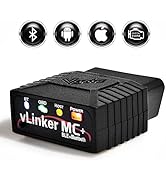
The Vgate vLinker MC+ Bluetooth OBD2 Scan Tool is a compact, energy-efficient diagnostic device supporting advanced protocols including SW-CAN and MS-CAN. It offers seamless compatibility across iOS, Android, and Windows platforms with Bluetooth Low Energy for quick, hassle-free connections. Designed for both professional and DIY users, it delivers high data throughput and broad software support, making it a versatile must-have for modern vehicle diagnostics.


| ASIN | B088LW211V |
| Automotive Fit Type | Universal Fit |
| Best Sellers Rank | #9,665 in Automotive ( See Top 100 in Automotive ) #65 in Code Readers & Scan Tools |
| Brand Name | Vgate |
| Customer Reviews | 4.4 4.4 out of 5 stars (1,372) |
| Item Dimensions L x W x H | 1.97"L x 1.73"W x 0.87"H |
| Item Type Name | OBD car code reader diagnostic tool Vgate vLinker MC+BLE4.0 - Android & iOS & Windows |
| Item Weight | 80 Grams |
| Manufacturer | Vgatemall |
| Manufacturer Part Number | vLinker MC+ BLE4.0 |
| Model Number | vLinker MC+ BL4.0 |
| Operating System | iOS, Android, Windows |
| Power Source | Vehicle |
| UPC | 824918866301 |
ಠ**ಠ
Fixed the issue with auto headlight function for my JL Wrangler when paired with JScan
I have a JL Wrangler which suffered from a glitch with the auto headlight function after using FlashCal. The Vgate vLinker MC+, when combined with JScan, fully resolved the issue. The device itself is easy to use. With Bluetooth Low Energy, I didn't even have to pair it using traditional Bluetooth. You just plug the device into the OBD-II port, then launch whichever diagnostic app you have, select the BLE option and it connects within seconds. It's small enough that I can just throw it into the glove box or the center console and just dig it out again whenever I need it. It was fully compatible with my vehicle and I was able to change a lot of functions using it--far more so than I could do with FlashCal. It worked pretty well, although there were a few hiccups when trying to save some of the altered settings where the app became stuck while trying to save the changed settings, but I was able to resolve that issue by restarting the app and cycling the vehicle's ignition state. Note: For any 2018 and newer FCA/Stellantis vehicles, you will need to have the Security Gateway (SGW) bypass module connected to make any programming changes. That's not a limitation of the vLinker or JScan. That's just FCA/Stellantis gatekeeping everyone--even dealerships--from accessing the computer system in their vehicles for free. The official product that FCA/Stellantis dealerships have to use is wiTech, and aftermarket programmers need AutoAuth to unlock SGW, and both of them need annual subscription. You can find SGW bypass modules on Amazon for about $30. If you own a JL Wrangler and have issues where you have malfunctioning auto headlamp feature, I have the tutorial on how to fix that issue below: FlashCal and Tazer users, including myself, have reported the two products introduce a glitch with the JL Wranglers' auto headlight function, where the headlight will automatically turn on when the ambient lighting is low but refuse to automatically turn off when it gets bright, which commonly happens when you're driving through a tunnel or at an extended stop under an overpass. Some people have suggested replacing the ambient light sensor by the windshield, which I tried and that did not resolve the issue. What seems to happen is when you use FlashCal and Tazer to change any of the settings, they seem to cause a bug where invalid value is entered for how the BCM reads the voltage from the ambient light sensor. The way the ambient light sensor works for JL seems to be resistor-based where being exposed to brighter ambient lighting will cause it to read lower voltage and vice versa. FlashCal and Tazer do not have a way to read and adjust the data to and from the ambient light sensor. JScan, on the other hand, goes fairly in-depth with not only reading the voltage but allows you to adjust, as well. After you plug the device into the OBD-II port, you can use Bluetooth Low Energy on your phone to establish connection to the JScan app. That only takes a few second, and you don't even have to pair the device to your phone. 1. Go into the "ADAPTATIONS" menu 2. Then access the "AUTO HEADLAMP & AUTO HIGH BEAM SETTINGS" 3. For "Auto Headlamp OFF Threshold", the factory default value is "2.80V" 4. For "Auto Headlamp ON Threshold", the factory default value is "3.60V" 5. Scroll all the way down to "Twilight Sensor / Light Sensor / Tunnel Detect On/Off" and ensure it is set to "Active" Following the instructions above should restore full functionality.
S**B
Phone BT [BlueTooth] disconnect after initial BT pairing is correct [see review]
Product: Vgate vLinker MC+ Bluetooth OBD2 [bought Jan 2022] $60 Car: Mazda CX-5 2021 Test: OBD software 'FORScan Lite' v1.5.12.1 on 2 mobile phones [Android 12 & Android 10] I thought there was a problem as, after following the instructions to pair phone with BT [i.e. select "vLinker MC-Android" in phone BT 'pair new device' settings], it prompted for the code [1234], then the BT would seem to connect...then disconnect about 2 secs later [according to phone] :-(. I was expecting it to stay connected [& now clicking the 'connect' button on phone BT does nothing] Turns out this BT disconnecting is expected - the above pairing defines a new BT adaptor config in phone [for the MC+] and you now have to set your OBD software to use this config i.e. in my case run the FORScan software on phone then select 'Settings' / 'Bluetooth adaptor' & choose 'vLinker MC-Android' [I left 'Settings' / 'Connection type' as 'Bluetooth 0']. When you click the FORScan icon to connect to MC+, it will then start this BT connection - only need to do this BT pairing once I think VGate should update their instructions to indicate the BT disconnect is correct/normal [I almost returned mine] FYI 1: When connect the MC+ to car socket, the MC+ power LED lights up solid red & the BT LED goes on/off every second [i.e. indicates that BT disconnected]. When click the button on front of MC+ [to enter BT pairing mode], the BT LED flashes rapidly [several times a sec] until pairing complete [then goes back to the 1 second on/off i.e. disconnected]. When connect with FORScan, the BT LED is solid blue [i.e. connected] - the OBD and Host LED flash rapidly only when pulling data FYI 2: I can use BT to pair the phone to the car infotainment [e.g. to play music from phone to car] at the same time as FORScan is pulling live data from MC+. This may depend on phone FYI 3: The FORScan software is only intuitive once you get the hang of it e.g. run it & BT connected to MC+ but NOT active [don't click the button that looks like play] so can then add items [called PID's] to monitor [e.g. speed, revs, oil pressure/temp...there are literally hundreds] - after adding PID's, only then click the play icon to actively get the vals of these PID's from car i.e. can't add PID's when in play mode I'd expect other OBD software to work similarly i.e. need to pair MC+ to phone & then change the software config to use this connection. Remember, although the MC+ should work on most modern-ish cars [US >1996, Euro cars > 2004, OZ/NZ > 2006 etc] and some light trucks, the OBD software you choose usually only fully supports [i.e. a large range of PID's] on very specific car make [and to a lesser extent model/year] e.g. FORScan is for "Ford, Mazda, Lincoln and Mercury vehicles" I got this OBD scanner as vLinker series seem to be well supported by OBD software [so less chance of 'issues'], it supports additional protocols [future proofing & use on other car makes], can connect using android/iOS/laptop [only tested first], and has a faster transfer rate [baud equiv of 500kbps - about double that of cheaper OBD readers] Overall, the MC+ seems to do what it says on the tin! M
S**T
Perfect tool for DIY data collection and custom dashboard
This thing is awesome for a diy hacker wanting more out of my older daily driver. I have a 2010 base model Corolla that I drive the crap out of. One thing I love about these low-tech cars is that it's a blank canvas to have fun and not worry about resale value - not like this thing affects that. I have a old surface pro 3 that i've rigged up as my interface for the car. Wanted to take the car integration part to the next level and this OBD2 tool lets me do exactly that. I'm not a software engineer, but lets say I dabble. I can't write anything meaningful on my own but AI like Gemini fills in the blanks for me. I wrote an awesome python tkinter based dashboard for my surface pro that lets me see all sorts of fun things like speed, tach, temperatures of engine coolant and even transmission temp! MAF sensor gives me instant MPG estimation. I can even see my individual tire pressure values when my car only has a light that says when something is low! I have not had a problem with connectivity once I figured it out. For Windows 10, the key is to pair it (even though it says android) with 1234. It just worked right out of the box for me with what I wanted to do with it. If you are a diy kind of person and isn't afraid to throw some vibe coding at it, you can have a lot of fun with the data and create something cool. That's what i wanted out of it and that's what it gave me. If that is you, then buy it. Can't speak for the other stuff like pairing it with existing apps or whatever. But its easy to use for me! Compatible right out the box. Love it!!
M**.
Muy buen producto, lo conecte al coche parado y arrancado y usé autodoctor y va genial. Se pueden borrar y leer fallos con código correspondiente. Llego rápido y perfecto
J**K
Excellent OBD scanner at a brilliant price. I considered this against other scanners and for the price of the listing it was a great deal. The vGate vLinker MC+ connects quickly and performs read/writes operations at a blazingly fast speed which is great as I'm not sat there concerned how long it is taking. Obviously, you'll need a dedicated app to interface for your car's system - don't expect to just plug in, download any random app and get going - do your research! For example, FORDs like FORSCAN, Bimmerlink for BMW, Jeeps work with JScan/Alfa OBD, etc... You're paying for the wireless scanner that the app uses to communicate with your car! With that aside, it instantly connects to my phone when powered, and has native compatibility with many apps, the manual even comes with a little booklet of apps to download. For me, it connected with JScan for my 2021 Jeep Renegade with ease and was able to read all codes, OBD information, etc, and was able to write data to the system too (to enable hidden features, etc. note FCA vehicles 2018+ need a security bypass module). Overall, 100% worth the money, a must get even for the minor car lover, great to just leave in the boot just in case you need it some day.
R**A
Muy buen escaner, lo use en conjunto con forscan y con eso tengo acceso a todo lo que un escaner profesional me puede ofrecer.
G**F
Product runs perfectly! And shipping didn't take long at all. FYI, when I first plugged it into my OBD, when searching for the Bluetooth on my Samsung S10 5G, it was only showing "MC-IOS" and wouldn't connect. I thought it was a product fault, but that is because I didn't read the manual lol. To all men out there, RTFM! There is a button on the vLinker which is the BT button lol. My fault, not the product or manufacturer or the seller. Product: 100% recommended. Seller: No issues so 100% recommended Used on a 530i E60 LCI BMW App used: -Bimmercode (Full Version) -Bimmerlink (Full Version)
A**K
Above is an excellent alterntaive to more expensive brand name OBD2 adapters. and vGate Support also has been responsive via their email. I have used this with great success to get many hundereds of Live gm EV data points from consumption, torque, wheels rpms, to temperature of individual Battery modules SOC%, Voltage, Efficiency of driving, Front and Rear electric motor live stats,... tons of informations using Car Scanner Pro (Also Free version) on Iphone and is compatible with many tens of other softwares of your choice as well. Could read the OBD2 codes as well. Also universally works on many smart phones of different OS , IOS, Android, etc... More differenet Automobile brands covered, un matched performance, Battery saver operates at 24 mA and has a sleep current of 3 mA.
Trustpilot
3 weeks ago
3 weeks ago