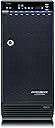
🚀 Elevate your storage game with pro-level speed and scale!
The Mediasonic H82-SU3S2 ProBox is a robust 8-bay external enclosure designed for 3.5-inch SATA hard drives, supporting up to 14TB per drive. It offers ultra-fast SATA III and eSATA transfer rates up to 6.0Gbps, with a smart fan system for optimal thermal management. Ideal for prosumers and media professionals, it features easy interface switching and broad compatibility, enabling scalable, high-capacity storage without the complexity of RAID.


| ASIN | B005GYDMYG |
| Compatible Devices | Laptop |
| Customer Reviews | 4.0 4.0 out of 5 stars (254) |
| Data Transfer Rate | 5 Gigabits Per Second |
| Date First Available | August 8, 2011 |
| Global Trade Identification Number | 00629329000746 |
| Hard Disk Form Factor | 2.5 Inches |
| Is Discontinued By Manufacturer | No |
| Item Weight | 11 pounds |
| Item model number | H82-SU3S2 |
| Manufacturer | RJ Tech |
| Max Number of Supported Devices | 8 |
| Memory Storage Capacity | 12 TB |
| Product Dimensions | 10 x 6.5 x 14 inches |
| UPC | 629329000746 |
S**0
A great drive solution for the prosumer out there with a caveat.
A great drive solution for the prosumer out there with a caveat. What can I say, I love these things. I've had a couple of them in 24/7 operation for a couple of years now, first with Windows 7 and now Windows 10. Gotta say though, you really need to go the ESATA route if you want stable operation. USB 3.0 will work fine if you want to take to a friends computer and use for a bit, but it seems to lose connection here and there for me and my 2 friends that use these boxes as well, usually when it's unattended or not being used. USB 2 seems pretty stable, but too slow for big transfers. Also, ESATA allows you to pluck drives and reinstall different ones while the unit is on an running without disrupting other drives on the system. Was nervous to do this at first, but I've done it many times with no problems. ESATA also allows proper spin down of drives individually. Had problems with this using USB. Transfer speeds between drives are as fast as being directly hooked to the motherboard. Last thing to note which is no fault of the unit. If you crack portable hard drives out of their cases, if this size is larger than 2tb, there is a good chance it will need to be reformatted due to the proprietary transfer method in the external hard drive bay to circumvent the 2tb limit for older systems. Windows is very poor about announcing it will wipe out the drive. It just asks if you want to convert the drive when you first install it or something like that. If there is valuable info on that, SAY NO and then back up the drive and then install and convert it. It would be this way if you hooked it up to the MB and there is no way around it. Brand new drives, just crack them out, install, convert, wipe partition and create a new single partition. Easy peasy. Enjoy the box, don't forget the ESATA card. Cost like $15. Another thing.... screw RAID. If you main focus is convenient mass capacity, just go with this. Easy to add drives one at time as your capacity grows. Easy to back up individual drive with currently cheap hard drive prices. Too many stories of bad raid rebuilds. . Way too many. And then its all gone. Especially as capacity grows, seems like RAID is less able to handle these high capacities. Yes, I have 14 drives currently in use, and 14 more drives in safe, off site storage.
K**R
Works Great, but has requirements ... my setup: Win7 Ultimate x64, 8HD, 18TB
CONS: - I'm using Win7 now, but this does not work correctly under Windows 2008 Server. I had multiple drive issues using that operating system (some worked, some didn't). Also, If you are on a Mac, be sure to read other reviews, some people seem to be having trouble. - I was also having issues with the "drive sync" feature which manages drive power, I disabled this (by pushing the button on the front) and things work better. (This is for a file server, and I don't need sleep mode). I think this "drive sync" feature may be causing many of the issues other people are describing. - Seems like many people have issues with the eSATA connection. If you do want to use the eSATA, be sure to buy the recommended PCI card to ensure compatibility. I'm having no trouble with USB3, speed are very quick. PROS: - I have it connected to a Windows 7 machine and it's working great. No additional drivers or software required for Win7. - I have it fully loaded, with 8 HDs, all different brands and sizes. Totaling 18TB. They all are recognized and working well in Win7. - I get between 30MB/s to 100MB/s on drive to drive transfers. (I think the speed depends on the speed of the drives, some drives consistently get 100MB/s transfer rates) - The drives appear as all separate drive letters, which was expected, but I was able to create virtual links in one folder. So this way, I can use my Plex media server to point to a single directory, which has subfolders (junction links) to all the separate drives of video files. I recommend "Junction Link Magic" for Win7 (free software, just google it) - fans are reasonably quiet, considering how many drives are in there. - Much cheaper than an 8-bay NAS
E**D
Doesn't work properly with Mac OS X
*** UPDATE *** I have finally been able to get the ProBox to work consistently with a Retina MacBook Pro using this DATOptic U3eSATA USB 3.0 to Esata Adapter: http://www.amazon.com/gp/product/B005DCCMII/ref=oh_details_o03_s00_i00 The U3eSATA is a dongle-sized USB adapter that supports the port multiplier chipset in the ProBox. I've been using the Probox for 2 days over eSATA without the errors and hangs on the Mac. The U3eSATA bridge appears to be slower than Mediasonic's built in USB 3 port, and it's an extra 40 bucks we shouldn't have to spend. The best case scenario would be that either Mediasonic can fix the incompatibilities in their device logic, or Apple will fix the incompatibilities in their USB 3 drivers in the future so that I don't need a workaround. But the ProBox has a unique form factor, feature set, and price point that is unique -- to the point where I found myself expending irrational effort to try and make it work. But please DON'T expect something plug and play on a Mac, at least for the time being. ** Original Post ** It's a bit of a stretch claiming these drives work with OS X (at least over Apple's native USB3 ports). Indeed, the device starts up, drives mount, you can use it to copy/read/write, but once those tasks are done and the drives spin down, you will find your Finder access locked down and -50 errors when you try to create or modify any data (even as simple as creating a new folder.) A number of users on the Mediasonic Forums have been struggling with nearly identical problems with these drives running on Macs. In my case it's a brand new MacBook Pro Retina, Mountain Lion 10.8.2, with all current firmware updates. (USB3 is built-in on my model, but other users with USB2 Macs are seeing the same issue.) I see this behaviour in a mix of 2TB and 3TB SATA II and III drives in JBOD. Moving the drive(s) to ANY other FW800 or USB3 enclosure or Voyager USB3 dock immediately eliminates the problem. The problem is with the ProBox and/or how it communicated with the Mac's integrated USB port, no matter what the Mediasonic support suggests. The Mediasonic_Admin may ask the user to: * (Re-)Partion and/or format the drives using the Probox * Setting System Preferences > Energy Saver > Drive Sleep to OFF * Setting System Preferences > Energy Saver > Drive Sleep to ON * Use a USB2 connection (not an option for Mac laptop users anyhow) * Upgrade the USB3 firmware (which are Windows files only, and affect the USB port, not the enclosure -- and I have no idea what the specific USB chipset is on my Retina MBP. Do you?)` I purchased the ProBox to consolidate my drive storage for a yearlong project in East Africa. I really wanted this to work, but I have pulled out a lot of hair with idiopathic behaviour of gear like this over the years and it's almost always a waste of time. After wasting nearly a month with it, I have no choice but to return this drive as it does not work as needed by any reasonable standard, there are other options that cost more, promise less but ACTUALLY WORK, and the hassle and cost of shipping a potentially defective product back and forth from Africa will not be an option.
A**V
I currently own two of these and I'm about to get a third. I also own 3 of their 4-bays, two of which are quite old yet still function perfectly. When it comes to mass-storage on the cheap, I feel strongly that this is the best solution. I've had very few issues with my enclosures over the many years I've had them running almost 24/7. They give me quick and easy access to all of my drives without any fuss and I just manually keep track of drive lettering when I upgrade my system. Unless you wanna spend a fortune on a server, this is a solid way to go.
L**T
I have 3 of these on different computers. Current is revision 3, my oldest 4 years old is revision 1. A great solution if you want to individually access up to 8 drives of the same or different sizes and brands. For me using USB3 speeds are the same the same drive installed inside the computer on a SATA interface. Many reviews complain about drives "disappearing." Probably have the Sync button set wrong for their situation. The Sync indicator can be blue, orange or off. Read the little leaflet, figure which is what you want and set it. (For me the setting is "off", power stays on regardless of what happens to the computer.) And before rejecting any peripheral always first try a known good cable - USB3 full size in this case. External cables are the most common point of failure in any system.
M**P
On receipt, specs on box state Win 10 desktop only, not on Surface Pro et al. I use Surface Pro 4, hoped I might be spared. All works fine for about 1 minute or less, drives & contents recognized, then box switches off. I tried work arounds at the Forum, e.g. using powered hubs, etc, but no luck. Extremely well made product, but just can't get this 8 bay usb 3.0 or in the past their 4 bay usb 3.1 with their recommended substitute adaptor cable to work properly on my system. Using Thermaltake dual docking stn without issues instead.
J**D
TL;DR I recommend getting the ProBox for huge capacity storage in a single package. Otherwise, I would recommend getting 2 x 4 bay enclosures for the same price, if the drives will all be under heavy use at the same time. Full Review Below: Quality construction and design. The "hot swap" handles are unique compared to other enclosures I've used. Instead of yanking the drives out harshly, the handles flip down, gently disconnecting the drive before pulling it out. The transfer speeds drop off significantly when reading/writing to multiple drives at the same time. The fans aren't that loud, despite what other reviews say. Not something you'd want a foot from your head, but it's largely silent from 6ft away. The fans also have an “auto” mode, meaning they only turn on when cooling is needed. One concern I had is how it would handle larger capacity drives, considering most enclosures have problems with them. I'm using 7/8 of the bays, with my largest drive being a 12TB WD Gold. There's been zero issues with it being recognized, and I'm getting the full 250mb/s read/write the drive offers. I've used several multi-bay enclosures, with the highest performing being the 4-bay Icy Dock Black Vortex. The ProBox is a great choice for high-capacity storage, supporting at minimum 8 x 12TB drives. However, the performance is frustrating when reading/writing to multiple drives. I added a video showing a comparison between individual and simultaneous speed test results. There's been several reviews stating that the USB cable it uses is “proprietary” or “rare”, which is simply not true. It's called a “USB 3.0 Type A to B” cable. The cables that come with the enclosure are incredibly short, so if your computer is going to be more than a 10” away I'd also order a longer cable. This is the USB 3.0 cable I used for it, without issue. Cable Matters SuperSpeed USB 3.0 Type A to B Cable in Blue 10 Feet
C**X
An upgrade to my older Mediasonic 4 bay. This one supports up to 8TB drives (according to the website). These are rev 3 models. Loaded in 6 drives so far, and it's just as silent and speedy as my old one. No complaints other than the proprietary USB3 cable... so make sure you never lose that USB cable!
Trustpilot
1 week ago
2 months ago